RDP secret Macro / Remote tools / Tool Credential

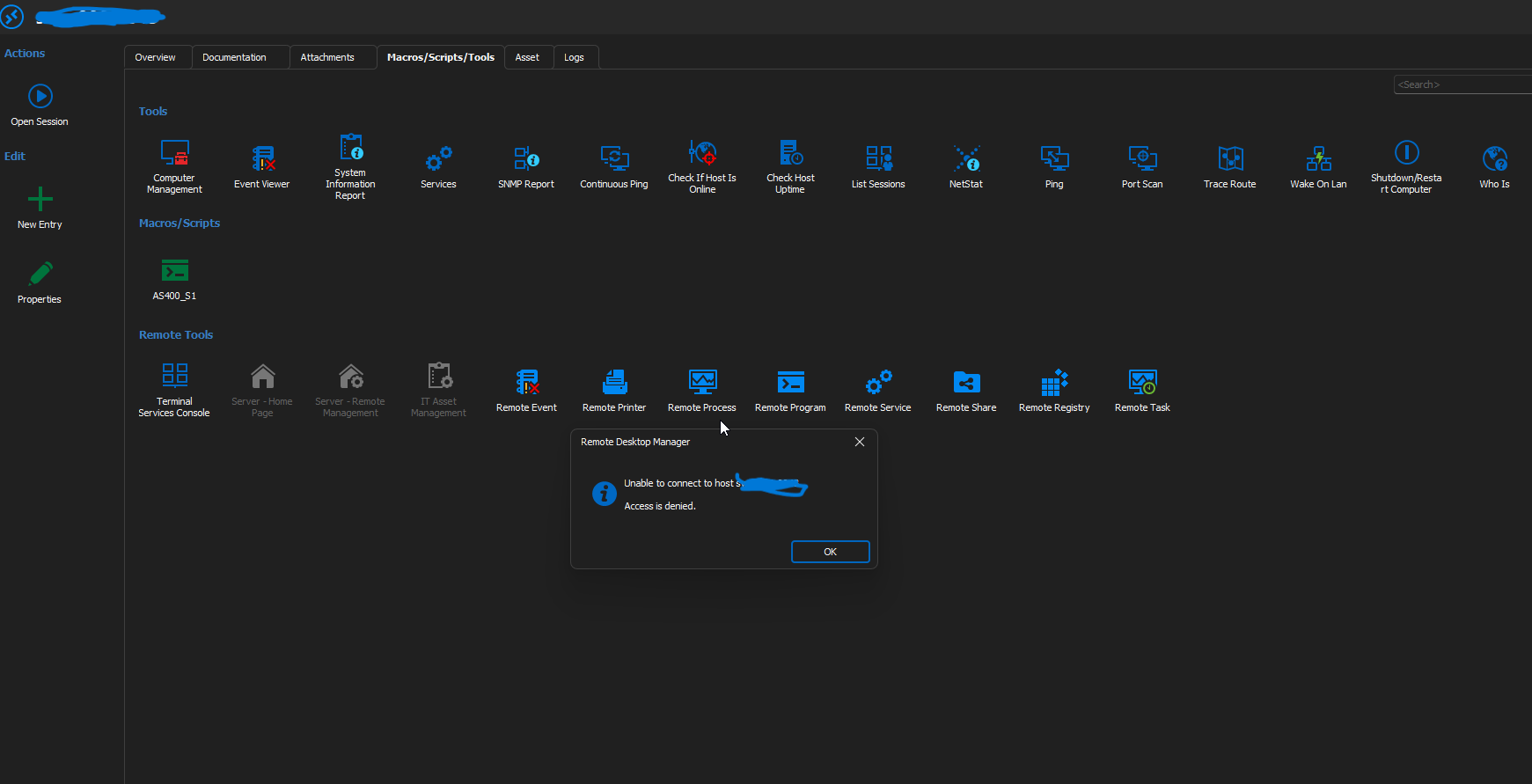 Dear Support
I have several RDP entries on my RDM (2023.3.39.0 64-bit) and I connect using Myprivileged Account. It is linked to our PAM Secretserver.
Today we had a problem on a server and I'd like to get the remote process list on the destination server.
So I've tried to use the Remote tools -> Remote Process but I get the access denied error. i suspect the tools run as my standard user and not myprivileged account.
Thank you
L.
RemoteDesktopManager_IbcEVogE4W.png
All Comments (7)
Hello,
Thank you for reaching out to us regarding this,
I see, if you go into your entry "Properties" under the "Management Tools" -> "Tools" section can you confirm that you have the correct credentials set there?
Let me know,
Best regards,
Samuel Dery
Hi
I've made some test using "Management Tools" -> "Tools" section
- When I use a local administrator account as the session credential, I have no problems accessing the tools.
- However, if I use my privileged domain account (which is also part of the local administrator group), I receive an "access denied" error.
- This behavior suggests a permission issue is unlikely, as I can successfully connect to the system using the same privileged account through Computer Management.
Hello Luca,
Thank you for your feedback.
I was able to reproduce the issue.
I will create a ticket and keep you updated.
Best regards,
Patrick Ouimet
Dear all,
I need some advice on this setting.
I have servers in different domains, and I need privileged accounts from CyberArk to connect to these servers via RDP.
When I select the "Use session credentials" option in this setting, the MMC console with the appropriate snap-in opens and connects to the desired server. Everything works fine only for servers that are in the same domain as my admin workstation.
When I run, for example, Computer Management for a server in a different domain with this setting, the MMC console opens, the snap-in connects to the server in the other domain, but without the necessary permissions. The problem is likely that the MMC console launched this way runs in the context of the user I’m logged in as on the admin workstation. This account doesn’t have the necessary admin rights in the other domain. I can see this in Task Manager as well.
When I change the settings in the RDP session under "Properties" -> "Management Tools" -> "Tools" and select "My Privileged Account" (where I have correctly configured authentication for CyberArk accounts), the MMC console no longer launches, not even for a server in the same domain.
Please advise on how to configure this so that I can use these tools across domains.
Thank you
best regards
Jakub Vácha
Hello Jakub,
Based on your description, this is consistent with how some Management Tools work in RDM.
“Use session credentials” applies to the remote session itself. However, tools such as MMC snap-ins (for example, Computer Management) are launched as local processes on your admin workstation (mmc.exe).
If the MMC process is started under your interactive Windows logon, the snap-in will access the remote server using that same Windows context, which explains why it behaves correctly only in the domain where your workstation account has the required rights.
When you switch the tool credential to “My Privileged Account”, RDM needs to be able to start the tool under that alternate credential. If the selected CyberArk workflow is passwordless/PSM-style or otherwise does not allow RDM to use a usable user/password for local process launch, the MMC tool may fail to start.
Next steps and workarounds to consider:
- For MMC tools, test launching the MMC snap-in using Windows “Run as different user” (or an equivalent approach such as “netonly”) with the target-domain privileged account, then connect to the remote host.
- If you must launch MMC from within RDM, running RDM under an account that has admin rights in the target domain can avoid the cross-domain context issue.
- If your CyberArk configuration allows password retrieval for the account (non-passwordless), ensure the credential being used for “Tools” provides a usable username/password for the tool launch context.
To narrow down the best approach, please confirm:
- Your RDM version/build.
- Which CyberArk integration mode is used by “My Privileged Account” (PSM/passwordless AAM vs password retrieval via PVWA/Web Services)?
- Whether the issue occurs only with MMC tools (Computer Management) or also with RDM Remote Tools (e.g., Remote Process).
Best regards,
Patrick Ouimet
Hello Patrick,
First, here are answers for your questions:
I'm using RDM version 2026.1.23.0.
We are using CyberArk integration mode via PVWA , web services.
It happens with all tools.
I can run the mmc.exe process using my privileged account via the "Run as" feature in my admin workstation and works connecting to target server with correct rights. I tried change setting in "Properties" -> "Management Tools" -> "Tools" from My privileged account to Linked (user vault). I changed to my CyberArk PVWA object with injection mode. This setting doesn't work too with any tools.
I have tried create object Credentials where I setup Username and Passwrod for my privileged account from CyberArk. After that this tool need write password again to Command Prompt window to runas command.
So I discovered that by using a Command-line object (external application), I can run mmc.exe or directly launch snap-ins such as Computer Management, etc., from RDM using a CyberArk account without having to enter a password.
We use these MMC tools—such as Computer Management, Services, and Event Viewer—on a daily basis for quick fixes and configuration.
It would be a great help if we could run all the tools in the Macros/Scripts/Tools tab using CyberArk accounts.
To give you a better idea, I've attached an image showing how I've configured the "Command line (external application)" object I mentioned above. (Parameter Net only is checked)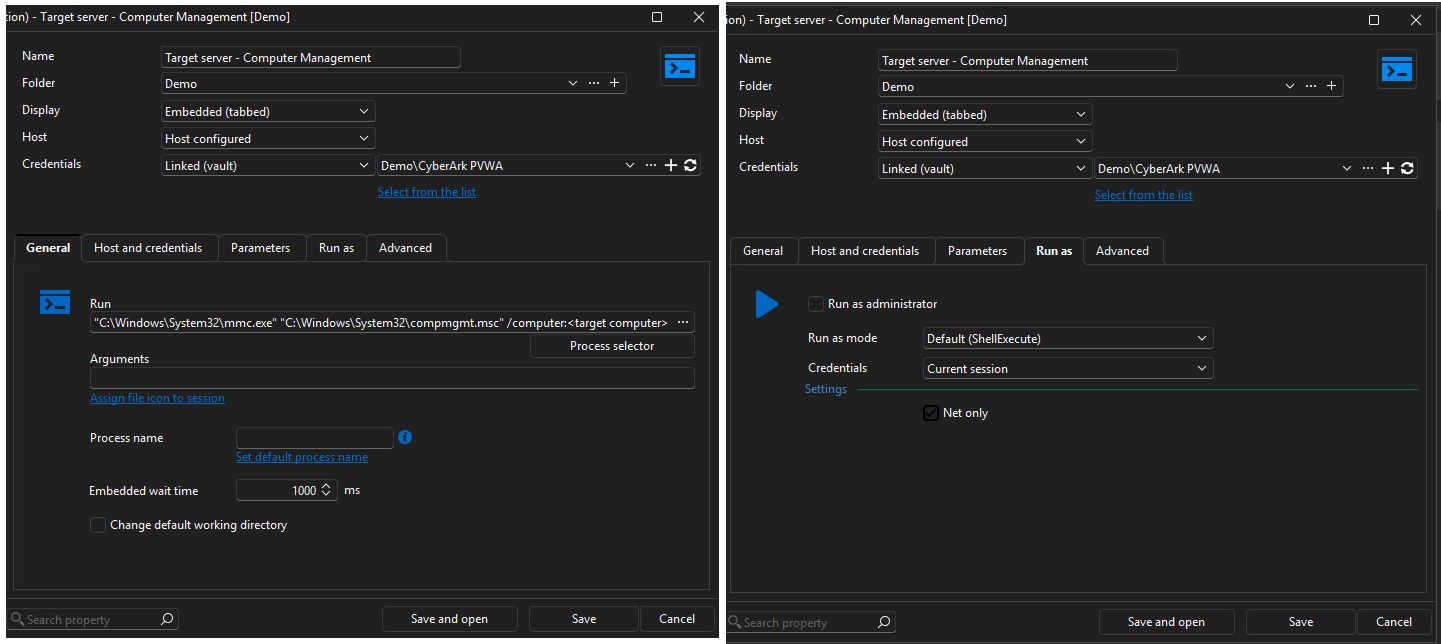
mmc.jpg
mmc.jpg
Hello Jakub,
Thank you for this feedback.
I have sent you an email to schedule a meeting.
During this meeting, we will investigate this further.
Best regards,
Patrick Ouimet