Devolutions Server could not connect license server

Hello, everyone,
We have a problem with our Devolutions servers. When I open the Licenses menu in the administration menu I get an error message: Could not reach server, please download and import license file from Devolutions Portal. As mentioned below in screen
We have checked the communication to the internet with the networker admins and they have not discovered any blocked communication. I read in the documentation that the servers should communicate to the URL https://api.devolutions.com, which was not visible in the network communication to the Internet when I opened the License menu.
Please advise, is it possible to manually trigger an attempt to connect to the license servers or should the attempt be made to get the license information when the License menu is opened. Is the correct address for the license server or which address is correct for the license server?
We have the latest version of Devolutions Server 2024.1.11.0 installed
Thank you
Best regards
Jakub Vácha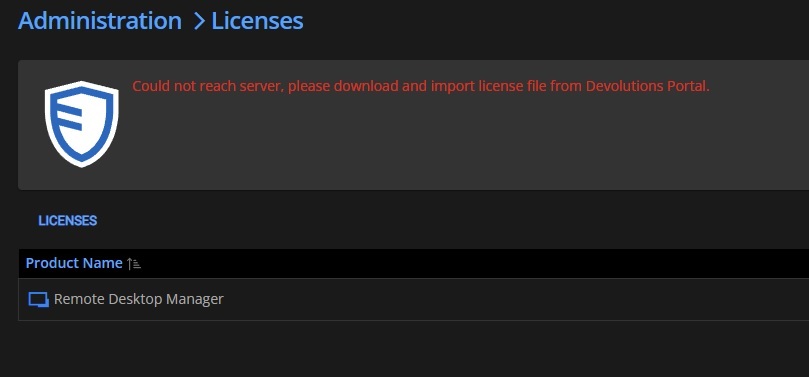
trezor.jpg
All Comments (3)
Hello,
Could you please verify if the Enable Internet Access option is enabled in Administration - Server Settings - Features?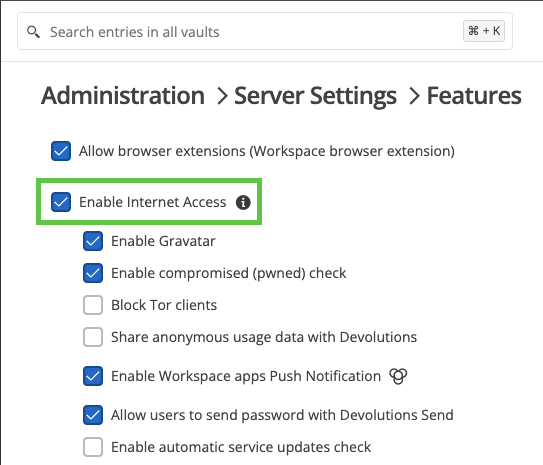
Best regards,
Érica Poirier
658c6ac2-ae1e-47ec-9059-bb1703c6bbb1.png
Hello Érica,
thank you for your advise.
This option was disabled. When I have enabled this option than I don't see this error, I see our license details.
But I have another question. Could this feature have been disabled in a any last updates of Devolutions Server? We are not aware of turning off this feature.
Certainly earlier in the year when we were dealing with some licensing regarding Devolutions products, I could see the license status without any problems. But it was still version 2023.x.x.x
Best regards
Jakub Vácha
Hello Jakub,
I'm glad enabling the 'Enable Internet Access' option resolved the license validation issue.
Regarding your question, the license validation feature hasn't used this option in older versions. That is why the license validation was working correctly.
Let us know if you have any more questions.
Best regards,
Érica Poirier