CyberArk Dashboard SAML authentication problem

Dear all
We need advice on CyberArk Dashboard and SAML authentication.
We have created PAW stations within our corporate PAM environment, where we use RDM. In the School and Work accounts section of PAW, we have added our accounts from the MS Edge browser to the Windows system. One of these accounts is used to log into CyberArk via SAML, and the other is for managing our MS tenant.
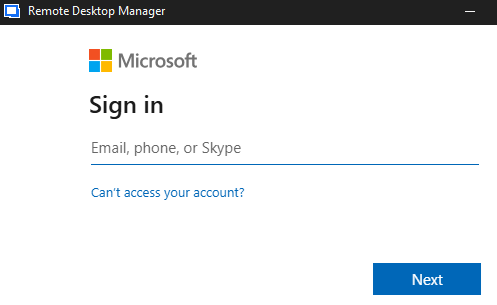
And when we launch CyberArk Dashboard on this PAW station, where we have set up authentication using SAML via our MS Tenant (as required), a window for selecting these accounts appears. Under normal circumstances, I can select the appropriate account and log in without any problems.
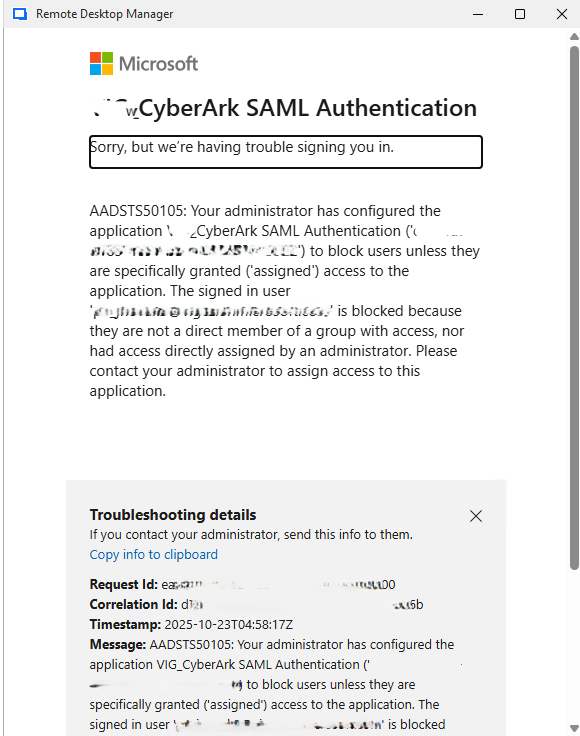
Occasionally, CyberArk Dashboard opens this window for selecting accounts but does not offer a list of accounts. Instead, it tries to use one of these accounts in the background to log in to CyberArk. It selects the wrong one and displays an authentication error, see image.
The strange thing is that when RDM and CyberArk Dashboard get into this state, the account selection window works fine in other applications.
So far, we have been able to resolve this issue either by deleting the RDM profile or, in some cases, by deleting the WebView2.Cache folder in the RDM profile.
Now, on one station, we are unable to get CyberArk Dashboard to offer a selection of accounts for authentication. Deleting the RDM profile does not help.
Unfortunately, we are unable to simulate this situation again.
In the RDM settings, I found the following options that could possibly solve our problem, or rather, consult their functionality.
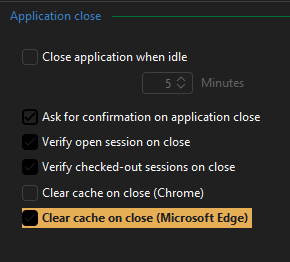
First. In the Application -> Application Close section, there is a Clear cache on close (Microsoft Edge) function. See the image. Which cache does RDM clear, and does it do so when RDM is closed?
Second. In the Entry types -> Sessions -> Website section, there is an option called Enable Single Sign-on with Windows accounts. See the image. By default, it is set to Yes. Changing it to No displays a login window without selecting an account. How does this option work? I assume it affects all website objects, is that correct?
We need advice on where the error might be. It seems that RDM is reading the list of accounts from Windows incorrectly. Does RDM log its process of retrieving accounts from Windows somewhere?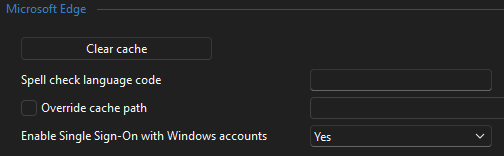
RDM_settings_cache1.png
RDM_settings_cache2.png
RDM_CyberArk_D2.png
RDM_CyberArk_D.png
All Comments (3)
Hello,
Thank you for reaching out!
My name is William, and I'm here to assist you in any way I can.
Sorry for the delay in my response. To better troubleshoot this issue, we would need to gather some logs from your Remote Desktop Manager (RDM).
Would it be possible to open the Performance Profiling tool under the Help tab or RDM? Then select the Debug Only tab and set the Debug level to 196995.
Leave the profiler window to the side (do not close it, it needs to be opened to gather the logs). Replicate the issue and head back to the profiler window. Copy the content and send it over to service@devolutions.net with FO-51393 in the subject. It will open a case with us, and it will be assigned to me.
Feel free to reach out if you have any questions or need further clarification.
Best regards,
Hello William,
Sure, we will provide you debuging logs from RDM.
But as I wrote, we are not able to reproduce this issue again. So we have to wait if this problem occure again. After that we will start debug loging as you describe on affected RDM and we will send you these logs.
Please be patient.
May I ask you for answers about specific setting in RDM as I mentioned in my previous post. I have copied them below:
First. In the Application -> Application Close section, there is a Clear cache on close (Microsoft Edge) function. See the image. Which cache does RDM clear, and does it do so when RDM is closed?
Second. In the Entry types -> Sessions -> Website section, there is an option called Enable Single Sign-on with Windows accounts. See the image. By default, it is set to Yes. Changing it to No displays a login window without selecting an account. How does this option work? I assume it affects all website objects, is that correct?
Thank you
Best Regards
Jakub Vácha
Hello,
Thank you for your response.
The cache that will be cleared is the one configured within the specific web entry.
As for the Enable Single Sign-On option, it falls under the Microsoft Edge section, so it will only affect websites opened using Microsoft Edge.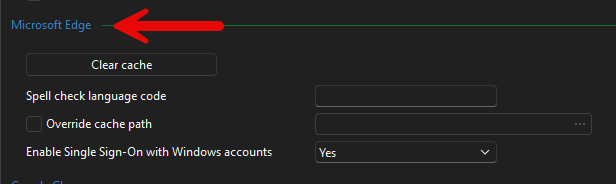
Best regards,
Tommy Sanders
51f4289f-3900-452a-9642-3f2e93c26c7b.png