2ß26.3.13 - RDM looses focus on RDP session logoff

Hello,
This is new in this version and was working in 2026.3.12
When I logoff from a Windows VM and while RDM is changing the tab title to "<VM Name> Disconnected", the focus of the RDM window is lost and another window - Edge in my case - is bought to front. I can reproduce it on every logoff...
Brgds Andreas
All Comments (12)
I have the same exact problem!
RDM is a great product but every update nowadays seem to produce new bugs which needs to be updated...
@johanjanssen you are right, but you can stay on the latest 2026.2 until 2026.3 is working as expected. I install every new version on my own client for testing, but the rest of my users is still on the latest 2026.2.
I also had this thought yesterday when I created this post. But then I remembered that they changed many basic components of RDM with 2026.3 and for this it is running quite smooth...
Brgds Andreas
Hi,
I'm having the same problem.
When I log out of an RDP session on a Windows server, RDM switches to the background after I log out.
I also have the latest version of RDM (2026.3.13.0) installed.
I haven't been able to find any workarounds or solutions. Do you have any updates on this issue?
Thank you
Hi,
I'm having the same problem.
When I log out of an RDP session on a Windows server, RDM switches to the background after I log out.
I also have the latest version of RDM (2026.3.13.0) installed.
I haven't been able to find any workarounds or solutions. Do you have any updates on this issue?
Thank you
Updates on this issue can be found here RDM window goees to background when a RDP error occurs - Devolutions Forum
Hello,
Thank you for reporting this.
This is a known issue in Remote Desktop Manager 2026.3.13.0, and other users have reported it on the forum.
When an RDP session ends with a logoff or a disconnect, the RDM window can drop behind other windows.
Our development team has fixed it, and the fix is planned for version 2026.3.14.0.
That version is not released yet, so I cannot give you a date.
Until then, you can change the RDP Version of your entries to one of the FreeRDP options, which users report does not show the problem.
FreeRDP behaves differently from the Microsoft RDP client, so please test it on a few sessions first.
You can also go back to 2026.3.12.0.
You can read more about the two RDP clients here: https://docs.devolutions.net/rdm/knowledge-base/how-to-articles/rdp-session-entry/rdp-clarification-and-information/
I will make sure you're notified as soon as version 2026.3.14.0 is available.
Best regards,
Alexis Beauparlant
Add me to the list of users having this issue. I'm on Windows 11 24H2 Education N with RDM free version 2026.3.13.0 64-bit JIT
Hello,
Thank you for being so patient!
If possible, could you update your RDM to the latest version (2026.3.15.0) and see if the problem persists? This version should resolve your issue.
Latest Version: Download RDM
If the problem persists after the update, please let us know so we can inform our development team.
Best regards,
Maxim Robert
Hello, for me it is fixed. Thanks for your help!
Brgds Andreas
New version fixed the issue for me, but when I logoff a computer in RDM the next server in the list is highlighted. Is it possible to keep the same computer in the list highlighted after disconnect?
Or, is this a new feature request I need to submit?
I just had the application minimize again after disconnecting from a session using "logoff" from PowerShell as Administrator.
For me it's fixed. Also tried with Powershell as admin, no issues.
Hello,
Thank you for your feedback! I'm glad to hear the issue is resolved for you with 2026.3.15.0. @Deas @johanjanssen
@ChrisK By default, the next tab is selected when closing a session. You can change this behavior in Settings > Dashboard > When closing session. To keep the same entry highlighted, select "Return to dashboard".
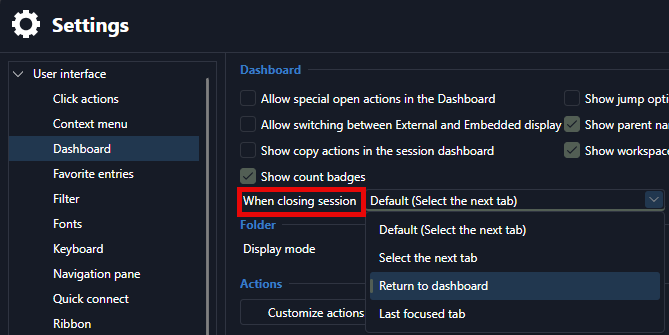
Also, I tried on my end and couldn't make RDM minimize on logoff. Are you able to easily reproduce the issue in 2026.3.15.0? If you can, could you send me a video of the issue occuring and how to reproduce?
You can send it to me in my DMs.
Best regards,
Alexis Beauparlant