jannisroth
WinSCP gateway
Hi Erica
Do you know if there is a good szenario for resolving this?
WinSCP is so much better than the integrated SCP/SFTP Client.
Right now I have a setup that is not really stable:
DVLS Tunnel with Local Port Exposure
WinSCP Connection the localhost and Port through the tunnel.
Best regards,
Jannis
Devolutions Gateway Port exhaustion
Hi Alex
Sorry for my late response.
I'm not sure about the 57 Sessions, this was the last values i saw, maybe it is wrong displayed.
When the issue occurs i can't even connect to the VM itself, when i log on locally i can check through Netstat that all 65,535 Ports are in use.
The resolution would be a reboot or i can sometimes close the old sessions through DVLS Admin, but this process takes very long since I can only close one session at the same time.
Kind regards,
Devolutions Gateway Port exhaustion
Hi Erica
DVLS: 2024.1.13.0
GW: 2024.1.6
RDM: 2024.1.32.0
Kind regards,
Version 2024.2.3.0 (June 17, 2024)
Hi Erica
BREAKING CHANGE Core - Devolutions Gateway licenses are now by user. A free license valid for up to 5 users is now included
Core - Added a Devolutions Gateway free license valid for 5 users
How is this Breaking Change affecting companies with per Gateway licenses?
Kind regards,
Devolutions Gateway Port exhaustion
Hi Erica
I changed the setting as you recommended but still got the same issue on my gateway.
As you can see in the screenshot those sessions are 7 days and older:

Another issue with the gateway is that sometimes there is a session launched by an Unkown User:

Kind regards,
Devolutions Gateway Port exhaustion
Hello Devolutions
We have a problem with our gateway that stops working at about 57 open sessions.
The problem is not that so many sessions are open at the same time, but that the sessions are never closed.
The problem is mainly with HTTPS, SSH and Tunnel Connections which are still open after several months.
The active sessions can only be closed one at a time, which takes a very long time as you have to wait approx. 3 seconds for each closing process.
Do you have a n solution for this problems?
Kind regards,
Multi vault search doesn't work any more in de latste versieon
Hi
@mschulpen as you can see in your error message the Character you are looking for is not \x1f (0x1F) your is \x13 (0x13).
But probably just wait for your fix.
Kind regards
Multi vault search doesn't work any more in de latste versieon
Hi Vincent
I solved the problem by myself.
@mschulpen you can follow my solutions path, maybe it works for you too.
Go to Reports -> Diagnostics -> Entries and press Export to CSV on the lower left side.
Open the CSV in Notepad++ and use following settings to find the special character:

The one error that made the deserialization fail is following character:

Kind regards,
Multi vault search doesn't work any more in de latste versieon
Hi Vincent
When will the fix be available? ETA?
When I go back to the last version I also need to downgrade 50 RDMs.
Kind regards,
Multi vault search doesn't work any more in de latste versieon
As mschulpen stated we can't profile that Vault:

Multi vault search doesn't work any more in de latste versieon
Same issues here with DVLS 2023.3.5.0 and RDM 2023.3.20.0
Web is working but also throwing the same error.
RDM can't connect at all to that specific vault.
On Reports -> Diagnostic -> Entries there is no Entrie with an Deserialization Error.
I also reseted Server Cache but still the same issues.
Error:
InvalidOperationException - There was an error
generating the XML document. at
System.Xml.Serialization.XmlSerializer.Serialize(XmlWriter xmlWriter, Object o,
XmlSerializerNamespaces namespaces, String encodingStyle, String id) at
Devolutions.RemoteDesktopManager.Managers.SerializationManager.SaveObjectToString(Object
value) at
Devolutions.Server.Managers.Variables.VariableManager.ApplyVariables(ISessionContext
context, Boolean isUri, Boolean isAdhoc, Connection connection, Int32 nesting)
at Devolutions.Server.Business.Search.ConnectionSearchEngine.<>c__DisplayClass15_0.<GetConnections>g__ApplyVariables|0(Connection
c) at System.Linq.Enumerable.SelectArrayIterator`2.MoveNext() at
System.Linq.Enumerable.WhereEnumerableIterator`1.ToArray() at
Devolutions.Server.Business.Search.ConnectionSearchEngine.GetSearchResults(SearchEngineParameters
parameters) ------------------------------------------ ArgumentException - '',
hexadecimal value 0x1F, is an invalid character. at
System.Xml.XmlUtf8RawTextWriter.WriteElementTextBlock(Char* pSrc, Char*
pSrcEnd) at System.Xml.XmlUtf8RawTextWriter.WriteString(String text) at
System.Xml.XmlWellFormedWriter.WriteString(String text) at
System.Xml.Serialization.XmlSerializationWriter.WriteElementString(String
localName, String ns, String value) at
Microsoft.Xml.Serialization.GeneratedAssembly.XmlSerializationWriter1.Write535_Connection(String
n, String ns, Connection o, Boolean isNullable, Boolean needType) at
Microsoft.Xml.Serialization.GeneratedAssembly.XmlSerializationWriter1.Write775_Connection(Object
o) --- Default
Source:
System.Private.Xml
Kind regards
FTP/WinSCP does not work over Devolutions Gateway
Hi Richard
Why is WinSCP (SCP) Connections over Gateway not posssible?
WinSCP is much better than the intergrated SCP Client that works over the Gateway (sorry :) ).
Kind regards,
Jannis
Version 2023.2.3.0 (July 6, 2023)
Hi Erica
I can confirm that syslog UDP issues are fixed with this update.
Still since Version 2023.2.2.0 many ArgumentNullException (I am on this case in a ticket.)
Kind regards,
Version 2023.2.2.0 (June 27, 2023)
Hi Francois
Perfect, I will install the update and check if syslog is working again.
Kind regards,
Version 2023.2.2.0 (June 27, 2023)
Hi Francois
As you can see in the screenshot it stopped in the same moment we updated DVLS to the latest Version.
Nothing else was changed and all our other syslogs are working.

Don't bother anymore about PAM, it's just more present in the latest Version of DVLS and RDM as it was before.
Kind regards,
Version 2023.2.2.0 (June 27, 2023)
Hi François
We had Syslog UDP configured for almost over 1 year.
No we never had PAM license or PAM trials or anything like that.
Kind regards,
Version 2023.2.2.0 (June 27, 2023)
Hi Richard
Okay, we would like to turn syslog on again since we use it for compliance.
Hmm I'm not sure about the PAM Module but it is definitily more present since the last update.
Since the update i receive multiple errors on a daily base. Where should I send you the Error reports?
ArgumentNullException, SqlException - Violation of PRIMARY KEY
Kind regards,
Version 2023.2.2.0 (June 27, 2023)
Hi Richard
With the latest DVLS Version we have the issue that an activated Syslog UDP Logging Configuration will almost brake DVLS.
Everything gets really slugish and some Errors are listed in the datasource:
SocketException - Error due to lack of resources.
at Devolutions.Server.Managers.SysLogManager.SenderUdp.SendMessage(Byte[] data)
at Devolutions.Server.Managers.SysLogManager.SendMessage(String messageId, SyslogEvent syslogEvent, String message, LogMessageType logType, String appName)
Server has plenty of ressources available.
If I turn the Syslog integration off everything continues to work again.
Is there no license needed for PAM with the latest version?
All the features are available even if we don't have any license.
Kind regards
DVLS GW (not domain joined) and AD Protected Users
Hi Devolutions
Our setup allows us to jump to different customers through one devolutions gateway.
Therefore the devolutions gateway is not joined to any customer active directory domain.
How can we connect to a Remote Server where the connection user is in the Protected Users group in active directory?
We are using FQDN's for the connection as stated in this forum post:
I accidently posted in the MacOS Forum but FreeRDP can't connect to RDM Gateway if I just change the RDP Client type.
Protected Users Security Group (AD) (devolutions.net)
Kind regards,
Protected Users Security Group (AD)
Hi Xavier
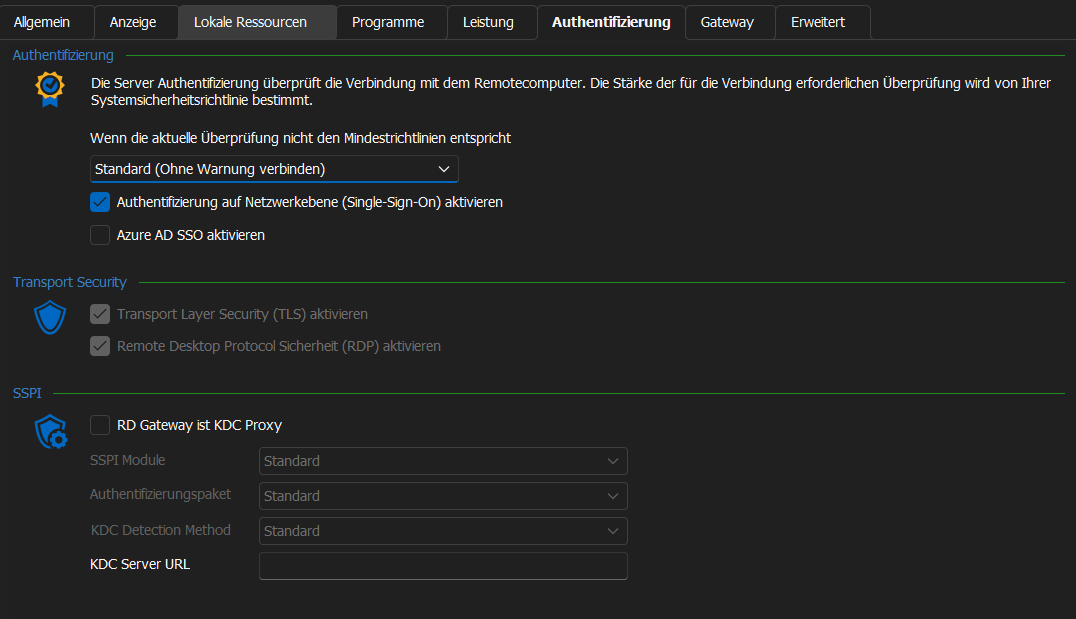
Im using Windows 10 and RDM 2023.2.9.0. The setting you mention in your screenshot is not possible to use (always greyed out).
Do I need to configure something else first?
Is it possible to use this setting as well through Devolutions Gateway?
Devolutions Gateway Side-by-Side
Hi Benoit
Yes, I received the key and allready got the setup working.
Thanks a lot!
Kind regards,
Jannis
RestAPI
Hi Devolutions
We really need an well documented and usable RestAPI for DVLS.
We like to automate more as an MSP and for that task we need to programmaticly create and read entries.
Favorable would also be an ansible collection for directly using it with well known and used tools in automation.
Kind regards,
Password rotation through Gateway
+1
Devolutions Gateway Side-by-Side
Hi Benoit
Yes, i can do that.
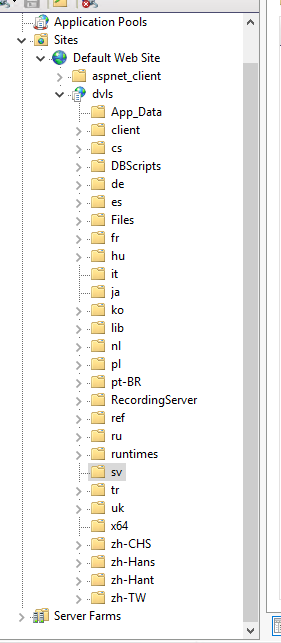
Where is the path exactly to disable this?
Devolutions Gateway Side-by-Side
Hi Benoit
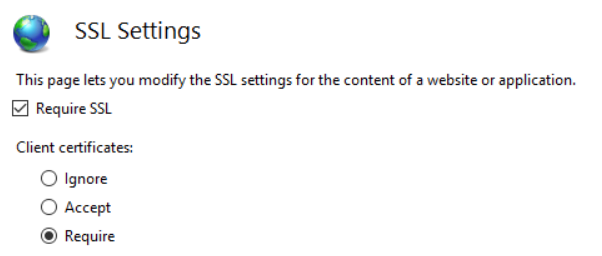
How can this be ignored by DVLS-GW if it is enforced by IIS?
No I didn't configure it.