Devolutions Gateway Side-by-Side

Hi Devolutions
We allready got one licensed external devolutions Gateway in production use right now.
Now we want to use the internal side-by-side gateway as well for some internal services.
When I try to connect to the internal gateway a message pop up shows that this gateway is not licensed.
Is this side-by-side not included(5 sessions only) if we allready use another instance?
Kind regards
All Comments (16)
Hi,
From my understandings, you are trying to set up a side by side Devolutions Gateway to use it internally within the 5 concurrent sessions limit.
From the error you are getting (Gateway is not licensed), it looks like the server do not recognize your Devolutions Gateway as a side by side installation.
To make sure you Gateway is recognized as a valid side by side installation, please make sure your Devolutions Gateway URL matches your server main access URI.
Do you have multiple access URIs for your server ?
Let me know if that helps,
Best regards,
Vincent Forest
Best regards,
Vincent Forest
Hi Vincent
Our main access URI for DVLs is:
https://dvls.sample.com/dvls
The URI for the side-by-side gateway looks like this if I install it through the wizard:
https://dvls.sample.com/dvls
This is not working, if I change it to this:
https://dvls.sample.com:7171
Webadmin says GW is reachable/pingable and config is fine but the license for side-by-side is not working.
We have another stand-alone gateway that is working.
Kind regards
It looks like event though your URL matches your main server URI, it still doesn't recognize your gateway as a side by side installation.
Could you please verify that :
1- Your Devolutions Gateway health status icon shows green with no warning (if there is a warning, let me know)
2- That you can manually get the logs or the sessions, by clicking on these buttons in the 'more' sub-menu (see screenshot attached)
Let me know how this goes and if you encounter any issues, we will keep investigating your case.
Best regards,
Vincent Forest
Best regards,
Vincent Forest
228090c0-ed00-46d8-8a05-6a7460775c50.png
Hi Vincent
- No Warning is stated on the left side. When I ping the gateway from the WebUI it states "Configuration not in sync."
- I can gather logs and diagnostics without any issue.
Kind regards,
Hi,
Since you are able to get the diagnostic, could you please tell me what version of Devolutions Gateway you are using ?
The Devolutions Gateway configuration is a newer feature and it looks like you might not have it on your Devolutions Gateway version, that would be the reason you see the message when you ping.
Best regards,
Vincent Forest
Best regards,
Vincent Forest
Hi Vincent
We are using the latest Version 2023.1.3
Kind regards,
Hi,
Good to know that you are on the latest version. When you use you replace your 'https://dvls.sample.com/dvls' with ''https://dvls.sample.com:7171' you are accessing the Devolutions Gateway directly, and that seems to work. I wonder, is it an update from an already existing Devolutions Gateway or is it a fresh install ?
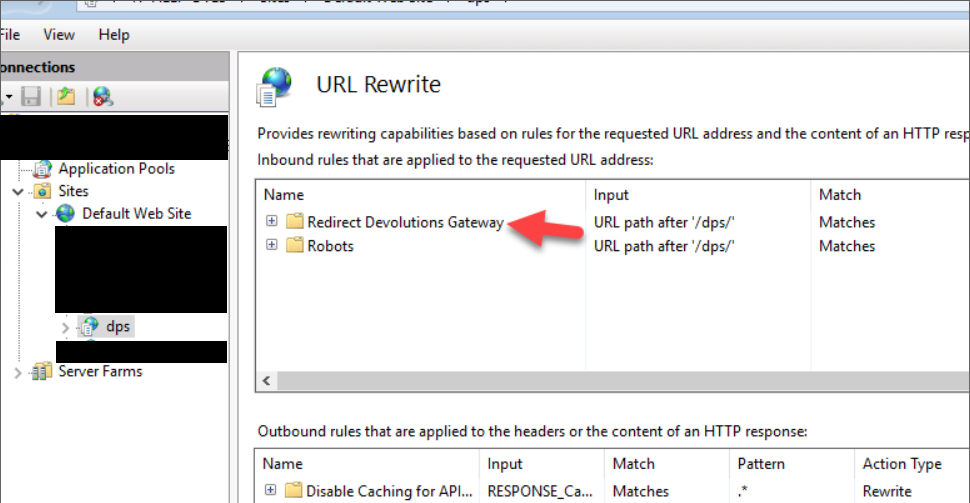
When installing the side-by-side Devolutions Gateway, there should be a new 'URL Rewrite rule' in IIS to redirect traffic to the Devolutions Gateway, maybe that rule is missing or not set properly ?
To see if it there, go in IIS, on your website, then click on URL Rewrite and make sure there is a 'Redirect Devolutions Gateway' folder. Make sure the action type is set to rewrite and that the rewrite URL is 'http://localhost:7171/{R:0}.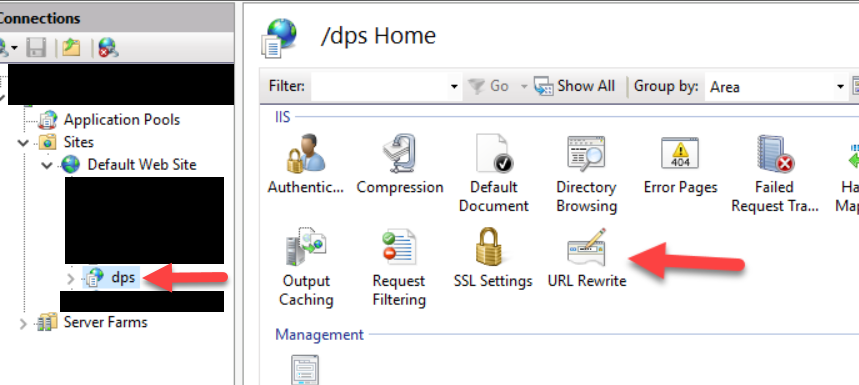
Best regards,
Vincent Forest
Best regards,
Vincent Forest
1c65ab37-121e-4523-ac10-73ed47a7b132.png
e70a82c5-01c5-420a-86d1-a15edc133cbe.png
Hi Vincent
This is an fresh installation of DVLS-GW.
That's correct this URL Rewrite is configured, but the issue here probably is that we are using Client Certificate Authentication and this won't work on the gateway.
I can't select an certificate with which the gateway would make the calls right?
Kind regards
Hi jannisroth,
> the issue here probably is that we are using Client Certificate Authentication and this won't work on the gateway.
I assume you mean client certificate authentication for TLS. This should not be a problem for Devolutions Gateway. It is simply ignored.
I gave a try on my testing server:
That being said, I want to clarify something.
> if I change it to this:
> https://dvls.sample.com:7171
> Webadmin says GW is reachable/pingable and config is fine but the license for side-by-side is not working.
Did you configure a TLS certificate directly in your side-by-side Devolutions Gateway?
In a side-by-side setup, this should not be necessary because IIS is taking care of TLS for us.
The idea is:
https://dvls.sample.com/dvls (IIS) -> http://localhost:7171 (local Devolutions Service)
This might be the problem. I’m not sure IIS URL rewrite rule is properly set to redirect to a local Devolutions Gateway using HTTPS (https://…). Maybe you can check that?
Best regards,
Benoit Cortier
8952b9ee-ef4b-4e4b-8875-1632ec700b2b.png
f85033c0-4912-4c5b-95fa-1b90a9bb6d20.png
Hi Benoit
How can this be ignored by DVLS-GW if it is enforced by IIS?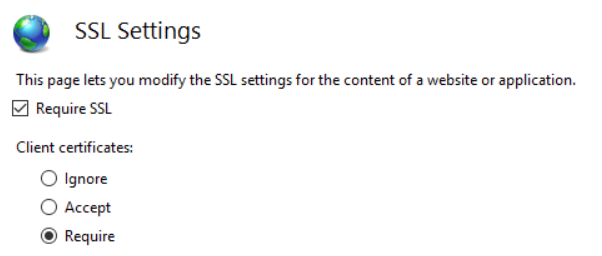
No I didn't configure it. 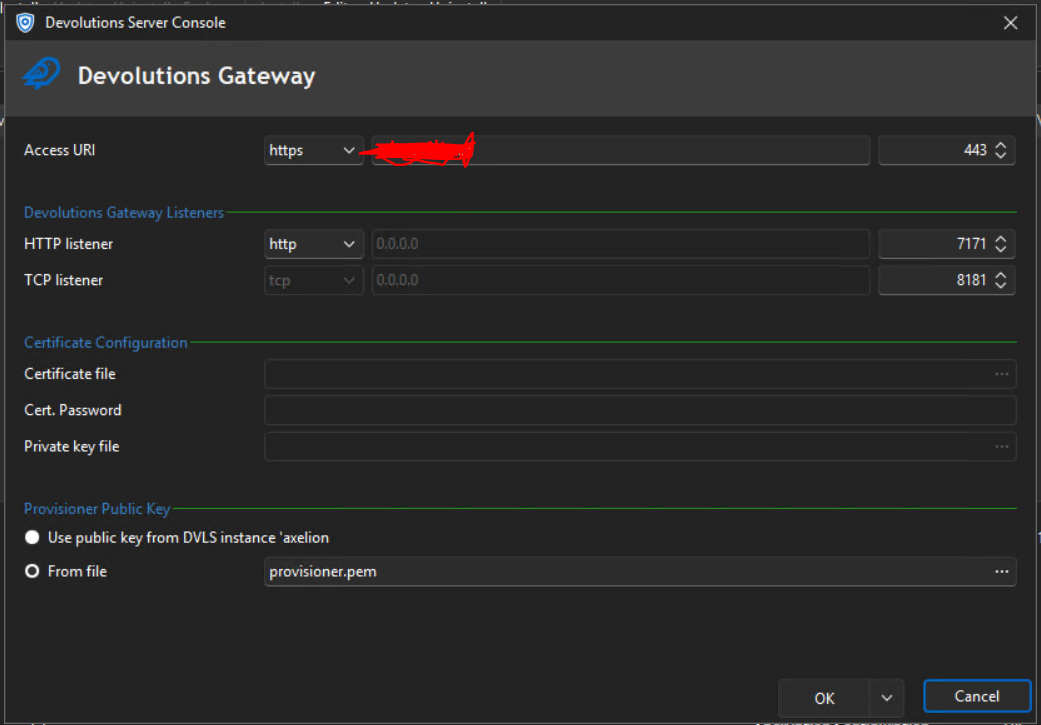
cc406b85-9c87-4c48-b280-6bb85c4dc0bc.png
e25e11ba-386f-4a21-8542-a2e9a6e55c04.png
Hi jannisroth,
> How can this be ignored by DVLS-GW if it is enforced by IIS?
I’m sorry, I meant to say that Devolutions Gateway itself will ignore the client certificate. Regarding this:
> the issue here probably is that we are using Client Certificate Authentication and this won't work on the gateway.
It’s not expected to be an issue on Devolutions Gateway side.
Of course, it should not be ignored by IIS in your case, and actually the problem is probably on DVLS side, when it tries to reach the Devolutions Gateway via IIS. I don’t think it’s possible to set up a client certificate for DVLS itself. Do you think you can disable this for everything under https://dvls.sample.com/dvls/jet? All Devolutions Gateway routes are under this path.
Benoit Cortier
Hi Benoit
Yes, i can do that.
Where is the path exactly to disable this?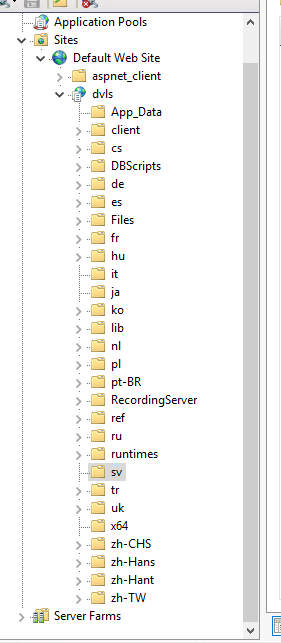
6111e2f6-eb0d-49a0-a016-d1aea6cf8d48.png
Hi,
It looks like IIS client certificate authentication can only be configured for an entire IIS site. I've never tried it myself, but a colleague of mine wrote a blog on how to set it up, and from the screenshots, there doesn't seem to be a way to change the settings for specific subdirectories within the same IIS site.
The Devolutions Gateway side-by-side deployment is configured as a special reverse proxy rule for everything under the /jet path which is then redirected to the Devolutions Gateway service. It is detected as a side-by-side deployment from its URL which matches the one from DVLS.
The obvious fix would be to deploy Devolutions Gateway separately, either using IIS + ARR with a similar configuration as the rule created for the side-by-side deployment, or separately from IIS, with an HTTPS listener in Devolutions Gateway + a dedicated port to listen on.
The only issue is that this Devolutions Gateway deployment would require a license to use, as it wouldn't be detected as a side-by-side deployment. Since the limitation is with IIS, there's not much that can be done to support it correctly. What we could probably do is treat this on an exception basis, and have support send you a license to work around the limitation. Contact them and point them to this thread, I'll give them a heads up about this special case.
Best regards,
Marc-André Moreau
Hello Jannis,
A serial key was sent to you for Devolutions Gateway, please look for an email from service@devolutions.net.
Let us know if you encounter any issues!
Best regards,
Richard Boisvert
Hi Benoit
Yes, I received the key and allready got the setup working.
Thanks a lot!
Kind regards,
Jannis
Hello Jannis,
Great! Let us know if you have any issues.
Best regards,
Richard Boisvert