Version 2024.2.3.0 (June 17, 2024)

If you use a client (RDM, PowerShell, etc.), version 2024.2 is required for this DVLS version
NEW FEATURES
- Core - 5 new security reports: Administrators, System permissions, Devolutions Gateway permissions, Connection permissions and Vault permissions
- Core - Added a Devolutions Gateway free license valid for 5 users
- Core - Added sealed entry feature
- Core - Added vault content type feature
- Core - Licenses can now be refreshed to reflect changes
- Core - PAM license is now assigned to users
- Core - Support RDM connection to DVLS with Azure Proxy
BREAKING CHANGES
- BREAKING CHANGE Core - Devolutions Gateway licenses are now by user. A free license valid for up to 5 users is now included
IMPROVEMENTS
- Core - Actions suggested in security dashboard can now be ignored
- Core - Added a way to specify icons for light background or dark background
- Core - Added an action "Select in tree" to focus on an entry when the tree is filtered
- Core - Added an option to search in all vaults if nothing is found in the current tree
- Core - Added recording tab on entries to be able to list all recordings
- Core - Added rule based on user tags in conditional access
- Core - Added secure message subject in the email sent to user
- Core - Added support for Door Code entry
- Core - Allow maximum file size to reach 100 Mb
- Core - Improved security reports
- Core - Improved significantly ARD performance
- PAM - Added a display name on a Just In Time (JIT) elevation group
- PAM - Improved Just In Time (JIT) elevation to allow the user to set only a subset of groups available on an account during the checkout
- PAM - Password rotation is now possible in infrastructure vault
- PAM - Support linked credentials on AnyIdentity provider
- Rest API - New endpoints to list, create, and delete credential entries
- Web - Allow to change the side panel width
FIXES
- Core - Fixed an issue where logs from System Vault were not added to reports
- Core - Fixed issue where vaults could not be selected as landing page
- Core - Fixed performance issue with LDAP GetGroupByUser
- Core - Fixed performance issue with PAM
- Core - Removed useless logs to avoid too much logs
- Core - Wait a few seconds to get connection with Database when the server starts in case SQL Server is starting as well
- Web - Several UI fixes
## CONSOLE RELEASE NOTES ##
IMPROVEMENTS
- Added zh-Hant-TW support
- Give rights to user running the scheduler on the AppSettings.json
- Save schema performance improvements
FIXES
- Fixed an issue to avoid SQL Express installation if the database host is remote
- Fixed an issue where changing the database and other parameters at the same time applies changes to the old database
Érica Poirier
All Comments (7)
Hi Erica
- BREAKING CHANGE Core - Devolutions Gateway licenses are now by user. A free license valid for up to 5 users is now included
- Core - Added a Devolutions Gateway free license valid for 5 users
How is this Breaking Change affecting companies with per Gateway licenses?
Kind regards,
Hello,
Once you update DVLS and Gateway, the application should still continue working with the current license you have.
On renewal, you will have to get a license per user for the Gateway and assign the license to the users.
Best regards,
Érica Poirier
Hello,
Once you update DVLS and Gateway, the application should still continue working with the current license you have.
On renewal, you will have to get a license per user for the Gateway and assign the license to the users.
Best regards,
Can you explain this a bit further? We currently have 35 Gateway licenses, but 110 users. Do we need gateway licensing for both our users and the gateways after this update?
Hello,
Sure, let me explain it a bit further. If you have 35 Gateway licenses, all your users will have access to all your Gateways. When all thoses 35 licenses will be expired, your renewal will be with the new license model based on user count. The new license will force you to assign the license to users. But this will be needed only when all your 35 Gateway licenses will be expired or removed from the system. For now, since the "old" license model for the Gateway was based on the Gateway quantity, we decided to allow all users during that transition period to avoid issue on customer side.
Conclusion: If you have "old" licenses base on Gateway count (and this is what you have), you don't really have a breaking change. Everything will continue to work as before, all your user will have access to the Gateway like before.
I hope it is a bit clearer. Don't hesitate if you have questions, I will help you with pleasure.
Best regards,
François Dubois
If we create a Credentials vault, are we able to reference the credentials in that vault from another vault?
And also, can we hide that vault from users in the vault selectors, even though they have access to it?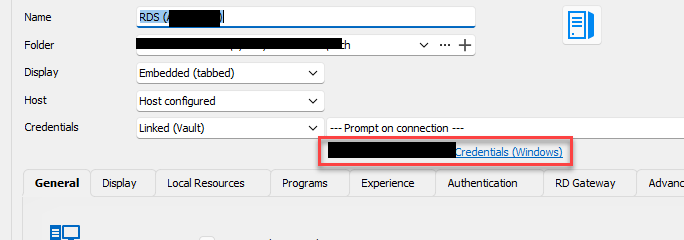
ee1e4a82-0353-48c7-b445-daa5d63b1a12.png
Hello,
We didn't change the behavior where we link credentials to another entry. Even if it is a credentials vault, you can't reference them from different vault. And users need access to the vault if you want them to use it. It will not be possible to hide the vault and have access to it unfortunately.
Best regards,
François Dubois
This would be a VERY useful feature. I will log in Feature Request. Thanks.