WinSCP gateway

with the sftp entry: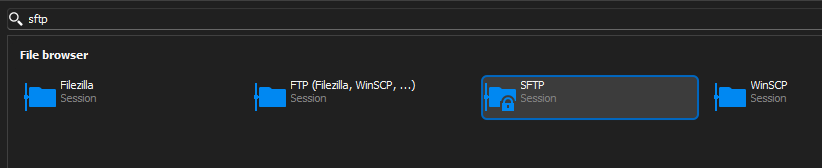
It comes with Gateway option:
Where the WinSCP entry (which just looks like it is a version of FTP entry):
Does not have Gateway tab (or Proxy or Advanced):
I need to ssh tunnel through a linux server to get to destination linux server. The gateway tab in SFTP entry works for this. But I can not do it with the WinSCP option. Running WinSCP manually with its own Site Manager support SSH Tunnel which works.
I thought maybe I could get around it using tunnel or gateway setting on the left menu(VPN/Tunnel/Gateway) but nothing I try always results in the same thing. once WinSCP launches and trys to connect it says the end host doesnt exist.
If I manually connect gateway server and manually sftp to end host it works.
Either I am missing a setting or something is not translating right.
46d8e452-e4d3-4051-9e9f-7b40dd904af5.png
87733f3b-3fc6-44bc-8270-2ba54d264b48.png
37217d28-718e-49c9-a246-669d50c9b80c.png
4eb666df-32f3-4f2f-bb73-525387679fe6.png
All Comments (5)
Hello,
Could you send us screen captures of the VPN/Tunnel/Gateway configuration you tried?
Have you tried using an entry as a Gateway and setting it in the VPN/Tunnel/Gateway of the WinSCP entry?
Best regards,
Érica Poirier
I can create an "ssh gateway" entry. However, in the VPN/Tunnel/Gateway section there is no "ssh gateway" option to select and create or link an existing one: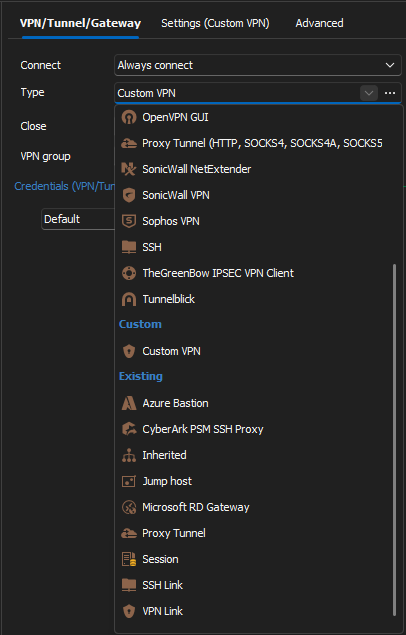
The "ssh gateway" entry I created does appear to be selectable with "VPN Link" or "Session" but selecting these results in same issue.
I have tried SSH, Session, Jump Host, SSH Link, VPN Link, Proxy Tunnel.
03f3b4f1-4c35-4c1c-a2d8-aac81ef423ed.png
Hello,
Thank you for your feedback.
Following a discussion with a developer, the Gateway is not visible because the WinSCP command line doesn't support it, and RDM uses this WinSCP command line feature.
The workaround I tried to explain is to create an SSH Gateway VPN entry type and then use it in the WinSCP entry as a Session in the VPN/Tunnel/Gateway.
As you mentioned, and because of the above reason, sadly this is not supported.
Best regards,
Érica Poirier
Hi Erica
Do you know if there is a good szenario for resolving this?
WinSCP is so much better than the integrated SCP/SFTP Client.
Right now I have a setup that is not really stable:
- DVLS Tunnel with Local Port Exposure
- WinSCP Connection the localhost and Port through the tunnel.
Best regards,
Jannis
Hello Jannis,
Thank you for your feedback.
At the moment, we haven't found any other method because RDM can interact with WinSCP through its command line interface only. That command line interface doesn't offer us that much options.
Best regards,
Érica Poirier