
sascha03
Database connections not possible with version 2024.1.5.1/2024.1.6.2
Hi Maxim,
thanks for your quick reply. Unfortunately, the workaround does not solve the issue for us.
We set the variable with the new version -> not working
We downgraded, set the value and upgraded -> not working
Cheers,
Sascha
Database connections not possible with version 2024.1.5.1/2024.1.6.2
Hi all,
we have some problems with macOS (Intel) and releases for the version 2024.1.5.1/2024.1.6.2. After updating from 2023.3.13.4 we are not able to connect to the data source and get an exception "TryGoOfflineException". Please find the complete exception string below.
After a downgrading to 2023.3.13.4 everything is working again.
Upgrading again results in the same error
On macOS with M1 or M2 chip, these issues don't exist.
Our Data Source is a MS SQL Server with Kerberos Authentication
Ticket has been verified using klist.
Regards
Sascha
Devolutions.RemoteDesktopManager.Business.TryGoOfflineException: TypeInitialization_Type, NetSecurityNative
   at Interop.NetSecurityNative.ImportPrincipalName(Status& minorStatus, String inputName, Int32 inputNameByteCount, SafeGssNameHandle& outputName)
   at Microsoft.Win32.SafeHandles.SafeGssNameHandle.CreatePrincipal(String name)
   at System.Net.Security.SafeDeleteNegoContext..ctor(SafeFreeNegoCredentials credential, String targetName)
   at System.Net.Security.NegotiateStreamPal.EstablishSecurityContext(SafeFreeNegoCredentials credential, SafeDeleteContext& context, String targetName, ContextFlagsPal inFlags, SecurityBuffer inputBuffer, SecurityBuffer outputBuffer, ContextFlagsPal& outFlags)
   at System.Net.Security.NegotiateStreamPal.InitializeSecurityContext(SafeFreeCredentials credentialsHandle, SafeDeleteContext& securityContext, String[] spns, ContextFlagsPal requestedContextFlags, SecurityBuffer[] inSecurityBufferArray, SecurityBuffer outSecurityBuffer, ContextFlagsPal& contextFlags)
   at Microsoft.Data.SqlClient.SNI.SNIProxy.GenSspiClientContext(SspiClientContextStatus sspiClientContextStatus, Byte[] receivedBuff, Byte[]& sendBuff, Byte[][] serverName)
   at Microsoft.Data.SqlClient.SNI.TdsParserStateObjectManaged.GenerateSspiClientContext(Byte[] receivedBuff, UInt32 receivedLength, Byte[]& sendBuff, UInt32& sendLength, Byte[][] _sniSpnBuffer)
   at Microsoft.Data.SqlClient.TdsParser.SNISSPIData(Byte[] receivedBuff, UInt32 receivedLength, Byte[]& sendBuff, UInt32& sendLength)
---> Microsoft.Data.SqlClient.SqlException (0x80131904): TypeInitialization_Type, NetSecurityNative
   at Interop.NetSecurityNative.ImportPrincipalName(Status& minorStatus, String inputName, Int32 inputNameByteCount, SafeGssNameHandle& outputName)
   at Microsoft.Win32.SafeHandles.SafeGssNameHandle.CreatePrincipal(String name)
   at System.Net.Security.SafeDeleteNegoContext..ctor(SafeFreeNegoCredentials credential, String targetName)
   at System.Net.Security.NegotiateStreamPal.EstablishSecurityContext(SafeFreeNegoCredentials credential, SafeDeleteContext& context, String targetName, ContextFlagsPal inFlags, SecurityBuffer inputBuffer, SecurityBuffer outputBuffer, ContextFlagsPal& outFlags)
   at System.Net.Security.NegotiateStreamPal.InitializeSecurityContext(SafeFreeCredentials credentialsHandle, SafeDeleteContext& securityContext, String[] spns, ContextFlagsPal requestedContextFlags, SecurityBuffer[] inSecurityBufferArray, SecurityBuffer outSecurityBuffer, ContextFlagsPal& contextFlags)
   at Microsoft.Data.SqlClient.SNI.SNIProxy.GenSspiClientContext(SspiClientContextStatus sspiClientContextStatus, Byte[] receivedBuff, Byte[]& sendBuff, Byte[][] serverName)
   at Microsoft.Data.SqlClient.SNI.TdsParserStateObjectManaged.GenerateSspiClientContext(Byte[] receivedBuff, UInt32 receivedLength, Byte[]& sendBuff, UInt32& sendLength, Byte[][] _sniSpnBuffer)
   at Microsoft.Data.SqlClient.TdsParser.SNISSPIData(Byte[] receivedBuff, UInt32 receivedLength, Byte[]& sendBuff, UInt32& sendLength)
   at Microsoft.Data.ProviderBase.DbConnectionPool.TryGetConnection(DbConnection owningObject, UInt32 waitForMultipleObjectsTimeout, Boolean allowCreate, Boolean onlyOneCheckConnection, DbConnectionOptions userOptions, DbConnectionInternal& connection)
   at Microsoft.Data.ProviderBase.DbConnectionPool.TryGetConnection(DbConnection owningObject, TaskCompletionSource`1 retry, DbConnectionOptions userOptions, DbConnectionInternal& connection)
   at Microsoft.Data.ProviderBase.DbConnectionFactory.TryGetConnection(DbConnection owningConnection, TaskCompletionSource`1 retry, DbConnectionOptions userOptions, DbConnectionInternal oldConnection, DbConnectionInternal& connection)
   at Microsoft.Data.ProviderBase.DbConnectionInternal.TryOpenConnectionInternal(DbConnection outerConnection, DbConnectionFactory connectionFactory, TaskCompletionSource`1 retry, DbConnectionOptions userOptions)
   at Microsoft.Data.ProviderBase.DbConnectionClosed.TryOpenConnection(DbConnection outerConnection, DbConnectionFactory connectionFactory, TaskCompletionSource`1 retry, DbConnectionOptions userOptions)
   at Microsoft.Data.SqlClient.SqlConnection.TryOpen(TaskCompletionSource`1 retry, SqlConnectionOverrides overrides)
   at Microsoft.Data.SqlClient.SqlConnection.Open(SqlConnectionOverrides overrides)
   at Microsoft.Data.SqlClient.SqlConnection.Open()
   at Devolutions.RemoteDesktopManager.Business.DataSources.SQLServerConnectionDataSource.CreateDbConnection(String connectionString, Boolean openConnection)
   at Devolutions.RemoteDesktopManager.Business.DataSources.SQLServerConnectionDataSource.CreateDbConnection(String connectionString)
   at Devolutions.RemoteDesktopManager.Business.DataSources.DatabaseConnectionDataSource.CreateDbConnection(Boolean master, Nullable`1 connectTimeout)
   at Devolutions.RemoteDesktopManager.Business.DataSources.SQLServerConnectionDataSource.CreateDbConnection(Boolean master, Nullable`1 connectTimeout)
   at Devolutions.RemoteDesktopManager.Business.DataSources.DatabaseConnectionDataSource.CreateDbConnection(Nullable`1 connectTimeout)
   at Devolutions.RemoteDesktopManager.Business.DataSources.DatabaseConnectionDataSource.ExecuteScalar[T](String sql, IDbDataParameter[] parameters)
   at Devolutions.RemoteDesktopManager.Business.DataSources.SQLServerConnectionDataSource.ExecuteScalar[T](String sql, IDbDataParameter[] parameters)
ClientConnectionId:6ede7ecf-33b9-4354-936a-8e2f34dffc8c
   Exception_EndOfInnerExceptionStack
   at Devolutions.RemoteDesktopManager.Business.DataSources.SQLServerConnectionDataSource.ExecuteScalar[T](String sql, IDbDataParameter[] parameters)
   at Devolutions.RemoteDesktopManager.Business.DataSources.DatabaseConnectionDataSource.GetConnectionCacheID()
   at Devolutions.RemoteDesktopManager.Business.DataSources.DatabaseConnectionDataSource.HasSecurityChanged()
   at Devolutions.RemoteDesktopManager.Managers.ConnectionManager.HasSecurityChanged(BaseConnectionDataSource dataSource)
at Devolutions.RemoteDesktopManager.Managers.ConnectionManager.LoadConnections(BaseConnectionDataSource dataSource)How to open ASDM sessions on RDM (Mac OS)
Hi everyone,
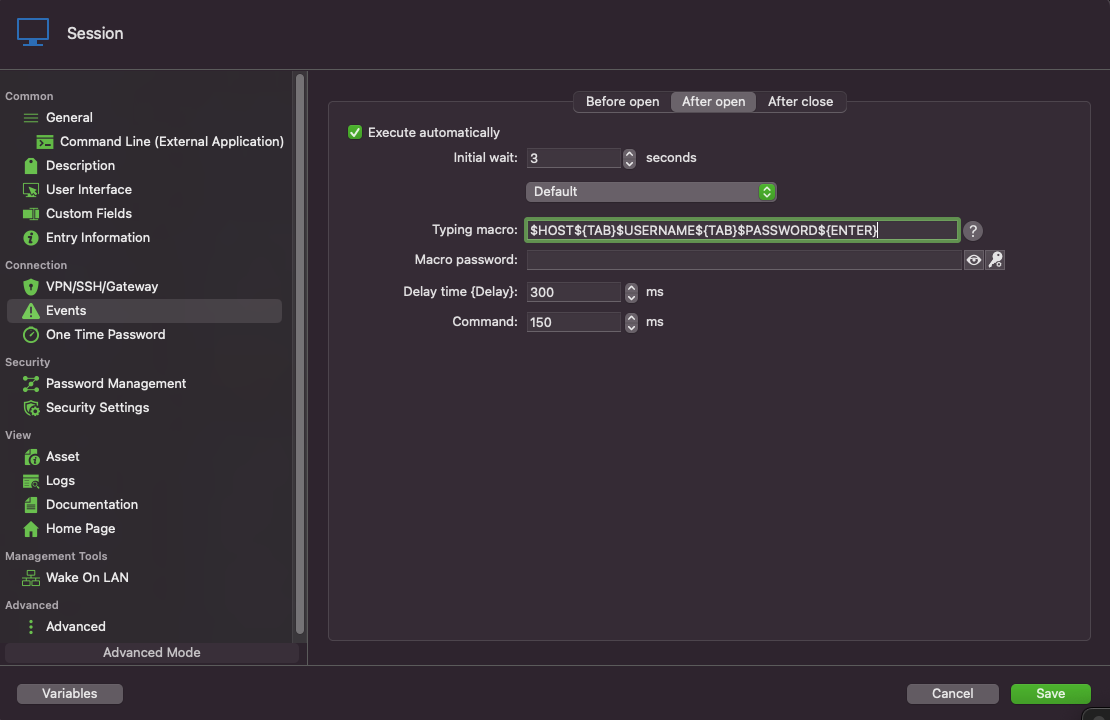
we found a workaround using the Event Feature of RDM.
Create a new Entry for Command Line (External Application)
As Run Command put
open "/Applications/Cisco/Cisco ASDM-IDM.app" Or the Installation path, if not default.
Under "Events" on the left-hand site, go to "After Open"
As Macro use
$HOST${TAB}$USERNAME${TAB}$PASSWORD${ENTER}
Change the Delay and Timing according to the speed of your system.
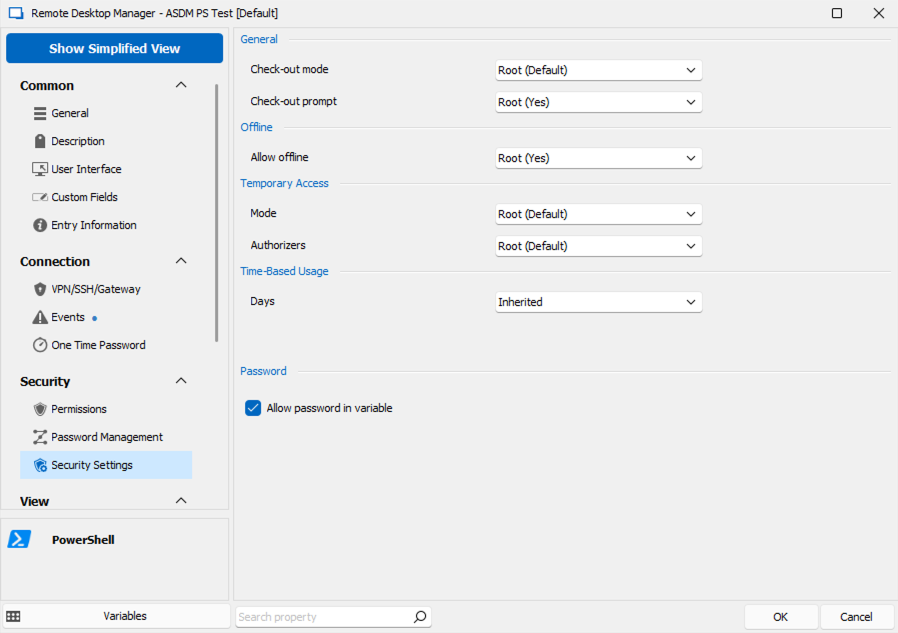
Under "Security Settings" on the left-hand site, choose "Others" and check "Allow password in variable".
Checkpoint Dashboard Add IN
Hi Samuel,
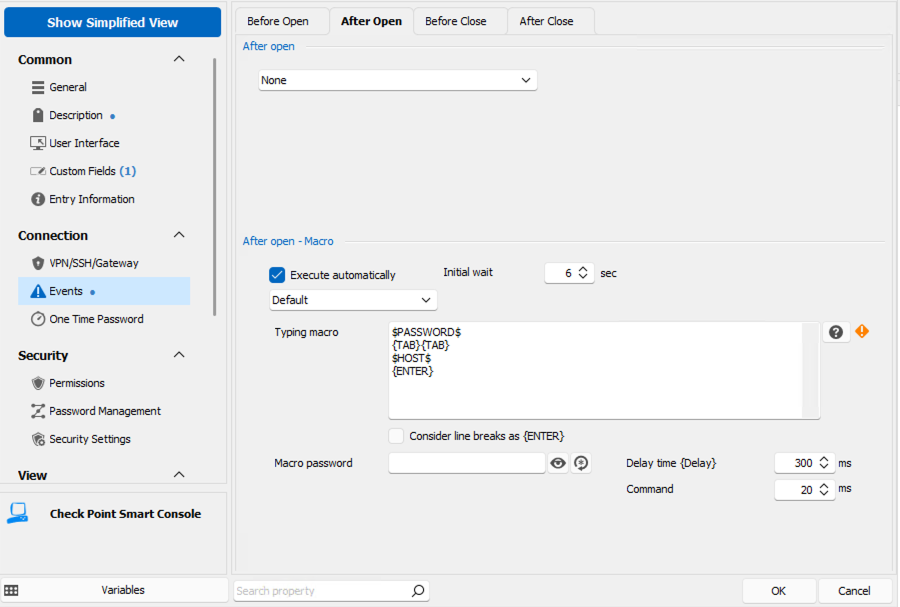
thanks for the hint. We've implemented the Event Feature and it's working!
For anyone else having this issue, here is our Event configuration. Delay and Wait times need to be set according to the start speed of smartconsole. Also the "Allow passoword in variable" check box needs to be set, und "Security Settings" on the left-hand site.
Cheers,
Sascha
Cisco ASDM 1.9.5 support
Hello,
Do you have any news about this thread ?
or is there any workaround that we could use until a fix is found ?
Thanks
Hi,
we found a workaround, using the Event Feature it's similar to the Auto-Type Feature of KeePass if you are familiar with it.
For details please see: https://forum.devolutions.net/topics/37974/cisco-asdm-not-launching-after-updating-asdm-to-195#175829
Cheers,
Sascha
Cisco ASDM not launching after updating ASDM to 1.9(5)
Hi all,
just wanted to share, how we overcame the issues and implemented a Workaround via Poweshell and the RDM Event Feature.
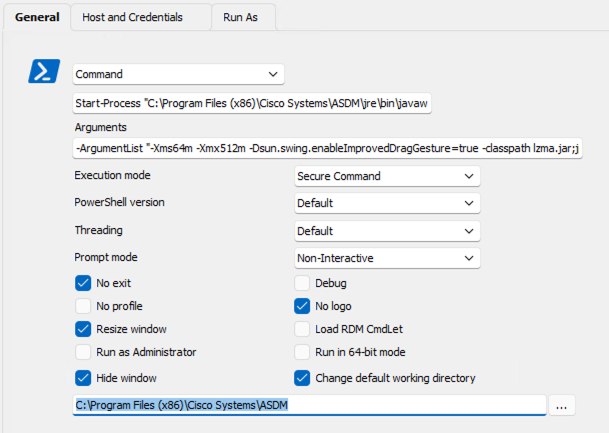
We created a new Powershell Entry and formatted the ASDM run.bat into powershell code:
Command:
Start-Process "C:\Program Files (x86)\Cisco Systems\ASDM\jre\bin\javaw.exe"
Arguments:
-ArgumentList "-Xms64m -Xmx512m -Dsun.swing.enableImprovedDragGesture=true -classpath lzma.jar;jploader.jar;asdm-launcher.jar;retroweaver-rt-2.0.jar com.cisco.launcher.Launcher cert.PEM"
Check "Change default working directory" and set it to:
C:\Program Files (x86)\Cisco Systems\ASDM
Under the Host and Crendentials settings, put your hostname and port as usual.
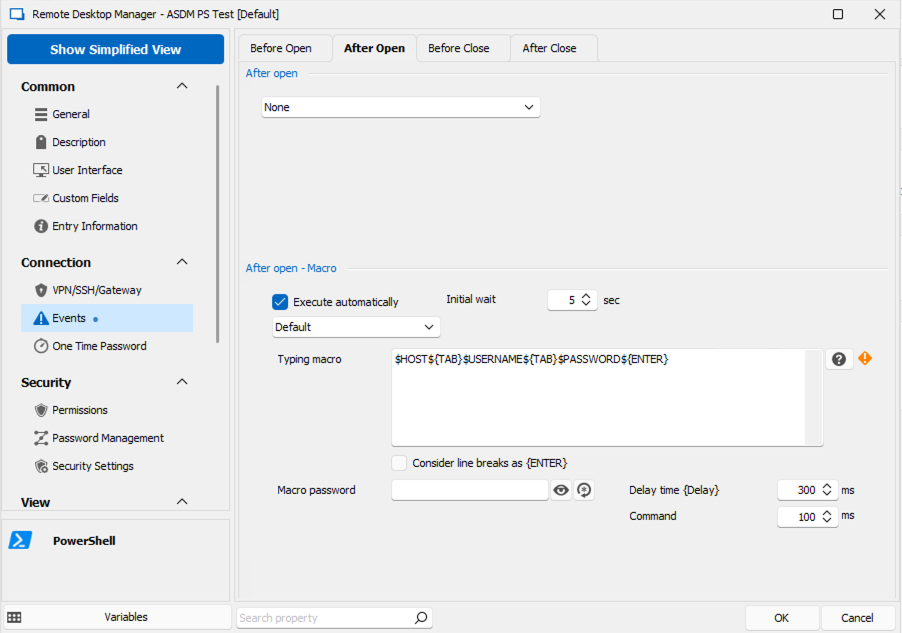
On the left-hand side under "Connection", go to "Events" and then under "After Open" use the typing macro.
Here, you can now enter the variables needed to connect and configure the different delays, depending how fast ASDM opens on your PC.
$HOST${TAB}$USERNAME${TAB}$PASSWORD${ENTER}
The Password parameter is optional. If you use it, make sure to set the "Security Settings" (also on the left-hand site) appropiatly. See the Screenshot below.
Cheers,
Sascha
Checkpoint Dashboard Add IN
Hi all,
the behavior described by Peter is the default from SmartConsole. CheckPoint removed the start parameters in some hot fix within r80.40, and it is not possible to start it directly with credentials and server.
CheckPoint is also not willing to bring this feature back due to security reasons, we opened a ticket for this at CheckPoint.
Maybe we can create a feature request to change the method of how RDM starts SmartConsole. I could think of a similar approach as with ASDM. Open SmartConsole and look for a window containing the name SmartConsole, switching to that window and write the username, followed by a Tab (to go to the next text-box), write the password, Tab again and write the server.
Cheers
Sascha
Cisco ASDM not launching after updating ASDM to 1.9(5)
Hi all,
we are experiencing the same issue. But on our site, RDM is not even capable of finding the window, even if we start ASDM by hand before connecting.
I also tried to create a Playlist in RDM, which runs the ASDM run.bat, to start ASDM, and then runs the "normal" connection. But without success, since RDM does not even find the window.
We also confirmed that the window name is still the same with
PS C:\> tasklist /v /FO:CSV
<omitted>
"javaw.exe","1120","RDP-Tcp#0","2","139.876 K","Running","<username>","0:00:03","Cisco ASDM-IDM Launcher v1.9(5)"
Is there any ETA to resolve this issue? We are managing 50+ ASA Devices and most of them currently run with ASDM 1.9.5
Cheers,
Sascha
RDM GUI is not reacting after updating to 2023.1.10.0
Hello,
we just installed Version 2023.1.20 and the issue seems to be fixed.
Thanks for the support!
Cheers
Sascha
RDM GUI is not reacting after updating to 2023.1.10.0
Hi James,
please find the screenshots attached. All other settings are default. Please keep in mind it is not regarding a specific entry, it is the whole KeePass database that can not be opened.
The KeePass file is located on a network drive and uses a key-file. Our first thought was, that it may has to do with the network drive, but a local copy is not working as well. Also, we tried to replicate the issue with other KeePass files, without success.
cheers
Sascha
RDM GUI is not reacting after updating to 2023.1.10.0
Hi,
we just tested with version 2023.1.15.0 and the issue still persists. We can not open some specific keepass files.
RDM GUI is not reacting after updating to 2023.1.10.0
Hi James,
thanks for getting the docs team involved.
As we tested, the version was not yet released. From the changelog (https://devolutions.net/remote-desktop-manager/release-notes), it does not seem to address the issue we are having, that the file is not opened properly. The only change regarding KeePass I can see is
Added prompt for install/update when KeePass plugin is not installed or outdated
We will try to install the version and verify if it changed anyway.
Cheers
Sascha
RDM GUI is not reacting after updating to 2023.1.10.0
Hello again,
we still have issues with one KeePass file which won't load properly in RDM. We always receive the message, that the entry is not found in the database. Prior to the upgrade, it worked fine and without issues. Also, when we try to search the database no entries show up, the list is empty (KeePass Entry -> Entry -> Type: UUID and then the three dots "...")
Other KeePass files work without problems.
Regards
Sascha
RDM GUI is not reacting after updating to 2023.1.10.0
Hi Klaus,
thanks for summarizing your solution, we were struggling with the same issue.
@Devolutions, could you please update the documentation for the keepass integration? We were troubleshooting the issue for about 2 hours before finding this thread. Would have been nice if the documentation was in place with the new version.
Thanks and regards
Sascha
Overwrite credentials wrong pop up settings
Hi Xavier,
just downloaded the updated and tried it out. Works like a charm now :)
Thanks for the quick fix of this issue/bug!
Cheers
Sascha
Overwrite credentials wrong pop up settings
A short addition. We tried the same on Windows and here we receive the same dialog/pop up as we do for the connection.
Overwrite credentials wrong pop up settings
Hi everyone,
In our setup we have multiple credentials in a shared database where we use them per default via KeePass. Anyways we have some users that are using Bitwarden or 1password as password safe. We are trying to make use of the user specific settings to overwrite the settings. If we do so on a connection directly this works perfectly fine if we otherwise try to overwrite a credential with user specific settings we get what I guess is the wrong pop up and it does not affect the entry.
For example if I edit the user specific settings on a connection I get the following pop up and every setting changed here takes affect.

When I edit the user specific settings on the KeePass credential entry I get a completely different pop up and all configuration done here is not saved at all. Note that we are change the type to Bitwarden/1Password with the three dots in the down left corner.

A third scenario is the batch edit where we receive the same pop up as we would when we edit the connection and this does also work fine, but we then need to always edit two settings which leads to the problem of having two credentials with the same linked/overwritten credential.
I hope I formulated this understandable and hope you can fix this issue.
Cheers,
Sascha
How to open ASDM sessions on RDM (Mac OS)
Hi everyone,
is there any news regarding this topic? We would be very interested in this as well.
Cheers,
Sascha
CheckPoint SmartConsole SSO Token Sign In
Hi Hubert,
thanks for the quick response!
Regarding your questions I'm not quit sure, how the SSO is generated, nor how the SmartConsole is started with it, I just saw it working on someone others maschine. Due to the lack of documentation on CheckPoint Site, I've opened a service request with your questions and I hope they can answer them. As soon as I have a valid answer form CheckPoint site I'll come back to you/this thread.
Regards
Sascha
CheckPoint SmartConsole SSO Token Sign In
Hi everyone,
we would like to have the possibility to login to CheckPoints SmartConsole with a SSO Token. The parameter "-p" with an XML-File, like it's done at the moment is deprecated and will no longer be supported (starting with SmartConsole R80.30 B92) by CheckPoint as you can read here.
With an SSO Token we could start smartconsole with the "-sso [SSO-Token]" parameter unfortunately it's not documented, but it's working. Would be great to be able to do it from RDM!
Regards
Sascha
Weird characters when inserting quotes, tildes or carets in SSH Shell
Hi Denis,
thank you so much for the quick fix. Waiting for the Update :)
Regards
Sascha
Weird characters when inserting quotes, tildes or carets in SSH Shell
Hi Denis,
thanks for the quick answer. Unfortunately the terminal type setting did not solve the problem.
After typing some text and pressing ESC + capital D the cursor did not move to the left. I now changed my keyboard layout to american layout (from german layout) after that the ^ works fine.
Would be great to have a fix for the german keyboard/keyboards with ^ as an accent.
Regards
Sascha
Weird characters when inserting quotes, tildes or carets in SSH Shell
Hi everyone,
currently we're facing a similiar problem. In SSH Sessions when writing the circumflex (^) when writing it, sometimes a tilde (~) is written to the terminal. This only appears in Sessions to network devices like router or switches. When connected to a server the circumflex is written, but the cursor jumps back one character (no tilde is printed).
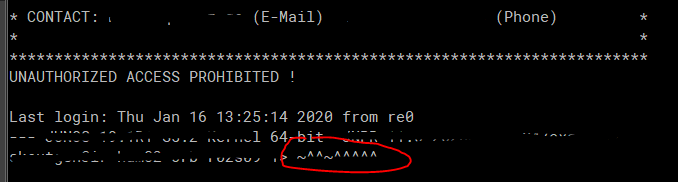
I already tried changing the terminal encoding, but that didn't help.
Regards
Sascha
make session properties mandatory
Hello,
it would be great to have the feature also availible for the custom variables.
Regards
Sascha
Template Setup
Hi Hubert,
yes, it is similar, sorry I didn't find it while searching throuh the request.
Thanks!
Regards
Sascha