Cisco ASDM not launching after updating ASDM to 1.9(5)

Hi,
Used to have Cisco ASDM 1.9(2) and it has worked flawlessly with RDM. Now I got forced to update to 1.9(5) which is included in the latest recommended ASDM bundle for Cisco ASA firewalls. Now the ASDM app does not even launch when I try to launch it from RDM.
Tested a few things:
Launched ASDM manually without RDM. It works without problems and I can connect so the issue is not with ASDM.
Launched ASDM manually and triggered the RDM connection. RDM can find the window without any issue at all and fill in my login information so there is no problem with RDM finding the "Login title".
The install path of ASDM is unchanged and is installed at its default location.
Tried resetting my settings by renaming RemoteDesktopManager.cfg without success.
If I re-install 1.9(2) I still get forced to update to 1.9(5) as soon as I connect to one of my customers firewalls that have the newer software.
Anyone else experiencing this?
Best regards,
Conny
All Comments (21)
Hello,
Thank you for contacting us on that matter!
I would like to ask you a few questions to help us try to replicate this issue internally.
- What version of RDM do you currently use?
- What type of data source do you use?
Best regards,
Gabriel Degrandpré
Hello Conny,
Our Engineering Department has confirmed that we do not support ASDM 1.9.5.0 for now. An improvement ticket has been opened with them and they will see what can be done.
We will be in touch as soon as we will have an update to provide on that matter.
Best regards,
James Lafleur
Hello,
Thank you for contacting us on that matter!
I would like to ask you a few questions to help us try to replicate this issue internally.
- What version of RDM do you currently use?
- What type of data source do you use?
Best regards,
Hi,
First off, terribly sorry that I haven't answered until now. I honestly forgot about the thread.
Running "2022.2.21.0" at the moment and using a MS SQL datasource.
Hello Conny,
Our Engineering Department has confirmed that we do not support ASDM 1.9.5.0 for now. An improvement ticket has been opened with them and they will see what can be done.
We will be in touch as soon as we will have an update to provide on that matter.
Best regards,
Hi James,
Thanks for the confirmation. I really hope they do get the time to squeeze in a fix for it soon as customers are being forced to the new version by Cisco when upgrading ASDM in their firewalls in order to mitigate security issues.
In the meantime, have a great day and looking forward to hearing from you when you have more information to share.
Best regards,
Conny
-- bump --
Any update on this?
Best regards,
Conny
Hello,
Unfortunately, we have no update to provide on that matter just yet.
We will be in touch as soon as we will have more information to share.
Best regards,
James Lafleur
James,
Just pinging for the same issue. Any update on this feature request to upgrade the plugin?
If not, is there an alternative way to handle this instead?
James,
Just pinging for the same issue. Any update on this feature request to upgrade the plugin?
If not, is there an alternative way to handle this instead?
The only workaround I've found so far is to manually launch ASDM, leave the window open and then open the shortcut you want to use in RDM.
Troublesome and really annoying but at least one doesn't have to copy/paste credentials as RDM manages to find the currently active ASDM window (it just can't launch it from RDM).
An escalation of this issue would be greately appreciated.
Hello,
Unfortunately, this is the only workaround we can provide at this time. As for the request, it is still on the to-do list of our Engineering Department.
We will make sure to update this thread as soon as we will have more details to provide.
Best regards,
James Lafleur
Hi all,
we are experiencing the same issue. But on our site, RDM is not even capable of finding the window, even if we start ASDM by hand before connecting.
I also tried to create a Playlist in RDM, which runs the ASDM run.bat, to start ASDM, and then runs the "normal" connection. But without success, since RDM does not even find the window.
We also confirmed that the window name is still the same with
PS C:\> tasklist /v /FO:CSV
<omitted>
"javaw.exe","1120","RDP-Tcp#0","2","139.876 K","Running","<username>","0:00:03","Cisco ASDM-IDM Launcher v1.9(5)"
Is there any ETA to resolve this issue? We are managing 50+ ASA Devices and most of them currently run with ASDM 1.9.5
Cheers,
Sascha
Hello Sascha,
Thank you for reaching us on that matter!
We are still working on getting a test environment on our end to investigate this issue.
We will update this thread as soon as we will have an update to provide,
Best regards,
James Lafleur
Hi all,
just wanted to share, how we overcame the issues and implemented a Workaround via Poweshell and the RDM Event Feature.
We created a new Powershell Entry and formatted the ASDM run.bat into powershell code:
Command: Start-Process "C:\Program Files (x86)\Cisco Systems\ASDM\jre\bin\javaw.exe"
Arguments: -ArgumentList "-Xms64m -Xmx512m -Dsun.swing.enableImprovedDragGesture=true -classpath lzma.jar;jploader.jar;asdm-launcher.jar;retroweaver-rt-2.0.jar com.cisco.launcher.Launcher cert.PEM"
Check "Change default working directory" and set it to:C:\Program Files (x86)\Cisco Systems\ASDM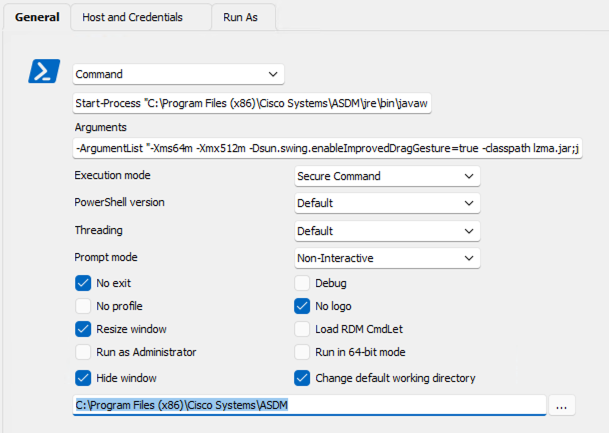
Under the Host and Crendentials settings, put your hostname and port as usual.
On the left-hand side under "Connection", go to "Events" and then under "After Open" use the typing macro.
Here, you can now enter the variables needed to connect and configure the different delays, depending how fast ASDM opens on your PC.$HOST${TAB}$USERNAME${TAB}$PASSWORD${ENTER}
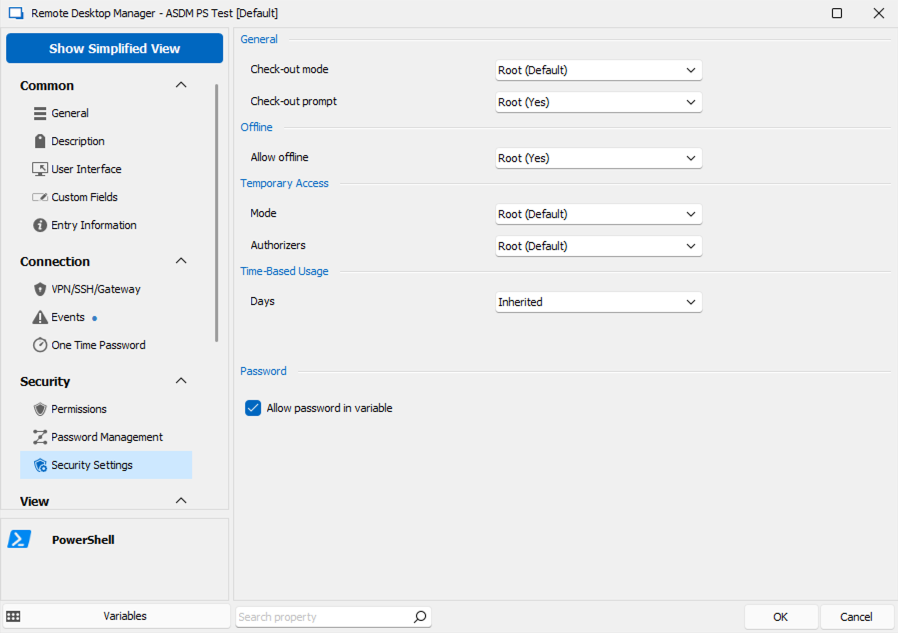
The Password parameter is optional. If you use it, make sure to set the "Security Settings" (also on the left-hand site) appropiatly. See the Screenshot below.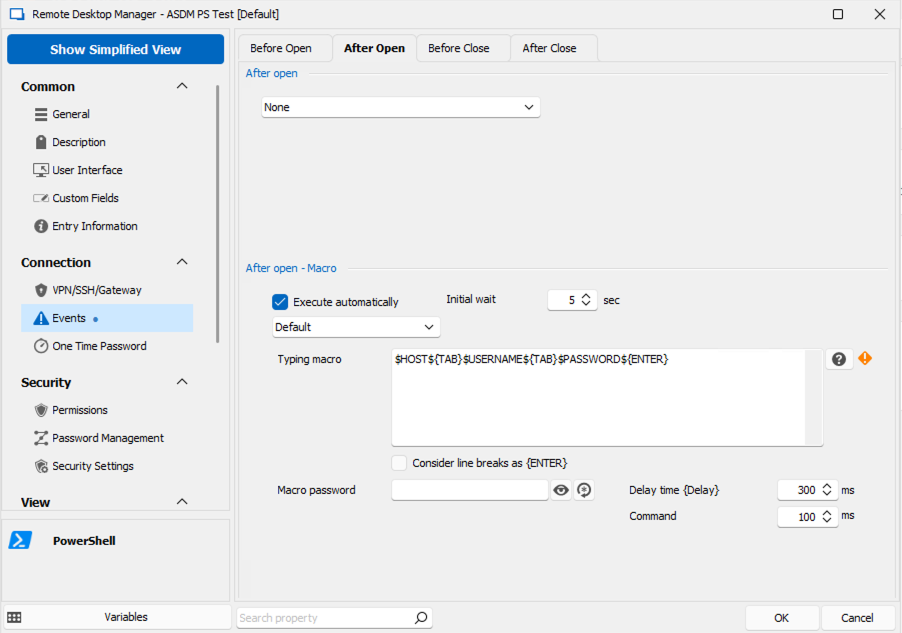
Cheers,
Sascha
97a91e7a-f69c-489f-9234-f4027b716889.png
8939c6e4-d009-4ab4-bde0-f7d0c973b35a.png
dd86e4ef-28c1-4f1e-bc8b-e789ecdd9b8a.png
Hello Sacha,
Thank you for this awesome workaround! I'm sure that this will prove helpful to our community.
Best regards,
James Lafleur
Hi @all,
i've upgraded from ASDM-launcher 1.9.0 to 1.9.7 because the old launcher said, that there is a new one...and nothing works, so i've installed the new launcher in a different path (eg. "c:\...\ASDM_1_9_7").
And now it works, i have to edit the target path of the desktop link , but then the launcher started.
BG
Sven
I actually went and created a new executable for launching ASDM. I used autohotkey (AHK2) to make a new Java launcher script. In the sub-folder as the script I placed the latest version of OpenJRE and the latest ASDM launcher.
The AHK launches Open-JRE with the required flags to start ASDM, then I used to have it wait for the appropriate gui elements and fills them in with CLI options passed to it. However I found a better way. I took the AHK script and compiled it into an executable called javaw.exe which ignores all cli options/flags. Now I just use the in-built ASDM plugin, and then point the javaw.exe location to my folder which has my executable in it, and the two sub-folders for open-jre and ASDM. I point the ASDM location to my sub-folder but it doesn't matter as the javaw executable will just ignore the passed flags. The executable launches open-jre which loads the the ASDM .jar file. Then the normal plugin takes over filling in the boxes. I did have to set the plugin delay to 2s because this usually takes just over a second to launch.
This has been the best integration for me with the least amount of reconfiguration, as the new ASDM requires a private key for encryption.
@weveland please share the script.
Hello Weveland,
Thank you for your feedback! As you can see per @lexuletz reply, our community seems to be very interested in the workaround you have found.
Best regards,
James Lafleur
Hello Sascha,
Thank you for reaching us on that matter!
We are still working on getting a test environment on our end to investigate this issue.
We will update this thread as soon as we will have an update to provide,
Best regards,
James Lafleur
Hi James,
It's been two months since this answer now and 10 months since I first reported the issue so forgive me for pointing this out in a rather "brute but honest and well meaning way", but wouldn't it be better to focus on fixing stuff that's broken than releasing new features and functions?
Nothing personal, just saying the engineering dept. might need a nudge in the right direction, and to be frank, I doubt this is hard to fix for the devs and would remove alot of unnecessary irritation among alot of Cisco users.
Don't get me wrong here, I do appreciate the community tips and fixes as well, but when it comes to fixing a feature that's been built in and working like a charm since many years (even though relying on a 3rd party app), it should get a higher prio. Just doesn't feel right that loads of Cisco techs out there should have to individually spend hours of troubleshooting to get a somewhat working interim solution, or worse, start looking at different solutions.
So, thank you for your work so far and I know you're trying to get it fixed, but can we get this upvoted/prioritized somehow? :)
Best regards,
Conny
Hello Conny,
Thank you for your reply, I will provide your feedback to ur engineering department and we will get back to you as soon as we will have an update to provide.
Best regards,
James Lafleur
Hello,
Rest assured that this has been on our radar since it was first brought to us. That said, we've found and fixed the issue, and this fix should be available for the upcoming version (2023.2.15)
Regards,
Jafran Majeau
Hello,
Rest assured that this has been on our radar since it was first brought to us. That said, we've found and fixed the issue, and this fix should be available for the upcoming version (2023.2.15)
Regards,
Great news,
Going to make our work days a hell of a lot easier again :)
Thanks!
Best regards,
Conny