Weird characters when inserting quotes, tildes or carets in SSH Shell
Weird characters when inserting quotes, tildes or carets in SSH Shell

Hello,
When I try to insert a quote ", a tilde ~ or a caret ^ in a SSH Shell, the terminal shows "D before inserting these characters (depending on the character used). I've tried changing the terminal encoding to UTF8, but this did not fix the issue.
- Quote " shows: "D
- Tilde ~ shows: ~D
- Caret ^ shows: ^D
Is there a setting somewhere that hides these characters?
Regards,
Mark
All Comments (11)
Hi Mark,
I am pretty sure it is a bug, and I think I have found how to fix it. Just to be sure, I would like to know which keyboard layout you are using. I suspect those characters are used as accents and are combined with the following key, am I right?
Regards
Denis Vincent
Hi Denis,
I'm using the United States-International keyboard layout. You are correct that those characters are used as accents and are combined with the following key.
Regards,
Mark
Hello,
We've made a fix and it will be available in RDM 2019.2.23.0.
Regards,
Hubert Mireault
I believe I am having similar issue on my SSH terminal. I am on RDM enterprise 2019.2.22.0 on Windows. May I know when 2019.2.23.0 will be released? when I run scripts having sed/echo/awk with single, and double quotes, the terminal will be unusable, and I had to disconnect and reconnect again.
Hi,
Sorry for the late answer, because of the holidays, we were operating with reduced staff. A release is about to be ready, it is currently being tested and should be online at the beginning of next week (January 6th).
Regards
Denis Vincent
Hi everyone,
currently we're facing a similiar problem. In SSH Sessions when writing the circumflex (^) when writing it, sometimes a tilde (~) is written to the terminal. This only appears in Sessions to network devices like router or switches. When connected to a server the circumflex is written, but the cursor jumps back one character (no tilde is printed).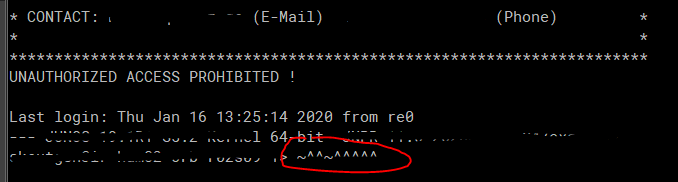
I already tried changing the terminal encoding, but that didn't help.
Regards
Sascha
error_junos.PNG
Hi Sascha,
If I understand correctly, you are using a keyboard layout where ^ is an accent character that is combined with the next keystroke. Apparently, some of your network devices seem to have a problem with the left arrow key. I am pretty sure that you would have the same ~ if you tried using the left arrow key. One thing you can try is to change the terminal type: in the properties of the problematic sessions, in the "Terminal" tab, set the "Override terminal type" to "vt100" or "vt220".
If that does not work, we may have to make some changes. I would then like if you could test this: type some text, then type ESC followed by D (capital D), this should make the cursor move left (or not). And in the mean time we fix this, you can change the keyboard layout to one where the ^ is not an accent.
Regards,
Denis Vincent
Hi Denis,
thanks for the quick answer. Unfortunately the terminal type setting did not solve the problem.
After typing some text and pressing ESC + capital D the cursor did not move to the left. I now changed my keyboard layout to american layout (from german layout) after that the ^ works fine.
Would be great to have a fix for the german keyboard/keyboards with ^ as an accent.
Regards
Sascha
Hi Sascha,
Thanks for the feedback. I will work on a solution for this, but I can not tell when it will be ready since I am not even sure what that solution is. As a programmer, I do understand the importance of having the correct keyboard layout.
Regards
Denis Vincent
Well, it turns out it was simpler to fix than I expected. I now have the same behaviour than any other windows text editor, it removes complexity and interactions with the server. This fix will be available in the next RDM version.
Regards
Denis Vincent
Hi Denis,
thank you so much for the quick fix. Waiting for the Update :)
Regards
Sascha