How to open ASDM sessions on RDM (Mac OS)

I can't find the way to open ASDM sessions on RDM for Mac.
I've imported a configuration DB sessions from a RDM windows profile and can't get the ASDM sessions to work?
Is this even possible on RDM for MAC?
Please let know.
Thanks.
All Comments (12)
Hello,
The ASDM session is an add-on inside RDM Windows. RDM Mac doesn't have any add-on, so the session type needs to exist in RDM Mac to be able to use it.
After verification, this session type doesn't exist under RDM Mac.
I opened a ticket to our engineering department to see if the integration is possible on mac as well.
Best regards,
Jeff Dagenais
Having the option of opening ASDM session on RDM for Mac would be great, ASDM is already mac compatible so if the devs can make the session find the ASDM installed and call the session would be awesome.
We managed hundreds of ASDM sessions via RDM on Windows already.
Thanks!
Hello,
The ASDM session is an add-on inside RDM Windows. RDM Mac doesn't have any add-on, so the session type needs to exist in RDM Mac to be able to use it.
After verification, this session type doesn't exist under RDM Mac.
I opened a ticket to our engineering department to see if the integration is possible on mac as well.
Best regards,
Jeff, it has been over a year, do you have any update on this request?
Hello,
This feature is still on the to-do list of our Engineering Department. I will contact them to see where we are at.
Best regards,
James Lafleur
Thank you.
Hi everyone,
is there any news regarding this topic? We would be very interested in this as well.
Cheers,
Sascha
Hi Sascha,
Unfortunately, nothing yet. This is still on the todo list.
Best regards,
Xavier Fortin
Hi,
any update? I also just moved on to my corporate environment from Windows to MAC. Without that feature (which was for us a game changer) I see no point in sticking to that solution and paying license..
Did you guys move that a little in queue during those 2 years from OP first post? ;)
Hi,
Unfortunately no. This has been a while, but as I remember it, the client does not provide any programmable way of interacting with it (command line, AppleScript, etc.) You can correct me if I'm wrong on this.
This means that we would most likely need to attempt to "fill" the client fields with Accessibility command, which is a clunky mechanism that's not necessarily easy to implement (depending on the application).
I'll raise the priority nonetheless.
Best regards,
Xavier Fortin
It's a bummer, ASDM is globally used by sys and net admins.
Two years later from my initial request and is still not available on MacOS, I doubt Devolutions will ever implement this feature.
We work with a lot of ASA's. This feature was so cool on windows. But we are now on MAC - we saw that is that RDM supports MAC.. I'd never thought that this one addon wouldn't work.. and especially that one.
I think there is no point to stick to RDM then on MAC - we will probably terminate licenses.. And I was the one that stood by RDM ;)
I feel let down TBH.
Hi everyone,
we found a workaround using the Event Feature of RDM.
Create a new Entry for Command Line (External Application)
As Run Command put
open "/Applications/Cisco/Cisco ASDM-IDM.app" Or the Installation path, if not default.
Under "Events" on the left-hand site, go to "After Open"
As Macro use
$HOST${TAB}$USERNAME${TAB}$PASSWORD${ENTER}
Change the Delay and Timing according to the speed of your system.
Under "Security Settings" on the left-hand site, choose "Others" and check "Allow password in variable".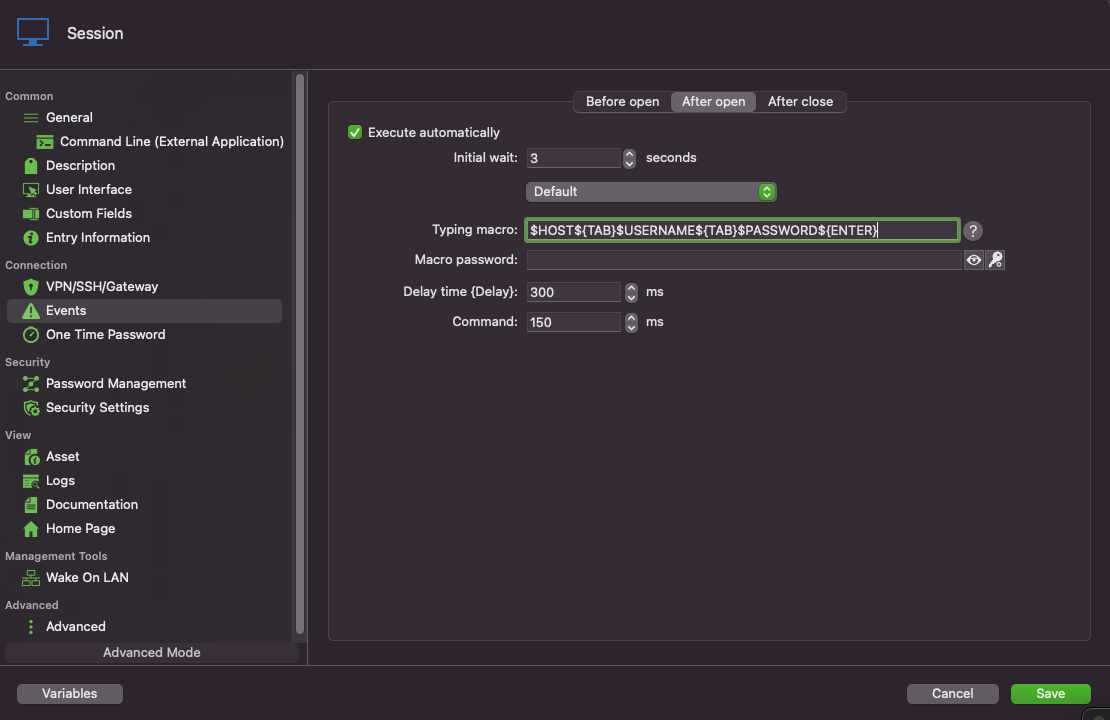
d13d0695-0140-451d-bce6-3b23ae5928c7.png