Checkpoint Dashboard Add IN
0 vote

Can you add Checkpoint Software(SmartDashboard, SmartEvent, SmartLog) as an AddIn.
GrtzWesley Pronk
All Comments (54)
Hi,
Do you know if they have an API or a command line we can invoke?
David Hervieux
Hi,
Its an executable.
Here's the path to the smartdashboard exe.
"C:\Program Files (x86)\CheckPoint\SmartConsole\R77.30\PROGRAM\FwPolicy.exe"
And this is the shortcut target
"C:\Program Files (x86)\CheckPoint\SmartConsole\R77.30\PROGRAM\CPAppStart.exe" 0
Do you want the installation file?
Hi,
I need to know before if the command line support any parameters?
David Hervieux
Hi,
These are the command lines
Smart dashboard
C:\Program Files (x86)\CheckPoint\SmartConsole\R77.30\PROGRAM\FwPolicy.exe connect 10.1.10.1 user password
Smartlog
C:\Program Files (x86)\CheckPoint\SmartConsole\R77.30\PROGRAM\SmartLogGui.exe connect 10.1.10.1 user password
DatabaseTool
C:\Program Files (x86)\CheckPoint\SmartConsole\R77.30\PROGRAM\GuiDBedit.exe connect 10.1.10.1 user password
SmartEvent
C:\Program Files (x86)\CheckPoint\SmartConsole\R77.30\PROGRAM\AnalyzerClient.exe connect 10.1.10.1 user password
These are some tools for Checkpoint Firewalls
Wesley Pronk
Really nice! I will add this to our todo list.
Regards
David Hervieux
Thnx,
I hoop it's soon added ;)
Wesley Pronk
Hi,
For your information, from version Checkpoint Smartconsole R80 an api is possible.
In this version it is also just one console instead from multiple consoles, these are all integrated.
Regards
Wesley Pronk
Hello,
An add-on for checkpoint tools based on version R77.30 has been developed and joined as an attachment to this post. Could you give it a try and give us some feedback? You can install it by putting it in the %LocalAppData%\Devolutions\RemoteDesktopManager folder.
As for version R80 of Checkpoint Smartconsole, could you give us more information on this API like a documentation link or something similar?
Regards,
edited by Hubert Mireault on 8/27/2015
Hubert Mireault
Hello,
I've put the contents of the zipfile in %LocalAppData%\Devolutions\RemoteDesktopManager but there is no add-on in RemoteDesktopManager.
I'm sorry Check Point has no more information at the moment from R80, as soon I have information I will let you know.
Regards,
Wesley
Hello,
You're right, I zipped up the wrong files by mistake. :)
Here is a zip with the right file in it, this should work. Be sure to remove the other files from the folder in case it causes any issue.
Regards,
Hubert Mireault
CheckPoint1.0.0.0.zip
Thanks,
I will let you know the testresults.
Regards,
Wesley
Hi,
I'm currently still testing but until now it works.
Only the password doesn't fill automaticly correct, there comes an error then you click "OK" and type the password manualy and it works.
I think this Check Point has been blocked due security reason.
I'll see if there is another solution.
Regards,
Wesley
edited by wesley.pronk@qi.nl on 8/27/2015
Thank you for testing it out. If you find anything else that can be improved, be sure to tell us.
I'll try to see if we can do something about the password not filling automatically, although I'm not sure what the problem is.
Regards,
Hubert Mireault
Is it possible to add the Option button "Prompt for password" in the Addon?
Aslo a colleague told this,
Hi Wesley,
Can you check what they expect from an API. Check Point R80 works with a REST-API so you can script against the database.
I think that is not what you are looking for. I assume that you just want to start the GUI.
The R80-GUI is still a windows executable where you need to enter the same information.
In september I will be doing an evaluation of R80 together witch Check Point's EA-team, so we can test this together.
Erwin
Regards,
Wesley
Hello,
Yes, we'll be sure to add the prompt for password option. Ill post back here when I have another version ready for you to test out.
As for version R80, is the GUI still spread across 4 executable files then?
Regards,
Hubert Mireault
Hi,
Ok that's nice!
Such as Check Point told currently its one executable.
Have a nice weekend!
Regards,
Wesley
Hello Wesley,
Here's a new version of the add-on with the prompt for password option added. You can also prompt for password when linking a credential entry by selecting the "prompt for password" option in the credential entry itself.
Before installing it like before, be sure to delete any checkpoint smartconsole entry you created in your datasources, then delete the previous DLL, then install the one in this post. You won't have to do this in the future for updates of this add-on.
After testing it, could you give us some feedback once again? Thank you.
Regards,
Hubert Mireault
CheckPointSmartConsole1.0.0.0.zip
Thank you very much.
I will be testing it and will let you know
Regards,
Wesley
Hi
So far, three of the highly integrated tools work in the addon.
This works well without a autotype password we use "always ask for password" and do not fill the field.
SmartLog is the only tool does not start.
I also had another question whether it is possible to use the option of smart dashboard for signing in with a certificate.
Regards,
Wesley
Hello Wesley,
Thanks for testing it out!
For the SmartLog issue can you try this out: in RDM, make a command line entry that starts SmartLog correctly and export the session and send it to me at hmireault (at) devolutions.net or through the forum's private messaging feature. I'd like to see what we're doing differently that doesn't work, since we can't test it.
As for the smart dashboard and signing in with a certificate, could you give us the command line for it? It shouldn't be difficult to add if it's the same principle as the other command lines :)
Regards,
Hubert Mireault
Hi Hubert,
I've tested Smartlog from a prompt.
It is not possible to open SmartLog from command line, it seems to me better when it is removed from the add on.
Almost in all cases the administrator opens first SmartDashboard (Fwpolicy) and then opens the other consoles.
Smart Event and DBedit are handy to open separately .
We have opened an incident at Check Point asking for additional parameters for opening the Smart Consoles.
Hive a Nice weekend
Regards,
Wesley
Hello,
The add-on is now available to download here http://remotedesktopmanager.com/Home/AddOn
The only difference with the one you currently have is the removal of SmartLog since you said it doesn't have a command line. Before installing this new version, because of the removal of SmartLog, make sure to delete your CheckPoint SmartConsole sessions in RDM before using the new version of the add-on, as it might cause conflicts. After this though, there should really be no more problems.
Thank you for opening a ticket with check point, please keep us updated on the subject.
Regards,
Hubert Mireault
Hi,
I will test the new addon.
I will also keep you updated about the incident at Check Point.
Next week I 'm on holiday , the week after my vacation I will pick this up again.
Regards,
Wesley
Hi,
We have received a reply from CheckPoint .
Unfortunately it is not possible to submit the password in a session.
About Smart Console Version R80 its still quiet, when I hear something more I let you know.
Regards,
Wesley
Thanks Wesley, keep us updated and we'll make sure to update the add-on when checkpoint has more command line support.
Regards,
Hubert Mireault
Hello Hubert,
My company is currently demoing Remote Desktop Manager and so far it is ideal to what we require. We mainly manage tons of different Checkpoint devices which can be in different versions. However, the add on as it is today has some limitations. It only launches version R77.30 of the software.
Could you add the option to indicate what version and use the corresponding path to the executable of the version chosen? ex.
Smart dashboard R77.30
C:\Program Files (x86)\CheckPoint\SmartConsole\R77.30\PROGRAM\FwPolicy.exe connect 10.1.10.1 user
Smart dashboard R75.40
C:\Program Files (x86)\CheckPoint\SmartConsole\R75.40\PROGRAM\FwPolicy.exe connect 10.1.10.1 user
And so on.
There is plenty of different console version and it might be difficult to you to add every single version so my idea is add a text field where the user writes the version number and the software automatically uses the right path. Alternatively, adding an option in the "path" menu for configuring multiple versions.
Other improvements are adding the option to launch another important smartconsole application:
Smart Endpoint R77.30
C:\Program Files (x86)\CheckPoint\SmartConsole\R77.30\PROGRAM\EndpointManager.exe connect 10.1.10.1 user
Lastly as other users have tested, passing the password as Parameter is not supported. Could the password field be deleted from the call so we do not trigger an authentication failure (reflected in the audit logs) while leaving the option to store the password within RDM for copying manually (or automatic when starting the session)?
Thanks in advance and would be great to get this features, that would be a plus for the company to go ahead and buy the software.
Christian G
Hello Christian,
Thank you for the suggestions! Currently in the path configuration (File > Options > Path > Configure installation path) you should be able to specify multiple paths by separating them with "". If I recall correctly the Checkpoint add-on should support this, but if it doesn't it should be easy to change.
As for specifying a path directly in the entry, that is a good idea too. It could be a text field that, if filled, it takes the executable found there, but if left empty, it takes the value in the path configuration in the options. What do you think?
We could definitely support Smart Endpoint.
For the password, we could allow the field to be empty and send nothing.
I'll work on these changes and get back to you with a preliminary version which you will be able to test and see if it works as expected.
Regards,
Hubert Mireault
Hello,
I attached to this post a new version of the add-on with the following changes:
- In the path configuration (File > Options > Path > Configure installation path) for the add-on, you can put multiple paths by separating them either with "" or skipping a line
- You can now put no password and it won't send it
- In addition to that there is an option in the new advanced tab to send the password. If you disable the password sending you will be able to store the password but not send it (since not all the command lines support sending the password)
- Smart Endpoint new option
Could you try out this new version with these changes and give us some feedback? You can install it by dropping the .DLL file in %LocalAppData%\Devolutions\RemoteDesktopManager which will replace your current installed version.
Regards,
Hubert Mireault
CheckPointSmartConsole1.1.0.0.zip
Hi Hubert,
Many thanks for your very quick reply.
I am currently thoroughly testing the add on and also all the posibilities the SmartConsole applications provide. As I have indetified some limitations of the Checkpoint software, I am investigating how they can be circumvent and I will update this post as soon as I have managed to do so. I already have some notes about what can be improved but will send all together.
Also as R80 version has been released, it uses an unified single console that currently does not accept any parameter. I will liase with CheckPoint and see if this can be added. Yes, it is true a new API is available for operations, but the main goal here is to automatize SmartConsole logins and nothing else.
Regards,
Thank you Christian! Please keep us updated. :)
Regards,
Hubert Mireault
Maybe its possible to use the same configuration ass the Cisco ASDM client for password auto-fill.
Regards,
Wesley Pronk
Here is info about command line for R80.10:
https://community.checkpoint.com/thread/6432-command-line-arguments-to-r8010-smartconsoleexe
Could you implement it?
Hello,
How do you think the implementation for R80.10 should work? Do you want to link to your own SmartConsole.LoginParams file? It would be good to know so the implementation can work best for your case.
Regards,
Hubert Mireault
Thank you for fast answer. I think best option could be creating by RemoteDesktop Manager XML file SmartConsole.LoginParams. So you can keep many diffrent SmartConsole.LoginParams files.
Thanks, we'll see what we can do to accomplish that. We've opened a ticket for the improvement.
Regards,
Hubert Mireault
Hi Hubert,
Thank you, if you need anything don't hesitate to contact me.
Kind Regards,
Wesley Pronk
Hi,
Is it possible for you to add a version selection in de add-on, for each version check point uses a different path.
For Smartconsole R77.30
C:\Program Files (x86)\CheckPoint\SmartConsole\R77.30\PROGRAM
The versionR80 works with the credential fill-in option, but unfortunately the exe path is different.
For Smartconsole R80.10
C:\Program Files (x86)\CheckPoint\SmartConsole\R80.10\PROGRAM
For Smartconsole R80.20
C:\Program Files (x86)\CheckPoint\SmartConsole\R80.20\PROGRAM
If there are any questions please don't hesitate to contact me.
Kind regards,
Wesley Pronk
Hello Wesley,
this is already possible, you can add more installtion paths in the installation path setting:
Regards,
Min
Hi all,
sorry to trigger a post this old, but it would be nice to have an option to choose which SmartConsole to use inside the connection itself, rather then having to choose it anytime I'm connecting. We are using SmartConsole a lot so this would be a huge improvement to us.
Would it be possible to implement like so? Or is it implemented and I didnt find it myself?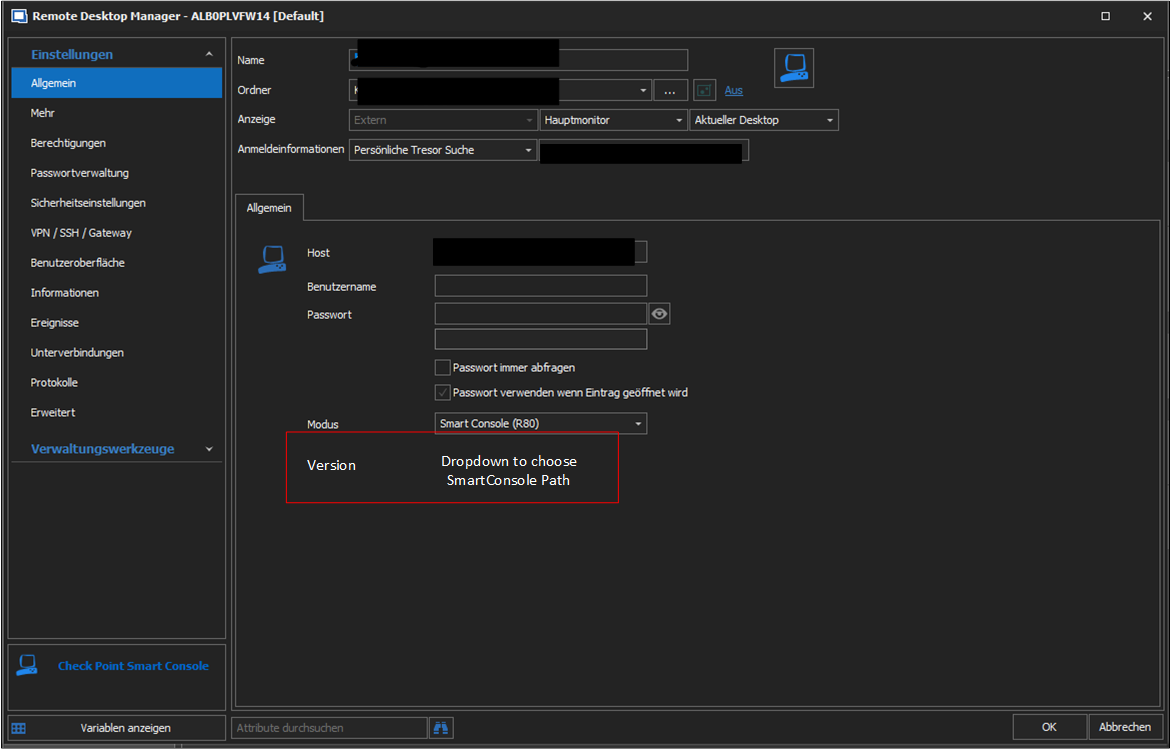 Thanks in advance
Regards
Sascha
SmartConsoleVersion.png
@sascha03,
Your request has been added to our ToDo list.
Best regards,
Jeff Dagenais
Hello,
The custom installation path setting will be available in version 2020.2.11.0.
Regards
Jonathan Del Signore
Hello,
thank you so for implementing and the quick responses! Waiting for the release :)
Regards
Sascha
Hello,
I notice that this is old post. Regarding CheckPoint console I have some additional questions.
I have more customer that have CheckPoint R81.10. I use CheckPoint Smart Console software to check the policy, logs,...
Configure Remote Desktop Manager in such way:
This configuration is for customer1. When I run this the Smart Console open but without the password.
Then I configure one more customer2 with different Host IP, Username and password.
When I open this customer2 object the Smart Console open but with the information of the first customer.
Is there any options to configure Customer1 to insert also the password information?
It there any options to configure Customer2 to insert the right username, password and IP address (in test there is information from customer1).
Best regards, Peter
Hello Peter,
Thank you for reaching out to us regarding this,
I have a few questions which you can hopefully answer.
- Which version of RDM are you using?
- Which type of data source are you using?
That is indeed odd, are there any "User Specific Settings" on this entry? This could explain why even after changing the credentials in the entry "Properties" it is still using the initial set of credentials.
Let me know,
Best regards,
Samuel Dery
Hello Samuel,
Sorry for late response.
I use RDM version 2023.1.20.0 64-bit which I recently updated.
I use database v1.147, connections.db (local data source).
And there no User Specific Settings.
Best regards, Peter
Hello Peter,
Thank you for your reply,
No problem, I see, I assume the problem persists with the latest version?
I'm wondering if you encounter the same behavior with a portable instance of RDM, to test this, you will need to do the following:
1- Download the .zip file below:
https://remotedesktopmanager.com/home/thankyou/rdmbin
2- Create a new folder on your Desktop
3- Extract the content of the .zip file into the folder created at #2
4- Go in this folder once the .zip file has been extracted and run remotedesktopmanager.exe
Let me know,
Best regards,
Samuel Dery
Hello Samuel,
Sorry for late response.
I try as you suggest but the problem is the same. When the program open the SmartConsole dont write data that I have inserted when I create new entry. In the SmartConsole in inofmration from the last session that I have.
Best regards, Peter
Hi all,
the behavior described by Peter is the default from SmartConsole. CheckPoint removed the start parameters in some hot fix within r80.40, and it is not possible to start it directly with credentials and server.
CheckPoint is also not willing to bring this feature back due to security reasons, we opened a ticket for this at CheckPoint.
Maybe we can create a feature request to change the method of how RDM starts SmartConsole. I could think of a similar approach as with ASDM. Open SmartConsole and look for a window containing the name SmartConsole, switching to that window and write the username, followed by a Tab (to go to the next text-box), write the password, Tab again and write the server.
Cheers
Sascha
Hello Sascha, Peter,
Thank you for your replies,
I see, I appreciate the additional information. I will reach out to our engineering department regarding this however from my understanding for this type of entry RDM is simply using command lines to launch it.
I will keep you updated with any news I receive,
Best regards,
Samuel Dery
Hello Sascha,
Thank you for your patience,
As mentioned I've discussed your case with our engineering department, we would recommend you attempt to achieve this with a macro, using the "Events" -> "After Open" section of your entry "Properties".
We have the following knowledge base article that I believe will be helpful: https://docs.devolutions.net/kb/remote-desktop-manager/how-to-articles/entry-types-events-settings/event-auto-typing-macro/#typing-macro
If it does not work using macro then unfortunately we will also be unable to implement such a workaround.
Let me know,
Best regards,
Samuel Dery
Hi Samuel,
thanks for the hint. We've implemented the Event Feature and it's working!
For anyone else having this issue, here is our Event configuration. Delay and Wait times need to be set according to the start speed of smartconsole. Also the "Allow passoword in variable" check box needs to be set, und "Security Settings" on the left-hand site.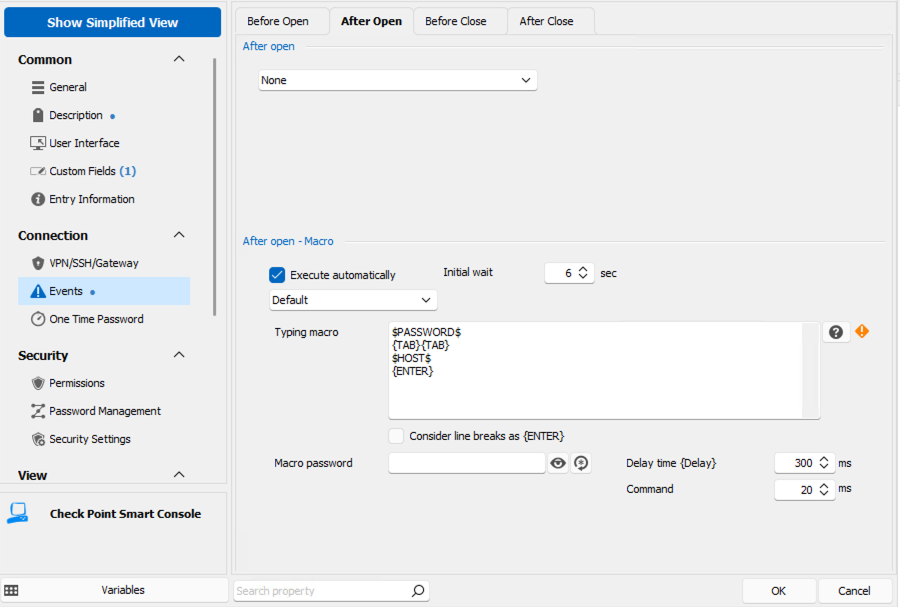
Cheers,
Sascha
7588c7aa-105b-455a-a1f2-6a4792e76922.png
Hello Sascha,
Thank you for your reply,
I'm glad to hear that this is working for you and I appreciate you sharing the configuration with others!
I've opened a case with our engineering department to see if we could implement something similar,
Let me know if you have further questions regarding this,
Best regards,
Samuel Dery
Hi,
Works. Thank you. If you have R81.10 and R81.20 (different version) you need to chose different Installation path for one or other version.
Best regards, Peter
Hello Peter,
Thank you for the feedback! I'm glad to hear that it is working for you also!
Let me know if you have further questions regarding this,
Best regards,
Samuel Dery