
Jonathan Del Signore
Reconnect with "quick search" filled reconnects wrong host
Hello,
A fix for this issue will be included in version 2026.3.18.
Just one detail, buttons in the Home tab are applied to the navigation bar selection. This is by design and is the same in 2026.2. If you want to act on active tabs, you need to go in the Actions tab. These are currently also acting on the navigation, which is what we're fixing here.
Regards
RDM type functions (type password, type clipboard) not working
Hello,
This issue will be fully resolved in version 2026.3.18.
Regards
v2026.3.16.0 Some annoyances in the favorites menu
Hello,
We've applied a fix for the delay on click in the favorites, which will be included in version 2026.3.17. Please let us know if you still encounter any other issue of the sort.
Another fix for the Username and Description columns not hiding and/or not displaying their content will be included in version 2026.3.18.
For the startup time, the fact that it loads the last vault is normal. We always load the shared vault first, then whatever view you're into (favorites in this case). We'll investigate to see if there's an issue with the load though, because 34sec sounds long to me.
Regards
v2026.3.16.0 Some annoyances in the favorites menu
Hello,
We reproduced the delay when clicking an entry in Favorites and found the cause. We are opening a ticket for it, and also one for the column issues you reported: the Username and Description columns staying visible after you turn them off, and the Description field sometimes showing empty.
For the slow startup, could you please send us your startup logs?
Start RDM as usual and wait until it has finished loading.
Go to Help > Performance profiling.
Open the Startup logs tab.
Use the copy button to copy the log, and paste it here or in a text file.
The startup logs are recorded by default, so you don’t need to change any setting.
Regards
Embedded SFTP from SSH session prompts for TOTP again despite OTP configuration
Hello,
As weird as it may seem, the issue was caused by the $NAME$ variable in your host. Thank you for providing this info, it would have been hard to diagnose otherwise.
We'll have a fix ready for version 2026.3.17.
Regards
RDM uses a lot of RAM
Hello,
A memory leak issue was fixed in version 2026.3.16, which should limit the RAM usage.
Please let us know if you're still having issues after updating to the latest version: https://devolutions.net/remote-desktop-manager/download/
Regards
2026.3.15 Scroll Bar
Hello,
We haven't lost track of your issue, we simply haven't reproduced it on our end and are waiting on a potential fix from a third party.
We'll keep you posted on your original thread to keep things simpler: https://forum.devolutions.net/topics/56589/2026310-scroll-bar#244072
Regards
High Memory usage - Growing up
Hello,
This issue will be resolved in version 2026.3.16.
Regards
Embedded SFTP from SSH session prompts for TOTP again despite OTP configuration
Hello,
There should be no difference between these 2 connection modes, so this looks like a bug. We'll open a ticket and let you know once we have an update.
Regards
Windows Dialog Box Recognition
Hello,
Most window title issues should be resolved once version 2026.3.16 releases. Please let us know if you still encounter any problems.
Regards
GUI/Computer stops responding when loading large Password List items and having "Overview" selected
Hello,
We have a fix prepared for this issue, which will be included in version 2026.3.16.0.
Regards
2026.3.13 - UI freezes 4-5 s when selecting a large folder (O(n*m) in ExpandConnectionsForCheckoutSelection)
Hello,
This issue will be fixed in version 2026.3.14.0.
Regards
Let an entry restrict which credentials appear in the credential prompt
Hello,
The ability to dynamically link multiple credentials at once will be included in version 2027.1.
This will allow you to preconfigure which items in your password list is shown in the prompt.
Regards
How to show a list of all connections?
Ok that makes sense, we'll open a ticket to add all entries to the dashboard view, but with an option like you said.
We'll let you know once it's done.
Regards
Windows Dialog Box Recognition
Thank you, I get the same issue with the windows you listed. I'll take another look to see what we've missed.
Cisco Secure Client Auto-Upgrade Causes First VPN Connection Attempt to Fail
Hello,
We've added an automatic retry when the Cisco client is updated during a connection. It will be included in RDM 2026.3.13.
We were able to replicate the problem by "faking" a triggered update, but we don't have a setup to properly test this scenario end-to-end, so it may need further adjustments depending on the timing of the update process. Please let us know how it behaves on your side.
Regards
RDM 2026.3.10.0 SSH Shell attempts SFTP when SFTP is disabled
Hello,
I currently can't find anything on our end that would explain why an SFTP connection is attempted when the related settings are all turned off, but I might be missing something.
Can you confirm that this is an issue that started with 2026.3.x specifically, and that it wasn't happening before?
Also, would you mind testing the same connection with PuTTY and check if the same logs appear? That would help narrow it down.
Thank you
Windows Dialog Box Recognition
Hello,
Could you please tell me which subwindow you saw that didn't have the correct title (or just 1-2 examples if you have many)? From further testing, we did stumble upon some windows that didn't catch the fix, so I want to make sure we fix as many as possible in the next interation.
Thank you
How to show a list of all connections?
Ah I misspoke earlier, this view doesn't show everything in the vault, it shows what's at the root level. It doesn't show entries that are in folders.
Could you please explain why you want to show all entries from there? Since it would virtually be the same as the navigation panel that already shows everything?
PS: If you want to know your workspace type, you can see it in Help -> System diagnostics -> Workspace
Regards
How to show a list of all connections?
Hello,
You're looking in the right place, the "Entries" section at the root level should show everything in that vault.
Could you please tell me which version of RDM you're on, and which workspace you're using (I'm assuming SQLite)?
Thank you
Mot de passe via le presse papier ne fonctionne pas
Bonjour,
J'ai laissé savoir l'équipe de support, ils devraient entrer en contact avec vous sous peu afin de céduler un appel à distance.
Mot de passe via le presse papier ne fonctionne pas
Bonjour,
Venez-vous tout juste de passer à travers la mise à jour qui migre le Hub personal?
Et si vous remettez vos identifiants Keeper sur la racine, est-ce que tout se remet à fonctionner comme il faut?
Je ne suis pas au courant d'un problème de migration qui pourrait expliquer une perte de données comme celle-là. Vous pourriez regarder l`historique de l'entrée (clique droit -> Affichage) pour voir quand les identifiants auraient été perdus.
Si l'historique n'est pas clair et que remettre les identifiants ne résout pas vos problèmes, je pourrai notifier notre équipe de support pour arranger une rencontre.
Cordialement
Mot de passe via le presse papier ne fonctionne pas
Bonjour,
Je vois que votre mot de passe semble être sauvegardé à la racine de votre coffre utilisateur (corrigez moi si je me trompe). Quelle option parmis celles-ci utilisez-vous pour lié votre compte Keeper?
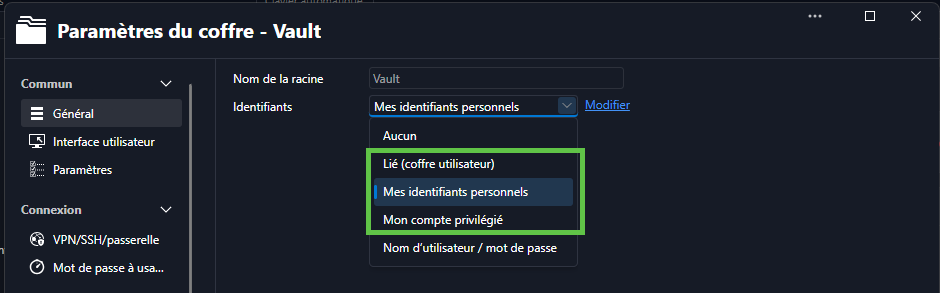
Désolé pour toutes ces questions, je suis tout simplement incapable de reproduire le problème pour le moment.
Merci
Windows Dialog Box Recognition
Hello,
This issue will be fixed in version 2026.3.11.0. Their title should now always be 'Remote Desktop Manager - Window title'
Regards
Mot de passe via le presse papier ne fonctionne pas
Bonjour,
Vous devez avoir une erreur différente de celle qu'on recevait de notre côté. Pourriez-vous spécifier:
Est-ce que c'est limité aux entrées Keeper?
Avez-vous le même problème si vous faites 'Afficher mot de passe'?
Voyez vous une erreur dans Aide -> Journaux de l'application?
Merci