Reconnect with "quick search" filled reconnects wrong host

v 2026.3.13.0
- Open an RDP session to host1
- In the quick search box enter host2 and connect
- In the active tabs, select host1 and click "reconnect"
- Host2 reconnects
- Clear the text in quick search, and select host1 and click "reconnect" - host1 reconnects as expected
Before the UI refresh, the tab you had active would be the one that would reconnect, regardless of what was in the search box.
In addition to the above, and it's probably the same bug:
- Open RDP session to host1
- In quick search box enter host2 and connect
- Log off of host2 and ensure the host1 tab is selected
- Observe that the "Actions" menu is missing nearly all the options
- Clear contents of search box
- Click "dashboard" tab, then back to host1, and observe "Actions" menu now has all the entries again
All Comments (5)
Hello,
Thank you for contacting us on that matter,
Could you please try to reproduce the issue using the latest version (2026.3.15.0) and send us a screenshot showing the missing action menu?
I believe you are referring to the options menu for an entry in the right-hand column of the dashboard. I have been able to reproduce what appears to be the same issue on my end, but a screenshot would help me confirm that we are experiencing the same behavior.
Once confirmed, I will report the issue to our development team for further investigation and resolution.
Best regards,
Tommy Sanders
Could you please try to reproduce the issue using the latest version (2026.3.15.0) and send us a screenshot showing the missing action menu?
Thanks @Tommy Sanders
I can say the issues still exist in 2026.3.15.0. I've narrowed down the behavior even more, and identified it's not the search box that triggers it. If you have an item selected in the navigation menu, that is not the active tab you want to reconnect, it'll reconnect the wrong device. The search filter made it more obvious because you have narrowed down what you're looking at. For example here: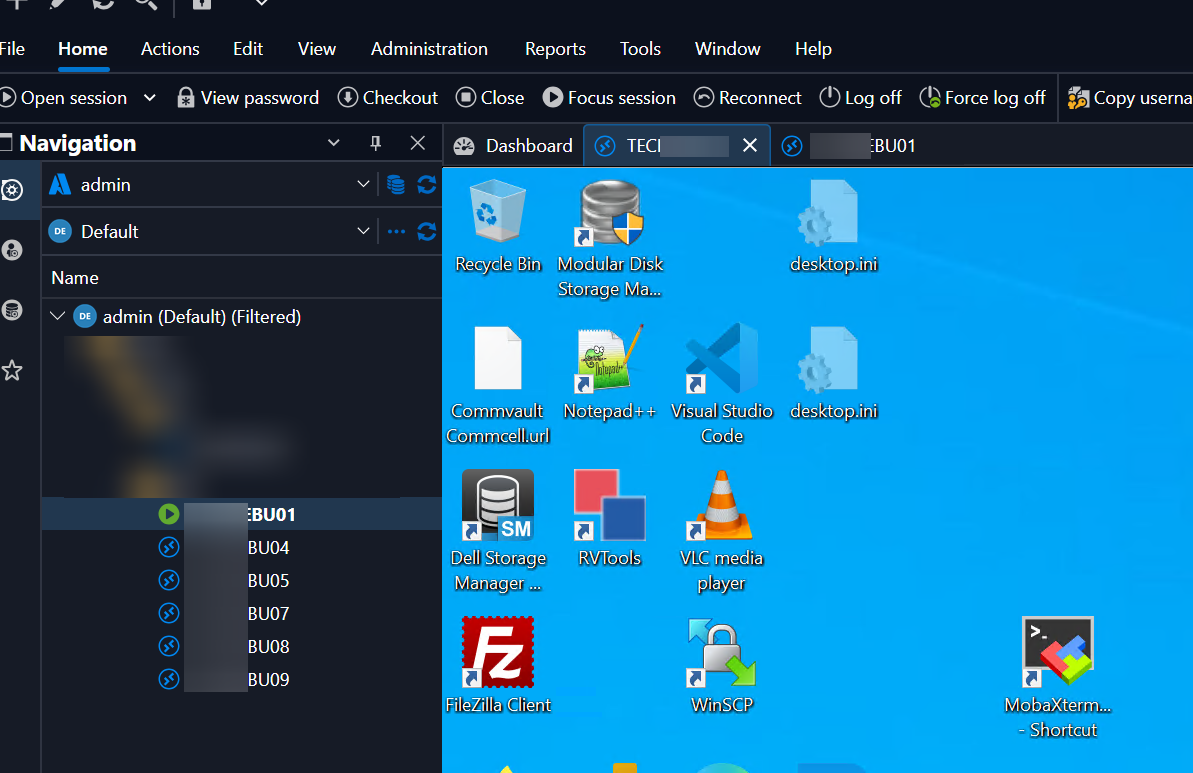
In the above screenshot you can see I am connected to TECH**** and ***BU01. TECH**** is the active tab while ***BU01 is the selected node in the navigation bar (this is shown with the highlighted bar over the host). If I click reconnect from the action bar, it will reconnect ***BU01, not the TECH*** even though it is active tab in the center.
This expands to the second issue. If we log-off ***BU01, but it is still selected in the navigation bar on the left, the menu bar no longer has any of the appropriate actions. I previously stated "Action menu" when the reconnect/etc is on the "Home" menu.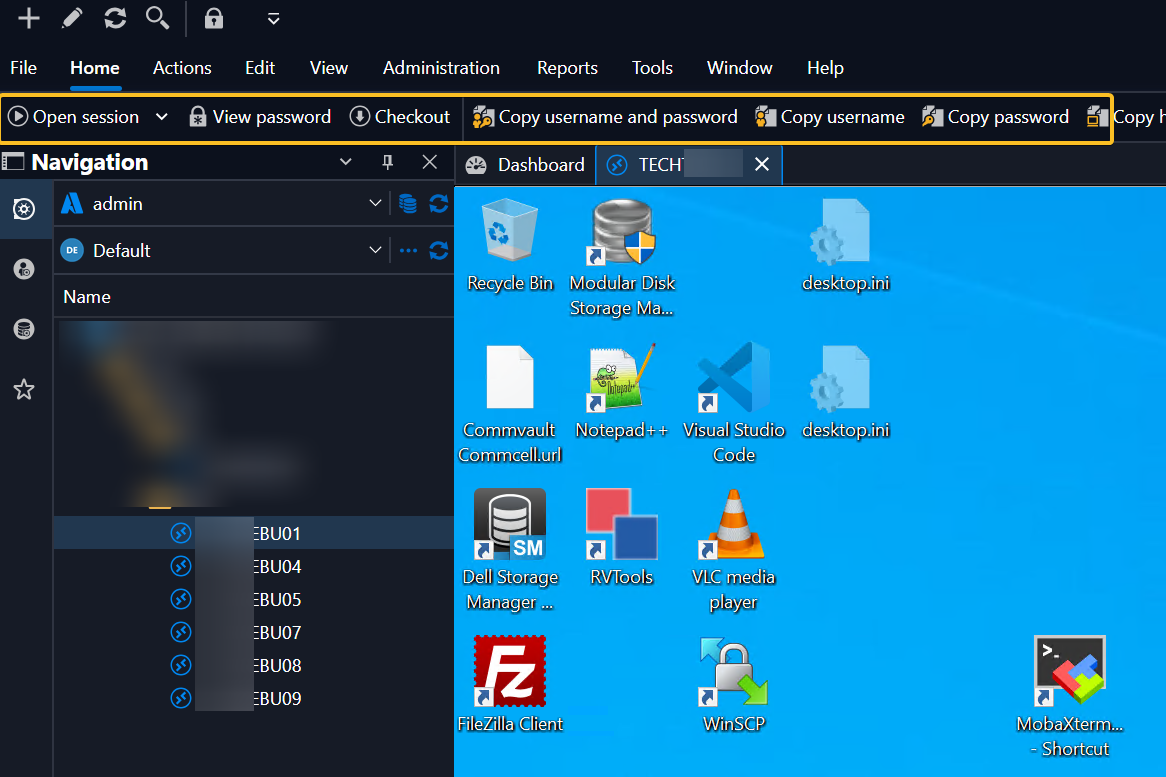
So the bug appears to be that the menu is driving its content based on the navigation bar, not the active tabs. Prior to 2026.3.x this was not the behavior.
9e1f641c-9c01-4b29-8522-36dabc94a0b6.png
85794ece-5efd-4615-a0c9-b26ea83a56be.png
Hello,
Thank you for your response.
I have sent you a private message regarding a remote session.
Best regards,
Tommy Sanders
Hello,
Thank you for taking the time to participate in the session.
I have reported your issue to our development team for further investigation. I will get back to you as soon as I have an update.
Best regards,
Tommy Sanders
Hello,
A fix for this issue will be included in version 2026.3.18.
Just one detail, buttons in the Home tab are applied to the navigation bar selection. This is by design and is the same in 2026.2. If you want to act on active tabs, you need to go in the Actions tab. These are currently also acting on the navigation, which is what we're fixing here.
Regards
Jonathan Del Signore