
ms1
Add new page with FTP needs full webapp restart to discover the page
Hi,
you could try to reload the configuration via Settings - Files - Reload Configuration Files

I guess restarting the app itself wont load manually created files on the disk into the memory.
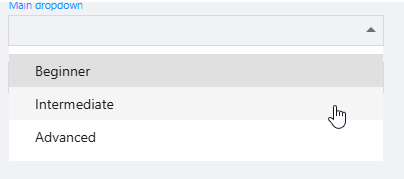
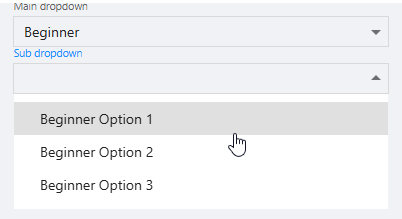
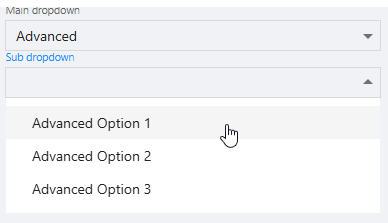
Can two New-UDSelect dropdowns be set up so the second updates dynamically based on the first selection?
Hi, like dynamic wrote its easy to build, for example:
$dropdownLookup = @{
    value_option_1 = [ordered]@{
        "Beginner Option 1" = "beginner_value_1"
        "Beginner Option 2" = "beginner_value_2"
        "Beginner Option 3" = "beginner_value_3"
    }
    value_option_2 = [ordered]@{
        "Intermediate Option 1" = "intermediate_value_1"
        "Intermediate Option 2" = "intermediate_value_2"
        "Intermediate Option 3" = "intermediate_value_3"
    }
    value_option_3 = [ordered]@{
        "Advanced Option 1" = "advanced_value_1"
        "Advanced Option 2" = "advanced_value_2"
        "Advanced Option 3" = "advanced_value_3"
    }
}

New-UDSelect -Id "select_mainDropDown" -Label "Main dropdown" -Option {
    New-UDSelectOption -Name "Beginner" -Value "value_option_1"
    New-UDSelectOption -Name "Intermediate" -Value "value_option_2"
    New-UDSelectOption -Name "Advanced" -Value "value_option_3"
} -OnChange {
    Sync-UDElement -Id "dynamic_select_subDropdown"
}

New-UDDynamic -Id "dynamic_select_subDropdown" -Content {
    $mainDropDownElement = (Get-UDElement -Id "select_mainDropDown").Value
    if(-not $mainDropDownElement) {
        $disabled = $true
    } else {
        $disabled = $false
    }
    New-UDSelect -id "select_subDropDown" -Label "Sub dropdown" -Option {
        if($mainDropDownElement) {
            $dropdownLookup.$mainDropDownElement.GetEnumerator() | ForEach-Object {
                New-UDSelectOption -Name $_.Key -Value $_.Value
            }
        }
    } -Disabled:$disabled
}
PowerShell Universal - 2026.1.1
This happens to me all the time in the first 1-2 days after a release.
I normally wait 3-4 days before updating so microsoft wont block the msi or any underlaying exe.
New App with Multiple Pages
Hi, no I mean how you coded your burger menu
something like this:
for example this is how my app page is looking (with a simple list navigation):
$Navigation = @(
      New-UDListItem -Label "Approvals" -Icon (New-UDIcon -Icon check-to-slot) -OnClick {
      Invoke-UDRedirect -Url "/Approvals"
   }
   New-UDListItem -Label "Service Requests" -Icon (New-UDIcon -Icon boxes-packing) -OnClick {
      Invoke-UDRedirect -Url "/ServiceRequest"
   }
   ...
)

New-UDApp -Title "<redacted>" -Pages @(
   Get-UDPage -Name "Approvals"
   Get-UDPage -Name "ServiceRequest"
   ...
) -NavigationLayout Permanent -Navigation $Navigation -Logo "<redacted>"New App with Multiple Pages
Can you share the code how you coded the navigation and a screenshot of your pages name and url? Maybe we can find the reason why its working there.
New App with Multiple Pages
Got the same problem, ended up putting the Get-UDPage directly into -Pages and not via variable which worked:
New-UDApp -Title "xxxx" -Pages @(
   Get-UDPage -Name “Page1…”
   Get-UDPage -Name “Page2…”
)PowerShell Universal - 5.6.13
github.com/ironmansoftware/powershell-universal
Still not working
Setting up a PowerShell Universal development environment
Make a dev branch from your main branch and set all schedules to paused in the schedules.ps1
Or add the schedules.ps1 to your .gitignore.
How to use Invoke-PSUScript?
I dont have a shorter script but this is something we use which works:

The gRPC error normally occurs if you are not connected to the psu server
How to use Invoke-PSUScript?
Hi,
try use the parameter -TrustCertificate while using Get-PSUScript.
If there is still an error you probably need to connect to the psu server itself:
Connect-ExchangeOnline - Could not load file or assembly
.9
Hi,
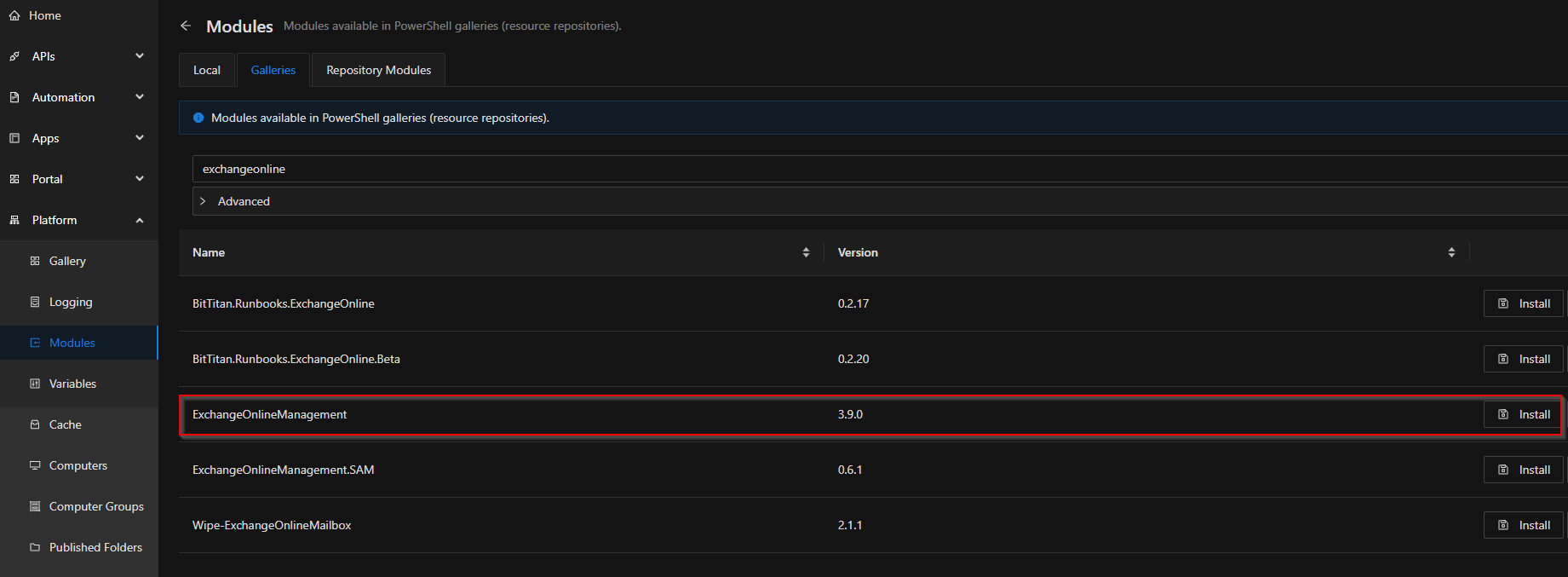
try to uninstall it and install it via powershell universal directly.
This should fix the problem (fixed it for use back when we had the same problem):
Checkbox can enable other components, but not disable
Hi, I dont know if the problem comes from the “elseif” or the condition “$false -eq $body” but it works if you use a switch
New-UDCheckBox -id "Checkbox" -Label "Checkbox" -OnChange {
    switch($Body) {
        $true {
            set-udelement -id "select" -properties @{disabled = $false}
            set-udelement -id "textbox" -properties @{disabled = $false}
        }
        $false {
            set-udelement -id "select" -properties @{disabled = $true}
            set-udelement -id "textbox" -properties @{disabled = $true}

        }
    }
}

New-UDHtml -Markup "<br>"
new-udselect -id "select" -label "Select" -option {
        new-udselectoption -name "name" -value "name"

} -OnChange {
    show-udtoast -message $EventData[0] -Duration 5000

} -disabled
New-UDHtml -Markup "<br>"
New-UDTextbox -id "textbox" -label "textbox" -disabledHow to restart a single API endpoint without restarting the whole PSU 5 service?
Hi, you could create a custom environment for your api (Settings - Environment), then simply restart the custom environment.
Invoke-sqlcmd using a Connection String with Secrets
It probably depends on which vault your credentials are located.
Maybe this could be the problem:
Product: PowerShell Universal Version: 5.0.16 I have a secret variable defined in vault database. I have verified that I can access it by a script using code: Write-Output $Secret:MysecretVariable But when I try to get the value from an API Endpoint it always returns empty. I’am using an API token for authentication and have tried to give the api token and Identity all roles but still no luck. I can see that $ClaimsPrincipal contains the role that has access to the secret variable. I tried …
Properly update AZ modules
If it’s a Server 2025 it is possible they are built in but I dont know for sure.
Normally when there are new version I install them in our test environment and try them out with some test scripts (like connecting with connect-azaccount, some exchange stuff, some storage stuff and so on) because they get installed parallel so if they dont work you can just uninstall them.
Probably some pester tests would be nice for this.
Properly update AZ modules
Hi,
did you install the module manually or via PSU itself?
We also installed it manually but later removed it again and installed it via PSU to make “updates” (install newer version under “Galleries” and delete the old ones under “Repository Modules”) easier.

No output in portal as the script is running?
Hi,
I’ve made a test with your script and with the following dashboard and this works pretty fine:
$Page:ShowResult = $false
New-UDForm -Content {
    New-UDTextbox -Id "textbox_myName" -Label "Enter your name"
} -OnSubmit {
    $myName = $EventData.textbox_myName
    $myScript = Get-PSUScript -Name "<SCRIPTNAME>" -TrustCertificate
    Invoke-PSUScript -Script $myScript -TrustCertificate -Name $myName
    $Page:ShowResult = $true
}

$Script = Get-PSUScript -Name "<SCRIPTNAME>" -TrustCertificate
New-UDDynamic -Content {
    if($Page:ShowResult) {
        if($Job = Get-PSUJob -Script $Script -TrustCertificate | Select-Object -First 1) {
            $JobOutput = Get-PSUJobOutput -JobId $Job.ID -TrustCertificate
            $JobInformation = $JobOutput | ConvertTo-Json | ForEach-Object { [System.Text.RegularExpressions.Regex]::Unescape($_) }
            New-UDCodeEditor -Code $JobInformation -Language "json" -ReadOnly
        }
    }
}  -AutoRefresh -AutoRefreshInterval 5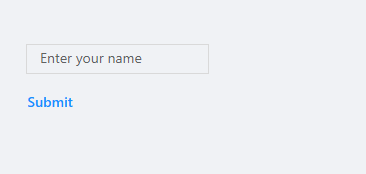
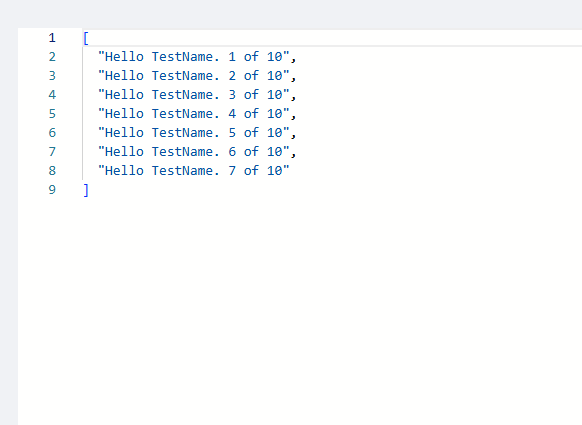
No output in portal as the script is running?
Hi,
we have something similar in use.
You have to get the script, then its job and then its joboutput.
Place this inside a New-UDCodeEdito inside a New-UDDynamic and let it autorefresh.
something like this for example:
$Script = Get-PSUScript -Name "<Put Script name here>" -TrustCertificate
New-UDDynamic -Content {
    $Job = Get-PSUJob -Script $Script -TrustCertificate | Select-Object -First 1
    $JobOutput = Get-PSUJobOutput -JobId $Job.ID -TrustCertificate
    $JobInformation = $JobOutput | ConvertTo-Json | ForEach-Object { [System.Text.RegularExpressions.Regex]::Unescape($_) }
    New-UDCodeEditor -Code $JobInformation -Language "json" -ReadOnly
} -AutoRefresh -AutoRefreshInterval 5Line break after New-UDTextBox
There are many options like New-UDGrid and so on
but the simple way would be to put a New-UDElement -Tag “p” -Content {}
after every element
Dynamically create UDColumns
Hi,
thats because you cannot match $EventData with a string like “PASS” because $EventData is a PSCustomObject of the concurrent Row so you need to identify the indentifier before.
Something like this should work for you:
$columns = @(
    New-UDTableColumn -Property "Server" -Title "Server"
    (1..10 | ForEach-Object {
            $check_n = "Check$_"
            New-UDTableColumn -Property "$check_n" -Title "$check_n" -OnRender {
                $CheckProperty = $EventData.PSObject.Properties.Name | Where-Object { $_ -match "Check" }
                if ($EventData.$CheckProperty -eq "PASS") {
                    New-UDIcon -Icon check -Color green -Size sm
                } elseif ($EventData.$CheckProperty -eq "FAIL") {
                    New-UDIcon -Icon times -Color red -Size sm
                } else {
                    New-UDTypography "N/A"
                }
            }
        }
    )
)
Edit:
The example above only works with one column named “CheckXXX”.
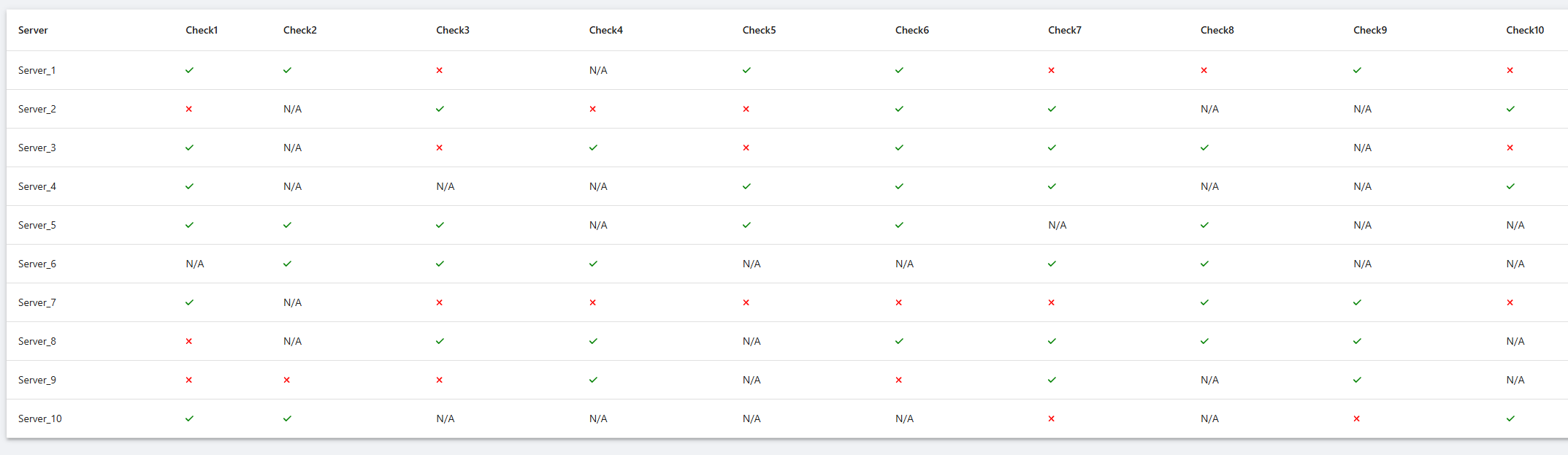
Here is a example of a working set of Servers with 10 checks, also you need to use -LoadRows in New-UDTable to get $EventData.$Property to work
$columns = @(
    New-UDTableColumn -Property "Server" -Title "Server"
    (1..10 | ForEach-Object {
            $check_n = "Check$_"
            $OnRender = {
                $CheckProperty = $EventData.$Property
                if ($CheckProperty -eq "PASS") {
                    New-UDIcon -Icon check -Color green -Size sm
                } elseif ($CheckProperty -eq "FAIL") {
                    New-UDIcon -Icon times -Color red -Size sm
                } else {
                    New-UDTypography "N/A"
                }
            }
            New-UDTableColumn -Property "$check_n" -Title "$check_n" -OnRender $OnRender
        }
    )
)

$TableData = 1..10 | Foreach-Object {
    $InnerData = [PSCustomObject]@{
        Server = "Server_$_"
    }

    1..10 | Foreach-Object {
        $CheckKey = "Check$_"
        $RandomValue = Get-Random -Minimum 1 -Maximum 10
        $CheckValue = if($RandomValue % 2 -eq 0) {
            "PASS"
        } elseif ($RandomValue % 3 -eq 0) {
            "FAIL"
        } else {
            "N/A"
        }
        Add-Member -InputObject $InnerData -NotePropertyName $CheckKey -NotePropertyValue $CheckValue
    }

    $InnerData
}

New-UDTable -Columns $columns -LoadRows {
    $TotalCount = $TableData.Count
    $TableData | Out-UDTableData -Page $EventData.Page -TotalCount $TotalCount -Properties $EventData.Properties
}
New-UDform -script. SSL connection could not be established
Hi,
try to make a connect-psuserver before using the New-UDForm.
Works for me (version 5.5.5)
Why is the data inconsistent when ps1 files are edited here?: https://psu.domain.com/admin/settings/files
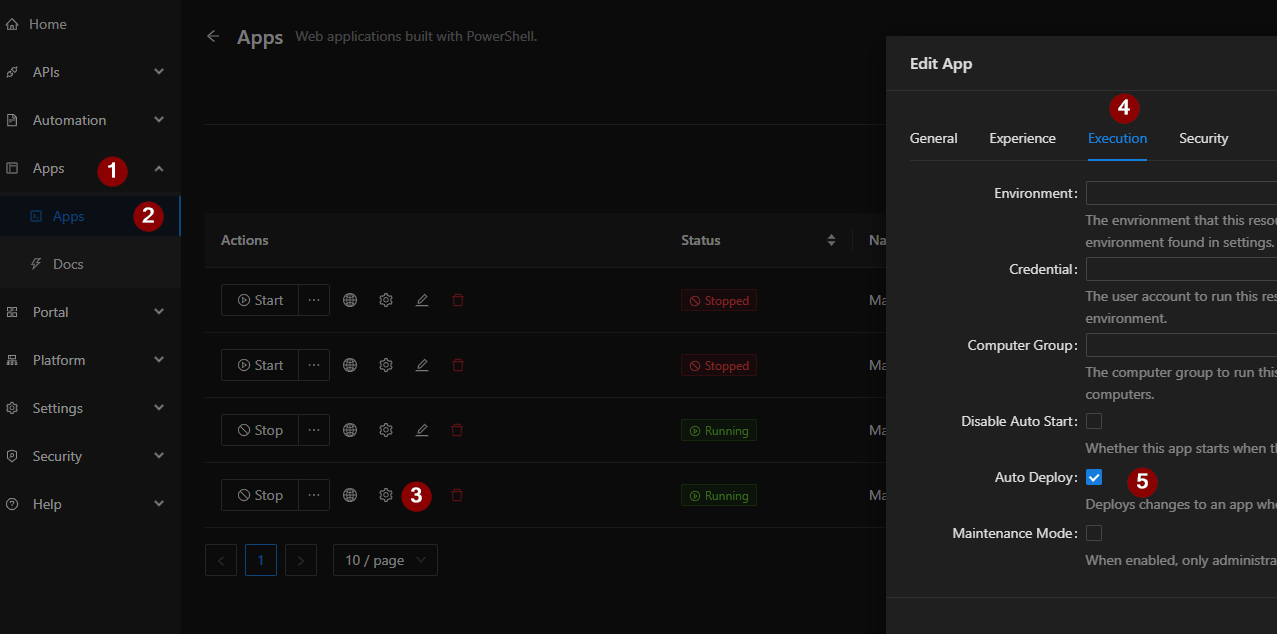
I guess @insomniacc is talking about the auto deploy functionality for apps
Why is the data inconsistent when ps1 files are edited here?: https://psu.domain.com/admin/settings/files
Hi,
if you edit files directly (under “Files” or the script itself on the server) you need to reload those informations:
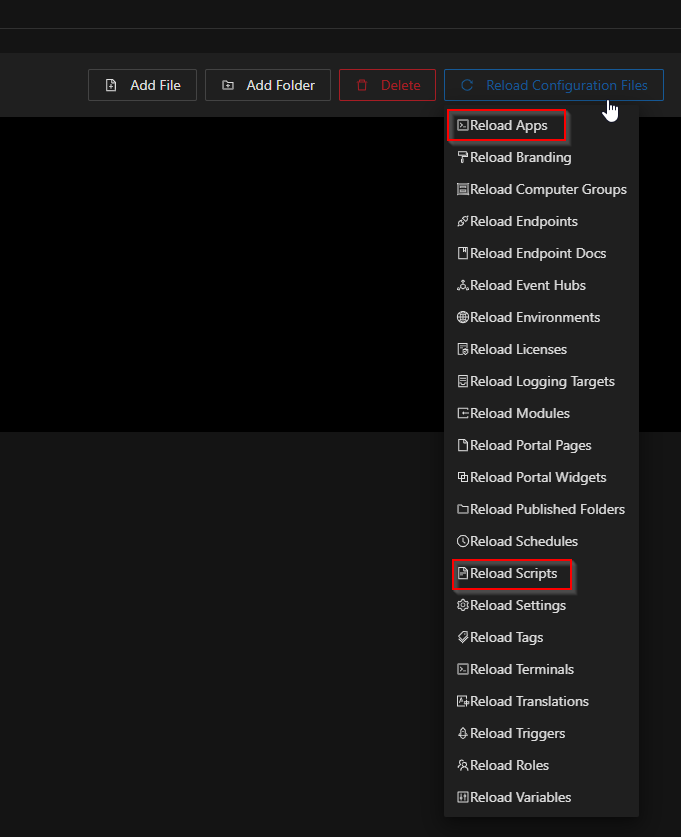
The button is also found under “Files” - just hover over it and select what you changed, otherwise everything gets reloaded (which takes some time).
Just out of curiosity, why do you edit files under “Files”?
Alternating table row colors with light/dark theme via MUI overrides?
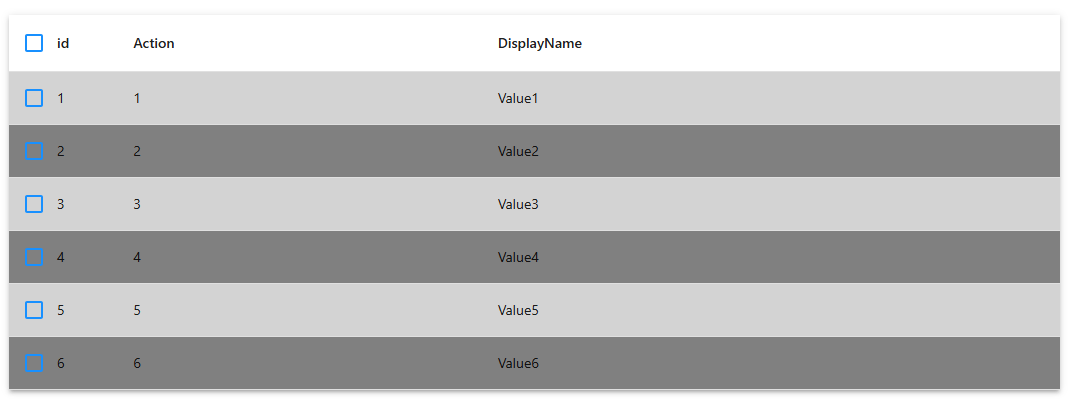
Hi, something like this works:
$tableData = @(
    @{ id = 1; DisplayName = "Value1"; Action = "1" }
    @{ id = 2; DisplayName = "Value2"; Action = "2" }
    @{ id = 3; DisplayName = "Value3"; Action = "3" }
    @{ id = 4; DisplayName = "Value4"; Action = "4" }
    @{ id = 5; DisplayName = "Value5"; Action = "5" }
    @{ id = 6; DisplayName = "Value6"; Action = "6" }
)

New-UDTable -Id "table_myTable2" -Data $tableData -ShowSelection -OnRowStyle {
    $rowStyle = $EventData.id % 2
    if($rowStyle -eq 0) {
        $Color = "grey"
    } else {
        $color = "lightgrey"
    }
    @{ backgroundColor = $Color }
}
Hook Theme Switcher
Hi parzog,
maybe we could override the current theme with a switch case on specific user claims.
This may be not the best way, as you said you would like to not set the theme itself but I also tried different stuff with custom css and so on which didn’t worked so well but maybe its easier like this.
github.com/ironmansoftware/gallery
Maybe something like this:
$claims = # crazy stuff here to get the claims of a user
switch($claims) {
"Accounting" {
$currentTheme = Get-UDTheme -Name "AntDesign"
# do styling stuff here
$currentTheme.light.overrides.... = # new style here
}
"Some other group" { ... }
}
$newTheme = $currentTheme.Clone()
Set-UDTheme -Theme $newTheme
I’ll have a try later because this would be also a usefull thing for us.
Edit:
You need to copy the current theme, otherwise you will override the AntDesign Theme itself
Edit2:
It works but it’s a bit squishy