Why is the data inconsistent when ps1 files are edited here?: https://psu.domain.com/admin/settings/files
Why is the data inconsistent when ps1 files are edited here?: https://psu.domain.com/admin/settings/files

Product: PowerShell Universal
Version: 5.6.5
Hello,
I have a strange puzzle:
Unfortunately, as a new user, I have to combine all screenshots .
These are the titles for each Screenshot :
1. If we edit and save a file here …**
2. and then, we open the same file here** …**
3. why does the PSU Page displays outdated file data?**
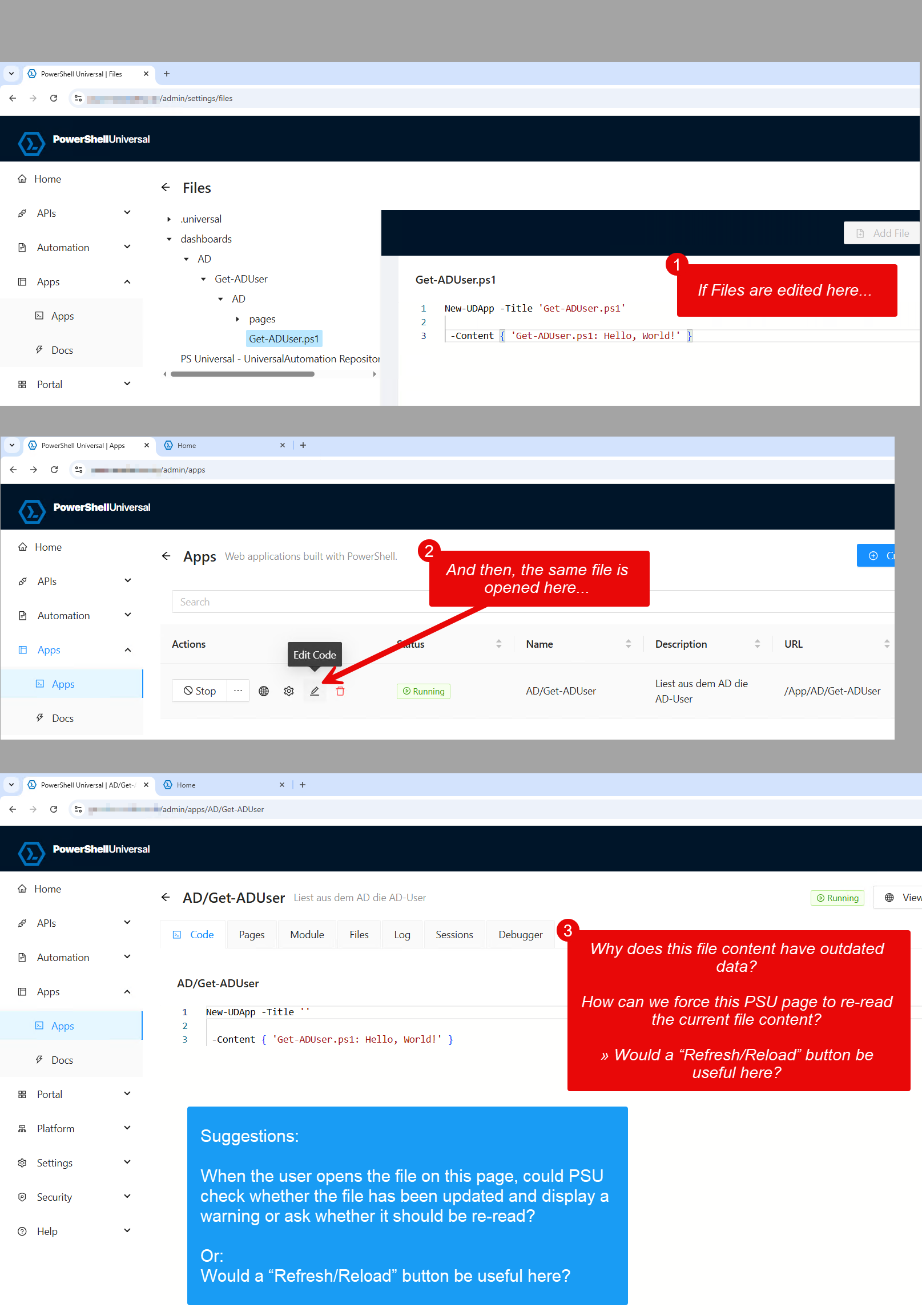
I guess that PSU displays the file on this page that the PSU service is currently using to display the app.
By the way:
The File on the disk really has the content of screenshot #1:
c:\ProgramData\UniversalAutomation\Repository\dashboards\AD\Get-ADUser\AD\Get-ADUser.ps1But PSU really displays wrong content in Screenshot #3
And there is no intuitive way to re-read the file-content
This situation is dangerous because you don’t realize that you are editing an outdated file.
Would a “Refresh/Reload” button be useful here?
And: When the user opens the file, couldn’t PSU check whether the file has been updated and display a warning or ask whether it should be re-read?
Thanks a lot, kind regards,
Thomas