PowerShell Universal - 2026.1.1
PowerShell Universal - 2026.1.1
Release Notes
Version 2026.1.1.0
Improvements
- Added support for logging in with the Devolutions account after the first run wizard
- Updated the /api/v1/status API to check if API endpoints were not started properly
Fixes
- Fixed an issue where apps would not start
- Fixed an issue where the Devolutions login button could be missing on the login page
- Fixed an issue where the Docker Container would Not Start
- Fixed an issue where the MSI truncates connection strings
- Fixed an issue where the MSI upgrade would remove the service account
- Fixed an issue where the role cleared out for local admin user
- Fixed an issue where users were unable to Call Invoke-PSUScript in Certain Environments
- Fixed an issue with New-UDTable and -ShowSelections
Downloads
Adam Driscoll
PowerShell Expert and Software Architect at Devolutions
All Comments (25)

Errors don’t leak in the console anymore. Thanks for taking care of it so quickly.
Hi.
I actually succeeded in upgrading one of my environments now and starting the service. However none of my scripts are actually working in this version, it seems unable to load any PS modules. Calls to Import-Module just returns the following error:
The term ‘Import-PowerShellDataFile’ is not recognized as the name of a cmdlet, function, script file, or operable program. Check the spelling of the name, or if a path was included, verify that the path is correct and try again.
Any idea what this is about?
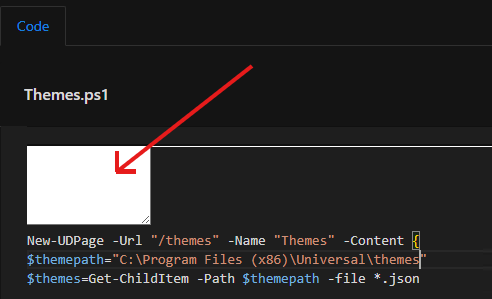
Updated my test box from 5.6.11 to 5.6.12 to 5.6.13 to 2026.1.1
Looks ok so far.
But shows that fragment in the app page editor.
Deleting cookies is no help.
But deleting the cache fixes it.
b5e1c00689ae50adb74b618f1d21b6168a55e8ea.png
This might be relevant for everyone using CSP. I had to add “worker-src ‘self’ blob:;” and “data:” to “font-src ‘self’ https:;”
That resolves this issue and a few other console errors in the Admin UI: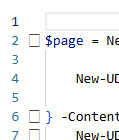
d240fd1365fc8c3a679b52e666eac809644eb843.png
I’ve upgraded our Azure container from 5.6.13 to 2026.1.1 but the container won’t start. It will give me an exit code 139.
Tried restarting the Azure App Service, even replaced the instance that was running the container.
We are running the container on a P1V3 instance (2 cores, 8gb mem).
Below is the log from the App Service that tries to start the container.
Container start method called.
2026-02-10T20:11:19.9317763Z Establishing network.
2026-02-10T20:11:19.9319675Z Pulling image: docker.io/devolutions/powershell-universal:2026.1.0-azure.
2026-02-10T20:11:20.4399704Z Container is starting.
2026-02-10T20:11:20.4402759Z Establishing user namespace if not established already.
2026-02-10T20:11:20.4404337Z Establishing network if not established already.
2026-02-10T20:11:20.4406190Z Mounting volumes.
2026-02-10T20:11:20.4409075Z Nested mountpoint
2026-02-10T20:11:20.4553157Z Nested mountpoint volatile/logs
2026-02-10T20:11:20.4817606Z Nested mountpoint
2026-02-10T20:11:20.4907393Z Creating container.
2026-02-10T20:11:20.4948891Z Creating pipes for streaming container io.
2026-02-10T20:11:20.4950787Z Creating stdout named pipe at /podr/container/pipe/9ec3318a4cea_##appname##/stdout_835d71c91edc4d9abb6b0e432c5ccdfb.
2026-02-10T20:11:20.4953685Z Successfully created stdout named pipe at: /podr/container/pipe/9ec3318a4cea_##appname##/stdout_835d71c91edc4d9abb6b0e432c5ccdfb.
2026-02-10T20:11:20.4955041Z Opening named pipe /podr/container/pipe/9ec3318a4cea_##appname##/stdout_835d71c91edc4d9abb6b0e432c5ccdfb for reading in non-blocking mode.
2026-02-10T20:11:20.4956415Z Successfully opened named pipe: /podr/container/pipe/9ec3318a4cea_##appname##/stdout_835d71c91edc4d9abb6b0e432c5ccdfb.
2026-02-10T20:11:20.4957451Z Successfully removed non-blocking flag from /podr/container/pipe/9ec3318a4cea_##appname##/stdout_835d71c91edc4d9abb6b0e432c5ccdfb.
2026-02-10T20:11:20.4958711Z Creating stderr named pipe at /podr/container/pipe/9ec3318a4cea_##appname##/stderr_8a2796c3a6cb4a20b85ac817b1b5cb09.
2026-02-10T20:11:20.4960329Z Successfully created stderr named pipe at: /podr/container/pipe/9ec3318a4cea_##appname##/stderr_8a2796c3a6cb4a20b85ac817b1b5cb09.
2026-02-10T20:11:20.4961358Z Opening named pipe /podr/container/pipe/9ec3318a4cea_##appname##/stderr_8a2796c3a6cb4a20b85ac817b1b5cb09 for reading in non-blocking mode.
2026-02-10T20:11:20.4962637Z Successfully opened named pipe: /podr/container/pipe/9ec3318a4cea_##appname##/stderr_8a2796c3a6cb4a20b85ac817b1b5cb09.
2026-02-10T20:11:20.4963933Z Successfully removed non-blocking flag from /podr/container/pipe/9ec3318a4cea_##appname##/stderr_8a2796c3a6cb4a20b85ac817b1b5cb09.
2026-02-10T20:11:20.4965360Z Overriding PORT environment variable with port exposed by container image.
2026-02-10T20:11:20.5197446Z Container image exposes ports: ContainerExposedPort { Port = 5000, Protocol = TCP }. Sanitized list of ports is: 5000. Resolved main port to 5000.
2026-02-10T20:11:20.5204081Z Setting value of PORT variable to 5000
2026-02-10T20:11:20.5208760Z Creating container with image: docker.io/devolutions/powershell-universal:2026.1.0-azure from registry: docker.io and fully qualified image name: docker.io/devolutions/powershell-universal:2026.1.0-azure
2026-02-10T20:11:20.7054041Z Starting container: 9ec3318a4cea_##appname##.
2026-02-10T20:11:20.7253092Z Starting watchers and probes.
2026-02-10T20:11:20.7275865Z Starting metrics collection.
2026-02-10T20:11:20.7297603Z Container is running.
2026-02-10T20:11:20.7459759Z Container start method finished after 814 ms.
**2026-02-10T20:11:30.5880501Z Container has finished running with exit code: 139.**
2026-02-10T20:11:30.5882346Z Container is terminating. Grace period: 5 seconds.
2026-02-10T20:11:30.5886223Z Stop and delete container. Retry count = 0
2026-02-10T20:11:30.5888392Z Stopping container: 9ec3318a4cea_##appname##.
2026-02-10T20:11:30.6062815Z Deleting container: 9ec3318a4cea_##appname##. Retry count = 0
2026-02-10T20:11:30.8141232Z Container spec TerminationMessagePolicy path
2026-02-10T20:11:30.8143498Z Container is terminated. Total time elapsed: 225 ms.
2026-02-10T20:11:30.8145095Z Site container: ##appname## terminated during site startup.
2026-02-10T20:11:30.8189819Z Site startup probe failed after 10.0700505 seconds.
2026-02-10T20:11:30.8955125Z Failed to start site. Revert by stopping site.
2026-02-10T20:11:30.8963521Z Site: ##appname## stopped.
Anybody had the same issue? If so, how did you solve it?
Looks very similar to the bug from the last version. I think only Adam can fix it.
Make sure you pull 2026.1.1. Based on the log, it’s pulling 2026.1.0
Adam Driscoll
PowerShell Expert and Software Architect at Devolutions
Hi Adam,
thanks for the reply, completely missed the 2026.1.1 image, the 2026.1.0 image is still in the selection list on the docker hub.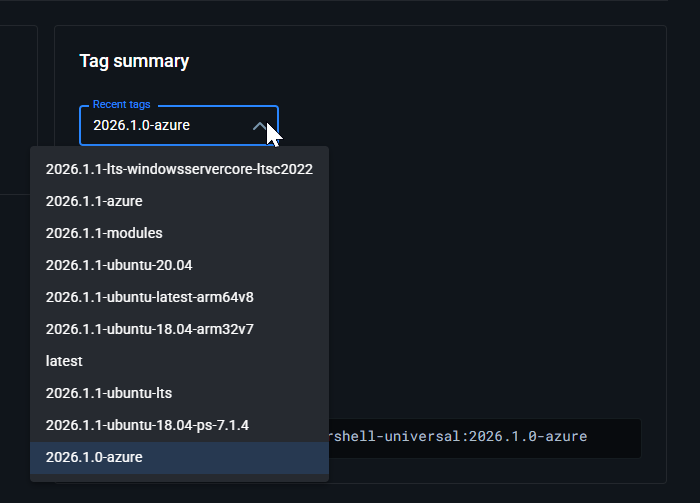
But I now set the AppService to pull the 2026.1.1 image and it works again.
I only notice that there is an update warning about an image I can’t pull: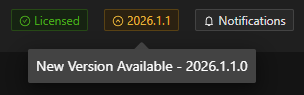
25b24e7f8cbdb9ab3a9bbbafcd228d5a0056ce41.png
ef2e8cb122b10e793412eeaae64d81e28de3e068.png
Is anyones defender kicking off at this release.
I installed the msi and got this: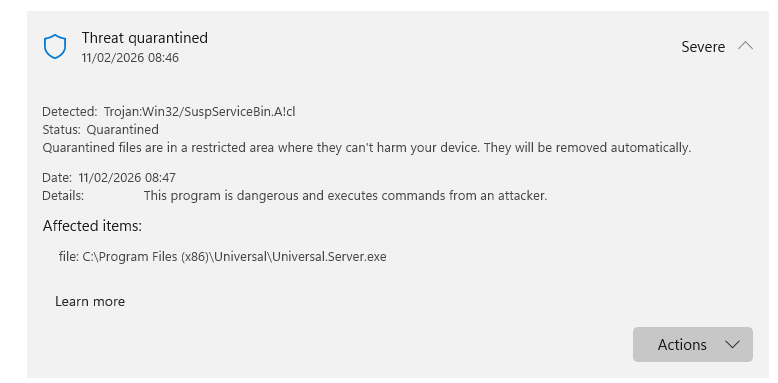
I’m pretty sure this is a false positive however I need to explain this to internal it to avoid a device wipe.
f619d65f38cf982be0fdad8164e805c00b7284b8.png
This happens to me all the time in the first 1-2 days after a release.
I normally wait 3-4 days before updating so microsoft wont block the msi or any underlaying exe.
@Adam Driscoll I didn’t check this version yet, but if it has built in lasts devolutions powershell module, there is a bug with Get-DSEntries command that forcibly requires VaultID Input.
Already contact devolutions support and they report it as a bug and im waiting for a working version.
Working Version: 2025.2.3
Bug Version: 2025.3.3
@AnonymousUser We don’t package the Devolutions PowerShell module with PSU.
Adam Driscoll
PowerShell Expert and Software Architect at Devolutions
We’re looking at ways to alleviate this. The problem is that embedding the PS SDK looks risky to AV. One issue is that the server binary is not currently signed. We will be fixing that in an upcoming release in hopes that helps.
Adam Driscoll
PowerShell Expert and Software Architect at Devolutions
I’m having issues after upgrading from 5.6.13 to 2026.1.1. I created a new app and new script to confirm nothing in my code is the issue.
Get-PSUScript fails to return anything when run from the app. Log messages are below. Sample code is listed in the log message lines [2] and [3].
[2/11/2026 6:26:38 AM] [Error] [App-Troubleshooting]
at 5a3125fd-6458-4382-8079-fbc64205a972: line 2
at 5a3125fd-6458-4382-8079-fbc64205a972: line 1
at Troubleshooting.ps1
[2/11/2026 6:26:38 AM] [Error] [App-Troubleshooting] Value cannot be null. (Parameter ‘value’)
[File]: Troubleshooting.ps1
[Endpoint]: 5a3125fd-6458-4382-8079-fbc64205a972
[Page]:
[1]
~~> [2] $Script = Get-PSUScript ‘Test_2026_1_1.ps1’
[3] Show-UDToast “Message: $($Script.Name)” -duration 30000
[4]
Additionally, connecting from vscode or a pwsh terminal using Connect-PSUServer returns the same error.
Get-PSUScript ‘Test_2026_1-1.ps1’
Get-PSUScript: Value cannot be null. (Parameter ‘value’)
They are already on it:
github.com/ironmansoftware/powershell-universal
Updated our dev server.
All went fine.
But now it tells me there is a new version 2026.1.1.0
And this fragment is back: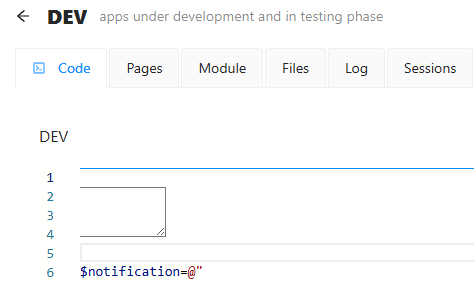
But CRTL-F5 in the browser fixes it.
45aa3f12a127c8b085854700bb9b97ee38c69055.png
6cc3229796c9fff92ea6917fdfcac9aad284c073.png
I get the new version available as well.
I’m getting ‘Value cannot be null. (Parameter ‘value’)’ with get-psurole, get-psuidentity, I’m also showing that I have an upgrade available. but I just upgraded to 2026.1.1
I updated to 2026.1.1 only to fix the 2026.1.0 problems.. but now Get-PSUscript doesnt work, so my app that builds on generating forms from scripts is unfunctional. Please fix this asap
Is there any idea when 2026.1.2 is going to be released. I think I may need to revert my snapshot. This has broken critical API. The api calls both get-psurole and get-psuidentity - both of which return Value cannot be null. (Parameter ‘value’)
The root problem is already known, and Adam closed the issue right away, which makes me think it’s going to be ready in a few days. However, if it’s critical, I would roll back the snapshot and not take the risk in case the problem takes more time than expected.
An update, I reverted to 5.6.13 and all works well
Updated to 2026.1.1 and New-UDUpload seems to not be working anymore, nothing happens when pressing the button
I think versions 2026.1.1 and 2026.1.0 should be removed from the CDN, as they contain breaking changes. With all due respect. @Adam Driscoll
Calls to Import-Module just returns the following error:
The term ‘Import-PowerShellDataFile’ is not recognized as the name of a cmdlet, function, script file, or operable program. Check the spelling of the name, or if a path was included, verify that the path is correct and try again.
Just for the record: Tried 2026.1.2 and this problem mysteriously has vanished, even though I don’t see anything in the changelog about it. So now I got one environment that’s upgraded!