Connect-ExchangeOnline - Could not load file or assembly

Product: PowerShell Universal
Version: 5.6.11
I have searched around and seen similar topics, but nothing will work for me. I have an app that loads the ExchangeOnlineManagement module and then attempts a Connect-ExchangeOnline -Credential $o365cred. This fails with the error shown below in all environments. I am able to run the equivalent scripts fine with PowerShell on the same server.
Could not load file or assembly 'C:\Program Files\WindowsPowerShell\Modules\ExchangeOnlineManagement\3.9.0\netCore\Microsoft.Identity.Client.dll'. The located assembly's manifest definition does not match the assembly reference. (0x80131040)
Recommended Answer
.9Hi,
try to uninstall it and install it via powershell universal directly.
This should fix the problem (fixed it for use back when we had the same problem):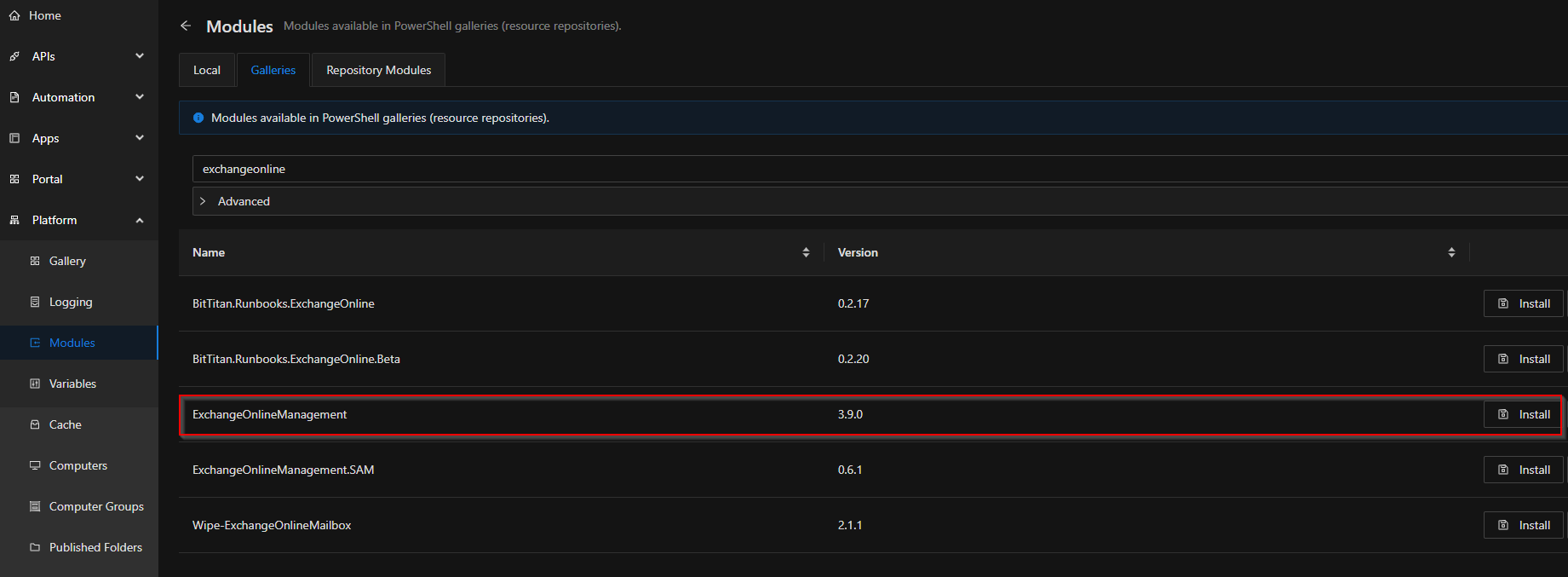
027edc09c702748a8b8a558b73430a368674929c.png
All Comments (2)
.9Hi,
try to uninstall it and install it via powershell universal directly.
This should fix the problem (fixed it for use back when we had the same problem):
027edc09c702748a8b8a558b73430a368674929c.png
Thank you for the response. This appears to have resolved the issue, but I am having a different problem actually connecting now. It probably needs a separate post, so I will consider this one resolved. Appreciate the help.