New App with Multiple Pages

Product: PowerShell Universal
Version: 1.4.6
Hello,
Have searched for my issue and have seen solution but does not seem to work in my instance
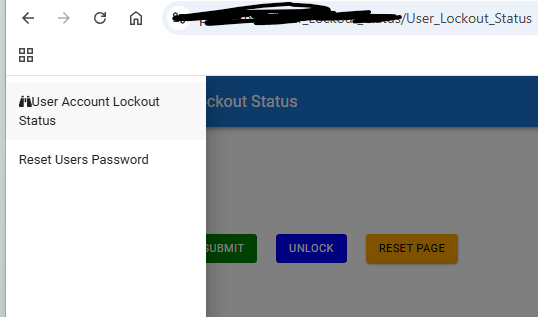
- Have have both pages display when I click on the hamburger menu
- The First page in my page array loads, unable to get the second page load
- If I switch the order in the array, the second page loads
Code
#Array all pages
$all_pages = @(
get-UDPage -Name "pg_acc_lockout_status"

get-UDPage -Name "Reset_User_Account"
)
#Get Application Page
New-UDApp -Title “AD User Lockout Status” -Theme $appication_theme -Pages @(
#Get all Pages

$all_pages
)
All I get is a flicker but still defaults to the first Page
cc58fedf4d6f596aaeb480512b7c1f20c3c5fd46.png
All Comments (10)
Got the same problem, ended up putting the Get-UDPage directly into -Pages and not via variable which worked:
New-UDApp -Title "xxxx" -Pages @(
   Get-UDPage -Name “Page1…”
   Get-UDPage -Name “Page2…”
)
Hello @ms1 ,
Thanks for the updates.
Did try this:
#Get Application Page
New-UDApp -Title “AD User Lockout Status” -Theme $appication_theme -Pages @(
get-UDPage -Name "pg_acc_lockout_status"

get-UDPage -Name "Reset_User_Account"
)
Still getting the same issue.
Again, thanks all the same
Can you share the code how you coded the navigation and a screenshot of your pages name and url? Maybe we can find the reason why its working there.
Hello @ms1 ,
I am pretty new using PS Universal.
Application was setup using the GUI
#Application Theme
$appication_theme = @{
Palatte = @{

    primary = @{

        main = "#D3D3D3"

    }

    background = @{

        sub = "ffffff"

    }

}
}
#Get Application Page
New-UDApp -Title “AD User Lockout Status” -Theme $appication_theme -Pages @(
get-UDPage -Name "pg_acc_lockout_status"

get-UDPage -Name "Reset_User_Account"
)
Again grom the GUI I created the pages.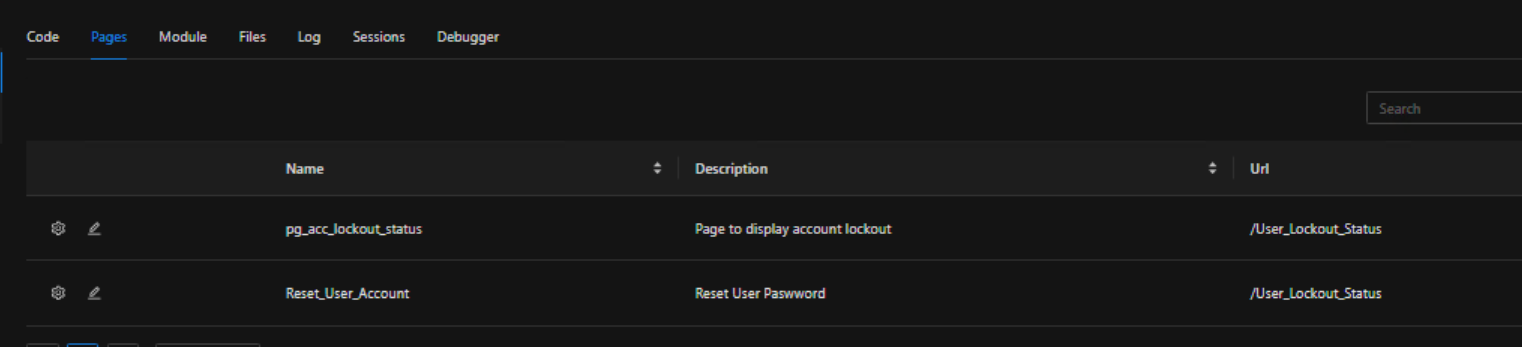
I also have functions in the Modules Tab.
Have four functions which I in the
#Validate Account username
function Check_User_Account {
param($input_user_account)


try {


    $check_account_validity = (get-ADUser -Filter {samaccountname -eq $input_user_account}).samaccountname


    if (-not \[string\]::IsNullOrEmpty($check_account_validity)) {


        return $true


    } else {


        return $false

    }


} catch {


    show-UDToast -Message "$($input_user_account) is not a valid account" -Position "center" -Balloon -BackgroundColor "red" -MessageColor "white"


}
}
#Function to get account status
function Get_Account_Status {
param ($in_User_account)


#Get All the DC's in the Forrest

$all_domain_ctrls = Get-ADDomainController -Filter \*


#Empty Array to hold account status

$user_account_state_all_dc = @()


#Display waiting Message

show-UDToast -Message "Retreiving Account Lockout Information, Please Wait.... "  -BackgroundColor "blue" -MessageColor "white" -Position "center" -Id "Loading"  -Duration 25000


$get_user_password_expiry_date = Get-ADUser $in_User_account -Properties msDS-UserPasswordExpiryTimeComputed | Select-Object name,{\[datetime\]::FromFileTime($\_."msDS-UserPasswordExpiryTimeComputed")}


#Format Password Date

$format_password_expiry = $get_user_password_expiry_date.'\[datetime\]::FromFileTime($\_."msDS-UserPasswordExpiryTimeComputed")'


foreach ($d_ctrl in $all_domain_ctrls) {


    #Domain Account Details

    $get_dc_name = $d_ctrl.Name

    $get_dc_site = $d_ctrl.Site

    $get_user_state = Get-ADUser $in_User_account  -Properties PasswordLastSet, LockedOut, badPwdCount, lockoutTime -Server $d_ctrl.hostname | Select-Object PasswordLastSet, LockedOut, badPwdCount, lockoutTime

    $get_user_password_last_set = $get_user_state.PasswordLastSet

    $get_user_lockout_state = $get_user_state.LockedOut

    $get_user_bad_password_count = $get_user_state.badPwdCount

    $get_user_lockout_time = $get_user_state.lockoutTime


    #Create user accountstate object

    $user_state_obj = \[PSCustomObject\]@{

        "DC Name" = $get_dc_name; Site = $get_dc_site; "Locked" = $get_user_lockout_state; "Bad Pwd Count" = $get_user_bad_password_count; "Password Last Set" = $get_user_password_last_set; "Lockout Time" = $get_user_lockout_time; "Password Expires" = $format_password_expiry

    }


    $user_account_state_all_dc += $user_state_obj


}


#Clear The Display Information

hide-UDToast -Id "Loading"


#Return Account Status

return $user_account_state_all_dc
}
#Function to unlock account
function Unlock_User_Account {
param ($in_username)


try {


    #Command to unlock Add Account accross all domains

    unlock-ADAccount $in_username -Confirm:$false


    #Display Unlock Command State

    show-UDToast -Message "$($in_username) unlocked successfully" -Position "center" -BackgroundColor "green" -MessageColor "white" -Duration 3000


} catch {


    #Display Error

    show-UDToast -Message "Access Denied" -Position "center" -BackgroundColor "red" -MessageColor "white" -Duration 5000

}
}
The Reset Password was a new Page Was Just setting up:
Test code:
new-UDGrid -Container -Spacing 3 -Children {
new-UDGrid -Item -ExtraSmallSize 12 -Children {


    new-UDTypography -Id "test" -Text "Hello Word"

}
}
This is all I have at the moment.
Thanks Again
95ff107553214df98d9e2228b2981487479ee20e.png
Hi, no I mean how you coded your burger menu
something like this:
docs.powershelluniversal.com
for example this is how my app page is looking (with a simple list navigation):
$Navigation = @(
      New-UDListItem -Label "Approvals" -Icon (New-UDIcon -Icon check-to-slot) -OnClick {
      Invoke-UDRedirect -Url "/Approvals"
   }
   New-UDListItem -Label "Service Requests" -Icon (New-UDIcon -Icon boxes-packing) -OnClick {
      Invoke-UDRedirect -Url "/ServiceRequest"
   }
   ...
)

New-UDApp -Title "<redacted>" -Pages @(
   Get-UDPage -Name "Approvals"
   Get-UDPage -Name "ServiceRequest"
   ...
) -NavigationLayout Permanent -Navigation $Navigation -Logo "<redacted>"Hello @ms1 ,
Ah! thank for this information.
Will take a good look.
Awesome material.
Thanks
you are putting an array in an array here…
your line should read
New-UDApp -Title “AD User Lockout Status” -Theme $appication_theme -Pages $all_pages
Sample below works and shows some ways to enhance the simple menu
$TOS=@"
Whatever bla bla
"{RIPFQDN}
"@

$pages=@(
    New-UDPage -Content {
        $RIP=(($remoteIPaddress) -split ":")[-1]
        $FQDN=(Resolve-DnsName -NoHostsFile -Name $RIP).namehost
        New-UDElement -Tag div -Attributes @{style = @{border = "8px solid crimson"; 'border-radius' = '8px' } } -Content {
            New-UDTextbox -Disabled -Multiline -FullWidth -Variant outlined -Value ($TOS -replace "{RIPFQDN}","$RIP $FQDN")
        }
    } -Title "TOS" -Name "TOS" -Icon @{ type='icon'; icon = 'igloo' }
    Get-UDPage -Name 'page1'
    Get-UDPage -Name 'page2'
    Get-UDPage -Name 'page3'
    new-UDPage -Content { invoke-UDRedirect "/Portal" -Native } -Name "Portal" -Icon @{ type='icon'; icon = 'rotate-left' }
)

New-UDApp -Title 'COMMON' -Pages $pages I know it’s not relevant to your issue, but for future refrence, when pasting code you can use three back ticks followed by the word powershell like this: ```powershell then put your code on the next line, and finish it off on a new line with three more backticks ``` this will create a code block that correctly highlights the powershell syntax like MS-Marox and deroppi have done above.
Noted with thanks
Hello @ms1 ,
Just to let you know that the links helped and resolved my Issue.
I had not coded the Navigation, which is now done and working a treat.
Thanks