
agussofe
Devolutions Password Manager Browser Extension - OTP Detection Issue Across All Browsers
Hello,
Sorry for forgetting to respond to this case. Yes, it has indeed been resolved with the update that was rolled out quite some time ago.
I understand that you can close the case if it has been resolved.
Devolutions Send - Add email notification
Hello,
After a year without any updates, I’m checking in again in the hope that there has been some progress on this feature request.
Are you still planning to implement it, or have you ruled it out?
Do you know if it’s currently in testing, or do you have an approximate date for when this feature will be available?
Devolutions Password Manager Browser Extension - OTP Detection Issue Across All Browsers
Hello,
I am experiencing a critical issue with the Devolutions Workspace browser extension that affects all browsers (Microsoft Edge, Firefox, and Chrome).
The Problem:
The extension successfully detects and fills in the stored credentials when accessing password-protected sites. However, when I attempt to copy the OTP (One-Time Password) code from the extension, it fails to detect the OTP field. The extension does not recognize that there is an OTP code available to copy, even though the credentials were properly filled in.
This issue occurs consistently across all three browsers mentioned above, which suggests it is not a browser-specific problem but rather an issue with the extension itself.
Steps to Reproduce:
1. Navigate to a login page that requires both credentials and OTP
2. The extension correctly fills in the username and password
3. Attempt to copy the OTP code from the extension - the copy button shows no available data to copy
4. Manual copy-paste of the OTP is required as a workaround
Affected Browsers:
- Microsoft Edge
- Firefox
- Chrome
Could you please investigate this issue? It would be very helpful if the extension could properly detect and allow copying of OTP codes without requiring manual intervention.
Thank you for your assistance.


Shortcut key to switch keyboard input from remote to local
I see that this keyboard shortcut option only works with Windows connections, however I cannot execute it with Linux or other types of connections, nor with web pages loaded directly. The option doesn't even appear in the ribbon at the top in the actions section.
I frequently use the ShareX application to take screenshots and capture screens for wikis or clients. Is there any way to take screenshots from my computer with ShareX without losing focus on the connection I have open with RDM?
Devolutions Send - Add email notification
Hi David,
Thank you for adding this to your todo list. Do you have any update on whether this feature will be implemented? If so, is there an estimated version or timeline for its release?
Regards
Quick connect tool as a text field in the top bar
I am reaching out to request, if possible, a new feature in RDM. We have a farm of remote PCs managed via RDP, and this farm undergoes a lot of changes (daily modifications), so I use quick connect quite frequently.
I don't know if it would be possible to add a quick connect field at the top of the RDM interface, so we can avoid using keyboard shortcuts or going to View -> Quick Connect, for the window to open and allow configuration.
Specifically, I am referring to adding a text field here, to launch a quick connection directly from any session that I have open in RDM. Allowing me to choose the IP address and the connection protocol.

I am providing an example of applications that do have this functionality, in case it helps to clarify my request. Sorry for the image quality, but it was taken from the internet:

Thank you in advance
web site link with autofill login(native application)
Is it possible that you are referring to the situation when you create web entries in RDM and use the internal entry option, and the fields are not autofilled? I understand the problem may be that RDM itself does not detect the login and password or email fields, so the autofill doesn’t work when the page loads, forcing you to copy and paste manually from the clipboard to complete it yourself.
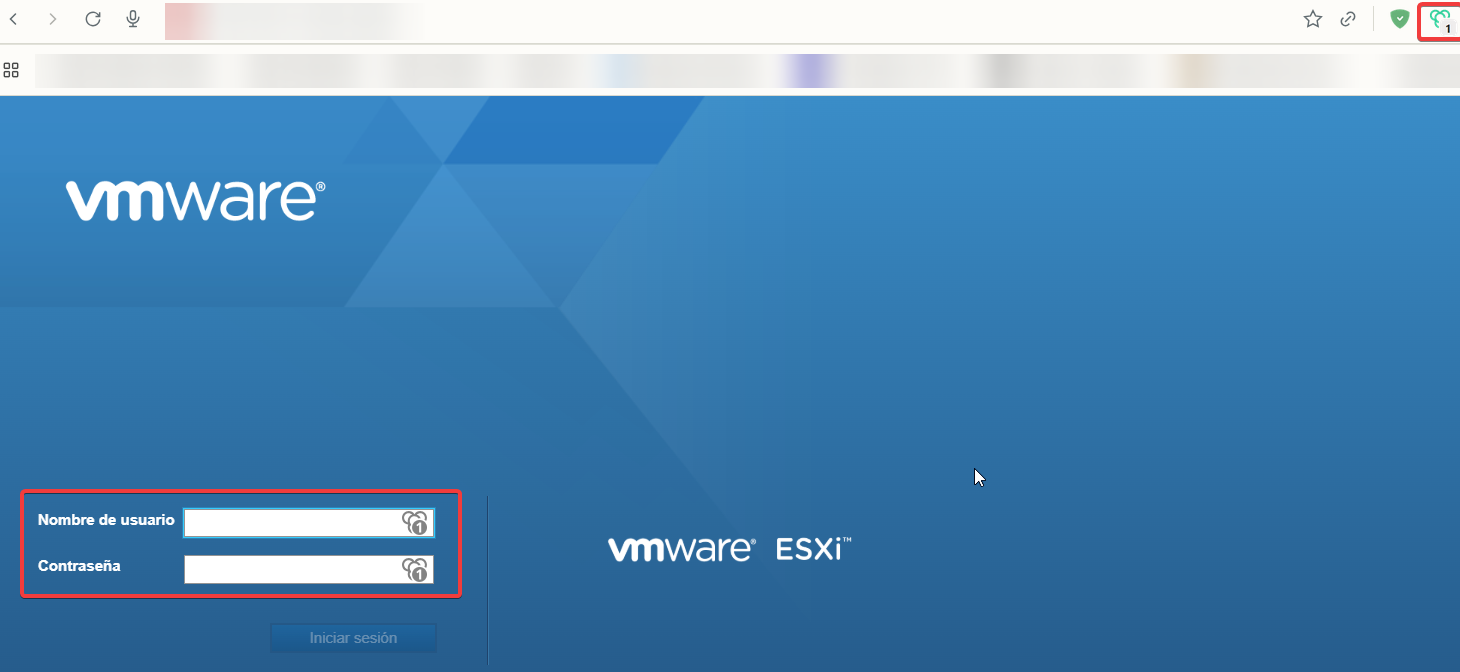
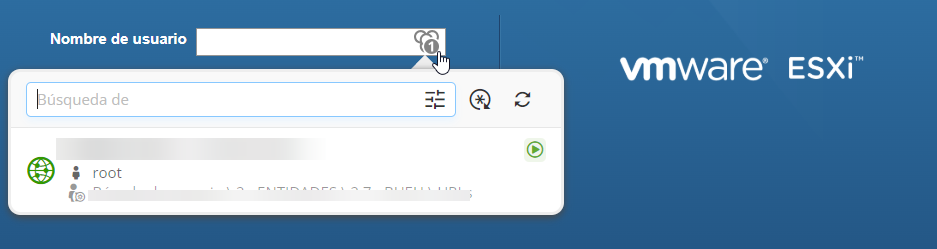
Additionally, regarding the Workspace extension, it works perfectly in Edge, Firefox, and Chrome. It does not autofill the fields automatically, but when you click on it, it displays the login details and then autofills them for you afterwards.
I am attaching screenshots of both Workspace and RDM. This illustrates how the login autofill behaves in each case:
Workspace login pag:
Login pag in RDM:
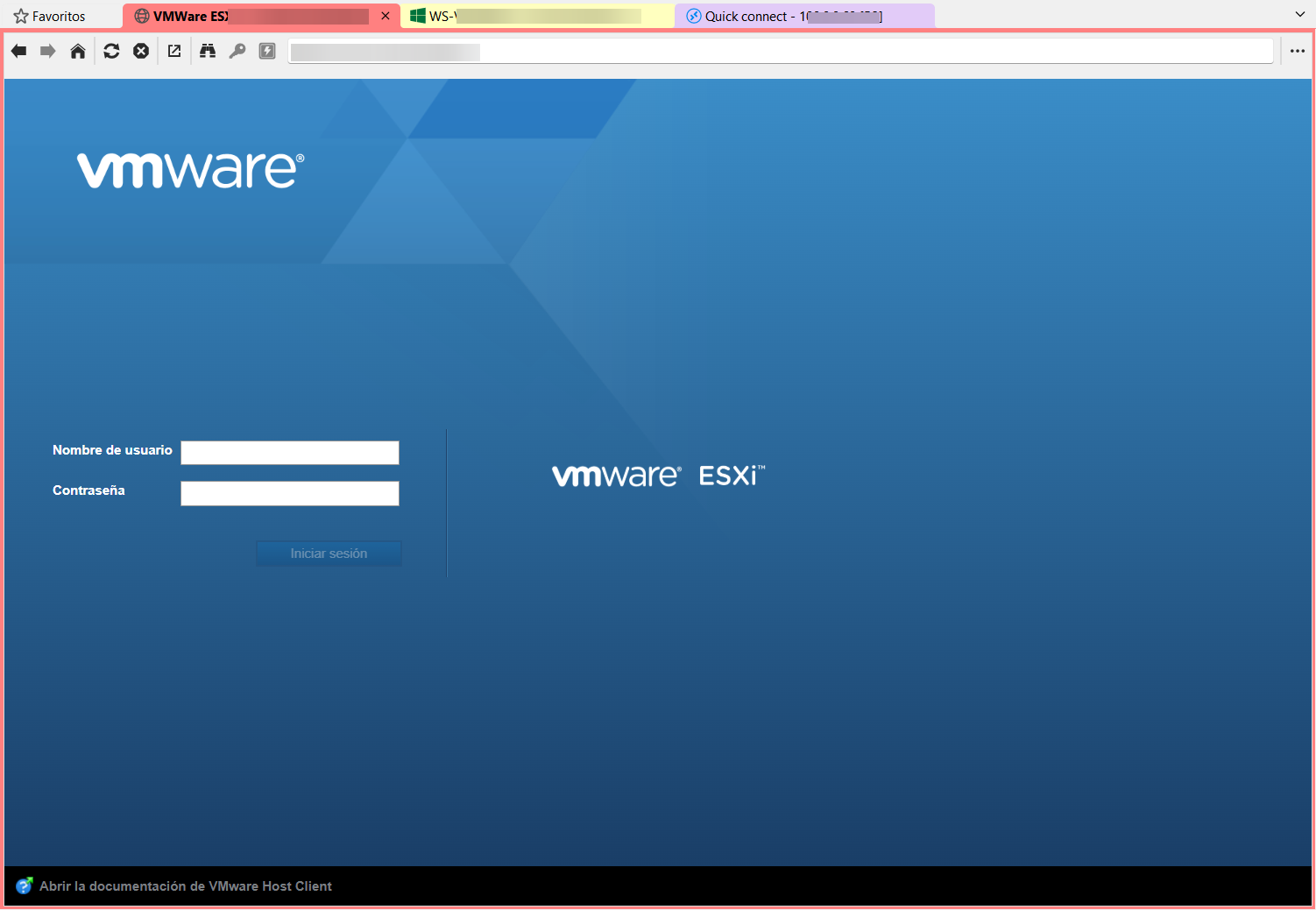
In RDM, as you can see, if you have the web entry configured internally, this does not happen—the fields are not autofilled, and you have to use the clipboard option to paste the fields manually. I have tried to configure the autofill feature in every possible way so that RDM completes the fields automatically, but I have never been able to achieve it.
Could it be that you were referring to this?
Auto-Disable Entry When Placed in Disabled Folder
Hi,
I completely agree with this request, I have more than 900 entries in my tree, some are disabled due to migrations or other reasons.
This would clean up the searches performed in the tree by hide entries that are not in use.
As mentioned earlier, it would also be good to add an option to activate this with a checkbox, for people who might find it useful to still display disabled entries in searches or in the tree itself.
Thank you for your support for the community.
Add IA Perperxity
Hello Community,
I’ve noticed that there are several AIs available for RDM, but Perplexity AI isn’t among them. Would it be possible to add it for use?

Devolutions Send - Add email notification
I'm not sure if it would be possible to integrate an option in Devolutions Send that sends an email notification when the note is destroyed or expires.

It would be great if, once a note expires or is destroyed, it becomes inaccessible and triggers an email notification to the recipient entered in the designated field.
Thank you for listening.
Color the OTP based on the remaining time until it expires.
Hi everyone, after updating to the version released today, Tuesday 07/10/2025, I can confirm that the implementation works correctly and is very attractive and visually appealing. Thank you for listening to the community. You're the best!

Bug version: 2025.2.30.0 64-bit (PreJIT)
Hi everyone, the update has just rolled out here in Spain, and I can confirm that after updating, the issue of the session remaining open after closing the connection has been resolved. Thank you all for your work, you're the best!
Color the OTP based on the remaining time until it expires.
Thank you very much for your support. I hope to see this issue resolved soon. I love this program and everything related to Devolutions—you’re doing an amazing job!
Bug version: 2025.2.30.0 64-bit (PreJIT)
Since the last update, when you start and end a session—whether SSH or RDP—RDM doesn't detect that the session has ended (even though it closes the tab), and it leaves the session as if it were still active, preventing you from starting a new connection to the same machine. To be able to reconnect, you have to manually force the session to close in the connection tree and then open it again as usual. I'm attaching screenshots.
As you can see in the screenshots, I currently only have one PowerShell session open, but the RDM connection tree still shows the entire history of today's connections as active. The only way to fix this is to manually "close" each connection from the tree.


Color the OTP based on the remaining time until it expires.
It would be interesting to implement a feature where OTP codes gradually change color depending on how much time they have left before expiring — similar to what apps like Google Authenticator, Keeper, Bitwarden, and Authy do to visually indicate urgency.
This visual feedback helps users quickly identify which codes are about to expire, improving usability and reducing failed login attempts due to expired OTPs.

RDM CONFIGURATION DOUBTS and POSSIBLE BUGS
Hello,
I have performed the mentioned tests from the portable version, and there are no issues. Therefore, I understand that the problem lies in my browser or system. I will reinstall the browser and RDM and update the case with the result.
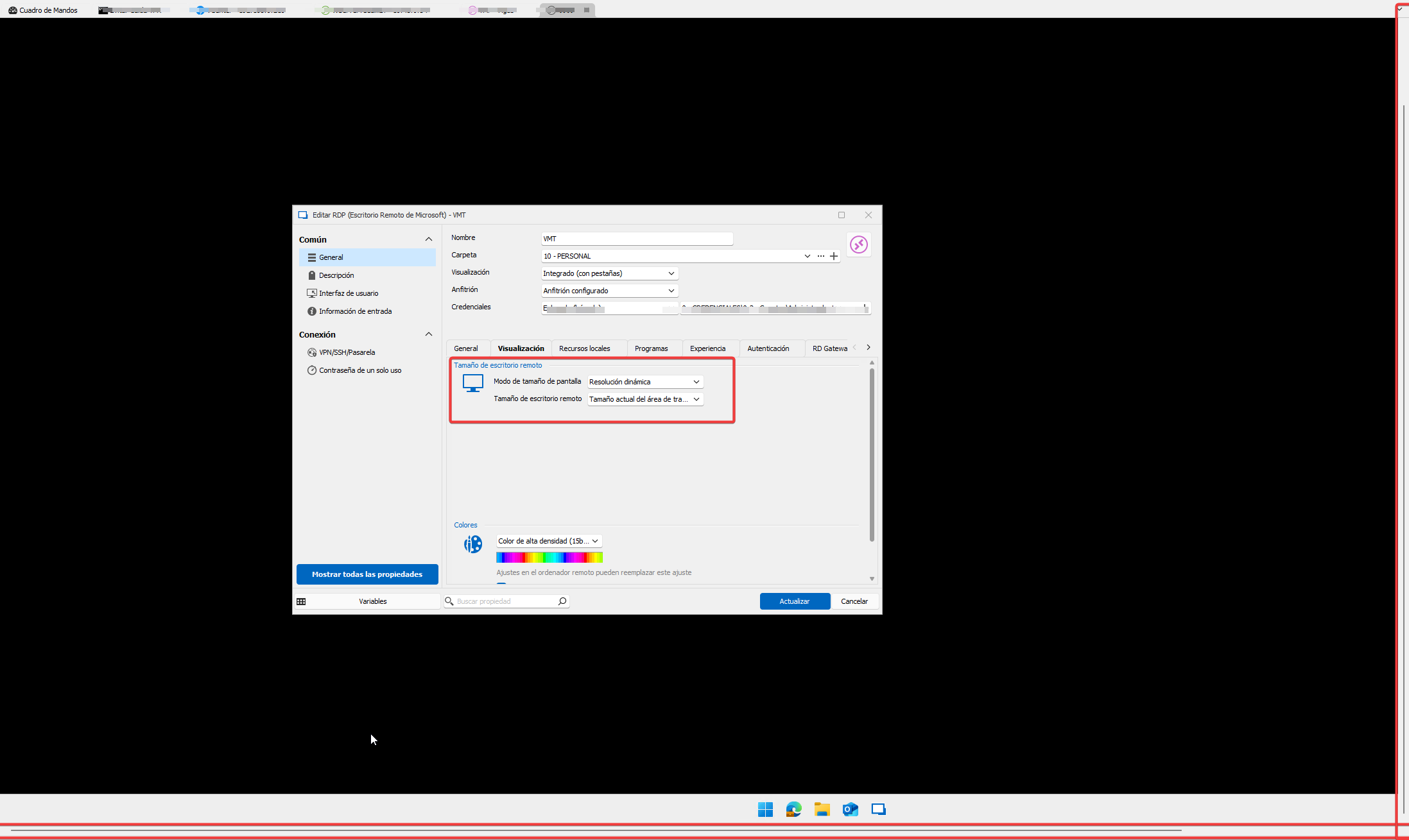
On the other hand, regarding the requested SnapShot, if you look at what is highlighted in red, that is what happens when you start a session. The visual configuration is set to integrated (with tab) and the screen size mode is dynamic resolution (so it always adapts to the window) and remote desktop size (current workspace area) to force the desktop to adapt to the screen size without applying zoom.
RDM CONFIGURATION DOUBTS and POSSIBLE BUGS
Hi all!,
First of all, I want to mention that I am using version: 2024.2.21.0 64-bit.
DOUBTS:
When you are editing entries or connections and want to see a saved password in the application, you cannot view it, having to close the editing to see the password or the value you want to edit. Is there a way to perform this action?
With the RDP display set to integrated, with dynamic resolution and current workspace size, you have to resize the window for the resolution to adapt to it when you connect. Is there an option without zoom that automatically adjusts the resolution without having to modify the window size with each connection?
ERRORS:
When connected to a machine via SSH, if you restore a snapshot of that machine and then restart it, RDM gets bugged, requiring you to force close it from the task manager. (It does not detect the loss of connectivity to the server and the program freezes.)
When you have URLs registered in RDM and load them from RDM (both internally and by executing externally), it creates subprocesses in Microsoft Edge, leading to system collapse (I have had up to 1230 Edge processes with CMD (“Console Window Host”), RDM (“Remote Desktop Manager”), and CMD (“Windows Command Processor”).
FortiClient SSL VPN
Hello,
Most of our VPN integration's are based on command line that vendor offer / develop. If they don't offer a command line to execute the VPN, it's almost impossible for us to do a proper integration.
On a side note, I don't know if this gonna make it work, but you can adjust the location of the executable and override the name in the menu File -> Settings -> Application -> Paths -> Configure Installation Path.
Best regards,
Hello everyone!
Correct, if you change the default path to the path where you have FortiTools, it works and automatically launches the client even with 2FA active on Fortigate.
I confirm that with RDM 2024.2.15.0 and FortiTools 7.4.0.1658, if you change the default path in RDM for the FortiSSL entry to the folder extracted from FortiTools.zip, Path: \FortiClientTools\SSLVPNcmdline\x64, RDM detects the .exe needed for the Forti SSL VPN connection, FortiSSLVPNclient.exe.
Then, simply create a FortiSSL VPN entry in RDM and configure the fields for IP, port, username, and password.
Thanks to everyone for your help and for this great program!
FortiClient SSL VPN
I already have the tool available, but now the RDM when it added a new forticlient SSL connection does not allow me to choose the executable file as if this option appeared before.
How did you configure SSL VPN on RDM through FortiTools?
FortiClient SSL VPN
Thanks for the warning, I hadn't noticed.
I will try to contact our supplier.
Greetings and thank you!
FortiClient SSL VPN
Como SSLVPN está en desuso, parece que Fortinet ya no proporciona SSLVPNCMDLINE en sus herramientas
Dado que es lo que RDM usa para pilotar las conexiones, me temo que no hay otra solución que cambiar a IP de acceso telefónico.
En este momento, esta herramienta solo falta en la versión 7.2.4.
Todavía está presente en las versiones 7.2.3, 7.0.13 y 7.4.0
Hola
He descargado e instalado FortiClient 7.4.0 en mi computadora, pero no puedo encontrar o descargar FortiClientTools en esta versión, por lo que puedo probar. Contamos con un firewall forti virtual que está administrado y cuenta con nuestro proveedor de internet, por lo que no tenemos el producto registrado en nuestra cuenta Forti para poder descargar esta herramienta desde su sitio web oficial: FortiClientTools_7.4.0.1658.zip. En teoría se hace desde este enlace: https://support.fortinet.com/Download/FirmwareImages.aspx
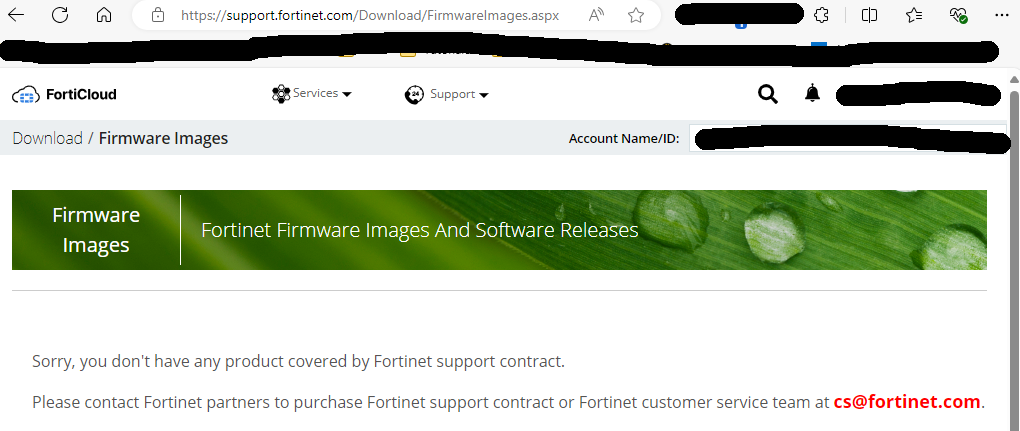
¿Alguien podría ayudarme con esto?
FortiClient SSL VPN
It would be possible to implement a solution for people using Forticlient with SSL VPN
create a VPN entry through DVLS web interface
Hi all!!
It would be possible to implement a solution for people using Forticlient with SSL VPN