FortiClient SSL VPN

hi!
what version of FortiClient SSL VPN is currently supported?
When I configure FortiClient there is a hint that only version 5.4 is available
When I select FortiSSL there is no such warning.
Having FortiClient 7.2.4.0972 installed I am also asked for the installation path as the executable seems to have changed.
If the current version is not supported a warning would be helpful.
KR
G.
b51ce991-c6a7-4a65-a0ef-4320019d2cd8.png
All Comments (13)
Hello Guenther,
Currently, we don't support FortiClient 7.2, only 5.4 and below.
There's a pretty good discussion about this topic here: https://forum.devolutions.net/topics/41259/create-a-vpn-entry-through-dvls-web-interface
Support for FortiClient 7.2 will be available on version 2024.2.2.0 of RDM.
Let me know if this helps!
Best regards,
Marc-Antoine Dubois
Marc-Antoine Dubois
hi Marc-Antoine,
thanks alot!
We will try again once that version is released.
May I suggest to add the version supported also to the FortiSSL-option?
KR
G.
There's an official FortiClient Windows App downloadable from Microsoft App Store. It adds "FORTICLIENT" as a VPN protocol to Windows's VPN connections. After creating new Fortinet VPN connection using Windows built-in VPN connection, you can connect your Fortinet VPN from RDM using "Microsoft VPN" and leave VPN type "Automatic". under VPN name, you can select your Fortinet VPN tunnel from the list.
Hello,
In RDM 2024.2, a new entry called Forticlient IPSec will be available. When this version will be available, I think it would be the first thing for you to try.
Best regards,
Jeff Dagenais
It would be possible to implement a solution for people using Forticlient with SSL VPN
@agussofe,
Since we are not a customer of Fortinet, we cannot contact their support and get information on a possible improved implementation.
Do you know if they have a command line, API or SDK that we could implement for a proper integration of this specific type of VPN?
Best regards,
Jeff Dagenais
As SSLVPN is deprecated, Fortinet appears to no longer provide SSLVPNCMDLINE in their tools
Since it is what RDM use to pilot the connections, I'm afraid there is no other solution that changing to Dial Up IPsec.
Right now, this tool is only missing from version 7.2.4.
It's still present on version 7.2.3, 7.0.13 and 7.4.0
Como SSLVPN está en desuso, parece que Fortinet ya no proporciona SSLVPNCMDLINE en sus herramientas
Dado que es lo que RDM usa para pilotar las conexiones, me temo que no hay otra solución que cambiar a IP de acceso telefónico.
En este momento, esta herramienta solo falta en la versión 7.2.4.
Todavía está presente en las versiones 7.2.3, 7.0.13 y 7.4.0
Hola
He descargado e instalado FortiClient 7.4.0 en mi computadora, pero no puedo encontrar o descargar FortiClientTools en esta versión, por lo que puedo probar. Contamos con un firewall forti virtual que está administrado y cuenta con nuestro proveedor de internet, por lo que no tenemos el producto registrado en nuestra cuenta Forti para poder descargar esta herramienta desde su sitio web oficial: FortiClientTools_7.4.0.1658.zip. En teoría se hace desde este enlace: https://support.fortinet.com/Download/FirmwareImages.aspx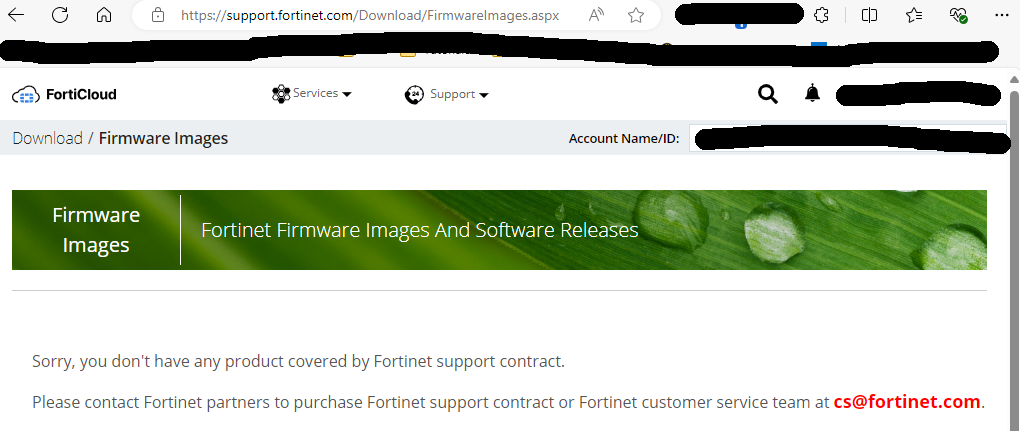
¿Alguien podría ayudarme con esto?
ScreenShot.png
Hi Agussofe,
You need a valid contract to download the tools.
Maybe your best option is to ask your provider to download it for you...
Also, if this virtual firewall is your property, you should have it on your own account. Your provider can still access it as a secondary account or MSP.
And, if I was you, I wouldn't provide the mail address and or name of my company on a screenshot :)
Regards
Alex
Thanks for the warning, I hadn't noticed.
I will try to contact our supplier.
Greetings and thank you!
I already have the tool available, but now the RDM when it added a new forticlient SSL connection does not allow me to choose the executable file as if this option appeared before.
How did you configure SSL VPN on RDM through FortiTools?
Hello,
Most of our VPN integration's are based on command line that vendor offer / develop. If they don't offer a command line to execute the VPN, it's almost impossible for us to do a proper integration.
On a side note, I don't know if this gonna make it work, but you can adjust the location of the executable and override the name in the menu File -> Settings -> Application -> Paths -> Configure Installation Path.
Best regards,
Jeff Dagenais
Hello,
Most of our VPN integration's are based on command line that vendor offer / develop. If they don't offer a command line to execute the VPN, it's almost impossible for us to do a proper integration.
On a side note, I don't know if this gonna make it work, but you can adjust the location of the executable and override the name in the menu File -> Settings -> Application -> Paths -> Configure Installation Path.
Best regards,
Hello everyone!
Correct, if you change the default path to the path where you have FortiTools, it works and automatically launches the client even with 2FA active on Fortigate.
I confirm that with RDM 2024.2.15.0 and FortiTools 7.4.0.1658, if you change the default path in RDM for the FortiSSL entry to the folder extracted from FortiTools.zip, Path: \FortiClientTools\SSLVPNcmdline\x64, RDM detects the .exe needed for the Forti SSL VPN connection, FortiSSLVPNclient.exe.
Then, simply create a FortiSSL VPN entry in RDM and configure the fields for IP, port, username, and password.
Thanks to everyone for your help and for this great program!