create a VPN entry through DVLS web interface
0 vote

I have a client who is interested to add the possibility to create a FortiClient VPN in the web interface of DVLS
Carl Marien
All Comments (23)
We only supported FortiClient until version 5.4 in RDM because Fortinet stopped supporting CLI commands. FortiClient 5.4 was released in July 2017.
What version of FortiClient is your customer using?
Is there value in trying to develop something that's EOE? I guess this is a question for the devs.
Best regards,
Marc-Antoine Dubois
Marc-Antoine Dubois
If I can save the legwork for someone, here's everything I found that's relevant to what they currently support in 7.2:
CLI Doc: https://docs.fortinet.com/document/forticlient/7.2.3/administration-guide/095591/forticlient-windows-cli-commands
API Doc: https://docs.fortinet.com/document/forticlient/7.2.3/administration-guide/745554/api-reference
Marc-Antoine Dubois
CLI is no longer available with FortiClient 7.2.4 and older CMDLine version is not working anymore.
Do you plan to implement entries compatible with API or VBscript ?
Hello Alexander,
Thanks for bringing this to light.
I'll let the developers take a look at this one.
FortiClient API doc: https://docs.fortinet.com/document/forticlient/7.2.4/administration-guide/745554/api-reference
Have a great day!
Best regards,
Marc-Antoine Dubois
Marc-Antoine Dubois
I'd be very interested in using FortiClient IPsec with RDM, cause all our customers use it...
Hello,
FortiClient is already available in RDM, is it what you are looking for ?.png)
Best regards,
François Dubois
image (5).png
As mentioned in the previous posts, it's only supported up to 5.4
Hello François,
I think we should move this thread to RDM feature requests. I hadn't noticed that it was in DVLS.
You're right that it's already in RDM but the argument is that it's only supported for FortiClient 5.4 which is EOL and the last version where CLI worked. Most customers are on 7.2 (latest).
The goal would be to look into the API for FortiClient and see if there's a way to do the same implementation we had with CLI.
Let me know if this answers your question.
Best regards,
Marc-Antoine Dubois
Marc-Antoine Dubois
Hello everyone,
I wanted to let you know I moved the thread to RDM feature request.
To clarify, before we even get to the step where we talk about implementing FortiClient in the web interface of Devolutions Server, we first need to make it work with Remote Desktop Manager.
Best regards,
Marc-Antoine Dubois
Marc-Antoine Dubois
Hello,
Would you be able to provide us the vpn_com_examples zip package contained in the FortiClientTools file? It's mentioned in their API documentation here that they have multiple examples of how to integrate with their COM APIs, which might help us see what is possible within RDM. Unfortunately, these files are not available for non-customers, so we would need your help accessing these files.
You can send this using our sharefile: https://devolutions.sharefile.com/share/filedrop
Just make sure to mention my name so it reaches me more quickly.
Regards,
Hubert Mireault
Hi,
I've uploaded it but those examples are pretty basic IMO.
We already looked at the API documentation and we didn't find a way to create connection from scripts.
Good Luck :)
Regards,
Alexandre
Hello Alexandre,
Thank you for sending the file over. Unfortunately it seems that either the zip file you sent was empty, or it didn't properly upload. Could you double check on your end that the zip file does contain data, and if so, try sending it over again?
As you say though, if the examples don't help much, then we may not be able to improve this at the current time. Looking at the API documentation, there seems to be a command to disconnect, but none to connect (despite there seemingly being a way to send credentials). Maybe the documentation is incomplete or unclear, as I find it odd you could disconnect but not connect.
Regards,
Hubert Mireault
I've sent the file again.
It seems better this time.
Sorry for the delay, thank you, I confirm that we correctly received it.
Looking at the example code, it does look to support a Connect action, as well as a way to send the credentials. This should be useful for our investigation. We will have to see if it's possible for us to get an environment through a trial or something similar, as it would be much more difficult to implement this otherwise.
Regards,
Hubert Mireault
Hello,
I'm investigating the possibility of adding FortiClient IPSec and am curious to know if anyone would be interested in helping. Here is the problem: it's very difficult to have all types of environments at Devolutions, but I could create a small application to test the potential code. I will need someone to download and test it.
Regards
David Hervieux
I would test it
Hello,
Do you want to give it a try?
David Hervieux
FortiClientGui.zip
Dear David
It works, tested with FortiClient 7.2.4
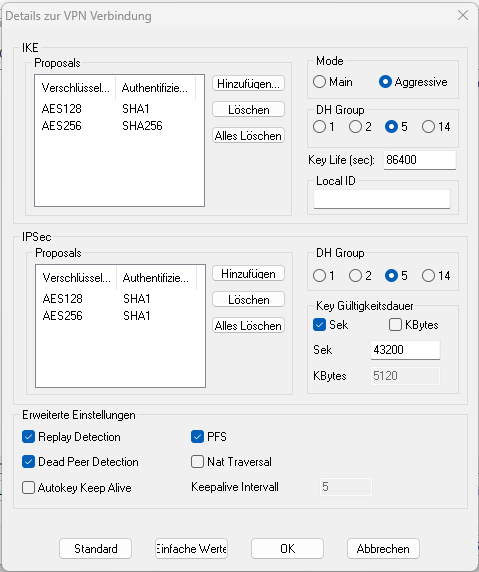
Would be great, if we could save the whole VPN connection in dvls, so it doesn't use the locally saved connection. Is that possible?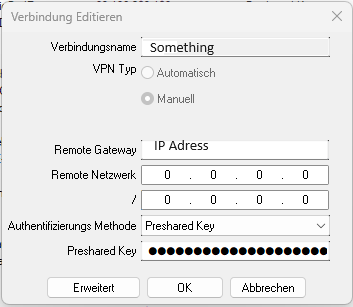
Screenshot 2024-04-02 103309.png
Screenshot 2024-04-02 103235.png
Hello,
Unfortunately I have no access to the configuration. Here is the only function available:
https://docs.fortinet.com/document/forticlient/7.2.4/administration-guide/745554/api-reference
This means that the configuration can't be generated from RDM or DVLS.
Regards
David Hervieux
487680b1-25da-407a-bbad-7a353a169023.png
I see, so we'l find another solution for that, but it would be great if you could implement this into RDM ^^
Thanks a lot and best regards
Hello,
This feature as been completed internally and will be available starting from the version 2024.2.2.0 of RDM.
There will be a new entry called "FortiClient IPsec" which uses the API.
Regards.
Hi all!!
It would be possible to implement a solution for people using Forticlient with SSL VPN
@agussofe,
Please see my response in https://forum.devolutions.net/topics/41883/forticlient-ssl-vpn#194255
Best regards,
Jeff Dagenais