RDM CONFIGURATION DOUBTS and POSSIBLE BUGS

Hi all!,
First of all, I want to mention that I am using version: 2024.2.21.0 64-bit.
DOUBTS:
- When you are editing entries or connections and want to see a saved password in the application, you cannot view it, having to close the editing to see the password or the value you want to edit. Is there a way to perform this action?
- With the RDP display set to integrated, with dynamic resolution and current workspace size, you have to resize the window for the resolution to adapt to it when you connect. Is there an option without zoom that automatically adjusts the resolution without having to modify the window size with each connection?
ERRORS:
- When connected to a machine via SSH, if you restore a snapshot of that machine and then restart it, RDM gets bugged, requiring you to force close it from the task manager. (It does not detect the loss of connectivity to the server and the program freezes.)
- When you have URLs registered in RDM and load them from RDM (both internally and by executing externally), it creates subprocesses in Microsoft Edge, leading to system collapse (I have had up to 1230 Edge processes with CMD (“Console Window Host”), RDM (“Remote Desktop Manager”), and CMD (“Windows Command Processor”).
All Comments (3)
Hello,
Thank you for reaching out to us regarding this,
For your first point, I'm afraid this would be the expected behavior currently.
I'm not sure I understand your second point, with this configuration in your entry Properties when starting the connection the resolution is incorrect without first moving/resizing the window? Could you provide me with a screenshot of the issue?
For the two points mentioned in the error section of your post, I'm wondering if you encounter the same problem with a portable instance of RDM, to test this, you will need to do the following:
1- Download the .zip file below:
https://cdn.devolutions.net/download/Devolutions.RemoteDesktopManager.Bin.2024.2.21.0.zip
2- Create a new folder on your Desktop
3- Extract the content of the .zip file into the folder created at #2
4- Go to this folder once the .zip file has been extracted and run remotedesktopmanager.exe
5- Connect to your data source
Let me know,
Best regards,
Samuel Dery
Hello,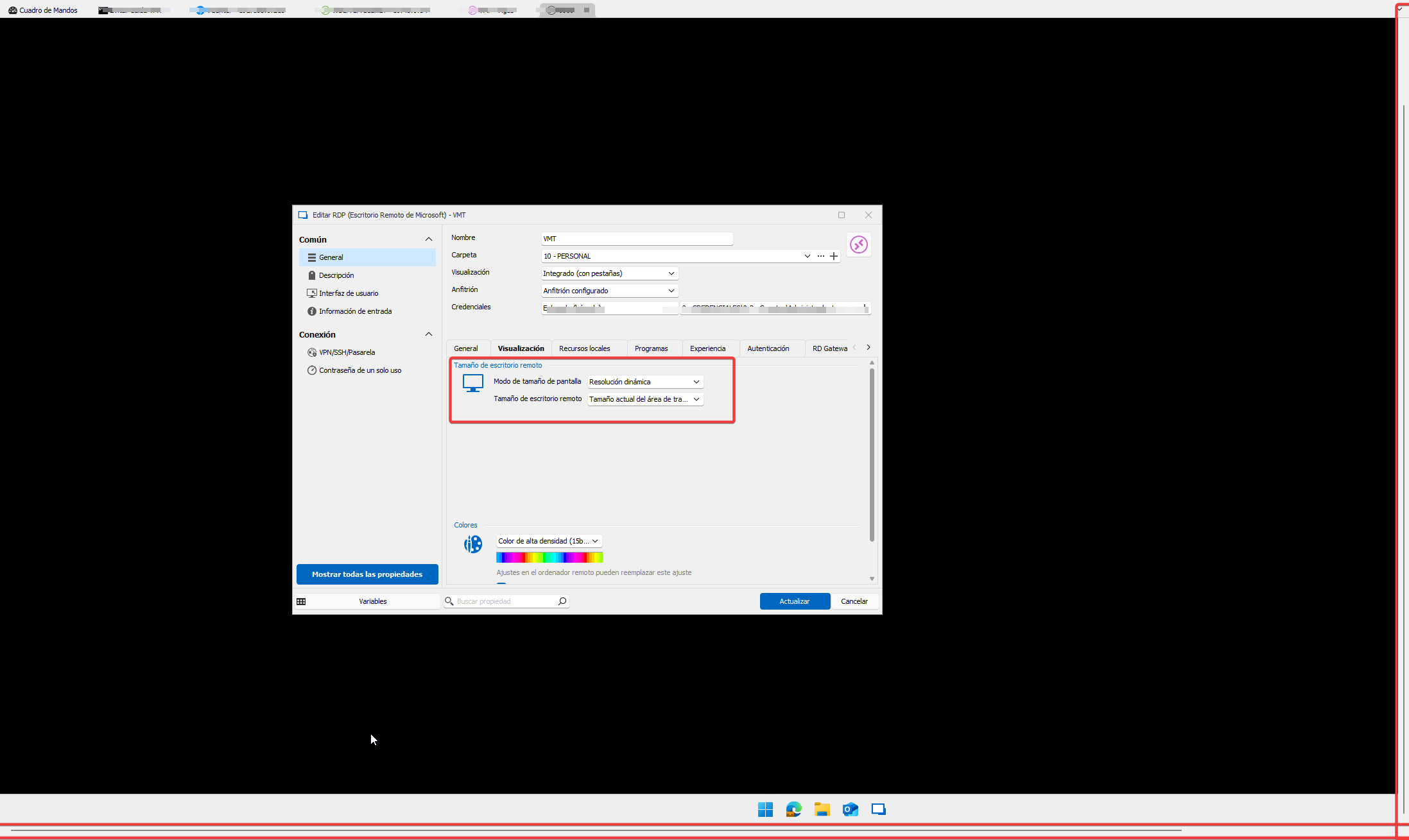
I have performed the mentioned tests from the portable version, and there are no issues. Therefore, I understand that the problem lies in my browser or system. I will reinstall the browser and RDM and update the case with the result.
On the other hand, regarding the requested SnapShot, if you look at what is highlighted in red, that is what happens when you start a session. The visual configuration is set to integrated (with tab) and the screen size mode is dynamic resolution (so it always adapts to the window) and remote desktop size (current workspace area) to force the desktop to adapt to the screen size without applying zoom.
RemoteDesktopManager_Nb4bDZ2LHV.png
Hello,
Thank you for your reply,
I see, are you encountering this behavior with all remote hosts or only with this specific host? Was it working for you previously without issues?
Let me know,
Best regards,
Samuel Dery