Auto-Disable Entry When Placed in Disabled Folder
2 votes

Hello,
This is a request stemming from this thread, where I had asked about folder "disabled" status and how it interacted with entry "disabled" status:
https://forum.devolutions.net/topics/51148/disabled-status-on-folders
Per the response there, the current behavior is that disabling a folder will disable all entries within it at the time. However, if another entry is later moved into that disabled folder, that entry itself would not be disabled.
I'd like to request the additional functionality to allow for an entry to be automatically disabled if it is placed into a disabled folder. It might make sense to make this be a default behavior since it seems unlikely to me that someone would want to place an entry into a disabled folder while still keeping the entry itself active. However, if there is a need for that scenario, then if we could at least add an option to auto-disable entries if they are placed in a disabled folder, that would be very much appreciated.
As always, thank you in advance for the consideration.
Best regards,
David Willis
All Comments (4)
Hello David,
Thank you for the request. Can you let me know what the goal of having the status be set on the entries in a folder is in your case? Is your goal to hide entries located in this folder as they're disabled?
We are planning to make some improvements to the statuses to be able to properly hide folders with those statuses (see thread here). I think it would be logical if when a folder with a particular status is hidden from those settings, that their content would also be hidden. What do you think?
Regards,
Hubert Mireault
Hi Hubert,
Thanks for the reply. Yes, I was thinking something like that - to either have them hidden or at least categorized as "disabled" so it's clear those entries are not in use (and so that if we place a new entry in that folder in the future, it would automatically inherit that status). And ideally, even other folders could inherit the status as well - for example if we drop FolderA and its entries into an existing "disabled" folder called FolderB, then FolderA and all its entries would inherit the disabled status too.
I agree it would make sense to hide a folder's content with a particular status if the folder itself with that status were hidden. However, there might be a use case for the opposite (showing the folder with disabled status but hiding its content - see option 2 below).
The only thing is, of course, if someone has their settings configured to hide disabled entries and the folder itself is also hidden, then that would make it difficult for them to add new entries to the disabled folder 🙂
So, with that in mind, maybe a new group of settings to allow users to toggle on/off the visibility of disabled, archived and expired folders and their content independently of one another (e.g. for each status type, they could show all, show folders only, or show none).
That would give users three options to fit three use cases:
- Show both disabled/archived/expired folders and entries
- Allows full control over disabled/archived/expired folders and their entries
- Show only disabled/archived/expired folders, but hide entries
- Allows the user to drag-n-drop new entries or subfolders into disabled/archived/expired folders in order to disable/archive/expire those items, but makes it so they don't have to see the entire tree of disabled items - with this configuration, presumably if the user dropped an entry or folder into a disabled/archived/expired folder, it would "disappear" from their tree view.
- Hide both disabled/archived/expired folders and entries
- Allows the user to hide all disabled/archived/expired entries so they don't have to see any of them
I think that would provide the most flexible configuration. If that makes things too complicated though, I think next best would be to have the show/hide setting for any of those statuses apply to both folders and entries, as that would at least give users two out of the three options listed above (#1 and #3).
Best regards,
David Willis
Hi,
I completely agree with this request, I have more than 900 entries in my tree, some are disabled due to migrations or other reasons.
This would clean up the searches performed in the tree by hide entries that are not in use.
As mentioned earlier, it would also be good to add an option to activate this with a checkbox, for people who might find it useful to still display disabled entries in searches or in the tree itself.
Thank you for your support for the community.
@davidwillis Thank you for the additional details. What you say makes sense and having this additional flexibility has its benefits. We already were moving forward with the plan to have the existing configuration apply to both folders and entries as it's a simple change that will improve the behavior for users. For this added flexibility you're requesting, we'll see if we can add this to a future roadmap, and as usual, we'll monitor this thread for additional feedback to help us prioritize this.
@agussofe These configurations already exist, they are located in the user preferences on team datasources: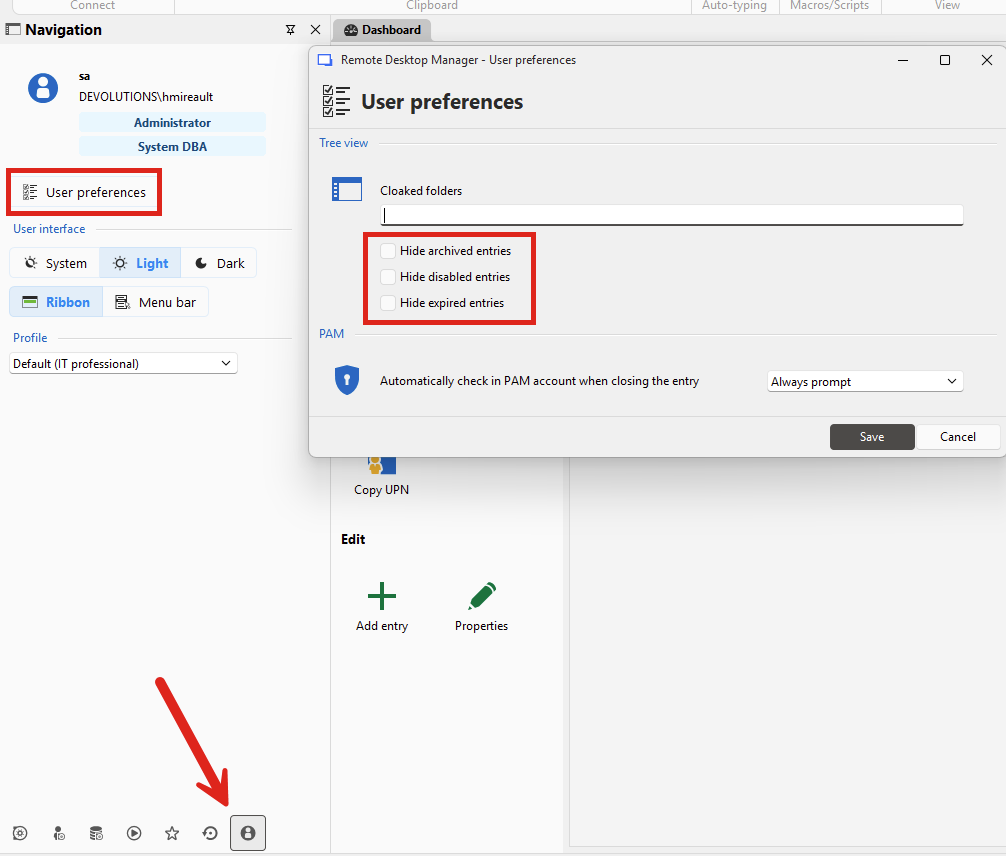
If you are on a single-user datasource, you can go in File > Settings > User interface > Tree view to change them: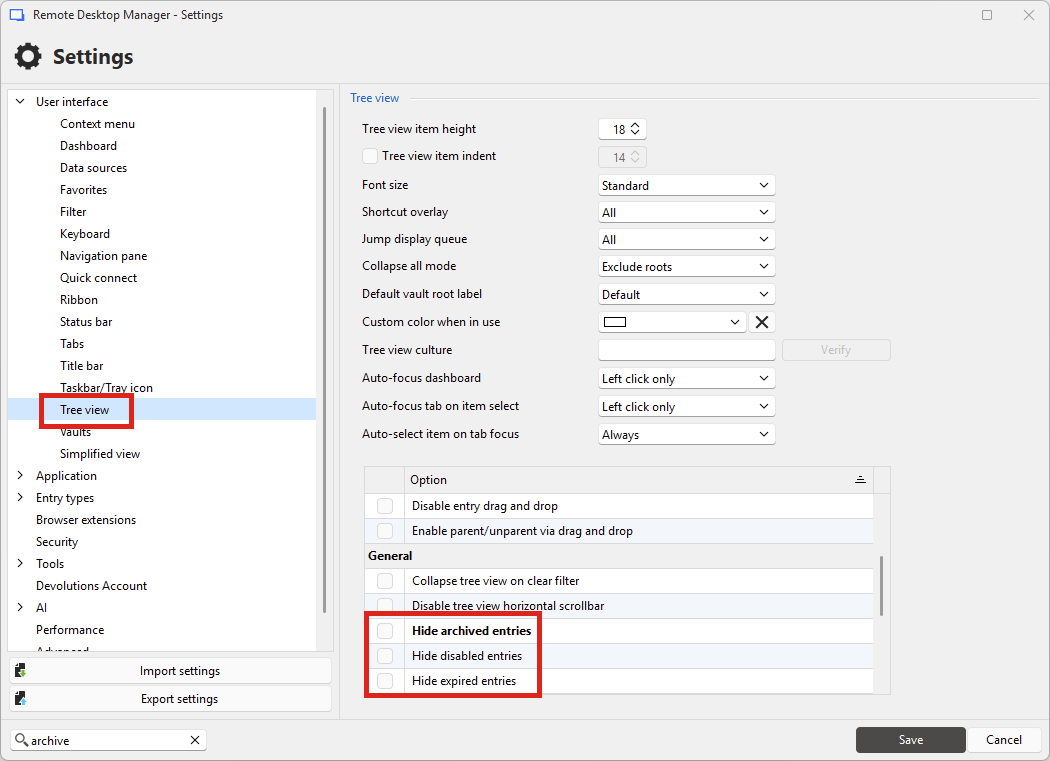
As I mentioned, we are planning to change these options to also apply to folders, not just entries, as that is the behavior in our other products (Server and Hub) as well. In the current release, they only apply to non-folder entries.
Regards,
Hubert Mireault
7af817a3-6505-4215-8c3d-c40d88e6d4c7.png
a4894676-49a3-4792-a5ad-0daa7c0f58e3.png