web site link with autofill login(native application)
web site link with autofill login(native application)
2 votes

Hi
Now I created some website entries with external firefox, is possible link login credential with one autofill login (native application) entry? So once website open the webpage, the autofill will automatically fill in.
Some of idea would add a link in crendentails for autofill login options. Thanks for consideration.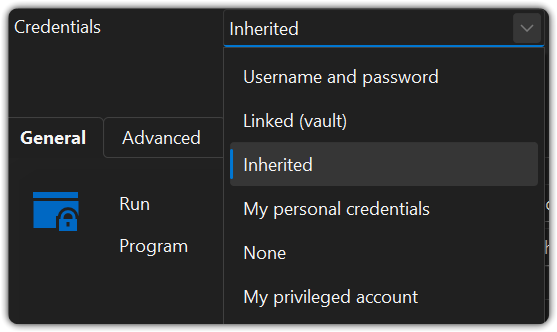
2bfdea86-6f99-4e06-90be-2f84ce86dd90.png
All Comments (18)
Hello,
I would recommend using the Workspace browser extension, which links to your Remote Desktop Manager application (or Devolutions Server and Hub) to allow filling credentials automatically on external web browser entries, whether they are started from RDM or not.
You can read more and find the download link here: https://devolutions.net/workspace/extension/
In your case, you would be interested in the Firefox extension, since it seems to be the browser you're using.
Regards,
Hubert Mireault
Is it possible that you are referring to the situation when you create web entries in RDM and use the internal entry option, and the fields are not autofilled? I understand the problem may be that RDM itself does not detect the login and password or email fields, so the autofill doesn’t work when the page loads, forcing you to copy and paste manually from the clipboard to complete it yourself.
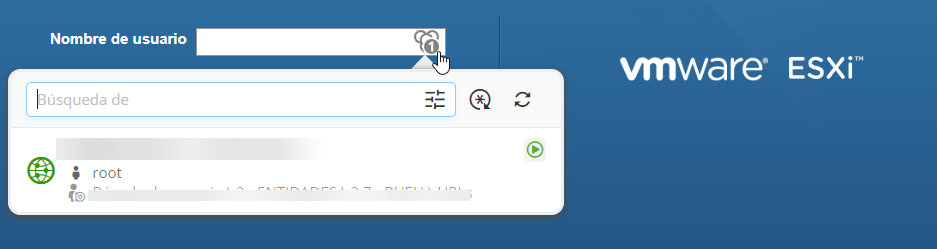
Additionally, regarding the Workspace extension, it works perfectly in Edge, Firefox, and Chrome. It does not autofill the fields automatically, but when you click on it, it displays the login details and then autofills them for you afterwards.
I am attaching screenshots of both Workspace and RDM. This illustrates how the login autofill behaves in each case:
Workspace login pag: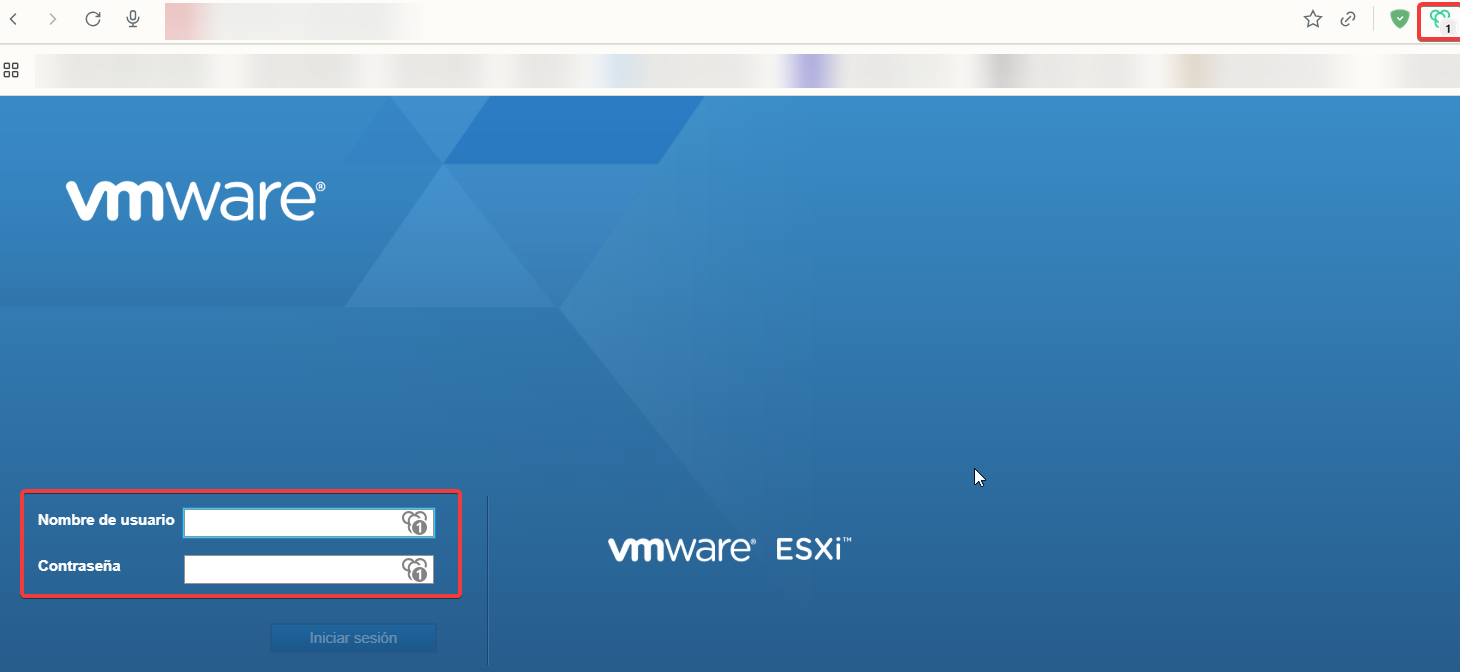
Login pag in RDM: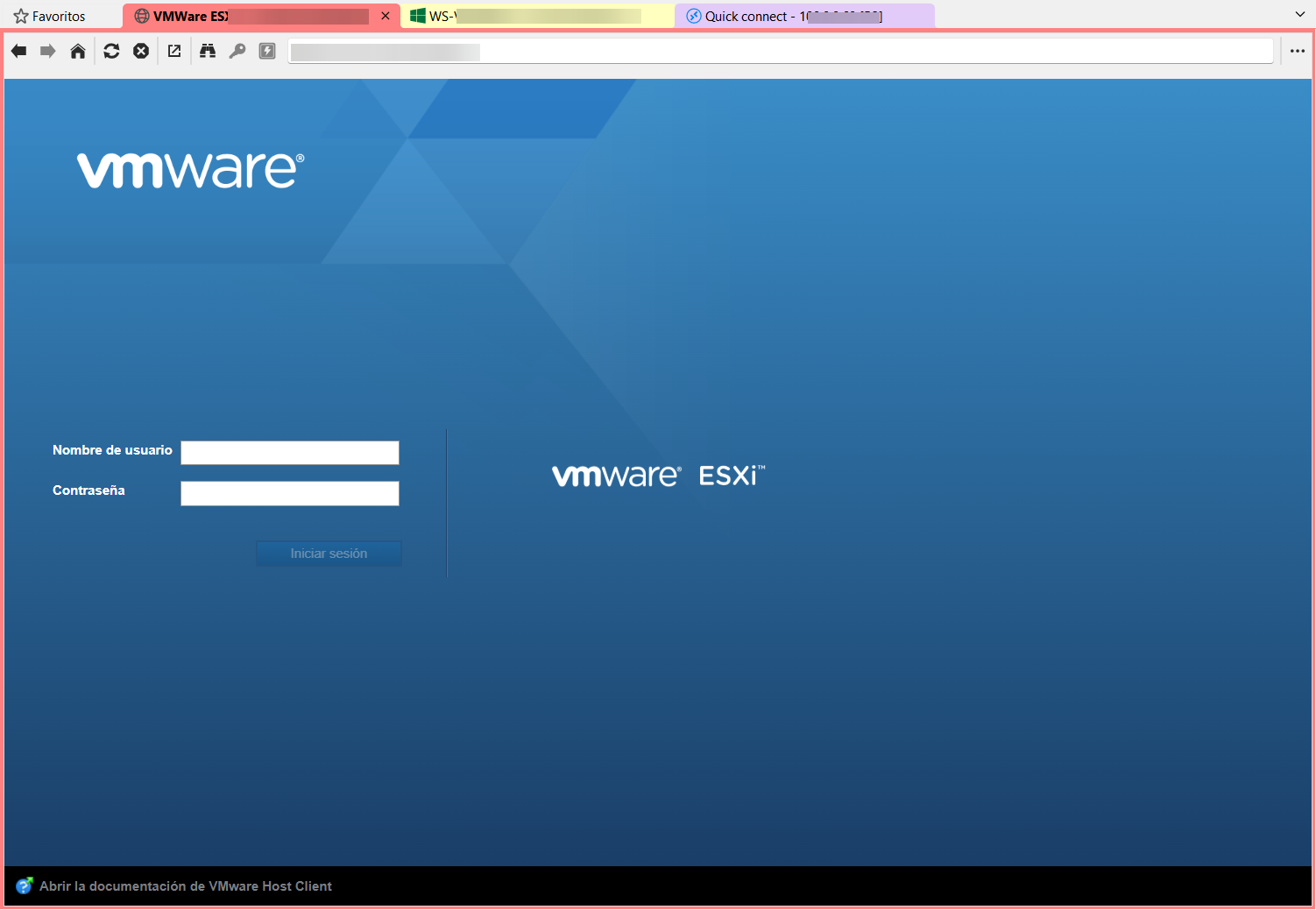 In RDM, as you can see, if you have the web entry configured internally, this does not happen—the fields are not autofilled, and you have to use the clipboard option to paste the fields manually. I have tried to configure the autofill feature in every possible way so that RDM completes the fields automatically, but I have never been able to achieve it.
Could it be that you were referring to this?
90642fe7-4199-4fe3-b844-88a2dcb56069.png
af8a0fa6-4c57-4616-9d65-e98d89823bb8.png
6f3b99e4-932a-4678-a9e6-caaf0b297992.png
Hi,
To enable autofill in Remote Desktop Manager (RDM), you’ll need to identify the login fields on your website by using the Automatic or Discover button or adding them manually. You can find some instructions here:
https://docs.devolutions.net/rdm/kb/knowledge-base/website-authentication/
https://academy.devolutions.net/student/activity/2404924-automating-website-logins-with-autofill-in-rdm
For the Workspace Browser Extension, you need the option “Automatically fill in credentials on load” enabled in the data source the extension is connected to. This allows autofill to work without manually selecting the entry:
https://docs.devolutions.net/workspace/workspace-browser-extension/settings/
Best regards,
Olivier Désalliers
Hi
Do you know this workspace extension work with portable version RDM or not?
Hi,
Yes, you can connect RDM portable with Workspace browser extension.
Best regards,
Olivier Désalliers
Hi
I tried with web browser extension, I had same problem with agussofe mentioned, I think some of website blocked autofill, my example is Palo Alto login web page. But the autofill login (native application) entry still work. Any idea on this?
Here some screenshot may help: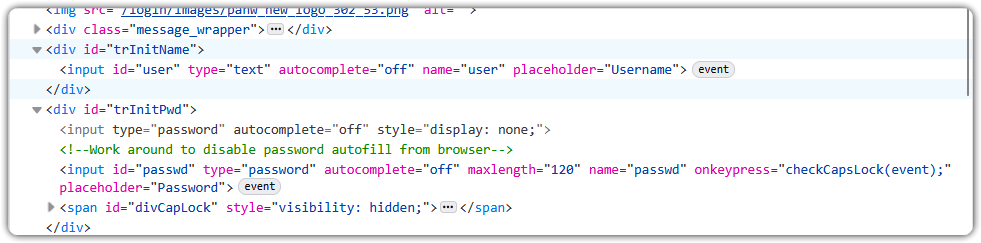
a752ab14-872f-407a-a620-2b8f4fcc6737.png
I saw another similar case in support section:
https://forum.devolutions.net/topics/51499/password-not-autofilling-when-autocompleteoff
Hi,
In RDM, does it work if you set up the website entry for the site in the screenshot using the following configuration: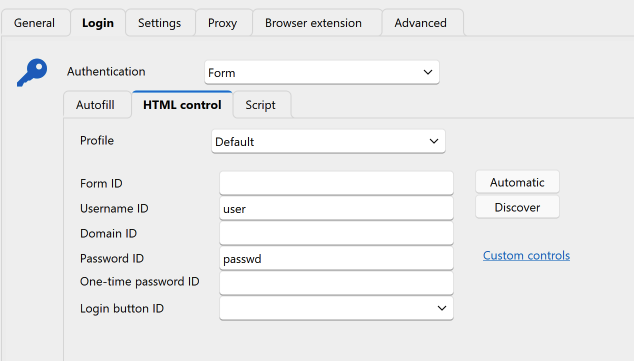
Best regards,
Olivier Désalliers
RDMWebsiteConfigAutofill.png
Hi
No, it doesn't work.
Hi,
It doesn’t work with RDM or Workspace Browser extension or both?
We tried to reproduce the issue based on the screenshot you provided but haven’t been able to so far.
If it happens in RDM, does the same issue occur when you click the “Key” button?
If it happens in Workspace Browser extension, are you using the “Automatically fill in credentials on load” option? And does the issue also occur when selecting the entry directly from the extension popup?
If you can, please send us the webpage URLs in a private message so we can take a closer look.
If the sites aren’t public, you can still share them by following these steps:
Saving and Sharing a Webpage
- Save the Complete Webpage
- Follow the steps in this guide: https://www.wikihow.com/Save-a-Webpage
- Make sure to save the page with all its resources (HTML, CSS, images, etc.) in a complete folder.
- Compress the Saved Webpage
- Locate the folder containing the saved webpage files.
- Right-click the folder and choose “Compress” or “Send to → Compressed (zipped) folder” to create a .zip file.
- Send the Zipped Folder to Support
- Attach the .zip file to an email and send it to our support team.
Thank you for your cooperation!
Best regards,
Olivier Désalliers
RDMWebsiteAutofill.png
Hi
It doesn't work on both. I have sent support file seperatedly.
Here is a webpage for ESX version 8, Agusofe is using probably 7.* version of esx.
Login - VMware ESXi.html
Hi,
NeilSmith2025, we’ve received your files. On our side, the username and password fields are filled correctly and remain visible (RDM and the browser extension). Is the issue that, although the fields look filled, the website does not recognize that the credentials were entered? If possible, could you send us a short video showing what happens on your end with the website you provided?
For ESX version 8, the username and password fields are also filled correctly and remain visible during our tests. Are you experiencing a similar issue there, where the site does not detect that the credentials have been entered even though the fields appear filled?
Best regards,
Olivier Désalliers
Hi, Oliver
Your descirption is correct. there is nothing filled in username and password. so the website cannot continue on that.
Hi,
A new version of RDM (2025.3.25.0) has been released that might fix for your issue.
Could you let us know if this update resolves the issue on your side?
Latest Version: Download RDM
Best regards,
Olivier Désalliers
Hi, Olivier
I downloaded latest version, but seems problem still there, no difference as before.
Hi @NeilSmith2025,
I’ve sent you a "Direct Message" with a video demonstrating the Palo Alto login autofill in RDM, along with a few additional questions related to it.
Best regards,
Olivier Désalliers