
Paul Dumais
Window is slightly too small to fit the RDP session
Hello,
Thanks we have logged a ticket and we will investigate a fix.
Paul Dumais
Regression: cannot type diacritic characters in documentation editor
Hello,
I'm sorry you found this issue, we updated our Markdown Editor to a new Avalonia version in the .16 release, I have logged the issue and I will fix this issue asap.
As for the downgrade, it's an interesting idea to allow it from inside the app. You can download previous builds from our website here:
Download Previous Versions | Remote Desktop Manager
Thanks,
Paul Dumais
Inquiry regarding SQL query traceability via Microsoft SQL Server entries
Hello @jvaillant ,
I have logged your requests in the ticket, and we will look into this.
Thanks,
Paul
Inquiry regarding SQL query traceability via Microsoft SQL Server entries
Hello,
This is a great feature request. I have logged a feature request ticket for a future version of RDM. Do you want to only record queries run by RDM or do you want to access Query logs, for example the Query Store or the SQL Server Agent to trace all queries run against the server?
Thanks,
Paul
Open in pane
Thank you for reporting this issue, we have logged a ticket and we will fix it.
Best regards,
Paul Dumais
Quick connect
@btojs Thanks, I have logged a ticket to fix these issues.
Paul Dumais
Option to pin the Navigation tab when it is docked as a document tab
@Danvo1 We have reproduced the issue with the navigation tab losing focus when docked as a session tab, we should have a fix shortly, thank you!
Best Regards,
Paul Dumais
Existing RDP session screen does not load
2026.3.13.0 seems worse than 3.12.
@chaddb Could you send me a video of the issue happening, it may be a slightly different issue than what the other user is reporting, i think we do have some repaint issues. Also the specific settings of your RDP connection would also help. You can post them here or send them to me privately as a Direct Message if you are not comfortable sharing it publically.
Quick connect
Hello,
Thanks for the suggestion. There are a few options available to you. First, the best way to solve your issue is to simply pin the ribbon button to the quick access toolbar, just right click on the button the select "Pin to Quick Access", this will add the button to the title bar of RDM and easy to access at all time:
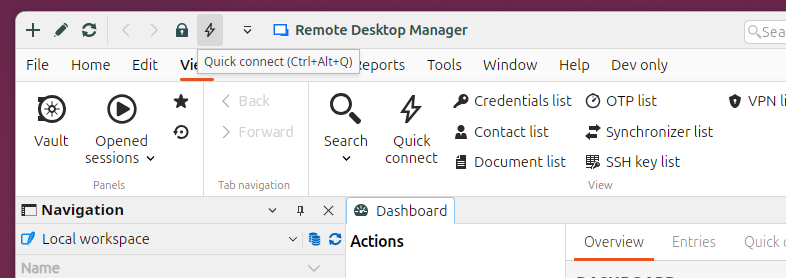
Another solution is to switch to Toolbar Mode, our new Toolbar mode is fully customizable. Click on your Account Icon in the top right, then select "Toolbar", then you can right click on the Toolbar and "Customize" the set of buttons shown in the toolbar, this will allow you to place the Quick Connect button anywhere you want on the Toolbar.
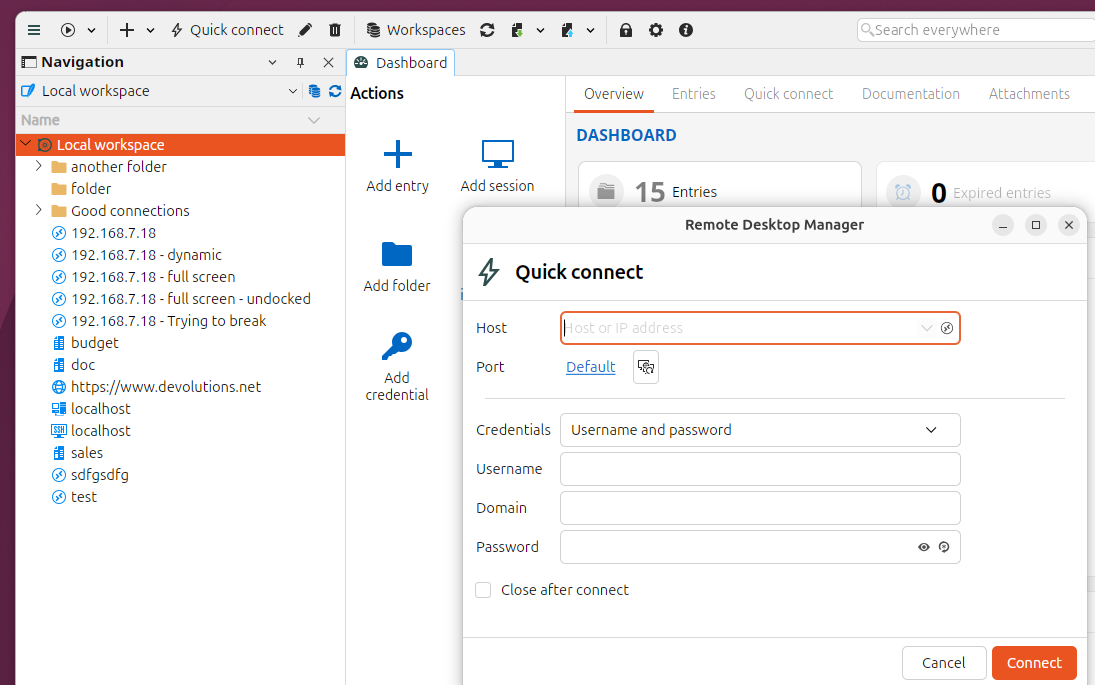
Best Regards,
Paul Dumais
When I logoff a RDP session...
Thanks we will re-open the issue and investigate why it is still happening.
Best Regards,
Paul Dumais
2026.3.12 - still display issues
Im getting this as well. I see the ribbon button for Session logs and another for System diagnostics. Which do you want and where do I send it?
@Tynighty
You can post a screenshot of your mouse hovering over the RDP session tab, this should show a popup with the connection information, including the RDP version and display resolution. For example:
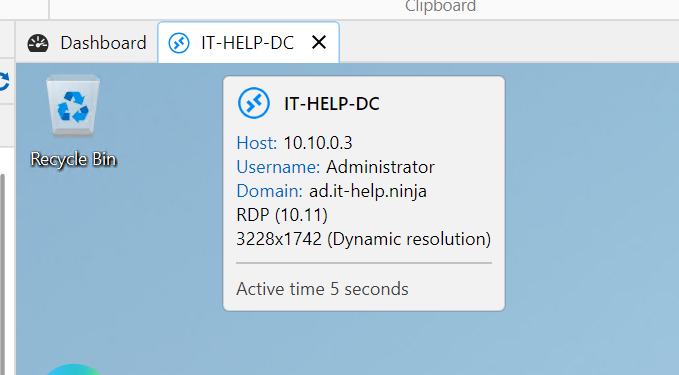
Thanks,
Paul Dumais
2026.3.12 - still display issues
Hello @Deas, thanks for reporting this issue. I am investigating a fix for this as soon as possible. I will probably send you some beta builds to try and see if the issue is resolved for you. Could you hover over the tab and send me the details of your connection? I'm curious about the resolution and RDP version of the connection.
Thanks,
Paul Dumais
When I logoff a RDP session...
RDM moves itself to the background, which is very annoying. It does not occur when we close a SSH session.
We upgraded to 2026.3.12.0 (from version 10) hoping that the fixed fixed our bugs which keep happening.
But this came instead. :-(
We use RDM on a RDS server (W2022)
Another annoying thing is that after a while we cannot type anything in the filter search bar, typing looks disabled; to fix it we need to close RDM and start it again.
@bramsoethof
Hello,
I have also seen this issue many times. I think this issue is fixed in our 2026.3.13 build which should be coming out soon. But it also depends on many factors of your RDP settings, for example if your are using FreeRDP or the Latest activex embedding for RDM connections, as well if you are using an undocked or full screen RDP window as well. But I think I fixed all those cases.
Thanks,
Paul Dumais
Bring Back ConnectWise Screen Connect - ASAP
Thank you for your feature request, funny timing of your request, I'm actually looking into working with ConnectWise closer right at this moment, do you also use the ConnectWise PSA or only ScreenConnect by itself? Feel free to send me a direct message and I will share my contact information, I'd like to virtual meet with you so that I can understand your requirements even better, and make sure we build the right solution to make you happy!
Best Regards,
Paul Dumais
Problem with consequences of the rendered frame around the fullscreen view
Thank you, I think I see a similar small single line at the top of the screen, It's probably a rounding error when scalling the pixels causing 1 pixel line to be missed, we will look into a fix for this.
Best regards,
Paul Dumais
Problem with consequences of the rendered frame around the fullscreen view
@andreas2 Thank you, I tried setting my laptop to 166% scale and did not see any extra line, but it may be also related to what the original resolution of your screen is as well, can you share your computer resolution and the scale of 166%? Can you send us a screenshot of the extra frame line you are seeing so that we can determine what is causing it? Also the brand of the desktop environment you are using would also be helpful, for example Ubuntu 26 etc.
Thanks,
Paul Dumais
Hide the top tabs
Hello,
I'm very sorry about this, it looks like when we reworked the session tabs we accidentally removed this feature, I will make sure it gets re-added in our 2026.3.7 build.
Best regards,
Paul Dumais
2026.3.4 Network Scan
Thanks, I have a logged a feature request ticket and we will add an option to allow you to disable the auto start on the network scan tool.
Regards,
Paul
2026.3.4 Network Scan
Hello,
Thank you for your feedback. If you click Tools - Network Scan then yes the scan start automatically. If you click File - Import - From Network Scan then the scan does not start automatically. Do you want me to create a feature request to add the option to disable the auto scan from the Tools, or is this workaround sufficient?
Best regards,
Paul Dumais
RDM v2026.3.5.0: RDP Session Display Issue
Hey Jimmy and Paul,
I am having the exact same issue with the latest update. Double clicking opens everything small however using the connect button on the ribbon works without issues. I also noticed it only happens sometimes when double clicking and not all the time.
Remote Desktop Manager 2026.3.5.0 64-bit (PreJIT)
Runtime: .NET 10.0.12
Platform: Microsoft Windows 10.0.26200
Workspace: Devolutions Hub Personal
Allocated memory: 547 MB
@kyleschultz
Hello Kyle,
I think the double clicking and very small view issue is fixed in our 2026.3.6 build which should be released very shortly (maybe today, I'm not sure). Let me know if the issue still happens in that version.
Thanks,
Paul
RDM v2026.3.5.0: RDP Session Display Issue
Hello Jimmy,
Do you know what the difference are in settings with the connections that show up small versus the ones that work properly, things like the RDP Version (Latest versus others), display sizing modes? The ones with the repaint issue, i have an idea what the issue is, I can look into that. You can also send me a Direct Message with more information about the connections if you would like to share it privately.
Thanks,
Paul
Question about Tab Pinning and Tab Strip Organization
Hello David,
Thank you I appreciate the understanding. The good news, is that last night I was able to re-implement the multi-row tabs feature, so it will be released very quickly in our next build 2026.3.6, and even better when we re-implement features it sometimes means we can make them better, so yes, the tab order does not shuffle now when you select a tab, it stays in the same order and the rows don't move. I'm not sure if all users will appreciate this not shuffling (maybe it should be an option), but I will wait to see what other users say first. There may be new unexpected issues with the new multi-row implementation, but from my tests last night the feature seamed to work pretty well.
Best Regards,
Paul Dumais
Question about Tab Pinning and Tab Strip Organization
Hello David,
I'm very sorry for this regression. We did not purposely remove the Multi-Row tab feature, we have been in the process of converting the RDM app to a new UI framework called Avalonia, this will allow all our RDM apps on all platforms to have the same feature set since they share a cross platform UI layer. Unfortunately it looks like the new Tab component we are using does not support multiple tab rows, and we didn't noticed this lacking feature until this last week. I have logged a ticket for this issue, and I'm trying to find a solution to this problem as soon as possible. We will let you know when we make progress on this, hopefully in the very short term.
Please keep the feedback coming we really appreciate it!
Best Regards,
Paul Dumais
"View only" can not be added to Quick Access bar.
Hello Dirk,
Thank you for your feedback. I am working on resolving this issue. Our next beta build of 2026.3 will include the ability to better customize the Quick Action Toolbar as well as add Session Action buttons like the "View only" mode button and toggle buttons to the Quick Action Bar. We also added a new Toolbar bar mode which is even more powerful.
Thanks,
Paul
Problem with consequences of the rendered frame around the fullscreen view
In the Linux version of RDM (I'm currently using 2026.2.2.2) there is always a thin frame around the content in the fullscreen view.
This doesn't look particularly good, but the bigger problem is that because this frame makes the actual view slightly smaller than the screen size, and I'm using the scrollbar screen sizing mode, there is always a scrollbar, as the content never fits perfectly because of the rendering area always being slightly smaller than the screen size.
On macOS, there is no frame around the fullscreen content in RDM, which both looks much better and prevents this issue.
Could this be changed on Linux too, so that it follows the way it behaves on macOS?
@andreas2
Thank you, we have reproduced the issue and logged a ticket, we are currently working on a fix in 2026.3.
Best regards,
Paul Dumais