Problem with consequences of the rendered frame around the fullscreen view
Problem with consequences of the rendered frame around the fullscreen view

In the Linux version of RDM (I'm currently using 2026.2.2.2) there is always a thin frame around the content in the fullscreen view.
This doesn't look particularly good, but the bigger problem is that because this frame makes the actual view slightly smaller than the screen size, and I'm using the scrollbar screen sizing mode, there is always a scrollbar, as the content never fits perfectly because of the rendering area always being slightly smaller than the screen size.
On macOS, there is no frame around the fullscreen content in RDM, which both looks much better and prevents this issue.
Could this be changed on Linux too, so that it follows the way it behaves on macOS?
All Comments (6)
In the Linux version of RDM (I'm currently using 2026.2.2.2) there is always a thin frame around the content in the fullscreen view.
This doesn't look particularly good, but the bigger problem is that because this frame makes the actual view slightly smaller than the screen size, and I'm using the scrollbar screen sizing mode, there is always a scrollbar, as the content never fits perfectly because of the rendering area always being slightly smaller than the screen size.
On macOS, there is no frame around the fullscreen content in RDM, which both looks much better and prevents this issue.
Could this be changed on Linux too, so that it follows the way it behaves on macOS?
@andreas2
Thank you, we have reproduced the issue and logged a ticket, we are currently working on a fix in 2026.3.
Best regards,
Paul Dumais
Awesome! Thanks a lot!
This is almost entirely resolved with the 2026.3 update, but just so you know, there is still a frame line on top of my screen when using 166% scaling, which is what I do on my laptop screen.
When using 200% scaling, there is no frame any more, and the scrollbar is not visible in either case so the more important part of this is resolved.
It's now simply a smaller visual issue that seems to only show up on some scaling settings.
It still doesn't look very nice when it does show up though :)
@andreas2 Thank you, I tried setting my laptop to 166% scale and did not see any extra line, but it may be also related to what the original resolution of your screen is as well, can you share your computer resolution and the scale of 166%? Can you send us a screenshot of the extra frame line you are seeing so that we can determine what is causing it? Also the brand of the desktop environment you are using would also be helpful, for example Ubuntu 26 etc.
Thanks,
Paul Dumais
Hi @Paul Dumais
My screen resolution is 2880x1800 at 166% scaling, and I'm running Ubuntu 26.04 with Gnome 50/Wayland, and Intel integrated graphics.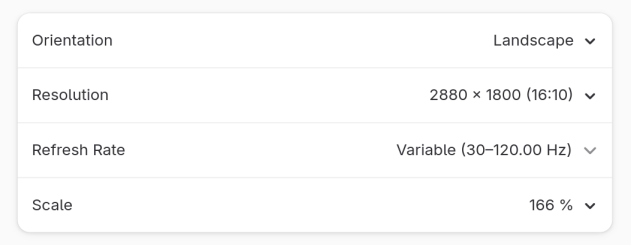
Here is a screenshot of how the line at the top of the screen looks with an RDP connection to a machine with black background. Not really visible here unless you download the image and zoom in, but there is a 1px gray line at the top of that image (it's much more visible when the remote machine's background is black, and the frame around the screen is also black)
One interesting thing that I noticed when I took that screenshot of the line, and that may or may not have something to do with the issue, is that while the screen resolution is clearly set to 2880x1800, the actual size of a screenshot of the whole screen is 2879x1799.
I would guess that this has something to do with the maths of scaling 2880x1800 to 166% scale, but it doesn't seem impossible that it could also be a part of why this issue occurs.
e5b6e951-babb-44f3-96f1-faf20150a04e.png
line-at-top-of-screen.png
Thank you, I think I see a similar small single line at the top of the screen, It's probably a rounding error when scalling the pixels causing 1 pixel line to be missed, we will look into a fix for this.
Best regards,
Paul Dumais