Existing RDP session screen does not load

Hi,
Sometimes when opening an existing RDP session the screen does not load. When triggering animations within Windows it only load that part. The workaround now is opening another tab and then go back again. 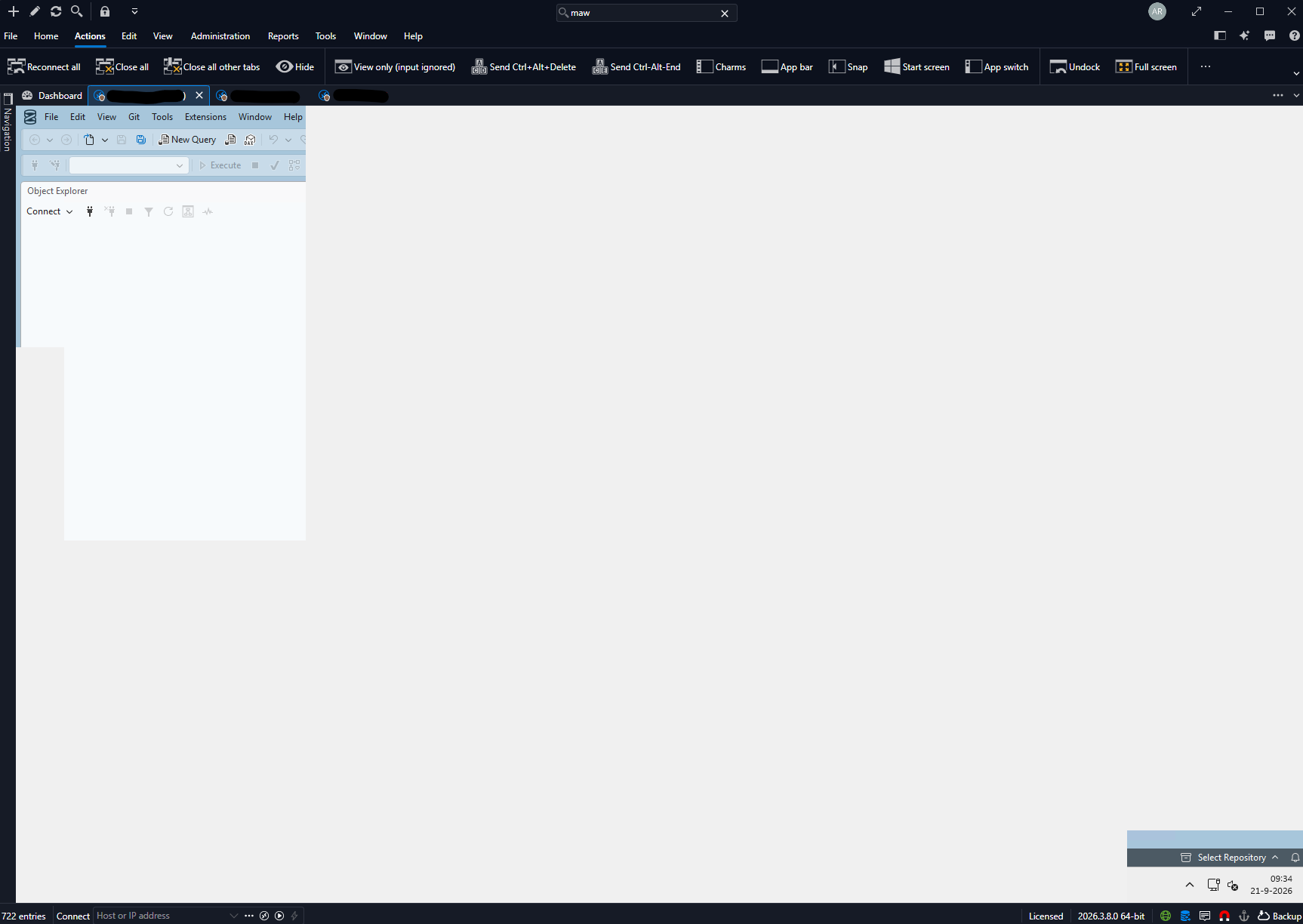
Kind Regards,
Arjan
dd089e80-3876-4a21-b14a-d65b66683ac9.png
All Comments (26)
Can confirm, version 2026.3.8.0 64-bit (JIT).
Same here with 2026.3.8.0 64bit (PreJIT) Smart resizing is also borked.
Hello,
Thank you for reporting this and for including the screenshot.
We have seen this same behaviour internally on version 2026.3.8.0.
Switching to another tab and back forces a full redraw, which is why your workaround works.
I am reporting it to our development team so it can be fixed in an upcoming release.
Best regards,
Alexis Beauparlant
Still not fixed in Remote Desktop Manager 2026.3.9.0 64-bit (JIT)
Unuseable at the moment, had to roll back.
Regards,
André
@andrebienkowski
Could you elaborate on what is not usable?
Do you encountered the exact same issue?
Could you post a small recording or a screenshot?
Best regards,
Jeff Dagenais
@Jeff Dagenais
Hi Jeff,
RDM as a whole is unusable at the moment, at least the latest Versions. Having the same problems like ArjanHP.
For us, the RDP clipboard redirection isnt working also.
So we are back to mstsc.exe, as long as it is still unfixed.
Regards,
André
I'm seeing the same behavior in 2026.3.8.0 as well. The 2026.3.x release of RDM is almost unusable. I've never seen such a bad update for RDM.
Hello,
We should have a fix for the blank RDP screen in the upcoming RDM 2026.3.10.0.
Best Regards,
Michaël Beaudin
Hello,
Thank you for being so patient!
If possible, could you update your RDM to the latest version (2026.3.10.0) and see if the problem persists? This version should resolve your issue.
Latest Version: Download RDM
If the problem persists after the update, please let us know so we can inform our development team.
Best regards,
Maxim Robert
Hello,
Thank you for being so patient!
If possible, could you update your RDM to the latest version (2026.3.10.0) and see if the problem persists? This version should resolve your issue.
Latest Version: Download RDM
If the problem persists after the update, please let us know so we can inform our development team.
Best regards,
@Maxim Robert
Hi Maxim,
works for me now! Thanks for the quick fix!
Regards,
André
Hello,
Thank you for being so patient!
If possible, could you update your RDM to the latest version (2026.3.10.0) and see if the problem persists? This version should resolve your issue.
Latest Version: Download RDM
If the problem persists after the update, please let us know so we can inform our development team.
Best regards,
@Maxim Robert
So far this seems fixed in 2026.3.10.
Hello,
Thank you for being so patient!
If possible, could you update your RDM to the latest version (2026.3.10.0) and see if the problem persists? This version should resolve your issue.
Latest Version: Download RDM
If the problem persists after the update, please let us know so we can inform our development team.
Best regards,
@Maxim Robert
I spoke too soon. Still seeing this in 2026.3.10.
Hello,
I haven't managed to reproduce on my end since the changes made in the 2026.3.10.0. We have some improvements to harden the fix in the upcoming 2026.3.11.0 later this week but I can't guarantee it will impact you as I can't reproduce the issue at all on my end anymore.
Do you have anything special on your setup or is it simply multiple RDP sessions opened at once?
Something like
- Thumbnail view
- Tab groups
- Performing dock/undocks
- Being on a Windows Server operating system
- Something else?
Best Regards,
Michaël Beaudin
Hello,
I haven't managed to reproduce on my end since the changes made in the 2026.3.10.0. We have some improvements to harden the fix in the upcoming 2026.3.11.0 later this week but I can't guarantee it will impact you as I can't reproduce the issue at all on my end anymore.
Do you have anything special on your setup or is it simply multiple RDP sessions opened at once?
Something like
- Thumbnail view
- Tab groups
- Performing dock/undocks
- Being on a Windows Server operating system
- Something else?
Best Regards,
@Michael Beaudin
It seems to happen more with the more tabs I have open. With only one tab open I don't notice it. But once you get more than two it seems to happen pretty consistently.
No performing any docks/undocks. It's happening on my workstation.
Hello,
This happens here every time RDM is locked and unlocked again.
Hello,
Thanks for the info, we'll see if we can reproduce through these scenarios and keep you updated. As a side note, we will be releasing 2026.3.12.0 (.11 was skipped) either today or tomorrow with some improvements to RDP / docking in general which might improve things on your end as a side effect but those fixes didn't target the white screen bug specifically so I cannot promise any definite changes on that front.
Best Regards,
Michaël Beaudin
My lock/unlock scenario looks good in 2026.3.12.0.
But now I see this on start of RDM where I automatically open 10 RDP sessions.
I'm still seeing issues in .12 where you have to leave the tab to redraw the window.
Hello,
Thanks for letting us know. This is now one of the very few high priority issues we still have related to the 2026.3 release. We will definitely do all we can to try and fix this for the remaining cases where this happens as soon as possible.
Best Regards,
Michaël Beaudin
Hello,
Thank you for your patience while our team looked into the issue you reported.
I'm happy to let you know that the latest version of Remote Desktop Manager includes a fix for this problem. You can download it from our website here:
https://devolutions.net/remote-desktop-manager/download/
Once you have installed the update, could you please test it in your environment and confirm that everything now works as expected? If the issue persists or if you notice anything unusual related to the same original problem, just reply to this message with a few details, and we will be glad to look into it further.
Thank you for your collaboration.
Best regards,
Érica Poirier
2026.3.13.0 seems worse than 3.12.
Not in my case. For me the problem is fixed in .13
2026.3.13.0 seems worse than 3.12.
@chaddb Could you send me a video of the issue happening, it may be a slightly different issue than what the other user is reporting, i think we do have some repaint issues. Also the specific settings of your RDP connection would also help. You can post them here or send them to me privately as a Direct Message if you are not comfortable sharing it publically.
2026.3.13.0 seems worse than 3.12.
@chaddb Could you send me a video of the issue happening, it may be a slightly different issue than what the other user is reporting, i think we do have some repaint issues. Also the specific settings of your RDP connection would also help. You can post them here or send them to me privately as a Direct Message if you are not comfortable sharing it publically.
@Paul Dumais
Yep, I'll DM you.
Hi @chaddb
Thanks for the detailed information you sent to Paul. I've reproduced your issue and it should be fixed for the next (2026.3.16) release. Once it's available, let me know if you're still seeing problems.
And don't hesitate with other questions or comments in the meantime.
Thanks for your patience and kind regards,
Richard Markievicz
@Richard Markiewicz So far the issue seems fixed in 2026.3.16. I haven't noticed any issues today after updating EOD yesterday. Lot of fixes included in .16. Thanks for sticking with it.