RDM v2026.3.5.0: RDP Session Display Issue

After updating RDM to v2026.3.5.0 today, my team and I are having numerous issues with display sizing of RDP sessions with RDM. The only fix is to use RDP outside of RDM. I updated DVLS to latest v2026.3.5.0 and the same thing persists. See screenshot below.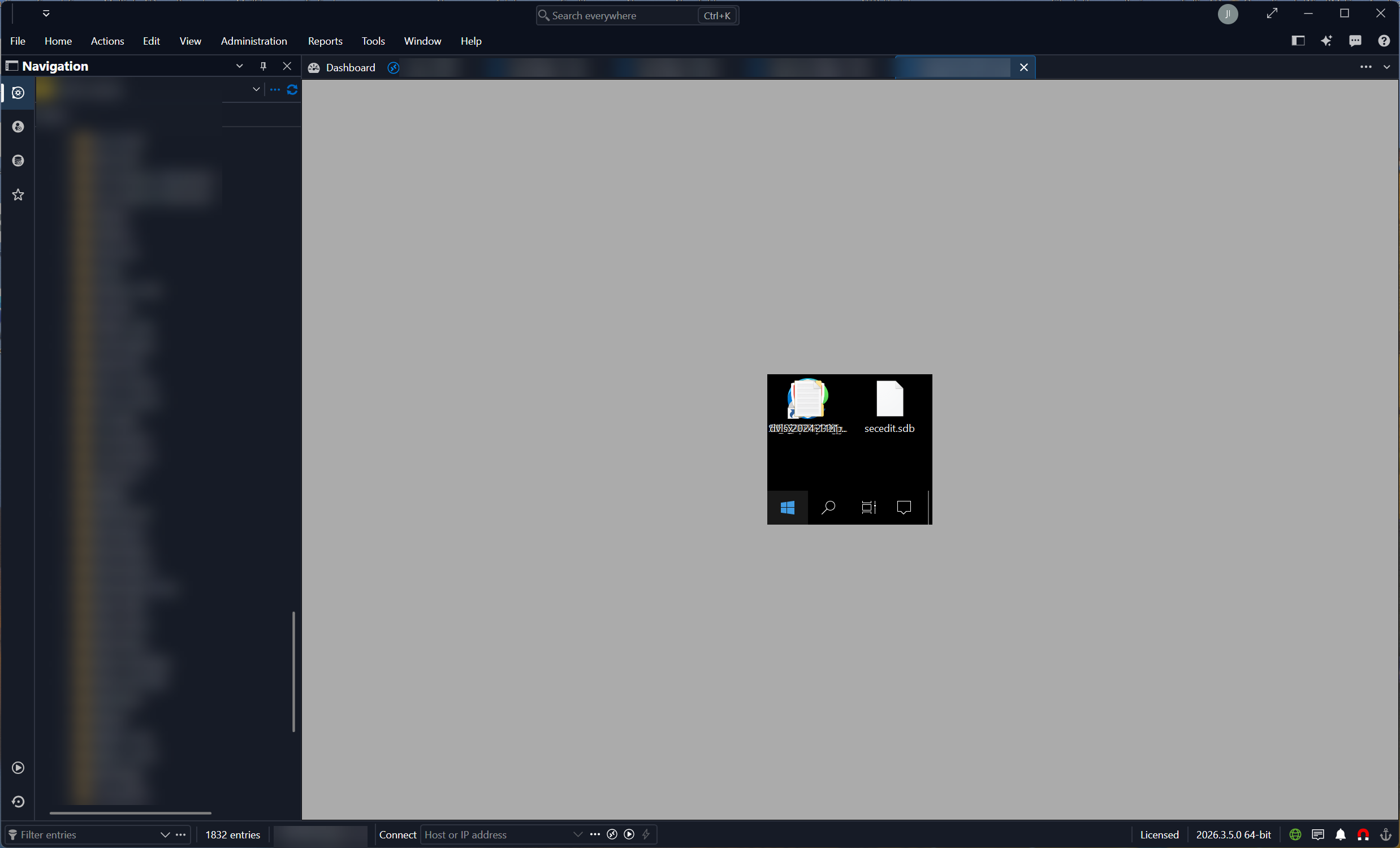
c0d788bf-93d3-44a3-924c-456e924834c9.png
All Comments (27)
And on RDM RDP sessions that are working decently, I can go out of the application and come back and they'll sometimes look odd like this below. If I click on another open RPD session and back to it then it'll display correctly: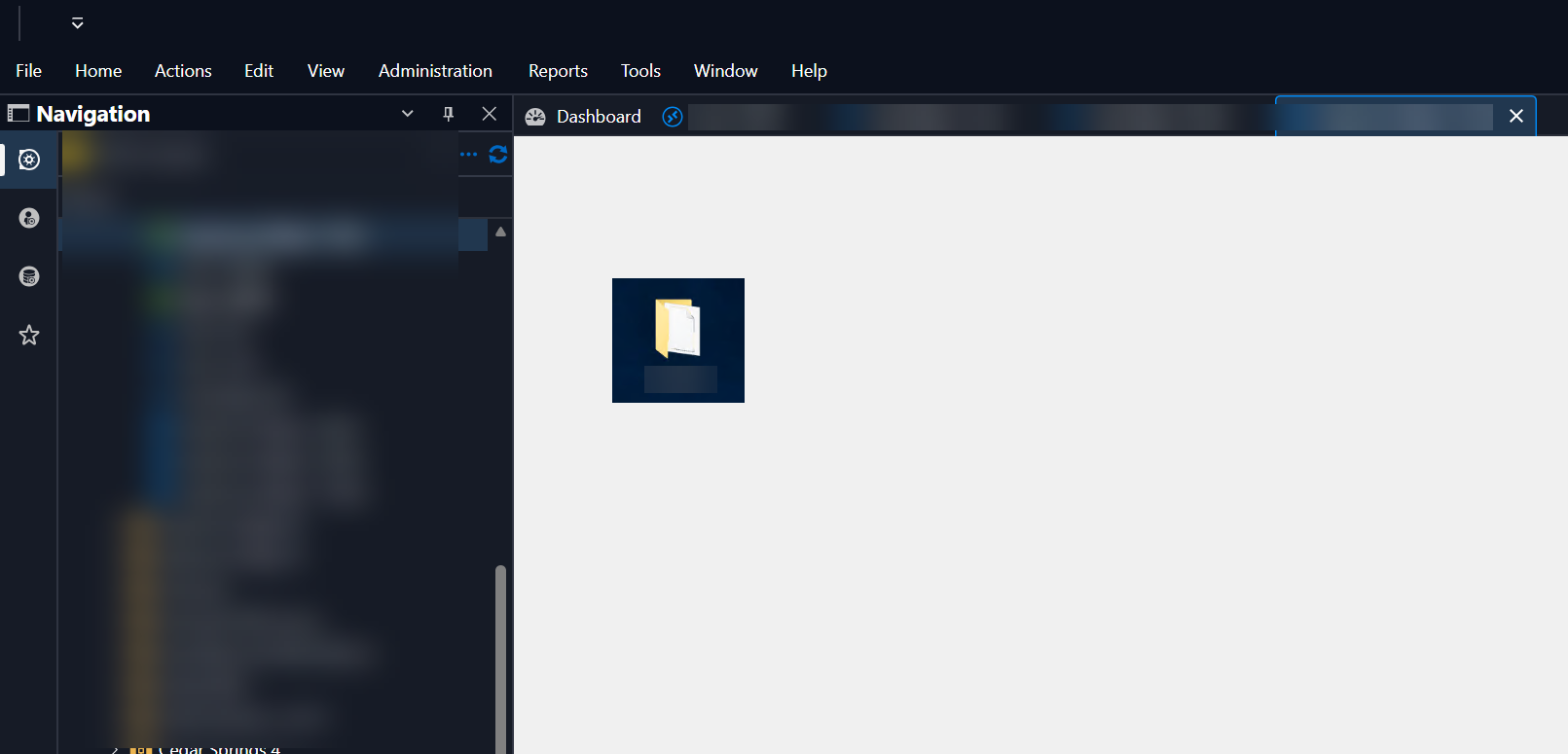
f1aa8a6c-a863-4b1c-a35c-00e724dfcd4a.png
Hello Jimmy,
Do you know what the difference are in settings with the connections that show up small versus the ones that work properly, things like the RDP Version (Latest versus others), display sizing modes? The ones with the repaint issue, i have an idea what the issue is, I can look into that. You can also send me a Direct Message with more information about the connections if you would like to share it privately.
Thanks,
Paul
Hello Jimmy,
Do you know what the difference are in settings with the connections that show up small versus the ones that work properly, things like the RDP Version (Latest versus others), display sizing modes? The ones with the repaint issue, i have an idea what the issue is, I can look into that. You can also send me a Direct Message with more information about the connections if you would like to share it privately.
Thanks,
Paul
@Paul Dumais
Hey Paul, you were on the money, and I should have verified that. The issue is with sites set like so: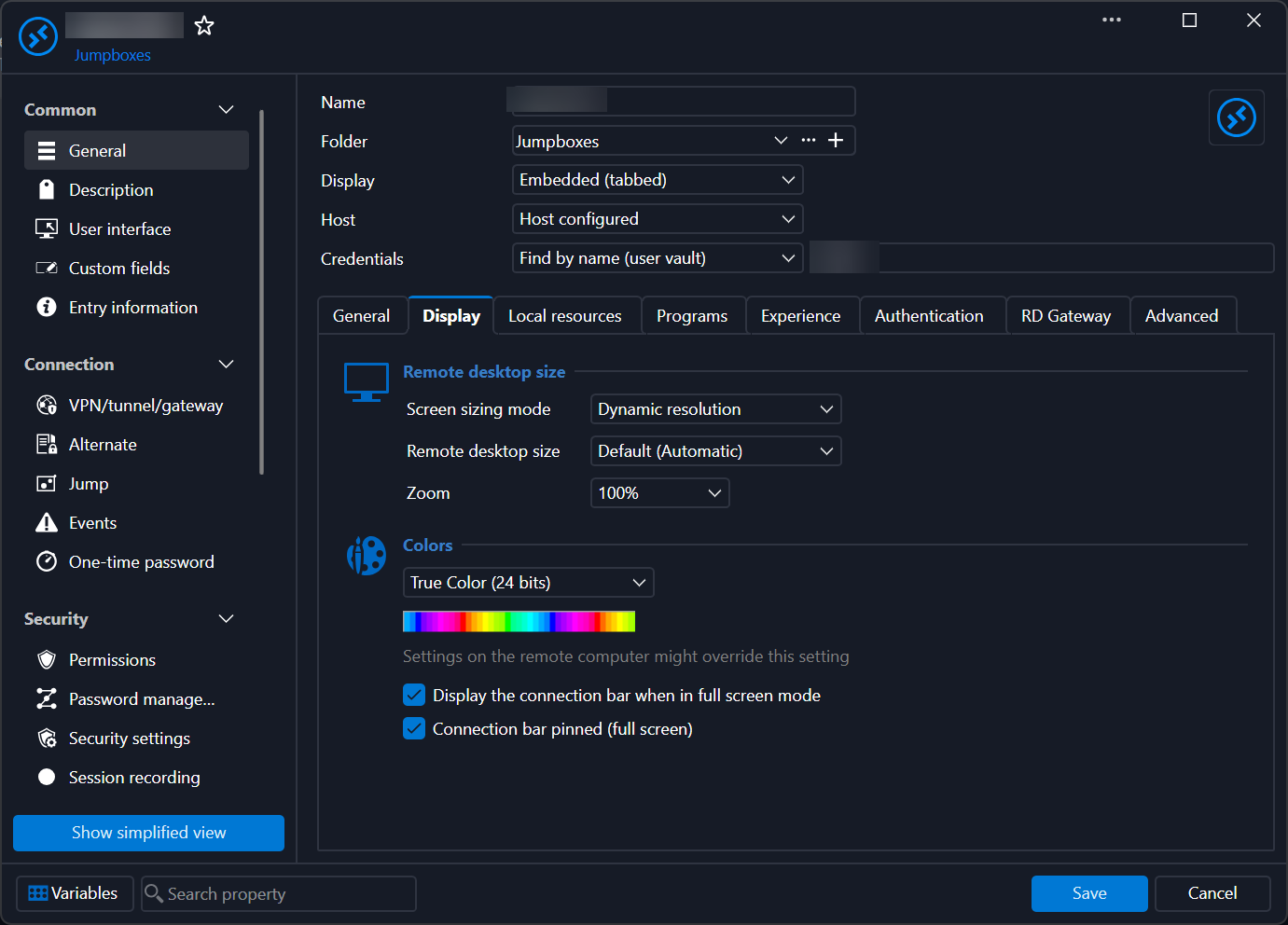
Set like this we don't have the issue: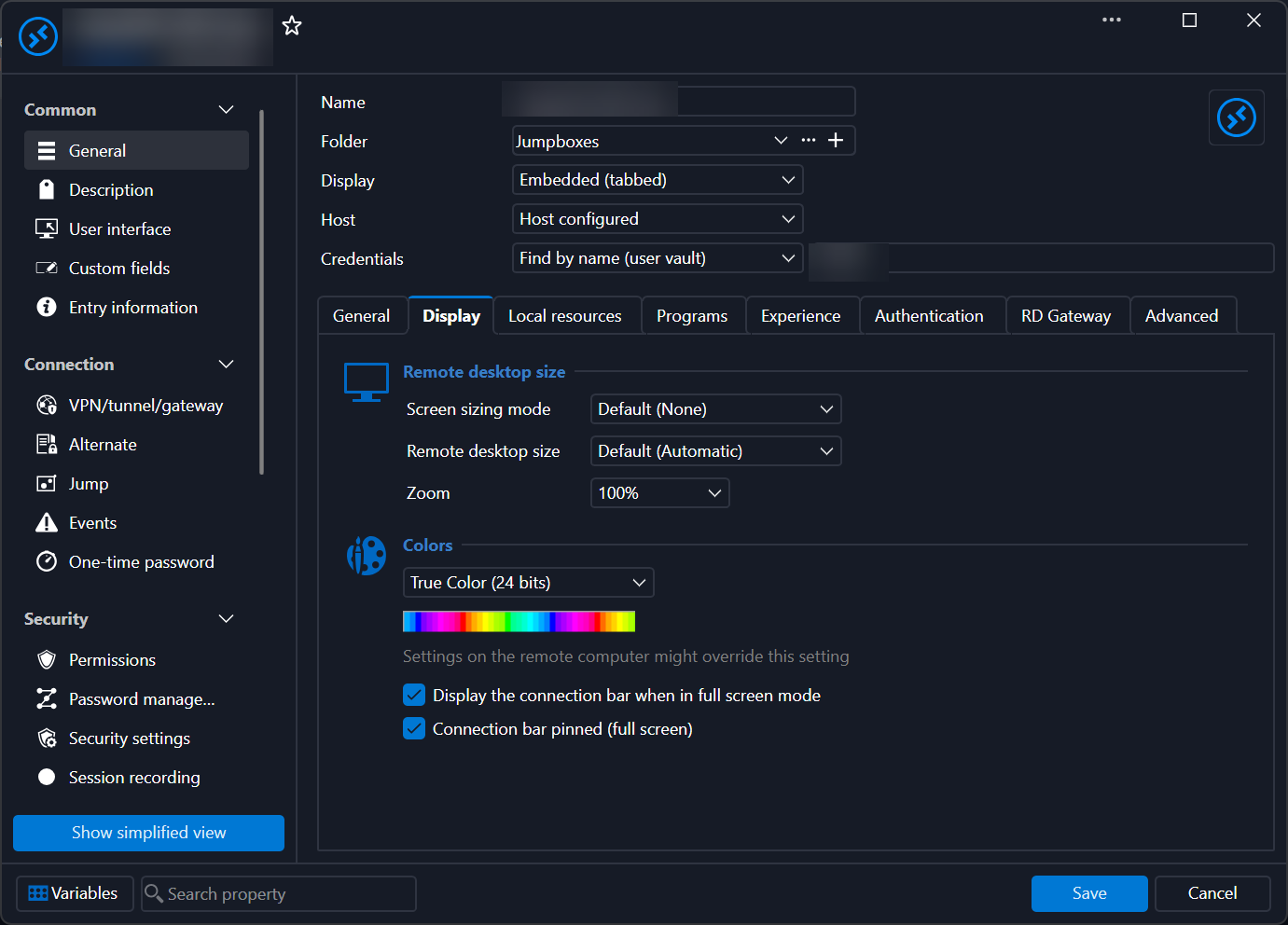
4aada0e4-bc2f-43e1-b96d-a75a9f588cfa.png
d1d932e6-6111-421e-97ff-34672a527658.png
Hey Jimmy and Paul,
I am having the exact same issue with the latest update. Double clicking opens everything small however using the connect button on the ribbon works without issues. I also noticed it only happens sometimes when double clicking and not all the time.
Remote Desktop Manager 2026.3.5.0 64-bit (PreJIT)
Runtime: .NET 10.0.12
Platform: Microsoft Windows 10.0.26200
Workspace: Devolutions Hub Personal
Allocated memory: 547 MB
I am having the issue when set like this. 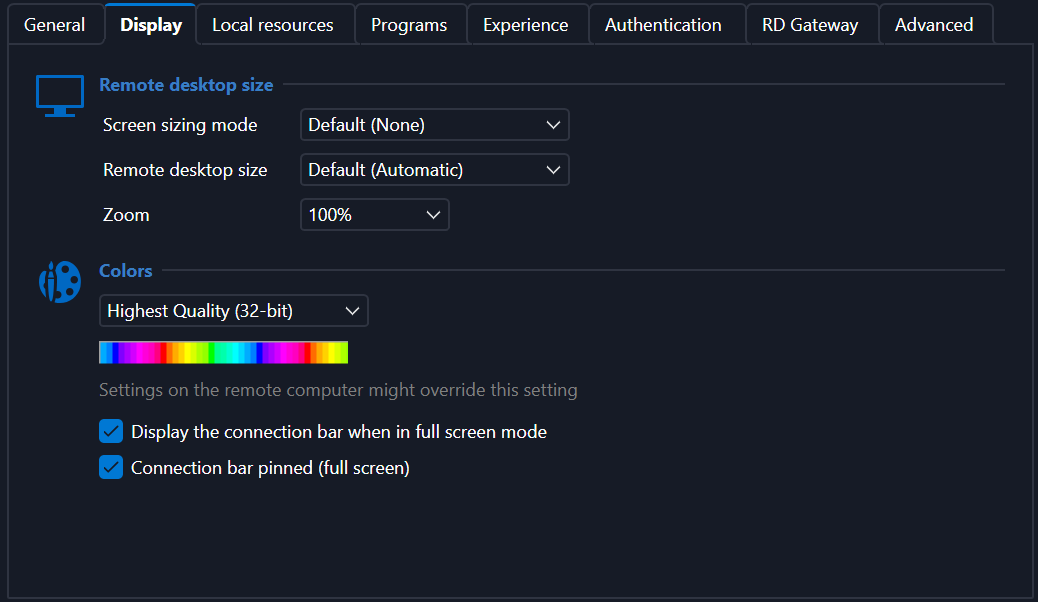
587fa206-f034-42f4-b9c7-8a73f5fbd1fd.png
Hello Jimmy,
Do you know what the difference are in settings with the connections that show up small versus the ones that work properly, things like the RDP Version (Latest versus others), display sizing modes? The ones with the repaint issue, i have an idea what the issue is, I can look into that. You can also send me a Direct Message with more information about the connections if you would like to share it privately.
Thanks,
Paul
@Paul Dumais
Hey Paul, you were on the money, and I should have verified that. The issue is with sites set like so:
Set like this we don't have the issue:
This only semi fixes it, FYI. The issue still happens but will clear up shortly after. However, for Windows 2008R2, it doesn't work at all (still super small square screen).
Hey Jimmy and Paul,
I am having the exact same issue with the latest update. Double clicking opens everything small however using the connect button on the ribbon works without issues. I also noticed it only happens sometimes when double clicking and not all the time.
Remote Desktop Manager 2026.3.5.0 64-bit (PreJIT)
Runtime: .NET 10.0.12
Platform: Microsoft Windows 10.0.26200
Workspace: Devolutions Hub Personal
Allocated memory: 547 MB
@kyleschultz
Hello Kyle,
I think the double clicking and very small view issue is fixed in our 2026.3.6 build which should be released very shortly (maybe today, I'm not sure). Let me know if the issue still happens in that version.
Thanks,
Paul
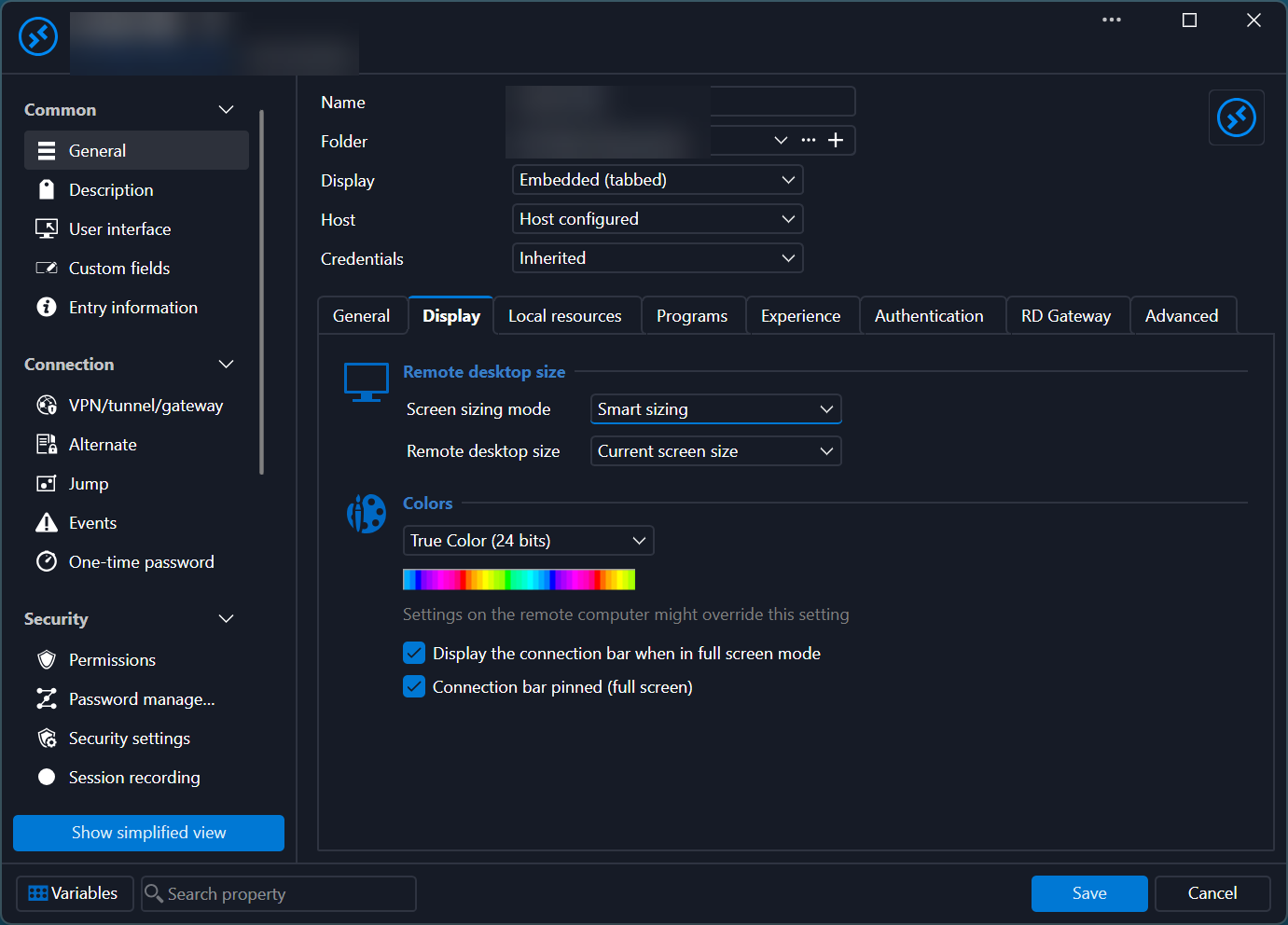
For 2008R2, the only way it displays right is with this setting
1e518f13-18ef-405c-8aea-92fdc65ea9ff.png
Hey Jimmy and Paul,
I am having the exact same issue with the latest update. Double clicking opens everything small however using the connect button on the ribbon works without issues. I also noticed it only happens sometimes when double clicking and not all the time.
Remote Desktop Manager 2026.3.5.0 64-bit (PreJIT)
Runtime: .NET 10.0.12
Platform: Microsoft Windows 10.0.26200
Workspace: Devolutions Hub Personal
Allocated memory: 547 MB
@kyleschultz
Hello Kyle,
I think the double clicking and very small view issue is fixed in our 2026.3.6 build which should be released very shortly (maybe today, I'm not sure). Let me know if the issue still happens in that version.
Thanks,
Paul
@Paul Dumais
This works for me, as well (clicking "Open session" versus double clicking). That said, at least with Windows 2012R2 and newer, Dynamic Resolution setting works mostly fine with double clicking.
Hello,
Thank you for contacting us about this!
The development team is currently working to resolve this issue. The issue will be resolved in the next release.
In the meantime, we found a workaround. In RDM, go into File > Settings > Entry Types > Sessions > Remote Desktop (RDP). In Display, change "Screen sizing mode" to "Dynamic Resolution".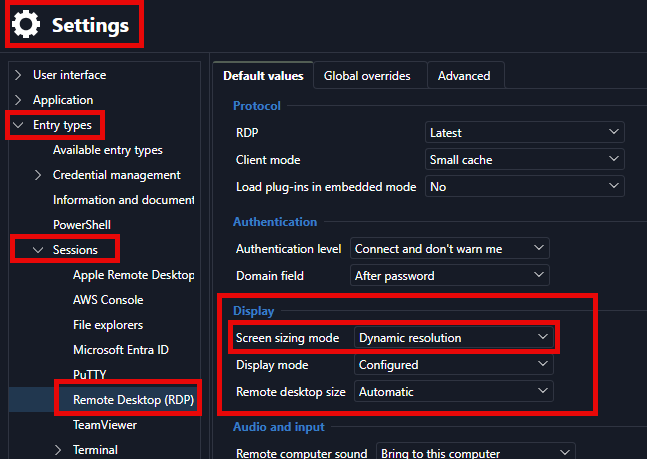
I’ll also make sure you’re notified by email when a new version with the fix is available.
If you have any other questions, please feel free to contact us.
Best regards,
Alexis Beauparlant
Alexis Beauparlant
d47f27c5-7f98-430e-9568-4bd4d0aabfb2.png
Hello,
We found a simpler workaround.Instead of double-clicking an RDP entry, select it and then click on "Open session" in the ribbon.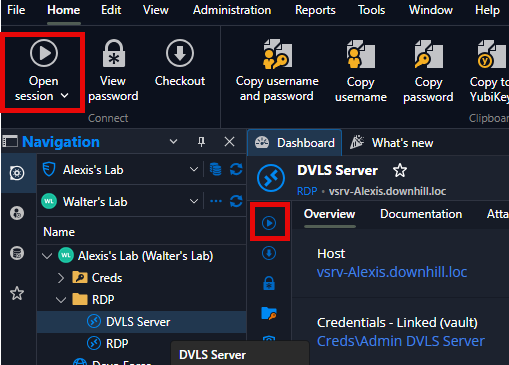
If you have any other questions, please feel free to contact us.
Best regards,
Alexis Beauparlant
f02bfaf5-1f19-4596-a9f4-1d2cb4966339.png
Hello,
We found a simpler workaround.Instead of double-clicking an RDP entry, select it and then click on "Open session" in the ribbon.
If you have any other questions, please feel free to contact us.
Best regards,
@Alexis Beauparlant
thank you
Hello,
For the issue where RDP opens in a small size, a new version containing a fix has been released. Please update to version 2026.3.8.0 or later.
Regards,
Hubert Mireault
Hello,
Thank you for being so patient!
I'm pleased to inform you that a new version of RDM (2026.3.8.0) has been released, featuring the fix for your issue.
Latest Version: Download RDM
Please let us know if this works or if you encounter any issues.
Best regards,
Maxim Robert
Hello,
Thank you for being so patient!
I'm pleased to inform you that a new version of RDM (2026.3.8.0) has been released, featuring the fix for your issue.
Latest Version: Download RDM
Please let us know if this works or if you encounter any issues.
Best regards,
@Maxim Robert
It's mostly fixed, but there are still some display quirks that happen as you jump from RDP to RDP session: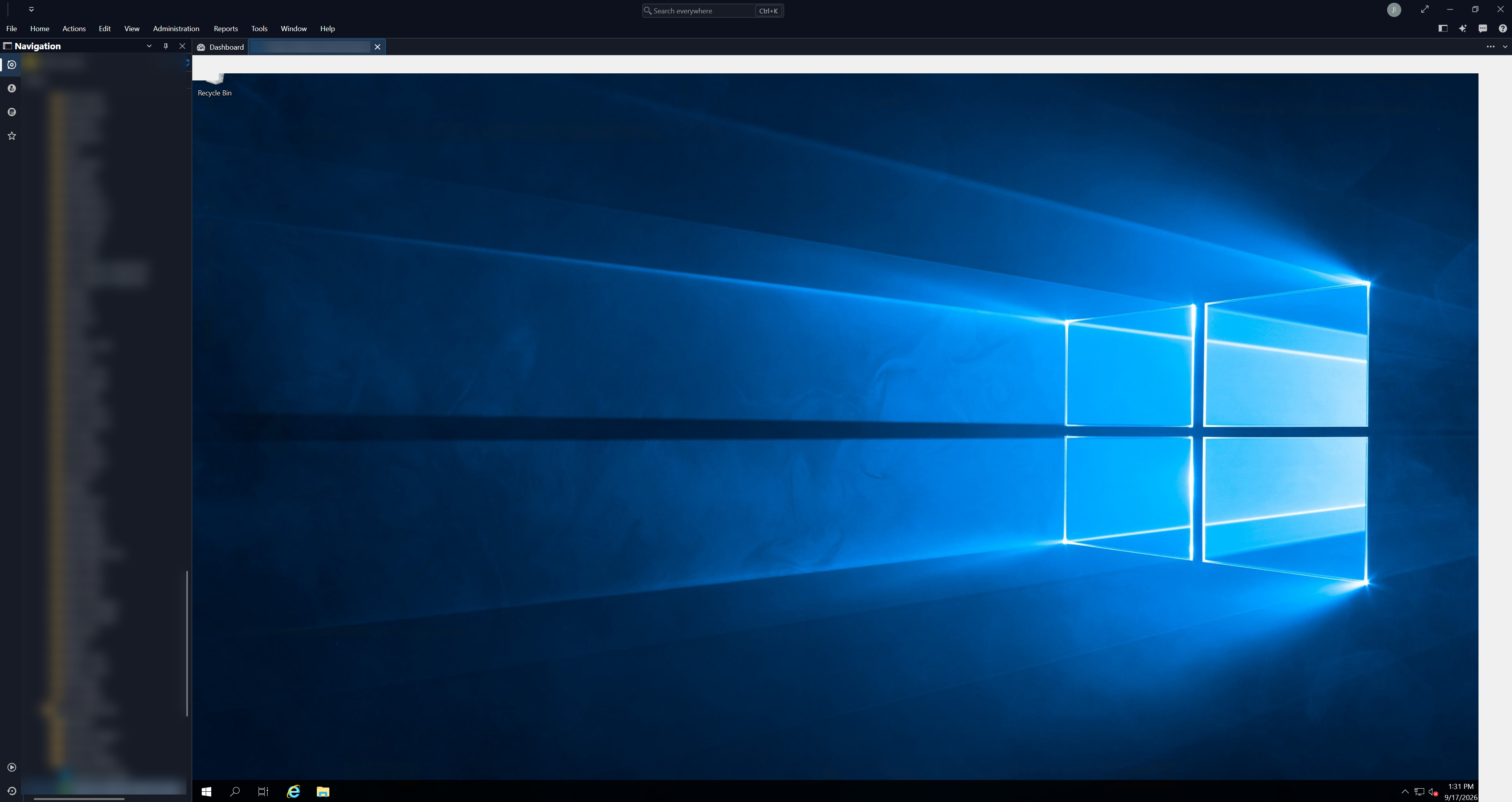
36fdb42f-67ac-4108-86e1-63bf03aeaa34.png
Hello,
Thanks for reporting this additional issue. One of our developers is currently working on this and it's at the top of our priorities right now.
Regards,
Hubert Mireault
I still have major issues with undocked RDP sessions in 2026.3.8.0.
Whenever I open or close an embedded Terminal session, the existing undocked RDP session to a Win11 24H2 sometimes completely garble up.
I've tried all the settings listed here. It seems that Dynamic Resolution, fixed custom size is working the best, but still have RDP display issues.
I noticed that new undocked RDP sessions does not respect Custom Size and forgets last location. It opens in default size and location regardless of what I configure.
Thanks for the feedback, I'll check with our dev who has been handling a lot of these fixes if he has an idea or maybe already is working on a fix.
Regards,
Hubert Mireault
Hello,
Could you update and let us know if you still have issues in the latest release (2026.3.9.0)?
Best regards,
Alexis Beauparlant
Hello,
Could you update and let us know if you still have issues in the latest release (2026.3.9.0)?
Best regards,
@Alexis Beauparlant
Issues are fixed for me.
2026.3.9.0 has improved for undocked sessions, but not for docked sessions. The problem with docked RDP sessions typically arises when closing Terminal in the same instance.
Also - undocked sessions still does not remember previous screen size and location.
@kyleschultz Thank you for your feedback!
@Søren For the docked RDP sessions, can you let me know what the behavior of the RDP sessions is when you close a Terminal?
For example, does the display go blank, get garbled, or change size?
Does it recover on its own after a few seconds, or does it stay that way until you resize or reconnect?
It would also help to know which type of Terminal entry you are closing, such as SSH or an embedded Windows Terminal.
For the undocked sessions that do not remember their size and location, I have not been able to reproduce this on my end.
Could you send me a few more details?
- The Undocked windows mode you use: Tabbed, Grouped or Standalone.
- The Display settings of the entry: the display mode, the Screen sizing mode, and the custom size you set.
- How you open the session: double-click, the Open session button, or opening it docked and undocking it afterward.
- Your monitor setup: the number of monitors, their resolution, and the Windows display scaling of each one.
- The exact steps you follow, for example open the session, move and resize the window, close it, then open it again.
A screenshot or a short screen recording of both issues would be very helpful.
Best regards,
Alexis Beauparlant
Hi Alexis.
The RDP session display was missing data (displaying default background) and did not recover by itself. Hovering the mouse over the blank areas made it appear. It was all RDP sesssions that were affected by this. It may have been related to resizing, but I can't say for sure. It often appeared when having multiple SSH Terminals and RDP sessions open as tabbed sessions. When closing one of the tabbed SSH sessions, all the RDP sessions got garbled. The display data was there, just not displayed until a manual refresh or mouse-over.
My default connection is Smart Reconnect with desktop size set to Default. I'm now trying to use Dynamic Resolution to see if this works better for me.
After upgrading to 2026.3.10.0, the display garble issue seems to have been fixed. I cannot provoke this error anymore.
But launching from navigation pane directly to an undocked RDP sessions does not remember the previous size and location like it used to. It does not even respect the Custom Desktop Size setting for the session.
Setup: I'm using laptop in a dock with a 3840x1600 monitor. I'm not using multiple monitors for this. Display drivers and firmware is fully up2date.
The display issues started with 2026.3.5.0. I had no issues before this and I did not change my setup.
Hello @Søren,
Thank you for the detailed answer and for testing 2026.3.10.0.
Good to hear the display garble issue is gone.
For the undocked sessions, I still can't reproduce it on my end, so a few more details would help.
Which Undocked windows mode do you use: Tabbed, Grouped or Standalone? Go to File > Settings > User interface > Tabs > Undocked windows. It's a dropdown menu.
What custom desktop size is set on the entry, and what Windows display scaling is set on the 3840x1600 monitor?
Does the issue also happen now that you use Dynamic Resolution?
Does it also happen with a brand new RDP entry set to open undocked?
Could you send a short screen recording that shows the whole sequence?
For example, open the session from the navigation pane, move and resize the window, close it, then open it again.
Since this is a public thread, please send it to me by private message rather than posting it here.
If you'd rather not share a recording, a test entry pointing to a non-sensitive machine works just as well.
With this, I can try to match your setup exactly and pass the details to our developers.
Best regards,
Alexis Beauparlant
Hello @Søren,
Thank you for the detailed answer and for testing 2026.3.10.0.
Good to hear the display garble issue is gone.
For the undocked sessions, I still can't reproduce it on my end, so a few more details would help.
Which Undocked windows mode do you use: Tabbed, Grouped or Standalone? Go to File > Settings > User interface > Tabs > Undocked windows. It's a dropdown menu.
What custom desktop size is set on the entry, and what Windows display scaling is set on the 3840x1600 monitor?
Does the issue also happen now that you use Dynamic Resolution?
Does it also happen with a brand new RDP entry set to open undocked?
Could you send a short screen recording that shows the whole sequence?
For example, open the session from the navigation pane, move and resize the window, close it, then open it again.
Since this is a public thread, please send it to me by private message rather than posting it here.
If you'd rather not share a recording, a test entry pointing to a non-sensitive machine works just as well.
With this, I can try to match your setup exactly and pass the details to our developers.
Best regards,
@Alexis Beauparlant
FWIW, we're seeing the same issue with the undocked sessions, as well. I'll work to get some details from my teammate, based on your ask above, and respond back.
Settings for Undocked Windows is "Standalone (no tabs)":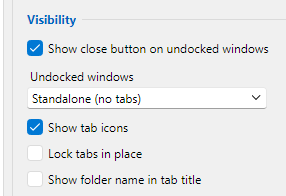
Custom Desktop size is 2560x1440: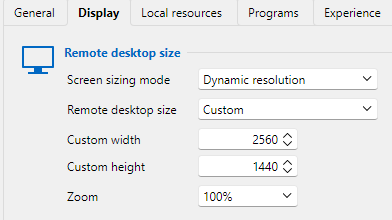
Monitor settings: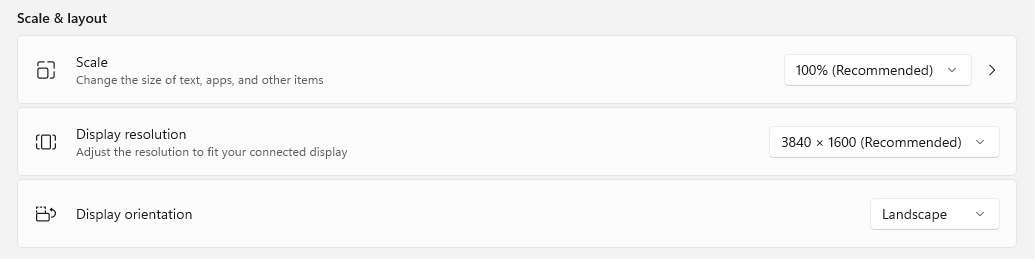
When I launch a new undocked session, it opens undocked but with the same size as docked sessions.
In my case, my docked sessions are 1800x1200 and the undocked are supposed to be 2560x1440.
132e18e1-d0b0-4e52-b8f5-5e2d474a5499.png
ca716715-0763-49e0-b6c6-a04b45a5321d.png
01ad7c0e-6e0b-48b3-8032-e4bd52f6f944.png
Hello @Søren,
Thank you for the screenshots.
I was able to reproduce the issue on my end.
Undocked RDP sessions open at the same size even when changing the remote desktop size setting, and they do not reopen where they were last closed.
I have reported the issue to our development team so they can investigate and see what's going on.
@Jimmy P Thank you for letting us know. I was able to reproduce the issue and sent a video of it to our development team so they can investigate. There is no need for you or your teammate to gather more details, but thank you for offering! :)
Best regards,
Alexis Beauparlant