
David Ringuet
ISL Support
Hi Guillaume !
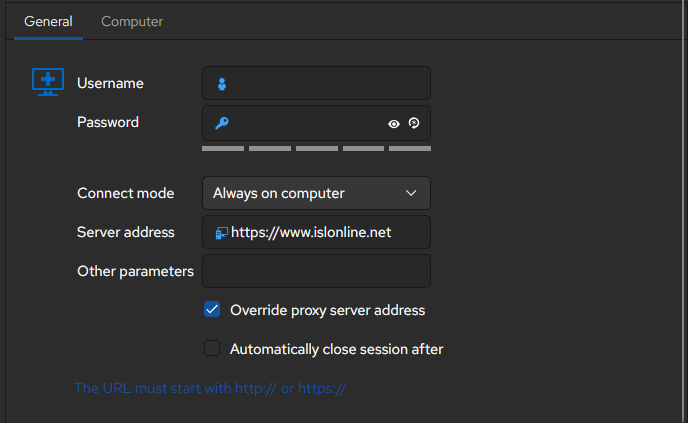
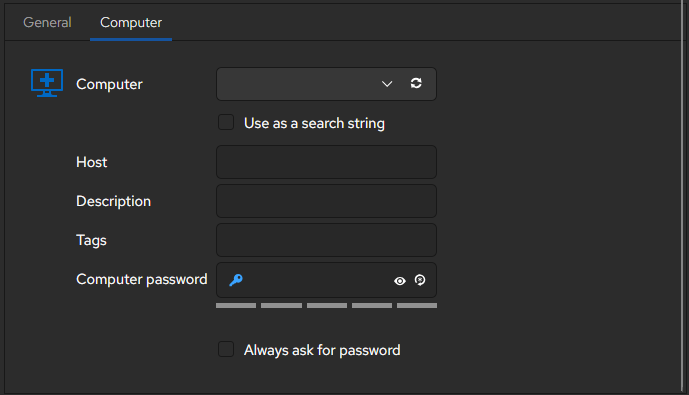
Changing the "Connect Mode" to either "New Session" or "Always on computer" will reveal more options, including a computer tab with the host field. Hope this helps,
TABS dans RDM ouvre toujours sur mon navigateur
Salut, oui, j’ai testé, merci… mais quand j’ouvre un onglet en navigation privée (que j’utilise souvent, entre autres, pour les environnements 365 de mes nombreux clients), il ne prend pas en compte mon environnement en navigation privée. Donc, il ouvre l’onglet et me redemande de me reconnecter à la plateforme où je me trouve à chaque fois se qu'il ne fessait pas sur windows. :(
@deschenesmathieu324
Bonjour !
Pour confirmer avec vous, est-ce que vous ouvrez
A) plusieurs onglets dans la même connexion navigateur privé dans RDM
ou
B) plusieurs connexions différentes en navigateur privé dans RDM
@David Ringuet
A
@deschenesmathieu324
Super ! Je travail dessus en ce moment alors ça devrait être prêt bientôt !
TABS dans RDM ouvre toujours sur mon navigateur
Salut, oui, j’ai testé, merci… mais quand j’ouvre un onglet en navigation privée (que j’utilise souvent, entre autres, pour les environnements 365 de mes nombreux clients), il ne prend pas en compte mon environnement en navigation privée. Donc, il ouvre l’onglet et me redemande de me reconnecter à la plateforme où je me trouve à chaque fois se qu'il ne fessait pas sur windows. :(
@deschenesmathieu324
Bonjour !
Pour confirmer avec vous, est-ce que vous ouvrez
A) plusieurs onglets dans la même connexion navigateur privé dans RDM
ou
B) plusieurs connexions différentes en navigateur privé dans RDM
RDP Gateway topics
Hi Jaanus,
The browse button is fixed, it will be part of our 2026.2.2.x release.
Have a wonderfull day !
Add/Edit Custom Variable
Hi Guillaume,
Could i ask you to copy and paste your system diagnostics in Help > System Diagnostics (use the copy to clipboard button please !) and also the version of RDM that you are currently using. This would help us figure out what is happening here.
Cheers,
RDM (latest) - Fresh Ubuntu 26.04 - Wait - And Zoom in menus
Hello pierre,
We are aware of some significant issues regarding UI scalling, ui responsiveness and overall performance with GTK for Wayland on Gnome for Ubuntu 25 and up. We are actively working to replace GTK with Avalonia, which works well under those conditions. However this process will take some more time but it is currently our top priority. We thank you for your patience.
Cheers,
RDM OpenVPN Connect
Hello Alexanderwien !
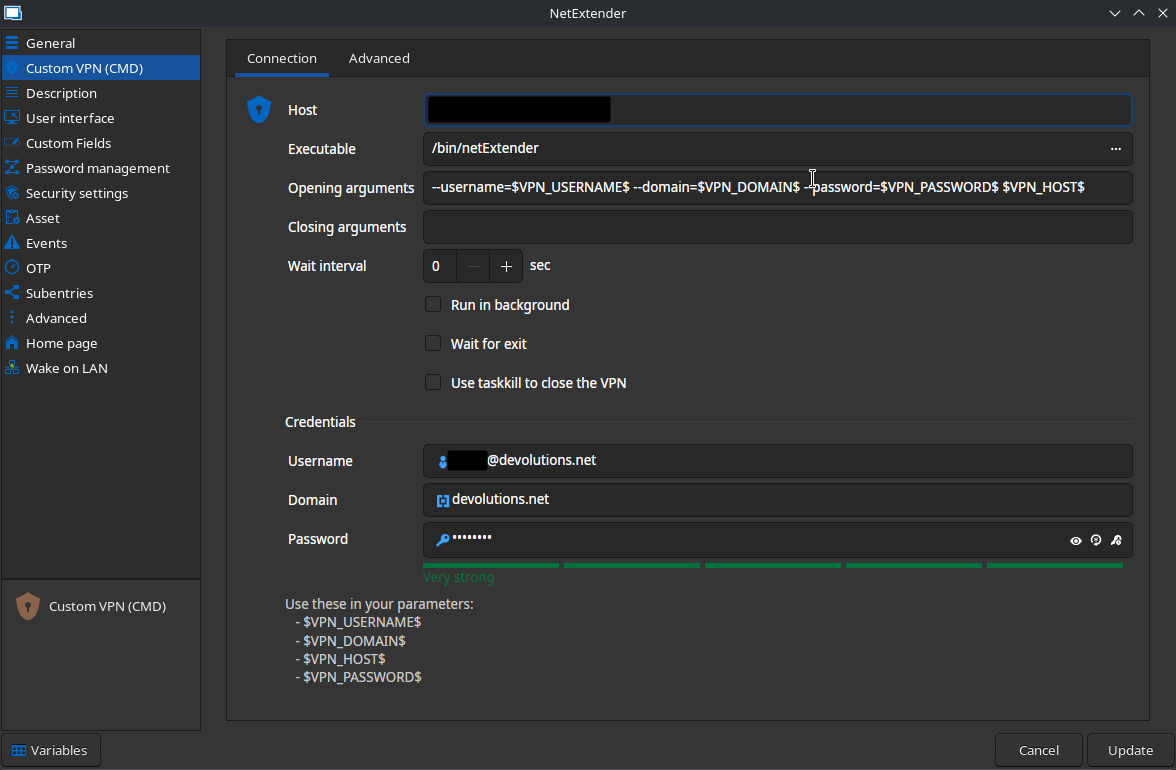
The Custom VPN entry was indeed added back in 2022.2.0.3 . It would appear that we have forgotten to announce this fact in the thread. We apologize for this lack of communication. The custom vpn entry should let you set up and use any vpn on linux through the command line, and allow you to use RDM to conveniently launch and manage it. Please note that not all vpn types are enabled by default, depending on your configuration, you might need to go to System Settings > Type availability > VPN/Tunnel/Gateway and enable your desired vpn type.
Here is an example of a custom vpn entry, using NetExtender cli as a custom vpn
RDM on Debian Trixie with Backport Kernel 6.16
@lee2 i would also like to know what linux distribution you are using and the method you used to intall RDM (flatpack, Repo, .deb file, etc)
RDM on Debian Trixie with Backport Kernel 6.16
Has there been any progress with this issue and Avalonia using GNOME with Wayland? I have been using Remote Desktop Manager for years, but this is now a deal breaker.
@lee2
Unfortunately Avalonia does not currently work on Wayland. I understand this might be a deal breaker for you but it is out of our control. However, in this blog post, the team behind Avalonia do explain that they plan on making it work. For now, you can use the Xwayland compatibility layer and still use RDM and its new Avalonia features.
Added RemoteApp support on RDM Linux (Fedora)
Hello virgilelecerf !
I've created a ticket for this, we will look into it but please note that while RemoteApp support on FreeRDP exists, it has been know to have issues, so even if the feature is added it might not work perfectly with the app you intend to use.
RDM 2024.1.2.3-1 for Fedora 40 in FIPS mode Cryptography error
Hi,
Unfortunately we figured out that one of the algorithm we use for obfuscation ( TripleDES ) is not supported by FIPS since early 2024.
We will not be able to provide a solution for this issue on our end since it would require an overwhelming amount of work.
You might be able to use RDM if you can enable TripleDES in your supported algorithms policy.
Regards,
Sending Option key over ARD
Hi ! This issue should be now fixed in RDM Linux 2024.3.2.4.
Have a great day,
UX feedback
Hi Nick ! I am pleased to announce that the multi-vault search is in RDM Linux 2024.3.2.4
Many Errors while start RDM inclusive Crash on Wayland
Hi again !,
From our testing it would appear that it is either distro or graphics driver related.
Could you tell me if the issue still occurs with the latest version of RDM ?
Cheers!
Smart Card for Linux
Hi mick !
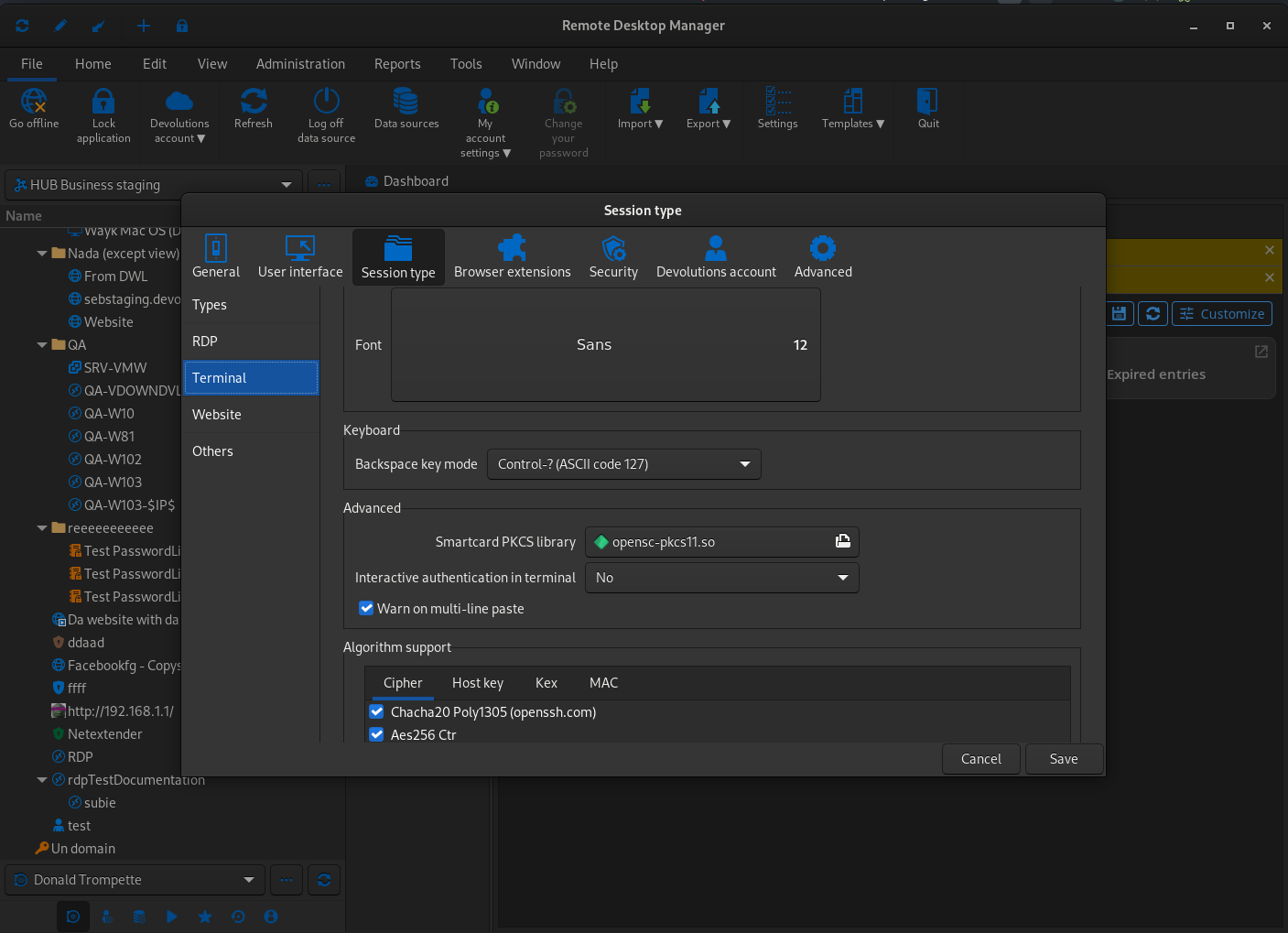
Yes in fact you will need to set the path to whichever library you wish to use in the Preferences -> Session type -> Terminal.
Hope this helps !
Difficulty adding debian repoistory
Ok well keep me updated if you succeed or not !
Best regards,
Difficulty adding debian repoistory
and it displays the content of the key like so ?
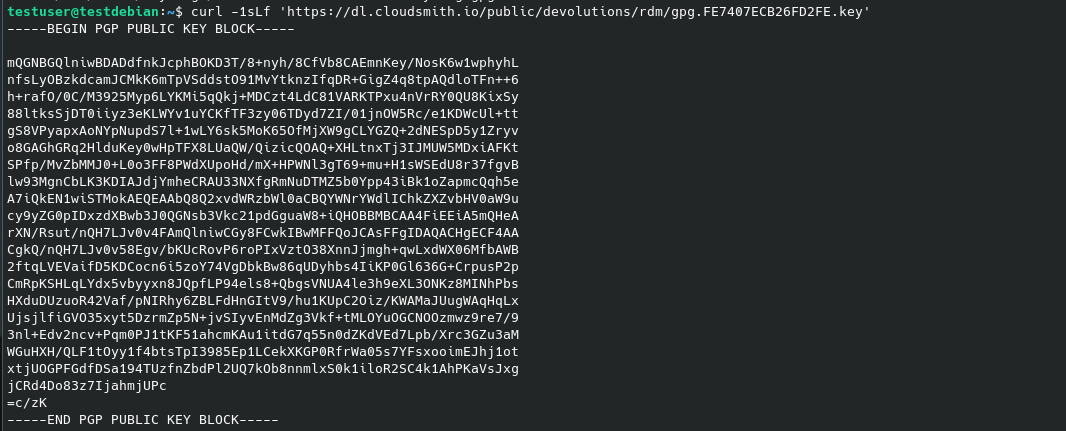
Difficulty adding debian repoistory
can you try to run just
curl -1sLf 'https://dl.cloudsmith.io/public/devolutions/rdm/gpg.FE7407ECB26FD2FE.key' and see if you get anything ?
Difficulty adding debian repoistory
Hi !
to try and fix your problem, I would try starting with cleaning the previous attempt with the following commands:
rm /etc/apt/sources.list.d/devolutions-rdm.list
apt-get clean
rm -rf /var/lib/apt/lists/*
apt-get update
and then re-attempting the installation. In the script you wrote, I also noticed that some parts of the instructions are missing after both curl instructions, which might explain why it failed.
As seen in the instructions here, the script needs to redirect the curl command's output into another command :
apt-get install -y debian-keyring  # debian only
apt-get install -y debian-archive-keyring  # debian only
apt-get install -y apt-transport-https
# For Debian Stretch, Ubuntu 16.04 and later
keyring_location=/usr/share/keyrings/devolutions-rdm-archive-keyring.gpg
# For Debian Jessie, Ubuntu 15.10 and earlier
# keyring_location=/etc/apt/trusted.gpg.d/devolutions-rdm.gpg
curl -1sLf 'https://dl.cloudsmith.io/public/devolutions/rdm/gpg.FE7407ECB26FD2FE.key' |  gpg --dearmor >> ${keyring_location}
curl -1sLf 'https://dl.cloudsmith.io/public/devolutions/rdm/config.deb.txt?distro=debian&codename=bookworm&component=main' > /etc/apt/sources.list.d/devolutions-rdm.list
apt-get update
if after a cleanup and retry you are still experiencing issues, let me know.
Cheers !
Many Errors while start RDM inclusive Crash on Wayland
Hi Corin !
We are not familiar with Nobara Fedora but we will try to install it and see if your issue is more of a distro-related issue or just a bug in RDM, I will create an internal ticket and keep you updated with our progress.
Cheers,
RDM 2024.1.2.3-1 for Fedora 40 in FIPS mode Cryptography error
Hi again !
Recently, certain components of Remote Desktop Manager have encountered compatibility issues with Fedora's FIPS mode.
We are actively investigating solutions to address this issue.
Regards,
RDM 2024.1.2.3-1 for Fedora 40 in FIPS mode Cryptography error
Hi,
It would appear that the openssl installation on your machine does not support the necessary protocols.
Would you be able to run openssl version and openssl list -digest-algorithms so i can see
what version of oppenssl is installed and what algorithms are supported ?
Cheers,
RDM on Fedora 40 KDE with Wayland failing to start with GException - format of picture file unknown
Hi ! thank you all for making us aware of the issue.
We are currently working on a fix and will keep you updated !
Cheers,
my personal private key greyed out
Hello !
this issue has been fixed in version 2024.1.1.0 which was released today!
Cheers,
DEB and RPM repository
for now, you can head to https://cloudsmith.io/~devolutions/repos/rdm/groups/ and follow their setup instructions to set up the repo, once that's done it will be as easy as using your package manager to install rdm! (please note the package's name is remotedesktopmanager on the Cloudsmith repo)
Hope this helps !