ISL Support
1 vote

Hi There,
Would it be possible to add the support of ISL Light?
The ISL Light Client Software is available for Linux.
Thank you guys
All Comments (6)
Hello Guillaume,
I created a ticket so we can investigate the implementation of ISL Light.
Regards,
Gabriel Dubois
Hello,
Thank you for being so patient!
If possible, could you update your RDM Linux to the latest version (2026.3.0.5) and see if the problem persists? This version includes the requested feature.
Latest Version: Download RDM
If there is any problem after the update, please let us know so we can inform our development team.
Best regards,
Maxim Robert
Hi Maxim,
Unfortunately it doesn't work. I get a message that the ISL Light executable can't be find.
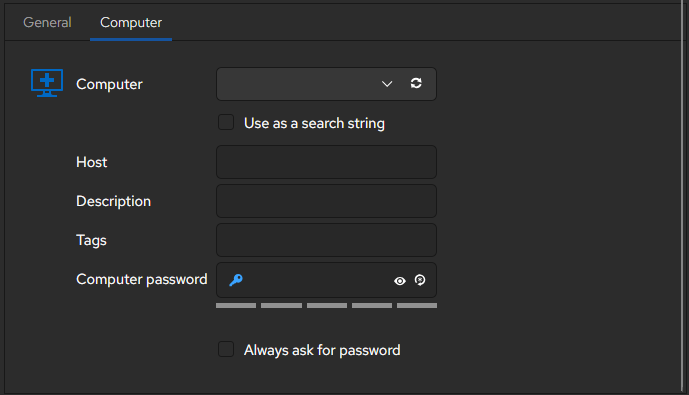
Beside that, I'm a bit confused as well in the entry editing, how do you define which host you would like to connect, or create a new session ID?
Hello,
Regarding the error with the ISL Light executable, you will need to specify the path to the ISL Light application in RDM.
You can configure this under File > Settings > Applications > Paths. This will allow RDM to know where to locate the ISL Light executable.
As for your second question, from what I can see, this entry type appears to be intended mainly as a way to launch the ISL Light application from RDM. There doesn't seem to be a field in the entry where you can specify a host/IP address or create a new session ID.
Best regards,
Carl Marien
Hi Guillaume !
Changing the "Connect Mode" to either "New Session" or "Always on computer" will reveal more options, including a computer tab with the host field. Hope this helps,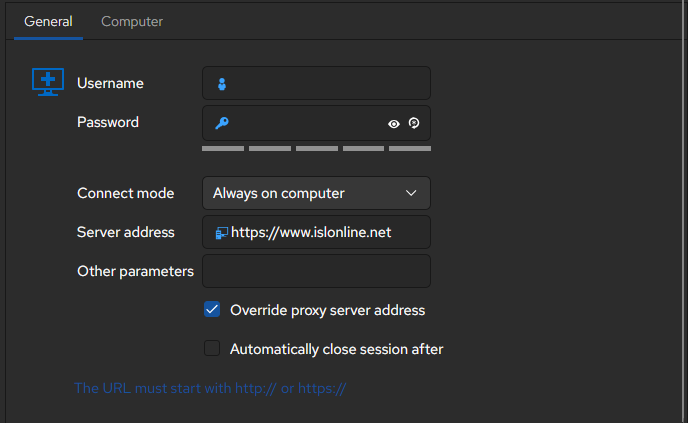
David Ringuet
6eb889bc-1105-474d-adcd-1e6212375a41.png
6dd62c73-be35-4d46-91a1-4cd2204c6cf1.png
Hi David and Carl,
Thank you Carl, the path to ISL in the preference solved the problem.
After a restart of RDM all work fine. (First the entrie editing didn't looked like Davids printscreen)
Thousand thanks to everyone for your great support