RDP Gateway topics

Hello!
I am trying out our companys central RDM database on Linux client version. As we use RDP gateway on 99.9% of our connections, I have run into some troubles and questions.
1) Where exactly are those "my RD Gateway credentials" configured? I cannot find a place for them.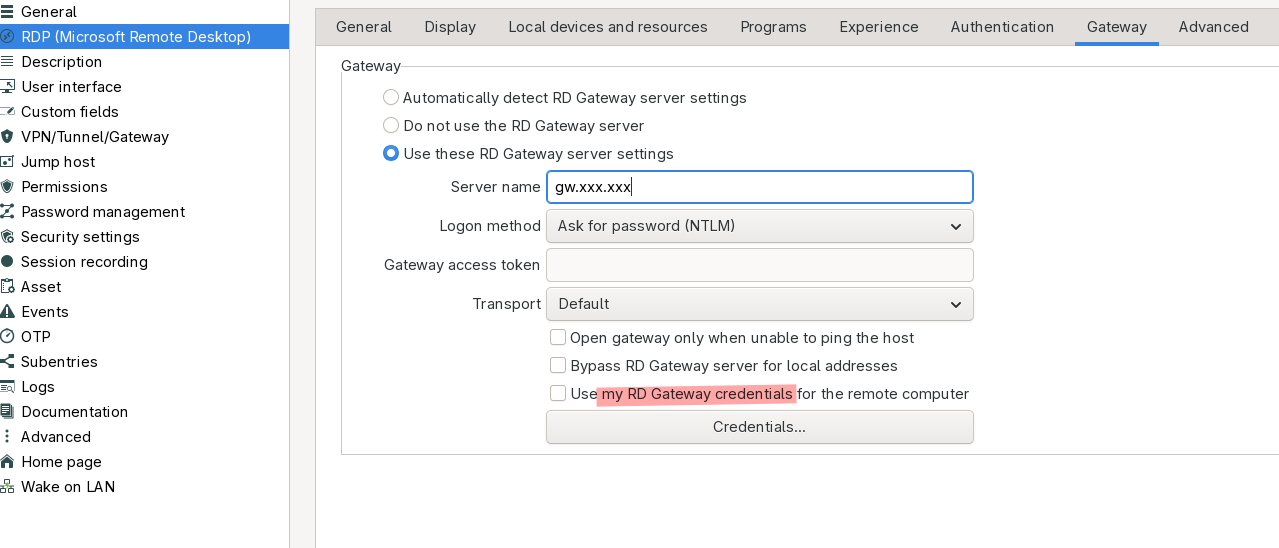
2) When I open that Credentials button, I get this screen: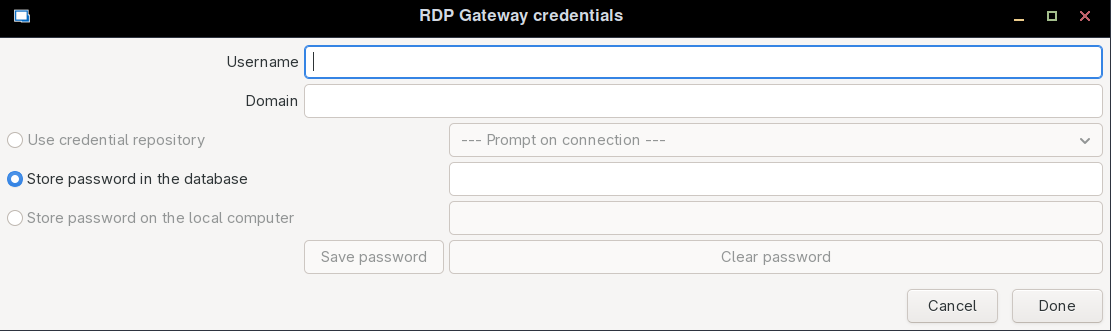
Why is credential repository grayed out?
(expected behaviour: like on Windows, the stored credential logic opens, we store them in the same vault as our connection info)
3) not exactly RDP Gateway question, but almost connected. We use Delinea Secret Server (previously Thycotic) for all our credential management and the "credential selection" options and logic differ between Windows and Linux versions, making it currently impossible to use the same connection on both platforms. Is there any ongoing development in that section?
4) reading your forum I found an opinion that "Automatically detect RD gateway settings" and "Do not use the RD Gateway" probably have the same result on Linux (which makes sense). Why not remove the auto option from Linux version?
Thanks in advance!
fb9b179e-cf88-4912-b9f1-8067b06a0a05.png
0f877c2a-dfee-4611-bce6-4d80ccc9e99f.png
All Comments (9)
Hi Jaanus,
Thank you for taking the time to document all of this your observations are accurate.
Based on your report and our internal review, we’ve identified multiple related limitations in the Linux RDM client, specifically around RDP Gateway behavior and credential handling compared to Windows. These include:
- RD Gateway credential handling differences on Linux
- Limited integration with credential repositories and external vaults
- UI options that are visible but not fully functional on Linux
- RD Gateway behavior that differs from Windows in certain scenarios
These points have already been reported as a mix of UX issues and feature gaps, and are under review by our development team. Some are tied to UI clarity, others to feature parity with Windows.
For now, the behavior you’re seeing is expected on Linux, but we agree it can be confusing, and improvements are planned. We’ll update the forum thread once we have concrete progress or fixes available.
Thanks again for the detailed feedback it’s genuinely helpful.
Best regards,
Michel Audi
Hello
Just chiming in to see if you have worked up a roadmap for solving these inconsistencies? I understand that .net upgrade must have taken a lot of effort, just reminding you that this is a blocker for me every day.
Btw a new linux bug in the latest version - opening "user specific settings" gives several prompts saying "you don't have permission". Used to work before the new release.
Hello jaajog,
A ticket regarding the inconsistencies is still open, and I have just raised its priority.
As for the new issue with the permission pop-up, I created a ticket and fixed it. This change will take effect in the next release (2026.1.1).
Regards,
Gabriel Dubois
Hello,
Thank you for being so patient!
I'm pleased to inform you that a new version of RDM Linux (2026.1.1.1) has been released, featuring the fix for your issue.
Latest Version: Download RDM
Please let us know if this works or if you encounter any issues.
Best regards,
Maxim Robert
Hello!
Sorry for the long radio silence. I just tested the current version and the blocker for my workflow right now seems the Delinea Secret Server plugin, which simply does not work under "Default" method, which is what my company is using.
Under Default method there is Folder ID configured (can be empty) and I am supposed to be able to choose a secret, but that button simply does not do anything. Method "Prompt for List" actually works.
Gateway section does have a lot of improvements, kudos for that. Just need some more stuff working to actually test it!
Hi Jaanus,
Thank you for the follow-up, and for taking the time to test the new build. Good to hear the user-specific settings prompts are resolved, and that the Gateway section is working much better for you now.
On the Delinea Secret Server entry, choosing a specific secret in the Default mode should work, so the unresponsive button you are seeing there is not expected. I want to reproduce it on our side on a matching setup and bring it to our development team, and I will update this thread as soon as I have something concrete. If it unblocks you in the meantime, Prompt for List is a usable path while we look into Default.
To reproduce it on the right setup, could you confirm two things:
1. The exact RDM Linux version you tested this on.
2. Whether your Secret Server is self-hosted (on-prem) or the cloud Delinea Platform instance.
Best regards,
Michel
Michel Audi
RDM version 2026.2.0.7 and our SecretServer is onprem. The button I am referring to is this (does not do anything with empty 'folder id' either)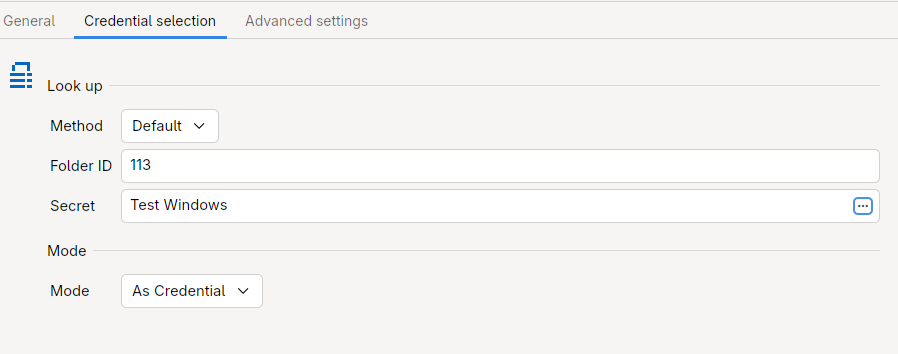
fe678b63-452b-4a9c-b562-5f5bf82ffc64.png
Hi Jaanus,
Thank you for the follow-up, and for confirming the other items are sorted on your side.
Good news on the Delinea Secret Server point. We reproduced the behavior you described, where in the Default credential selection mode the control to choose a specific secret does not respond. It is now logged with our development team as a confirmed bug, and we will update this thread as soon as a fix is available.
In the meantime, the Prompt for List mode remains a working way to select your secret, so you are not blocked while the fix is worked on.
Best regards,
Michel
Michel Audi
Hi Jaanus,
The browse button is fixed, it will be part of our 2026.2.2.x release.
Have a wonderfull day !
David Ringuet