Difficulty adding debian repoistory

Hello. I am having difficulty adding RDM as a repository to my debian 12 instance. I ran following command which ran through without error but didn't seem to add the repository:
curl -1sLf 'https://dl.cloudsmith.io/public/devolutions/rdm/setup.deb.sh' | sudo -E bash
I then tried creating a bash script that contains the following:
apt-get install -y debian-keyring  # debian only
apt-get install -y debian-archive-keyring  # debian only
apt-get install -y apt-transport-https
# For Debian Stretch, Ubuntu 16.04 and later
keyring_location=/usr/share/keyrings/devolutions-rdm-archive-keyring.gpg
# For Debian Jessie, Ubuntu 15.10 and earlier
# keyring_location=/etc/apt/trusted.gpg.d/devolutions-rdm.gpg
curl -1sLf 'https://dl.cloudsmith.io/public/devolutions/rdm/gpg.FE7407ECB26FD2F>
curl -1sLf 'https://dl.cloudsmith.io/public/devolutions/rdm/config.deb.txt?dist>
apt-get update
This created the file '/etc/apt/sources.list.d/devolutions-rdm.list' but when I look at it in nano, the file is empty.
Additionally, I tried just downloading the devolutions-rdm_deb.sh script and ran it but received an error.
Executing the  setup script for the 'devolutions/rdm' repository ...

   OK: Checking for required executable 'curl' ...
   OK: Checking for required executable 'apt-get' ...
   OK: Detecting your OS distribution and release using system methods ...
 ^^^^: ... Detected/provided for your OS/distribution, version and architecture:
 >>>>:
 >>>>: ... distro=debian  version=12  codename=bookworm  arch=x86_64
 >>>>:
   OK: Checking for apt dependency 'apt-transport-https' ...
   OK: Checking for apt dependency 'ca-certificates' ...
   OK: Checking for apt dependency 'gnupg' ...
  RUN: Importing 'devolutions/rdm' repository xecuting the  setup script for the 'devolutions/rdm' repository ...

   OK: Checking for required executable 'curl' ...
   OK: Checking for required executable 'apt-get' ...
   OK: Detecting your OS distribution and release using system methods ...
 ^^^^: ... Detected/provided for your OS/distribution, version and architecture:
 >>>>:
 >>>>: ... distro=debian  version=12  codename=bookworm  arch=x86_64
 >>>>:
   OK: Checking for apt dependency 'apt-transport-https' ...
   OK: Checking for apt dependency 'ca-certificates' ...
   OK: Checking for apt dependency 'gnupg' ...
  RUN: Importing 'devolutions/rdm' repository GPG keys ...gpg: no valid OpenPGP data found.
   OK: Checking for apt signed-by key support ...
   OK: Importing 'devolutions/rdm' repository GPG keys ...
 NOPE: Checking if upstream install config is OK ...
 ^^^^: ... Failed to fetch configuration for your OS distribution release/version.
 >>>>:
 >>>>: It looks like it might be because the configuration endpoint is not
 >>>>: currently available. Please try again in 10-15 minutes. If it still
 >>>>: doesn't work after an hour, please contact Devolutions
 >>>>: for assistance.
 >>>>:
 >>>>: You can force this script to use a particular value by specifying distro,
 >>>>: version, or codename via environment variable. E.g., to specify a distro
 >>>>: such as Ubuntu/Xenial (16.04), use the following:
 >>>>:
 >>>>:    distro=ubuntu version=16.04 codename=xenial /home/user/QubesIncoming/work/devolutions-rdm_deb.sh
 >>>>:
 !!!!: Oh no, your setup failed! :-( ... But we might be able to help. :-)
 !!!!:
 !!!!: You can contact Devolutions for further assistance.
 !!!!:
 !!!!: URL: https://devolutions.net
 !!!!:
 !!!!: Last 20 log lines from .csm_setup_w3mA1eRg5 (might not be errors, nor even relevant):
 !!!!:
 !!!!: > ii  gnupg                                         2.2.40-1.1
 !!!!: > all          GNU privacy guard - a free PGP replacement
 !!!!: > ii  gnupg-l10n                                    2.2.40-1.1
 !!!!: > all          GNU privacy guard - localization files
 !!!!: > ii  gnupg-utils                                   2.2.40-1.1
 !!!!: > amd64        GNU privacy guard - utility programs


GPG keys ...gpg: no valid OpenPGP data found.
   OK: Checking for apt signed-by key support ...
   OK: Importing 'devolutions/rdm' repository GPG keys ...
 NOPE: Checking if upstream install config is OK ...
 ^^^^: ... Failed to fetch configuration for your OS distribution release/version.
 >>>>:
 >>>>: It looks like it might be because the configuration endpoint is not
 >>>>: currently available. Please try again in 10-15 minutes. If it still
 >>>>: doesn't work after an hour, please contact Devolutions
 >>>>: for assistance.
 >>>>:
 >>>>: You can force this script to use a particular value by specifying distro,
 >>>>: version, or codename via environment variable. E.g., to specify a distro
 >>>>: such as Ubuntu/Xenial (16.04), use the following:
 >>>>:
 >>>>:    distro=ubuntu version=16.04 codename=xenial /home/user/QubesIncoming/work/devolutions-rdm_deb.sh
 >>>>:
 !!!!: Oh no, your setup failed! :-( ... But we might be able to help. :-)
 !!!!:
 !!!!: You can contact Devolutions for further assistance.
 !!!!:
 !!!!: URL: https://devolutions.net
 !!!!:
 !!!!: Last 20 log lines from .csm_setup_w3mA1eRg5 (might not be errors, nor even relevant):
 !!!!:
 !!!!: > ii  gnupg                                         2.2.40-1.1
 !!!!: > all          GNU privacy guard - a free PGP replacement
 !!!!: > ii  gnupg-l10n                                    2.2.40-1.1
 !!!!: > all          GNU privacy guard - localization files
 !!!!: > ii  gnupg-utils                                   2.2.40-1.1
 !!!!: > amd64        GNU privacy guard - utility programs
All Comments (11)
Hi !
to try and fix your problem, I would try starting with cleaning the previous attempt with the following commands:
rm /etc/apt/sources.list.d/devolutions-rdm.list
apt-get clean
rm -rf /var/lib/apt/lists/*
apt-get update
and then re-attempting the installation. In the script you wrote, I also noticed that some parts of the instructions are missing after both curl instructions, which might explain why it failed.
As seen in the instructions here, the script needs to redirect the curl command's output into another command :
apt-get install -y debian-keyring  # debian only
apt-get install -y debian-archive-keyring  # debian only
apt-get install -y apt-transport-https
# For Debian Stretch, Ubuntu 16.04 and later
keyring_location=/usr/share/keyrings/devolutions-rdm-archive-keyring.gpg
# For Debian Jessie, Ubuntu 15.10 and earlier
# keyring_location=/etc/apt/trusted.gpg.d/devolutions-rdm.gpg
curl -1sLf 'https://dl.cloudsmith.io/public/devolutions/rdm/gpg.FE7407ECB26FD2FE.key' |  gpg --dearmor >> ${keyring_location}
curl -1sLf 'https://dl.cloudsmith.io/public/devolutions/rdm/config.deb.txt?distro=debian&codename=bookworm&component=main' > /etc/apt/sources.list.d/devolutions-rdm.list
apt-get update
if after a cleanup and retry you are still experiencing issues, let me know.
Cheers !
David Ringuet
Thank You for the reply! I attempted your suggestion. No errors encountered but my devolutions-rdm.list is still empty file so RDM doesn't upgrade. Could I populate it manually perhaps?
Hi !
to try and fix your problem, I would try starting with cleaning the previous attempt with the following commands:
rm /etc/apt/sources.list.d/devolutions-rdm.list
apt-get clean
rm -rf /var/lib/apt/lists/*
apt-get updateand then re-attempting the installation. In the script you wrote, I also noticed that some parts of the instructions are missing after both curl instructions, which might explain why it failed.
As seen in the instructions here, the script needs to redirect the curl command's output into another command :
apt-get install -y debian-keyring # debian only
apt-get install -y debian-archive-keyring # debian only
apt-get install -y apt-transport-https
# For Debian Stretch, Ubuntu 16.04 and later
keyring_location=/usr/share/keyrings/devolutions-rdm-archive-keyring.gpg
# For Debian Jessie, Ubuntu 15.10 and earlier
# keyring_location=/etc/apt/trusted.gpg.d/devolutions-rdm.gpg
curl -1sLf 'https://dl.cloudsmith.io/public/devolutions/rdm/gpg.FE7407ECB26FD2FE.key' | gpg --dearmor >> ${keyring_location}
curl -1sLf 'https://dl.cloudsmith.io/public/devolutions/rdm/config.deb.txt?distro=debian&codename=bookworm&component=main' > /etc/apt/sources.list.d/devolutions-rdm.list
apt-get update if after a cleanup and retry you are still experiencing issues, let me know.
Cheers !
Ran the script with the verbose parameter. looks like a problem getting the key information?
apt-get install -y debian-keyring  # debian only
Reading package lists... Done
Building dependency tree... Done
Reading state information... Done
debian-keyring is already the newest version (2022.12.24).
The following packages were automatically installed and are no longer required:
  libjsoncpp25 linux-image-6.1.0-20-amd64 python3-daemon python3-lockfile
Use 'sudo apt autoremove' to remove them.
0 upgraded, 0 newly installed, 0 to remove and 0 not upgraded.
apt-get install -y debian-archive-keyring  # debian only
Reading package lists... Done
Building dependency tree... Done
Reading state information... Done
debian-archive-keyring is already the newest version (2023.3+deb12u1).
The following packages were automatically installed and are no longer required:
  libjsoncpp25 linux-image-6.1.0-20-amd64 python3-daemon python3-lockfile
Use 'sudo apt autoremove' to remove them.
0 upgraded, 0 newly installed, 0 to remove and 0 not upgraded.
apt-get install -y apt-transport-https
Reading package lists... Done
Building dependency tree... Done
Reading state information... Done
apt-transport-https is already the newest version (2.6.1).
The following packages were automatically installed and are no longer required:
  libjsoncpp25 linux-image-6.1.0-20-amd64 python3-daemon python3-lockfile
Use 'sudo apt autoremove' to remove them.
0 upgraded, 0 newly installed, 0 to remove and 0 not upgraded.
# For Debian Stretch, Ubuntu 16.04 and later
keyring_location=/usr/share/keyrings/devolutions-rdm-archive-keyring.gpg
# For Debian Jessie, Ubuntu 15.10 and earlier
# keyring_location=/etc/apt/trusted.gpg.d/devolutions-rdm.gpg
curl -1sLf 'https://dl.cloudsmith.io/public/devolutions/rdm/gpg.FE7407ECB26FD2FE.key' |  gpg --dearmor >> ${keyring_location}
gpg: no valid OpenPGP data found.
curl -1sLf 'https://dl.cloudsmith.io/public/devolutions/rdm/config.deb.txt?distro=debian&codename=bookworm&component=main' > /etc/apt/sources.list.d/devolutions-rdm.list
apt-get update
Hit:1 https://brave-browser-apt-release.s3.brave.com stable InRelease
Hit:2 https://deb.debian.org/debian bookworm InRelease
Hit:3 https://deb.debian.org/debian-security bookworm-security InRelease
Hit:4 https://deb.qubes-os.org/r4.2/vm bookworm InRelease
Reading package lists... Done
can you try to run just
curl -1sLf 'https://dl.cloudsmith.io/public/devolutions/rdm/gpg.FE7407ECB26FD2FE.key'
and see if you get anything ?
David Ringuet
It completes without any error displaying.
can you try to run just
curl -1sLf 'https://dl.cloudsmith.io/public/devolutions/rdm/gpg.FE7407ECB26FD2FE.key' and see if you get anything ?
and it displays the content of the key like so ?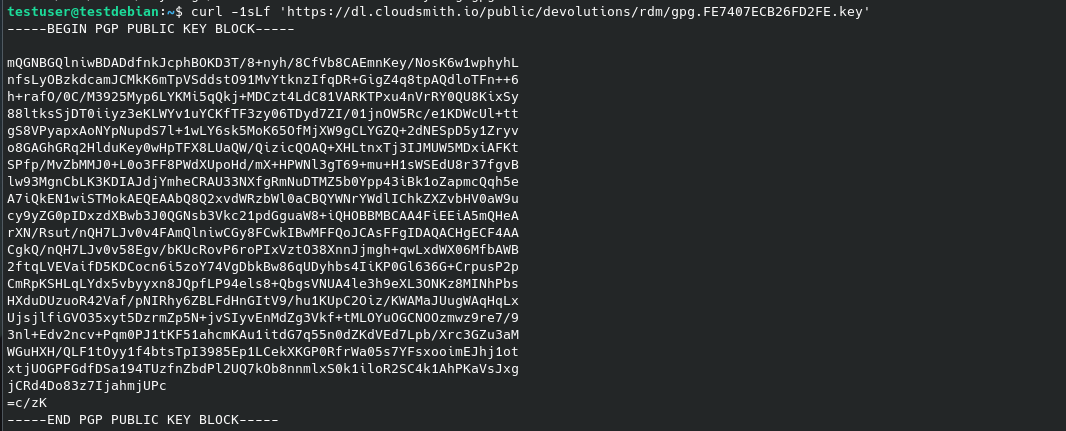
David Ringuet
Screenshot from 2024-08-07 11-12-05.png
If i try to run the following:
curl -1sLf 'https://dl.cloudsmith.io/public/devolutions/rdm/gpg.FE7407ECB26FD2FE.key' | gpg --dearmor >> /usr/share/keyrings/devolutions-rdm-archive-keyring.gpg
Then I get the "no valid OpenPGP data found"
No it doesn't. there is no output.
and it displays the content of the key like so ?
Seems when I add the verbose tag, the problem reveals itself.
"Could not resolve host: dl.cloudsmith.io"
So seems I have a network issue to resolve.
Thanks for the help on this. I think this thread can be closed.
Ok well keep me updated if you succeed or not !
Best regards,
David Ringuet
It worked fine after I resolved the network issue. Can now upgrade RDM using the repo for Debian. Thank You again for your help.
Ok well keep me updated if you succeed or not !
Best regards,