RDM OpenVPN Connect

Hello,
I have installed the RDM Free.
I want to create a VPN connection before connecting via RDP.
The VPN is already present in the system and I always open that manually with sudo systemctl start openvpn@vpn so far.
How can I get RDM to automatically create the connection when I open the RDP connection and close it when I close the RDP connection?
I am using Linux Mint.
Thanks for the help
All Comments (7)
sorry I see only now that there is a Linux forum, maybe the mods can move this.
Thanks
Hello,
Thank you for contacting us on that matter!
I will move this topic to the RDM Linux section of our forum and let the engineer in charge of this section provide you with an answer.
Best regards,
James Lafleur
Hello again,
While the VPNs are not officially supported on RDM Linux, setting your VPN under the VPN\SSH/Gateway section of your RDP entry may allow you to launch it automatically. If that does not work, using your command to open it manually would be the only best workaround.
You will need to add your command under the "Commands" section found in the "Advanced" tab
Best regards,
James Lafleur
is there a time scale for VPN function to work in the linux version?
Cheers
Rob
I don't have an ETA but we should start working on it in our current sprint.
We will focus our effort on the "Custom VPN" entry type. Custom VPN entry relies on cli commands to manage the vpn.
Jonathan Lafontaine
I don't have an ETA but we should start working on it in our current sprint.
We will focus our effort on the "Custom VPN" entry type. Custom VPN entry relies on cli commands to manage the vpn.
@Jonathan Lafontaine
So how is that sprint going?
Would appreciate a timeline after almost 5 years.
Hello Alexanderwien !
The Custom VPN entry was indeed added back in 2022.2.0.3 . It would appear that we have forgotten to announce this fact in the thread. We apologize for this lack of communication. The custom vpn entry should let you set up and use any vpn on linux through the command line, and allow you to use RDM to conveniently launch and manage it. Please note that not all vpn types are enabled by default, depending on your configuration, you might need to go to System Settings > Type availability > VPN/Tunnel/Gateway and enable your desired vpn type.
Here is an example of a custom vpn entry, using NetExtender cli as a custom vpn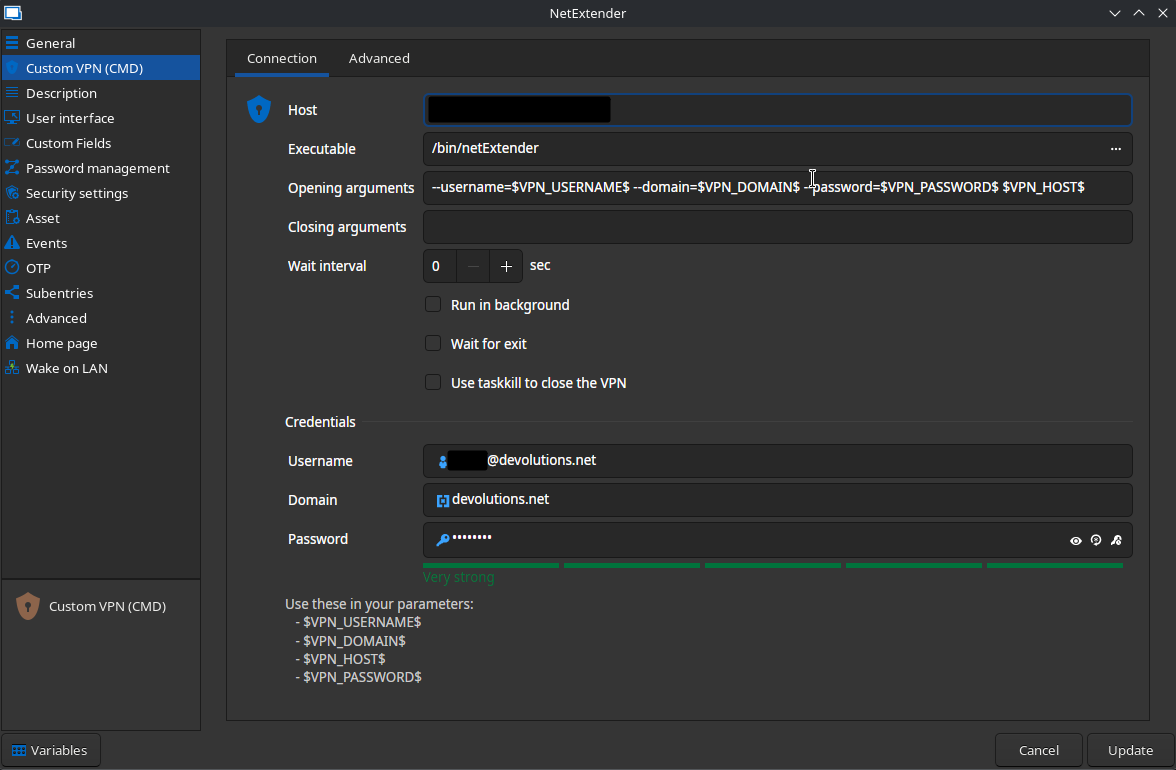
David Ringuet
27ddd691-8558-45aa-ad9b-acf6546c371e.png