RDM (latest) - Fresh Ubuntu 26.04 - Wait - And Zoom in menus

Hello,
We intensivly work with you (great) product on Ms Windows as the main tools for our technicen team @ work...
And I am frequently testing the "linux" version, with somes little things that have not been working perfectly...
But I would like to ask if you already came accros some solutions for my main problem, making the experiment un-usable.
I am currently testing on a laptop, I5, 16Gig of ram and embeted graph card, a "simple" old laptop.
I have a "fresh" Ubuntu 26.04 install, standard, so, using Wayland with Gnome.
One of the first thing I tried is RDM... but then, I can see 2 mains problems:
The scaline factor on menu looks weird (I set up my display to be 100%, not 125%) and when the mouse quits the main central windows and goes to menus or Navigation pane, It get "bigger"... When I try to change the scale factor of the component in the RDM settings: mouse does not behave correctly, and menus goes REALLY small.
Second problem, that might be linked... if that for almost all editing/opening entry, etc, I get a "close / Wait more" pop up showing..... clicking in "wai" will finally make it work.... but I made the experience un-usable.
(In a recent other test, it seems that on a KUbuntu, experience is much better, but i'll have to stick on GNOME)
Is that kind of thing having already been reported....
Would you have some tunning for me to try?
Have you any interest in my problems... and would you like to see: have a look, or check those things?
Thanks in advanced, and have, the whole team, a nice day
PS: Thanks for your work!
All Comments (11)
Might be nautghy, and I might be sure to complet this before:
First of all, dependancies.
- glibc 2.27
- libwebkit2gtk-4.0
- ca-certificates
- libsecret-1-0
- gnome-keyring
:-(
Hello,
Thank you for contacting us regarding this matter.
The two issues you are experiencing may be related to limitations in how RDM interacts with Wayland on GNOME.
As a workaround, could you please try forcing RDM to run through XWayland instead of Wayland?
You can set this permanently by editing RDM's .desktop launcher and adding GDK_BACKEND=x11 to the Exec= line.
Additionally, please ensure that your system dependencies are up to date. The libwebkit2gtk-4.0 package is outdated; the current version of RDM requires libwebkit2gtk-4.1-0.
Please let me know if this helps resolve the issue.
Best regards,
Tommy Sanders
Hello,Thanks for the reply: adding the GDK_BACKEND=x11 seems to do the trick for the graphic thing.
But still have these kind of messages...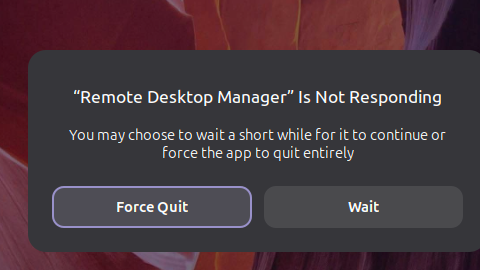
Then I closed it, relaunched, and it seems much better so far....
Will I have to modify the launcher in the futur or are there plan to have modifications?
Thanks for the feedback.
937e8e9f-4e6b-4bb5-a0dd-6f277fb50ac8.png
So, now it's much more usable... thanks...
Still have a lot of "close / Wait" .... guess would be a good idea to enable debug.... to see what might be the cause, unless you have an idea for me.
And now I also have this: This morning, I connected my laptop to 2 externals screens....
While on my laptop (main) screen, the "menu" appear like this: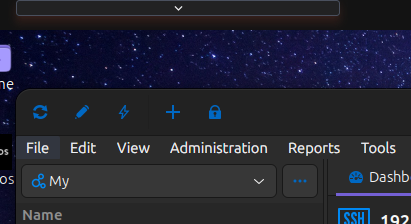
So, if I want to display the "file" menu, I have that rectangle, with the arrow, on top of my screen, If I click on the arrow, the arrow changes it's way and point to the top direction, but I still cannot see anything.
When I take RDM to any of the external screen, menus are showing correct .
:-D
Wish you a nice great day
2dddbd25-8a6c-4e81-8c24-52be7ffd16e3.png
Hello,
Thank you for your response.
Could you please provide the specifications of your monitors, including the screen size, resolution, model number, and any other relevant details?
Best regards,
Tommy Sanders
Hello, yes i can do that: :-D, without any problem, and even with pleasure....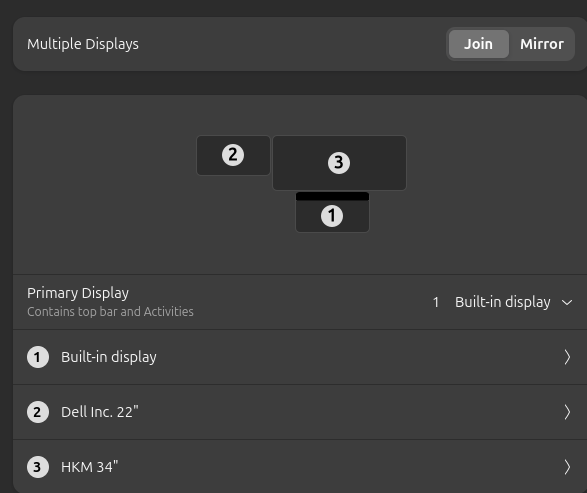
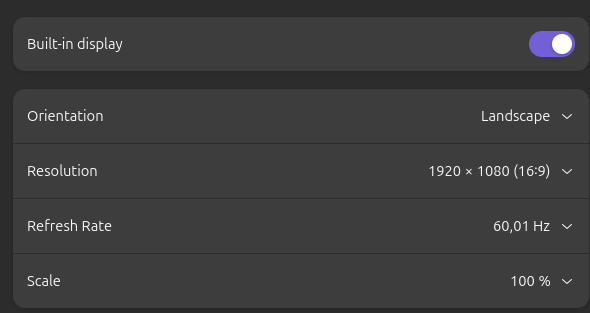
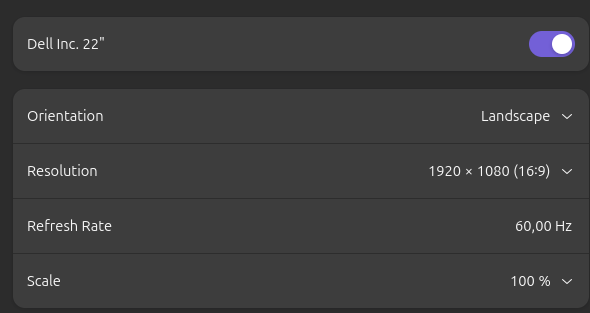
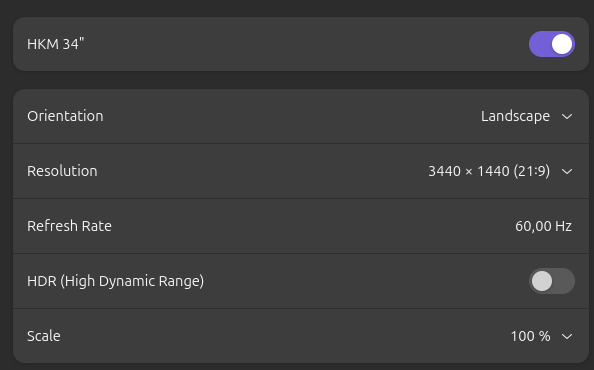
Does that help ?
Thanks for the feedback....
841d9204-895a-4c4a-883f-4838c996133c.png
36a4b075-c2ef-45d9-81a0-219f080d8c6d.png
168bbe85-db28-4039-8ea0-e6407fac8f28.png
f4eaa47a-8795-4383-860a-1a3873dbac9c.png
Hello,
Thank you for your response.
I have created a support case and would appreciate it if you could provide a recording of the issue. This will help us investigate the matter further.
We look forward to your reply.
Best regards,
Tommy Sanders
Hi,
I am really sorry for the delay....
I have uploaded as requested...
As well as the recording, and also the /home/user/.rdm/RemoteDesktopManager.log and . debug file .. (I set the debug to the maximum, i think)
Just in case that help.
Unfortunatelly, because I am loosing a big amount of time on that machine runing linux (NOTHING to do with RDM) I will no re-install that laptop with a Windows...
Meanwhile, if you found something, do not hesitate to let me know... ( I have another laptop for RDM testing) ...
Thanks a lot for the support... And PLEASE do keep on going on that nice peace of software!
Regards
Hello Pierre,
Thank you for your response.
I have reported your two issues under two separate cases to avoid any confusion. I will get back to you as soon as I receive an update from the developers.
Best regards,
Tommy Sanders
Hello pierre,
We are aware of some significant issues regarding UI scalling, ui responsiveness and overall performance with GTK for Wayland on Gnome for Ubuntu 25 and up. We are actively working to replace GTK with Avalonia, which works well under those conditions. However this process will take some more time but it is currently our top priority. We thank you for your patience.
Cheers,
David Ringuet
Hello
Thanks for your reply,
Patient I will be ...
And looking forward for your nice product I do.
Thanks again for the nice peace of software.
Have a nice day