Add/Edit Custom Variable
1 vote

Hello,
Could you please add the possibility of Add/Edit/Delete custom variables?
It is actually possible to visualise them, but for changes have to happend under another platform
Thank you very much
All Comments (9)
Hi @Guillaume,
Sorry for the late response. Thank you for the suggestion, we will add it to our roadmap. We are planning to make this feature available in the next version.
Best regards.
Nicolas Parr
Hi again @Guillaume,
Sorry for the conflicting information, but I just realized that we actually do have this feature in RDM Linux already. You will find it in the system settings under "Custom variables".
I hope this helps.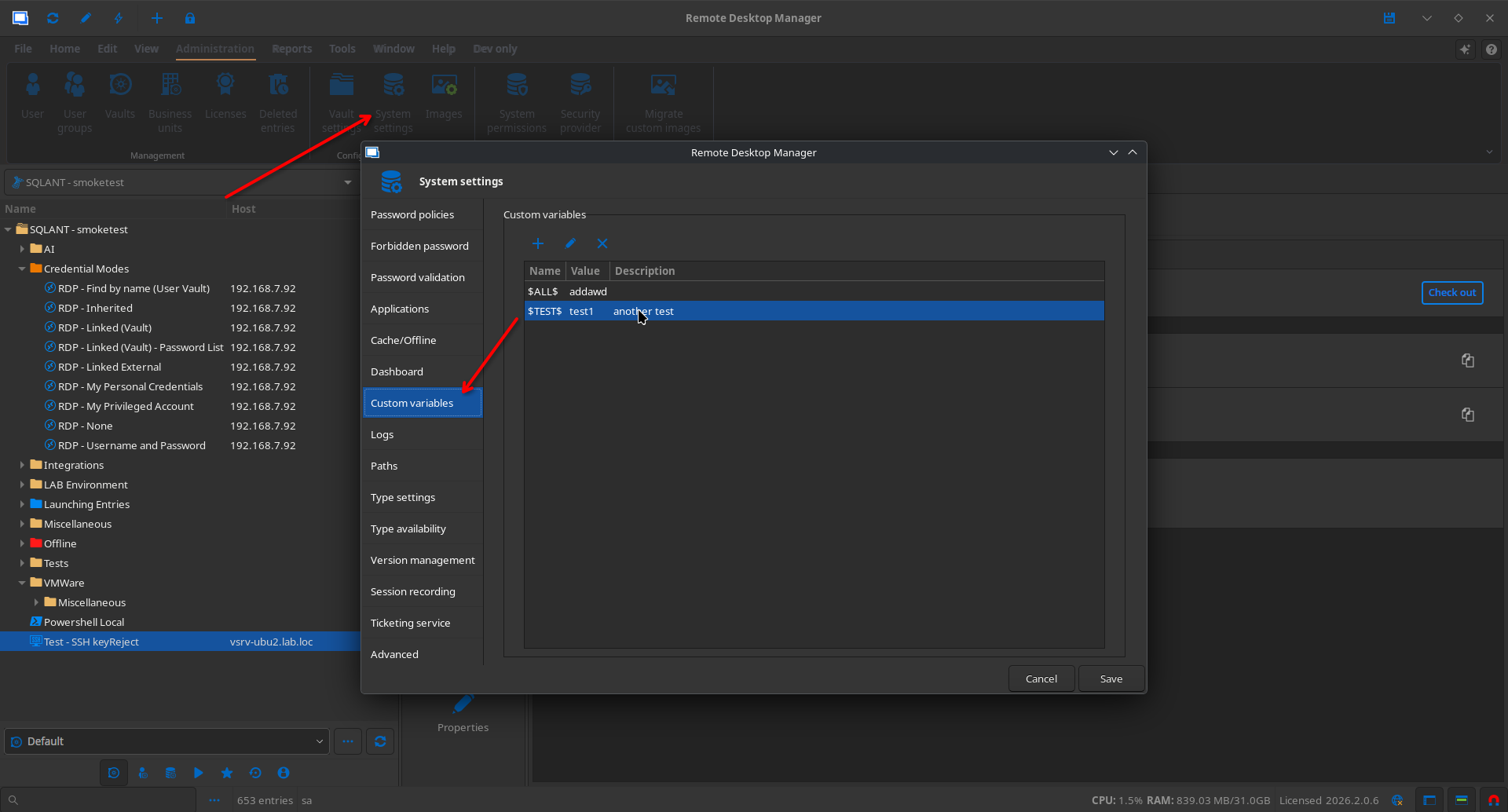
Nicolas Parr
6cc6a381-2788-4df1-b71e-fe4bfce59d9e.png
Hi Nicolas,
You're right, under Administration -> System Settings, Custom Variables menu can be found. But that doesn't seems to be the Vault variable.
Under the vault properties, I don't see the possibility to add/edit/delete the custome variables.
Sorry, I wanted to do a printscreen in a test vault but there is a thing in the linux version where I cannot Add entry, or view the properties of the vault. Everything is greyed out, but with the same use under windows, I can access everything. I'll try tomorrow again.
Hi Guillaume,
Could i ask you to copy and paste your system diagnostics in Help > System Diagnostics (use the copy to clipboard button please !) and also the version of RDM that you are currently using. This would help us figure out what is happening here.
Cheers,
David Ringuet
========== DIAGNOSTIC ==========
LinuxMint 22.3
Kernel version [6.17.0.35]
Container [None]
Desktop environment [X-Cinnamon]
Display server [x11]
Architecture [X64]
Support local password saving [Ok]
Is administrator [Ok]
Is a system administrator [No]
Is a database administrator [No]
Is elevated privilege [No]
Workspace size [1517 / 922]
Is the Internet connected [Ok]
Allow multiple instances [No]
Allow drag and drop [Ok]
Auto-refresh [No]
Debug level [0]
Running since [Running since: 10 min]
========== DATA SOURCE ==========
Data source ID: xxx
Server name: xxxx
Description:
Server version: 2026.2.4.0
DB version: 1179
Data source type: Devolutions Server
Data source size: 13.7 MB
User specific settings count: 0
Data source settings size: 9.6 KB
User specific settings size: 231 Bytes
Connection protocol: https
Caching/Offline: ReadOnly (File, OpenMCDFv2)
Allow connection states: True
xxxxx
Cache mode: File
Cache type: IntelligentCaching
It's interresting. It says that I'm not a system administrator. Which I am.
I've checked the same on the Windows Client, there it says it is.
Thank you @Guillaume,
We are currently working on adding the custom variables section to the vault settings. As for the issues with the system administrator status and adding entries to the root of your data source and editing it, we'll create tickets and keep you up to date when there is progress.
Best regards.
Nicolas Parr
Hi @Nicolas Parr
Thank you very much for your help. I've already opened a thread on the bug section of the forum.
https://forum.devolutions.net/topics/55302/system-permission--different-behavior-and-rights#237463
Hello,
Thank you for being so patient!
I'm pleased to inform you that a new version of RDM (2026.2.14.0) has been released, featuring Custom Variables section in Vault Settings.
Latest Version: Download RDM
The other tickets open are still under investigation and we will provide follow-up here once resolved.
Please let us know if the fix for the "Custom Variable" works or if you encounter any issues.
Best regards,
Maxim Robert
Hi Maxim,
Thank you so much, and thank to all the team for your incredible work and responsiveness.