System permission - Different behavior and rights

Hi Everyone.
I'm facing a new behavior in the 2026.2.0.6. I'm not allowed to do anything into the root of a vault.
I can't see properties, more or add new entries...
On Windows client, connected with the same user, I have the permissions.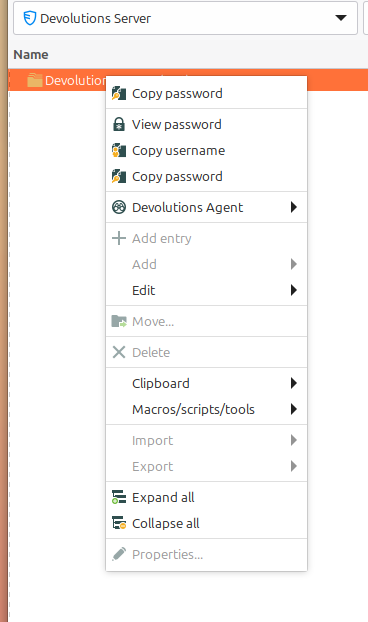
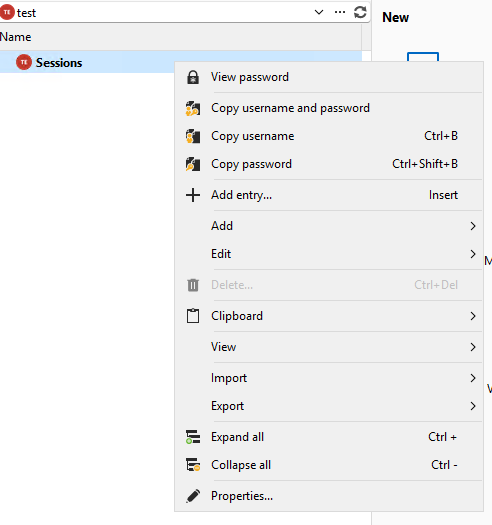
It seems like the system permissions aren't applied correctly.
Thank you in advanve.
32045447-44ca-4a7f-a683-1a94fe24ed22.png
21210e2a-414c-4e76-9c19-7c6a1444796f.png
All Comments (8)
Hello Guillaume,
Thank you for the report.
Could you confirm if the user connected in Remote Desktop Manager for Linux has administrative permissions on the data source/vault?
Since the same user appears to have the expected permissions on the Windows client, we would like to confirm whether the Linux client is correctly recognizing the account as an administrator or if the issue is specific to system permission handling on Linux.
Best regards,
Carl Marien
Hi Carl,
I don't want to confuse anyone. I've opend feature request about adding custom variable capabilities. As I wanted to make a printscreen of the "issue" I found out I could not go anymore into the properties of the vault. So your colleague David also asked about this diagnostic.
But the administrative permissions is a point: it says no, but in the windows Client, it says yes ..
========== DIAGNOSTIC ==========
LinuxMint 22.3
Kernel version [6.17.0.35]
Container [None]
Desktop environment [X-Cinnamon]
Display server [x11]
Architecture [X64]
Support local password saving [Ok]
Is administrator [Ok]
Is a system administrator [No]
Is a database administrator [No]
Is elevated privilege [No]
Workspace size [1517 / 922]
Is the Internet connected [Ok]
Allow multiple instances [No]
Allow drag and drop [Ok]
Auto-refresh [No]
Debug level [0]
Running since [Running since: 10 min]
========== DATA SOURCE ==========
Data source ID: xxxx
Server name: xxxxx
Description:
Server version: 2026.2.4.0
DB version: 1179
Data source type: Devolutions Server
Data source size: 13.7 MB
User specific settings count: 0
Data source settings size: 9.6 KB
User specific settings size: 231 Bytes
Connection protocol: https
Caching/Offline: ReadOnly (File, OpenMCDFv2)
Allow connection states: True
Hello Guillaume,
Thank you for the additional information and diagnostic.
To help us compare the behavior between both clients, could you please send us a screenshot of File → Workspace from both computers?
Ideally, please provide one screenshot from:
- The Linux client where the issue occurs.
- The Windows client where the permissions are displayed correctly.
This will help us verify if there is any difference in how the workspace or permission context is being detected between the two environments.
Best regards,
Carl Marien
Hello @Carl Marien
Certainly:
Linux: 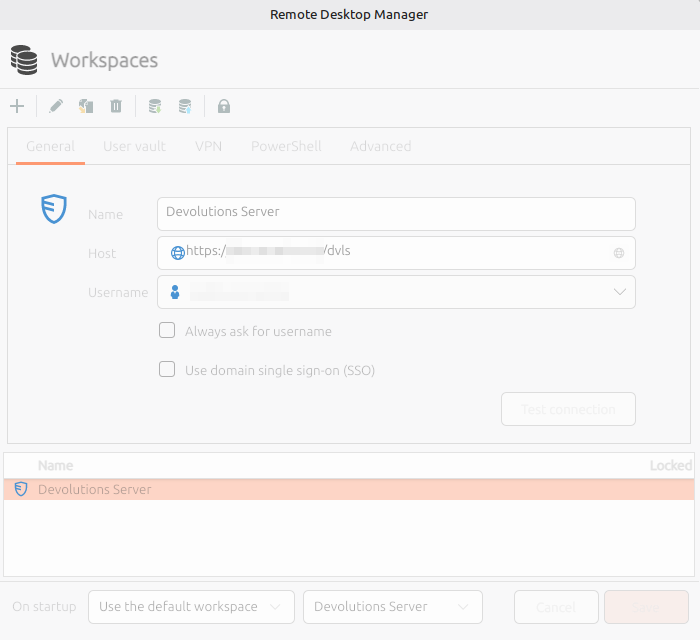 Windows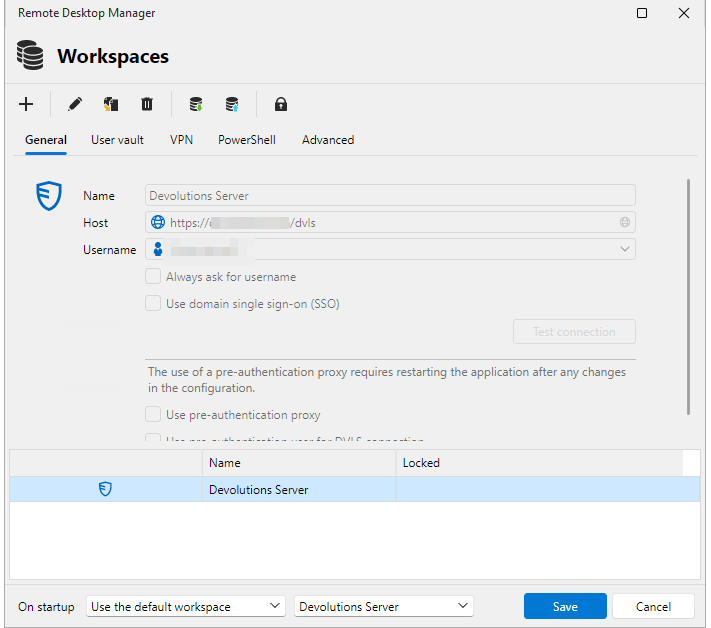
The only difference is, under Linux, my username is written, under Windows, it uses the variable %username% (what resolve the same username as the one entered on the linux configuration)
All Other configurations (User Vault, VPN, PowerShell, Advanced) are identical on both platforms.
3af73582-c91a-49c2-ae00-7d450ef0cf71.png
c81dbc3f-706a-4907-a653-868e48114bf9.png
Hello Guillaume,
At this point, I would like to see the issue directly on your side so I can better understand the behavior.
I will send you a link by email to start a remote session with me.
Best regards,
Carl Marien
Hello everyone,
Following a remote session with Guillaume, we reviewed the behavior together but were unfortunately unable to reproduce the issue.
Since we could not recreate the problem, I'll mark this topic as resolved and close the associated case for now.
If anyone is able to reproduce the behavior in the future or identifies reliable reproduction steps, please feel free to update this thread or open a new case. We'll be happy to investigate further.
Best regards,
Carl Marien
Hi Carl,
It might have hust needed some holiday. Today everything work as expected ..I can create entries in the root of a Vault...
Some Update maybe... Anyway, it works fine and I thank you for your time.
Hello,
That's great news! I'm glad to hear everything is working as expected now.
It's certainly possible that an update or a refresh on either the client or server side resolved the behavior. Since we weren't able to identify reliable reproduction steps, it's good to know the issue is no longer occurring.
Thank you for taking the time to follow up and let us know the outcome. I also appreciate your patience and your help throughout the investigation.
If you notice the behavior returning in the future or discover any reproducible steps, please don't hesitate to reach out. We'll be happy to investigate further.
Have a great day!
Best regards,
Carl Marien