
Denis Vincent
Sessions load fine using Putty, but fail with RDM
@ivorlevene
Enable the "Skip environment variable setup" in the "Advanced tab". It should resolve the problem which is frequent with Cisco devices.
Regards
"Staircase" effect in SSH session when apt progress bar is shown + font rendering issues
@RDMTinkerer
I received the recordings and I have opened a ticket. I can't tell you when a fix will be available, but we will contact you when it will.
Regards
"Staircase" effect in SSH session when apt progress bar is shown + font rendering issues
You can send it to me via direct message (hover the mouse over the picture in the circle next to my name)
"Staircase" effect in SSH session when apt progress bar is shown + font rendering issues
Hi @RDMTinkerer
For the progress bar bug, if you could send me a recording of it (follow these instructions: https://docs.devolutions.net/rdm/knowledge-base/how-to-articles/record-an-ssh-session-as-a-trp-file) it would help me a lot.
As for the point 2, it depends on the height of the graphic characters vs the height of the line, both are determined by the font. You might be able to reduce or eliminate those rendering artefacts (but not the gaps) by changing the "Font quality" setting in the "Display" sub-tab of the "Terminal" tab.
20263.12.0 64-bit Unexpected echo and input during Telnet connection
I made some investigation, and I believe you will need to use the telnet terminal, and set the "Local echo" setting to "Off", but it does not work at the moment. I made a fix that will be available, probably in the next version.
20263.12.0 64-bit Unexpected echo and input during Telnet connection
Hi @Confused Hao
What type of server are you connecting to? Based on the logs you sent, the server is not responding to telnet option negotiation, and seems to have echo on by default which is unusual for telnet.
You could try setting the "Local echo" setting to "Off"
You could try the "Raw terminal" instead and see if it works better, You would have to set "Local echo" to "Off" as well.
Regards
Post-login - sudo elevation
Yes, as I was writing my last message, I realized that the match is indeed case sensitive and that it makes it less useful.
It is also something easy to change, so I will open a ticket and make it case insensitive right away.
Regards
Post-login - sudo elevation
That's an interesting suggestion. We could do it using regex expressions.
That makes me think that, right now, you don't have to match the whole prompt. For exemple, if you are waiting for a prompt of the style:
[sudo] password for username:
where username can change, you can wait for:
password for
and that will be enough to trig the next step of the post login command sequence.
I hope that helps until we provide an improvement.
Regards
Post-login - sudo elevation
Hi @Tristis Oris
You are right, waiting for a specific word is a hack (as well as using delays). We are doing it this way because there are no standard way of knowing the server is ready for a command: there are no mandatory escape sequences sent around the prompt, and the prompt text changes from server to server and also changes on a single server depending on some mode or permission level. I am looking into something called "shell integration", but there are no standards there too. And that would only solve "command readiness", there are commands (like sudo) that have their own special prompts and no standard (again) to know when there are prompting.
And that is only about linux/unix servers. There are other non unix devices with wildly different behaviours (I am looking at you Cisco) making the definition of some heuristics for prompt detection quite difficult if not impossible. The reasonable approach would be to concentrate on linux servers which are the most frequent. But linux comes in many forms with many different shells, often customized by their users.
To summarize: using words and delays has its limitations, I am looking at what could be done to make a more reliable automation for terminals, the solution will probably be limited to unix type shells, and it may require some customization of the shell's resources. Also, at this point, I can't tell you when that might be ready.
Regards
RDM cannot use an OpenSSH certificate signed for an ED25519-SK FIDO2 key
Hi @Spectrum2k
I confirm that the certificate variations of the sk- key types are not currently supported. I have opened a ticket to correct that and I am already working on it. You should be notified when the fix will be available.
Regards
pasting multiple lines
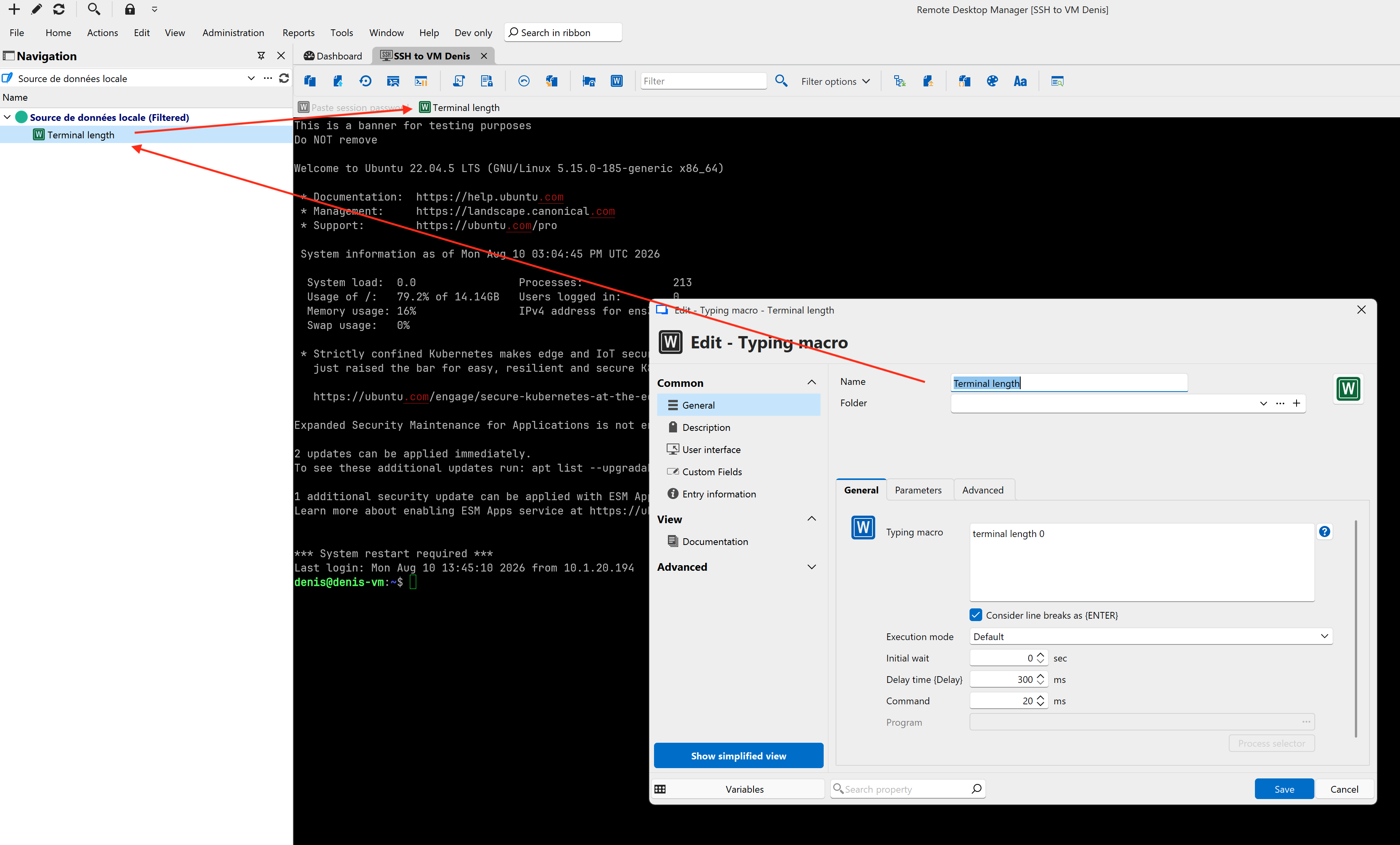
You can create entries of type "Typing macros" in which you can enter a sequence of commands. Each macro will appear as a button a the top of the terminal, you click that button to execute the macro. I think that by default, all macros are displayed, but you can control that using the "Macros" tab of the SSH entry properties.
pasting multiple lines
Hi,
The solution is definitely to enter the 'terminal length 0' command prior, but you can enter it in the "Post-login" tab of the SSH entry and it will be executed automatically after each login. Or you can make a macro if you don't want it executed systematically. As a matter of fact, you could look into using macros instead of using paste to automate certain command sequences.
Regards.
pasting multiple lines
Hi @deleted923775e9a87c49ce8777887626900107,
I have tested using an ASA Cisco switch and I have been able to reproduce your bug, sort of. The problem happens with many show commands which reply using a <---more---> style of output, which captures the input. On the switch I have available for testing, the "show version" just swallows the whole next pasted command ignoring all text.
I have tested also using another terminal (Putty) and I get the same result.
Have you tried testing with a different terminal if you get the same behaviour?
I will keep investigating in case I missed something.
Regards
pasting multiple lines
I will investigate this and see if I can reproduce.
Regards
pasting multiple lines
Yes, absolutely.
For some servers, pasted text must be separated line by line, otherwise they might drop some characters from their input. If the "Separate paste in line groups" is not checked, then pasted text is separated in approximately 1 kilo bytes block. In the examples you provided, this means that there is no delay between lines because the whole text is less than 1 kb.
On the other hand, some servers accept large multi line text to be sent in one single block without any problem. So there is no "one solution fits all" because separating multiline text line by line with a 100ms delay is crippling for servers that can handle large amount of text being sent. And it is not possible to wait for the output to finish before sending the next line because it is not known if the first line would even cause output in the first place, and it would introduce delays that are not necessary for some servers.
But I think that with the "Separate paste in line groups" checked and the "lines" field set to 1, it should work with a delay of 100ms because it seems to often work on your server with a delay of 0ms.
SSH connection hangs with Unknown SSH message types 26, 120, 136 on macOS (ProtocolsSharp 2026.1.29.1)
Hi,
Could you send us new logs with the verbose level set to 2? We might be facing another problem.
Also, it is normal to see in the logs the "Unknown SSH message type" line. The server you are connecting to seems to send such a message and I chose to leave a trace about it in the log to have a clue if there are other problems.
Regards
pasting multiple lines
Hi,
Some servers have buffer overrun problems when receiving multiline paste.
Have you tried modifying the "Separate paste in line groups" setting? It is located in the "Advanced" tab of the SSH Shell entry properties. I suggest checking this setting and setting the "lines" value to 1. The setting just above, "Paste delay" could be increased, but since most lines are executed properly, I think the default 100 ms will be fine.
Let me know if this fixes your problem or not.
Regards.
SCP to Cisco Routers / Switches
Hi,
Sorry about that, but I was not able to make it work for now. It turns out Cisco devices are even more non-standard than I anticipated. So they don't fit with my current architecture for SCP. I will have to make a separate implementation, for which I am not sure yet what it should be. I am not able, at this time, to evaluate when it will be available. I appreciate your offer for help, I will consider it for sure, but right now, I wouldn't even know what to ask.
Regards
nerd fonts did not work on ssh terminal
The fix for nerd fonts will be available in RDM 2026.1.18.0. Let me know if you still have trouble after this update.
Regards
BYOBU mouse scroll not working
Hi @ryanhurrell,
Forget my previous message. I was able to reproduce what I think is the problem you are experiencing: the wheel is scrolling the local window's content (the scrollbar moves) but it should have byobu scroll the content remotely (the scrollbar does not move and the byobu status bar remains at the bottom of the display). I understood the opposite, sorry about that.
I found the bug causing this and made a fix for it. It should be available in the next RDM release.
The "Force scrolling history when using mouse wheel" setting should be set to "No" for the fix to work. The "Reset scroll on display" will have no effect in this particular case and can be set to your preference.
Regards
BYOBU mouse scroll not working
I see you made the change in the global settings. But those settings can be overridden in the properties of each SSH terminal entry:
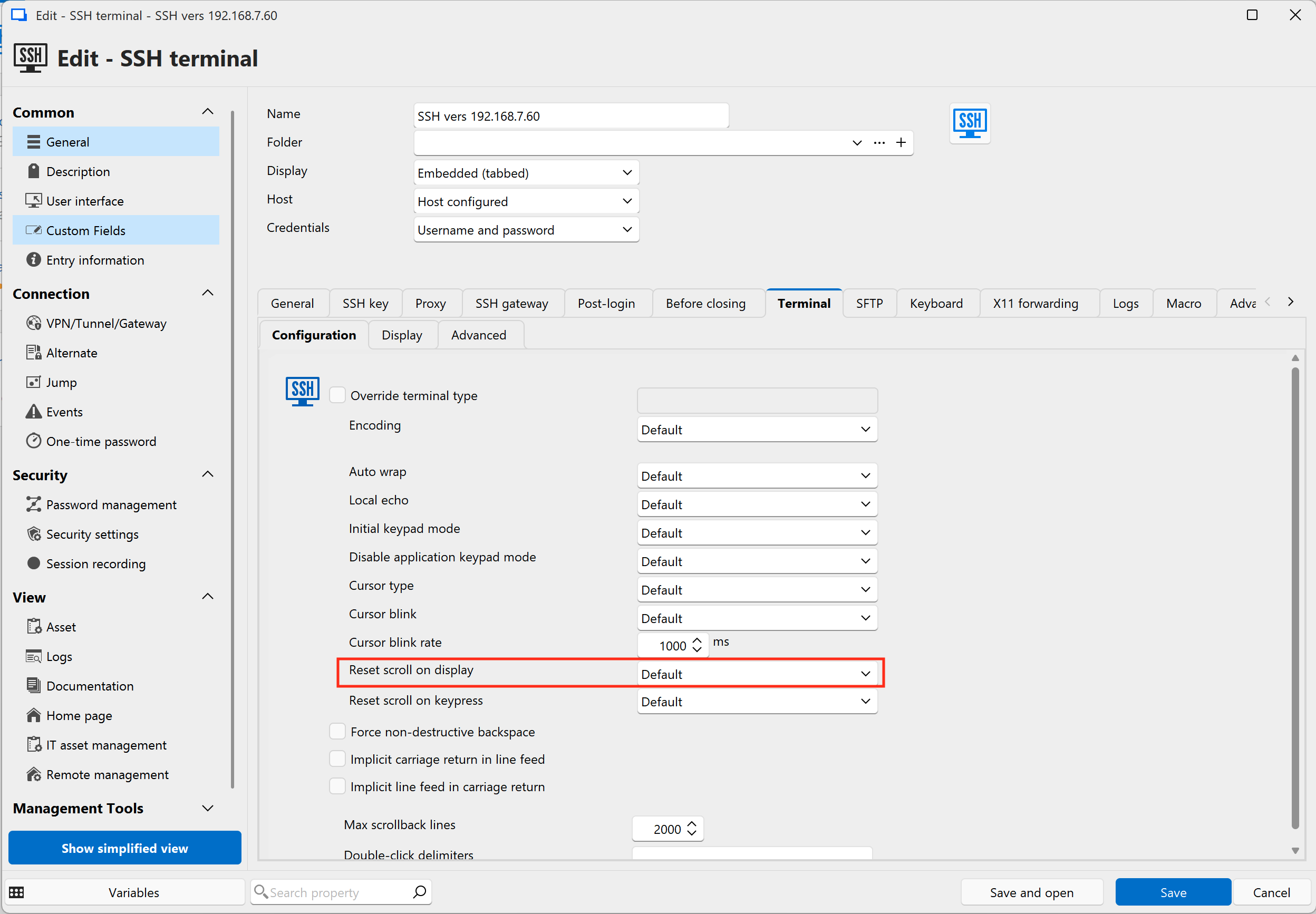
The global setting is used when the corresponding setting is set to default in the entry's properties.
If this this does not fix the problem, then can you tell me what type of server are you executing byobu on? I have tried to replicate the problem on an Ubuntu server and had to change the "reset scroll on display" setting because the clock in the status bar of byobu would reset the scroll each second. Maybe you are facing another problem. You mentioned having mouse mode enabled (I guess you mean in byobu), I will try to see if I can set it up (I am not familiar with byobu).
Regards
BYOBU mouse scroll not working
@ryanhurrell Hi,
Could you try to change:
Terminal → Configuration → Reset scroll on display : and set it to “No”
Let me know if it works.
Regards
How to get SFTP working with vCenter
Here you go:
How to get SFTP working with vCenter
Hi @hjbos
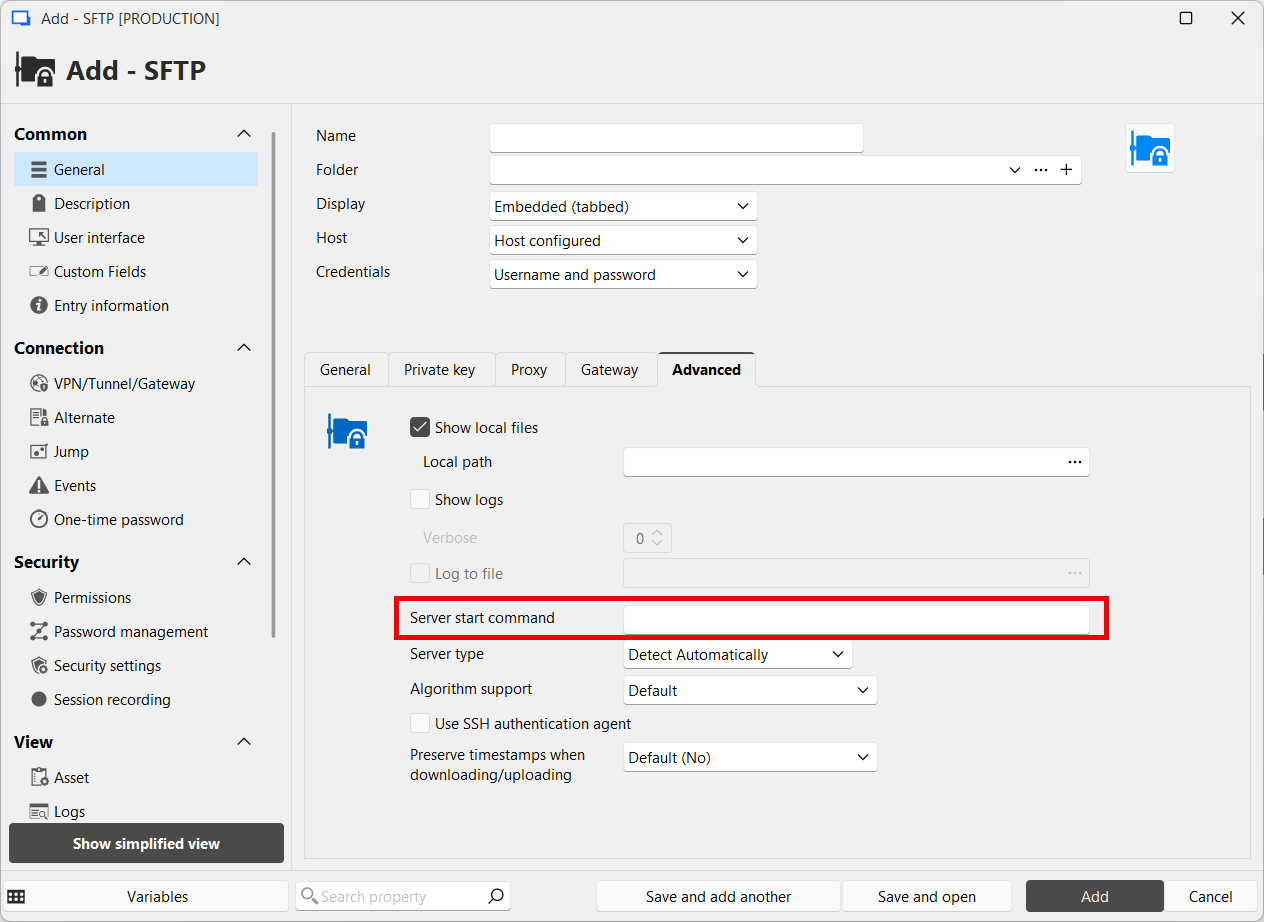
In the "Advanced" tab, you can set "Server start command" with: shell /usr/libexec/sftp-server (or just: /usr/libexec/sftp-server if the previous does not work)
I would recommend you also set "Server type" to "Unix".
Let us know if it works or not.
Regards
SCP to Cisco Routers / Switches
Hi,
I haven't begun development on this feature yet. We are planning to try having it in the 2026.2 version later this summer. Keep in mind this is not like a simple bug fix, it is a whole new feature which must be added carefully to not break what is already working. The SecureCRT output that you provided will most probably be useful, it's already sure it will help me select the correct Cisco OS to support, because not all Cisco devices have the same command syntax.
Regards.