BYOBU mouse scroll not working

Hello
I am new to RDM and like to use BYOBU but I am unable to scroll back in my window with mouse mode enabled.
I tried toggling the "Force scrolling history when using mouse wheel" setting but neither way worked.
All Comments (11)
Hello Ryan,
Thank you for reaching out to us regarding this,
Could you please specify the version of RDM you are currently using?
What type of data source are you using?
I'm assuming you are using an SSH Terminal type entry is that correct?
Best regards,
Samuel Dery
Thank you for the response.
RDM Version 2024.2.21.0 64-bit
I am using the devolutions hub as my data source.
Yes you are correct that I am using SSH Terminal.
I can scroll back when using SSH Terminal but when I use BYOBU it seems to begin to scroll back and almost immediately reverts back to the bottom.
When using putty on my local machine I am able to scroll back with BYOBU.
Hello,
Thank you for reaching out to Devolutions Support.
We have an internal ticket open regarding an issue with terminal multiplexers, and I have added your case to it.
Turning off "Force scrolling history when using mouse wheel" in File -> Settings -> Entry types -> Sessions -> Terminal could resolve the problem. Could you please try this and let us know if it works for you?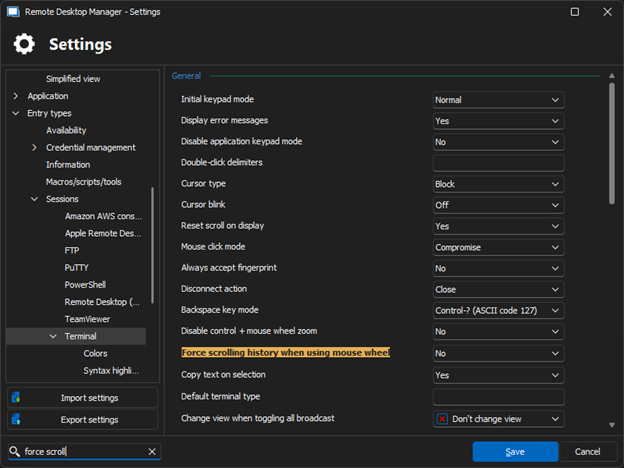
Best regards,
Carl Marien
Picture2.png
Yes I tried to to toggle that setting both ways with no success.
Hello,
Thank you for your response. I will contact the developer and keep you informed, as it seems the workaround did not resolve the issue on your end.
In the meantime, to the best of my knowledge, tmux should work without any problems.
Best regards,
Carl Marien
@ryanhurrell Hi,
Could you try to change:
Terminal → Configuration → Reset scroll on display : and set it to “No”
Let me know if it works.
Regards
Denis Vincent
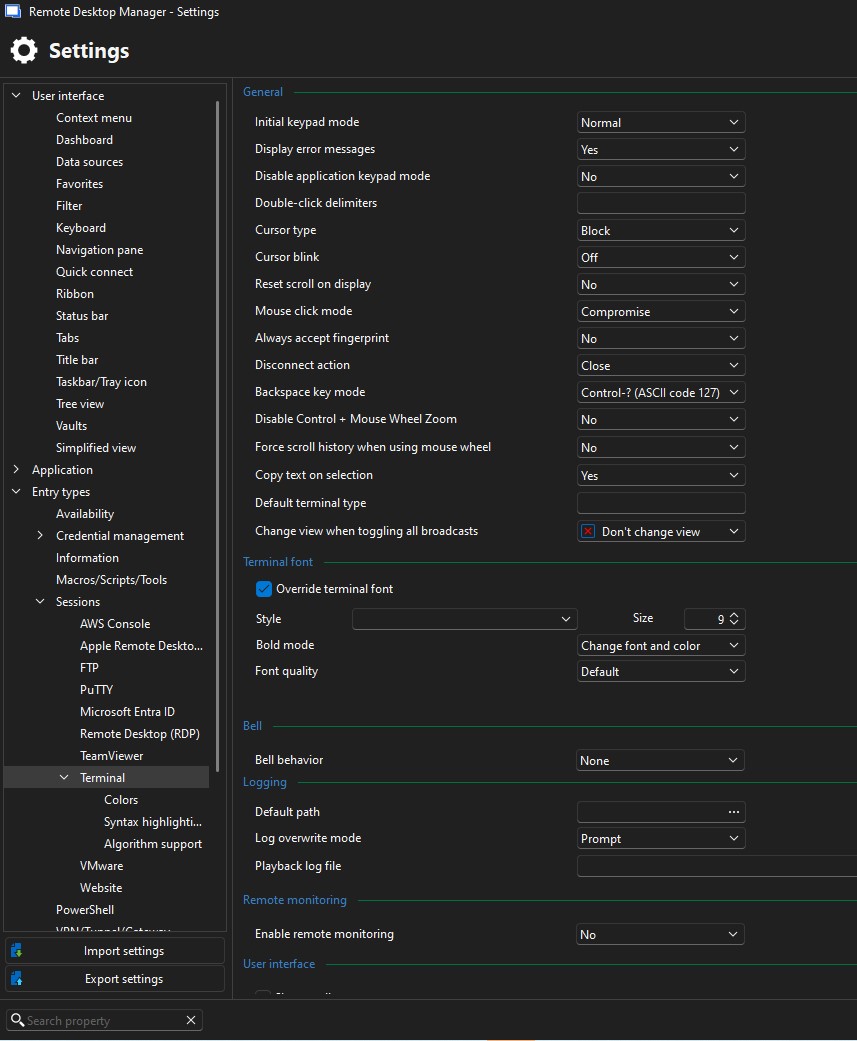
I just tried it it still doesnt seem to work.
i attached a screenshot of the terminal setting
Screenshot 2026-04-13 154221.jpg
I see you made the change in the global settings. But those settings can be overridden in the properties of each SSH terminal entry: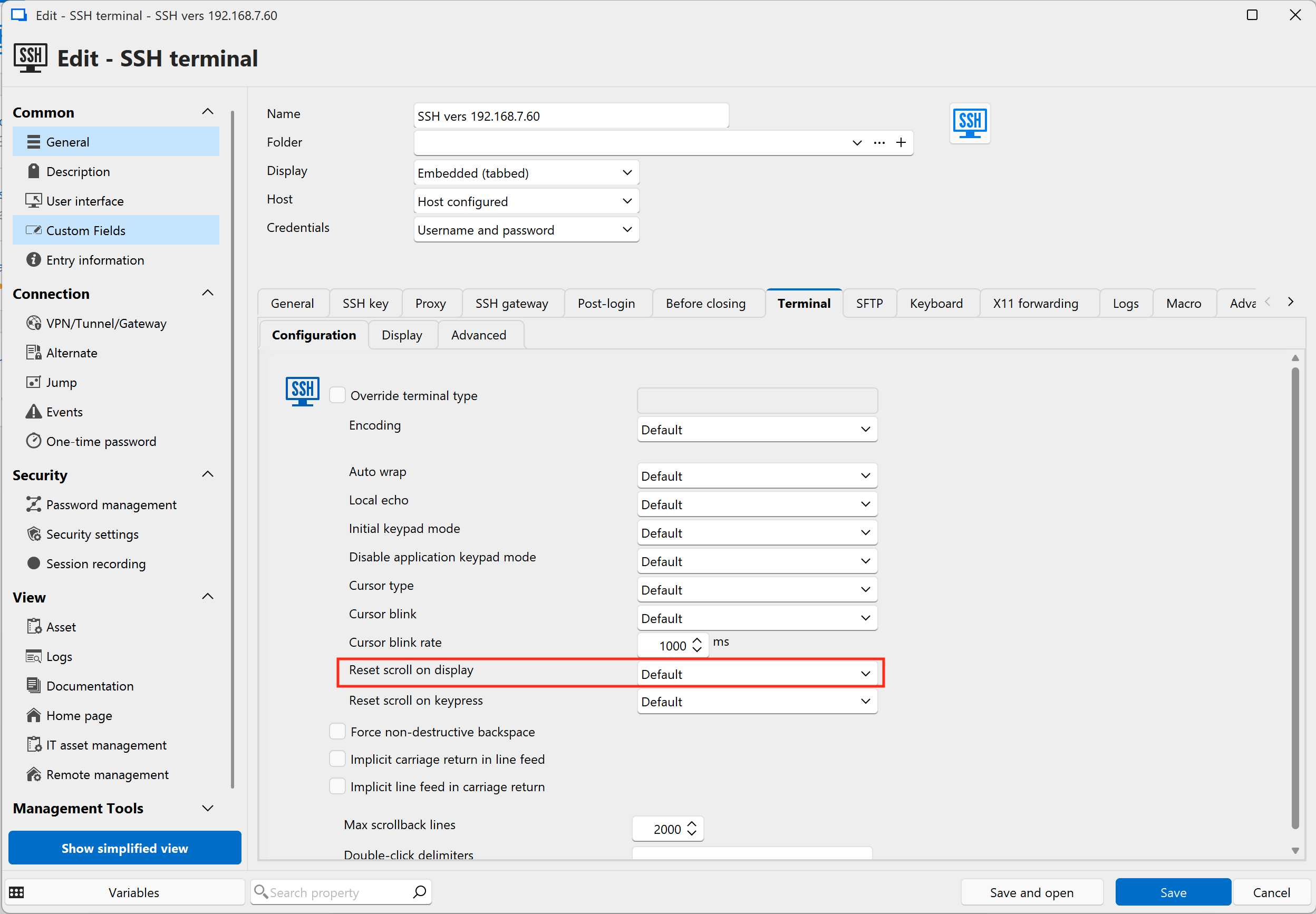 The global setting is used when the corresponding setting is set to default in the entry's properties.
If this this does not fix the problem, then can you tell me what type of server are you executing byobu on? I have tried to replicate the problem on an Ubuntu server and had to change the "reset scroll on display" setting because the clock in the status bar of byobu would reset the scroll each second. Maybe you are facing another problem. You mentioned having mouse mode enabled (I guess you mean in byobu), I will try to see if I can set it up (I am not familiar with byobu).
Regards
Denis Vincent
7c22fb70-8ef4-4a02-aa6b-56c3238b0016.png
Hi @ryanhurrell,
Forget my previous message. I was able to reproduce what I think is the problem you are experiencing: the wheel is scrolling the local window's content (the scrollbar moves) but it should have byobu scroll the content remotely (the scrollbar does not move and the byobu status bar remains at the bottom of the display). I understood the opposite, sorry about that.
I found the bug causing this and made a fix for it. It should be available in the next RDM release.
The "Force scrolling history when using mouse wheel" setting should be set to "No" for the fix to work. The "Reset scroll on display" will have no effect in this particular case and can be set to your preference.
Regards
Denis Vincent
Awesome I'm glad you were able to replicate it. Thank you for you help and sorry for the delay in repsonse.
Hello,
Thank you for being so patient!
I'm pleased to inform you that a new version of RDM (2026.1.22.0) has been released, featuring the fix for your issue.
Latest Version: Download RDM
Please let us know if this works or if you encounter any issues.
Best regards,
Maxim Robert