pasting multiple lines

Many times when I send these commands it show the preview and is correct, but when sending them one charater is missing.
What is being sent:
show interfaces gi1/0/5 counters errors
show interfaces gi1/0/8 counters errors
show interfaces status | include Gi1/0/5|Gi1/0/8
show log | include Gi1/0/5|Gi1/0/8|LINEPROTO|UPDOWN|ERR
show mac address-table interface gi1/0/5
show mac address-table interface gi1/0/8
8237RSU2-SW1#show interfaces gi1/0/5 counters errors
Port Align-Err FCS-Err Xmit-Err Rcv-Err UnderSize OutDiscards
Gi1/0/5 0 0 0 0 0 0
Port Single-Col Multi-Col Late-Col Excess-Col Carri-Sen Runts
Gi1/0/5 0 0 0 0 0 0
Port OverSize
Gi1/0/5 0
8237RSU2-SW1#show interfaces gi1/0/8 counters errors
Port Align-Err FCS-Err Xmit-Err Rcv-Err UnderSize OutDiscards
Gi1/0/8 0 0 0 0 0 0
Port Single-Col Multi-Col Late-Col Excess-Col Carri-Sen Runts
Gi1/0/8 0 0 0 0 0 0
Port OverSize
Gi1/0/8 0
8237RSU2-SW1#show interfaces status | include Gi1/0/5|Gi1/0/8
Gi1/0/5 Vertiv B-Left connected 25 a-full a-100 10/100/1000BaseTX
Gi1/0/8 Vertiv A-Right connected 25 a-full a-100 10/100/1000BaseTX
8237RSU2-SW1#show log | include Gi1/0/5|Gi1/0/8|LINEPROTO|UPDOWN|ERR
8237RSU2-SW1#how mac address-table interface gi1/0/5
^
% Invalid input detected at '^' marker.
8237RSU2-SW1#show mac address-table interface gi1/0/8
Mac Address Table
-------------------------------------------
All Comments (22)
Hello,
- Where exactly are you pasting this in our application? Is it in a specific entry type?
- Are you using Ctrl + V or a specific clipboard feature inside RDM?
Best Regards,
Michaël Beaudin
No, i copy commands from notepad++ and right click in my ssh and it removes the s. You can see it in the output above.
Here are the commands I copied:
write erase
delete flash:vlan.dat
here is the output when I right click in RDM:
8081RAD_MDF120_coresw#write erase
Erasing the nvram filesystem will remove all configuration files! Continue? [confirm]d
File system erase is not confirmed or Could not be completed
8081RAD_MDF120_coresw#elete flash:vlan.dat
^
% Invalid input detected at '^' marker.
8081RAD_MDF120_coresw#
8081RAD_MDF120_coresw#
8081RAD_MDF120_coresw#
8081RAD_MDF120_coresw#elete flash:vlan.dat
Hello,
Thanks for the clarifications. We will create a ticket and keep you updated on the progress.
Best Regards,
Michaël Beaudin
To clarify, in the example above it removed the d. Thanks for all you guys do.
Hi,
Some servers have buffer overrun problems when receiving multiline paste.
Have you tried modifying the "Separate paste in line groups" setting? It is located in the "Advanced" tab of the SSH Shell entry properties. I suggest checking this setting and setting the "lines" value to 1. The setting just above, "Paste delay" could be increased, but since most lines are executed properly, I think the default 100 ms will be fine.
Let me know if this fixes your problem or not.
Regards.
Denis Vincent
actually this could be the problem. if a line is pasted but the output doesn't finish before 100ms, might this cause the problem?
Yes, absolutely.
For some servers, pasted text must be separated line by line, otherwise they might drop some characters from their input. If the "Separate paste in line groups" is not checked, then pasted text is separated in approximately 1 kilo bytes block. In the examples you provided, this means that there is no delay between lines because the whole text is less than 1 kb.
On the other hand, some servers accept large multi line text to be sent in one single block without any problem. So there is no "one solution fits all" because separating multiline text line by line with a 100ms delay is crippling for servers that can handle large amount of text being sent. And it is not possible to wait for the output to finish before sending the next line because it is not known if the first line would even cause output in the first place, and it would introduce delays that are not necessary for some servers.
But I think that with the "Separate paste in line groups" checked and the "lines" field set to 1, it should work with a delay of 100ms because it seems to often work on your server with a delay of 0ms.
Denis Vincent
I am dealing with switches, not servers. I have always been able to past x number of lines with no issues. If this options helps, How can i update all my connections quickly?
Hello,
You could use the batch edit feature.
- Select your entries in the navigation tree
- Right click and go in Edit -> Batch Edit -> Session type settings
- Go in the advanced tab, check the override checkbox and set the setting then save.
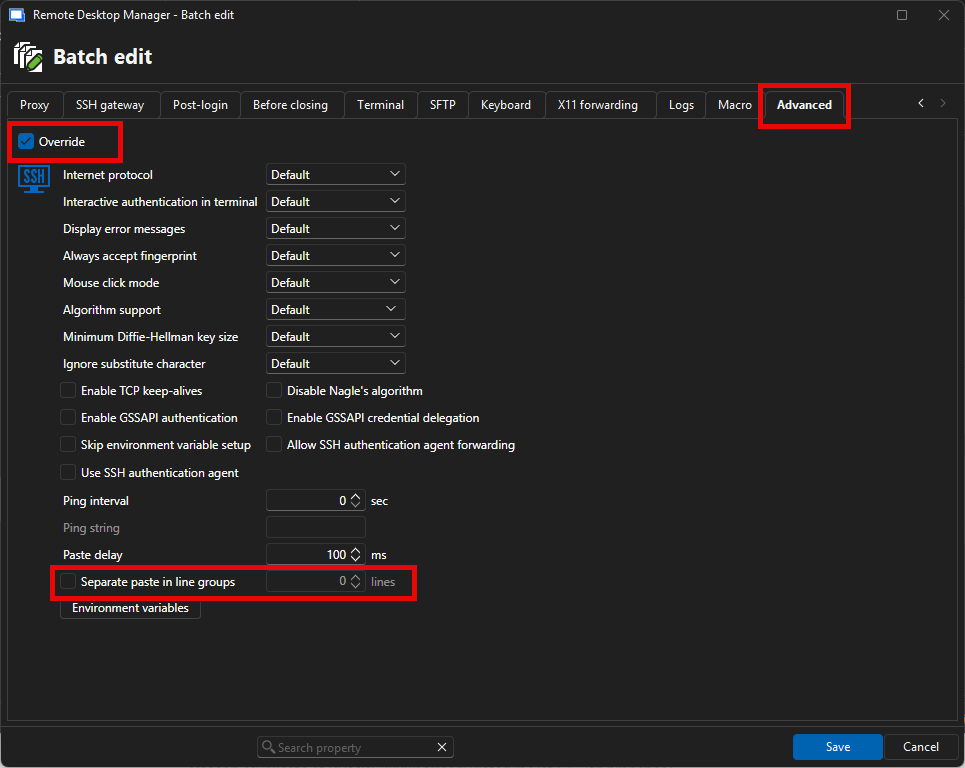
If you wish to do it on all your entries in the vault, it could help you to toggle on this search feature: 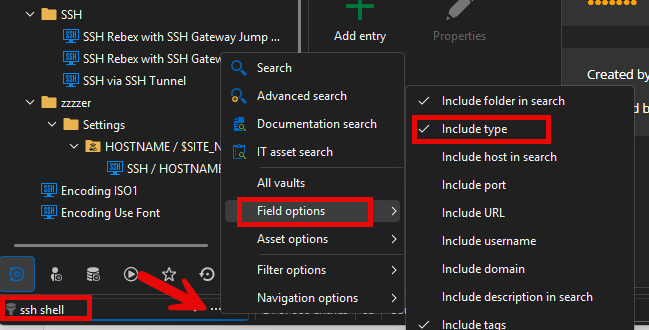
You can also try a multi vault search with the Advanced search (F11) and select the SSH Shell connection type. You can then order the gridview by vault and batch edit your SSH Shell entries 1 vault at a time.
Best Regards,
Michaël Beaudin
7dd1287b-ee0a-48ee-8595-48e935266903.png
77d5a9c2-b2d0-40d7-bb35-38cd290f61e5.png
Excellent response!
I used these commands:
show version
show inventory
show switch
show switch detail
show module
show environment all
show processes cpu sorted
show processes memory sorted
show clock
show uptime
show ip interface brief
show interfaces status
show interfaces description
show interfaces counters errors
show interfaces counters
show interfaces trunk
show interfaces switchport
show interfaces transceiver
show interfaces transceiver detail
show power inline
show vlan brief
show vlan id 1
show spanning-tree summary
show spanning-tree root
show spanning-tree blockedports
show spanning-tree vlan 1
show etherchannel summary
show etherchannel port-channel
show lacp neighbor
show cdp neighbors
show cdp neighbors detail
show lldp neighbors
show lldp neighbors detail
show mac address-table
show mac address-table dynamic
show arp
show ip arp
show ip route
show ip cef summary
show running-config
show startup-config
show archive
show users
show line
show logging
show aaa servers
show tacacs
show authentication sessions
show access-lists
show ip access-lists
show snmp user
show snmp group
show snmp engineID
show platform software status control-processor brief
show platform software fed switch active ifm interfaces
show platform software fed switch active acl summary
show interfaces status
show vlan brief
show ip interface brief
show logging
show version
show cdp neighbors detail
show spanning-tree summary
show etherchannel summary
show inventory
Still getting this:
#how version
^
% Invalid input detected at '^' marker.
I did different setting like 300ms and 1,5 and 10 for the lines. Still happening.
I will investigate this and see if I can reproduce.
Regards
Denis Vincent
Hi @deleted923775e9a87c49ce8777887626900107,
I have tested using an ASA Cisco switch and I have been able to reproduce your bug, sort of. The problem happens with many show commands which reply using a <---more---> style of output, which captures the input. On the switch I have available for testing, the "show version" just swallows the whole next pasted command ignoring all text.
I have tested also using another terminal (Putty) and I get the same result.
Have you tried testing with a different terminal if you get the same behaviour?
I will keep investigating in case I missed something.
Regards
Denis Vincent
Ok, you can close this issue. It is something on my system. I had to use serial and it was doing the same thing.
I just read all your comments, I too am getting same behavior in putty. this is interesting
i found the issue, both in putty and RDM, like you found too.
so far everything works great if i do a 'terminal length 0' before the commands. i think the issue is that some commands are pausing and this is the issue. Can RDM do anything or most likely the solution would be to enter this command prior.
Hi,
The solution is definitely to enter the 'terminal length 0' command prior, but you can enter it in the "Post-login" tab of the SSH entry and it will be executed automatically after each login. Or you can make a macro if you don't want it executed systematically. As a matter of fact, you could look into using macros instead of using paste to automate certain command sequences.
Regards.
Denis Vincent
what do you mean macros?
You can create entries of type "Typing macros" in which you can enter a sequence of commands. Each macro will appear as a button a the top of the terminal, you click that button to execute the macro. I think that by default, all macros are displayed, but you can control that using the "Macros" tab of the SSH entry properties.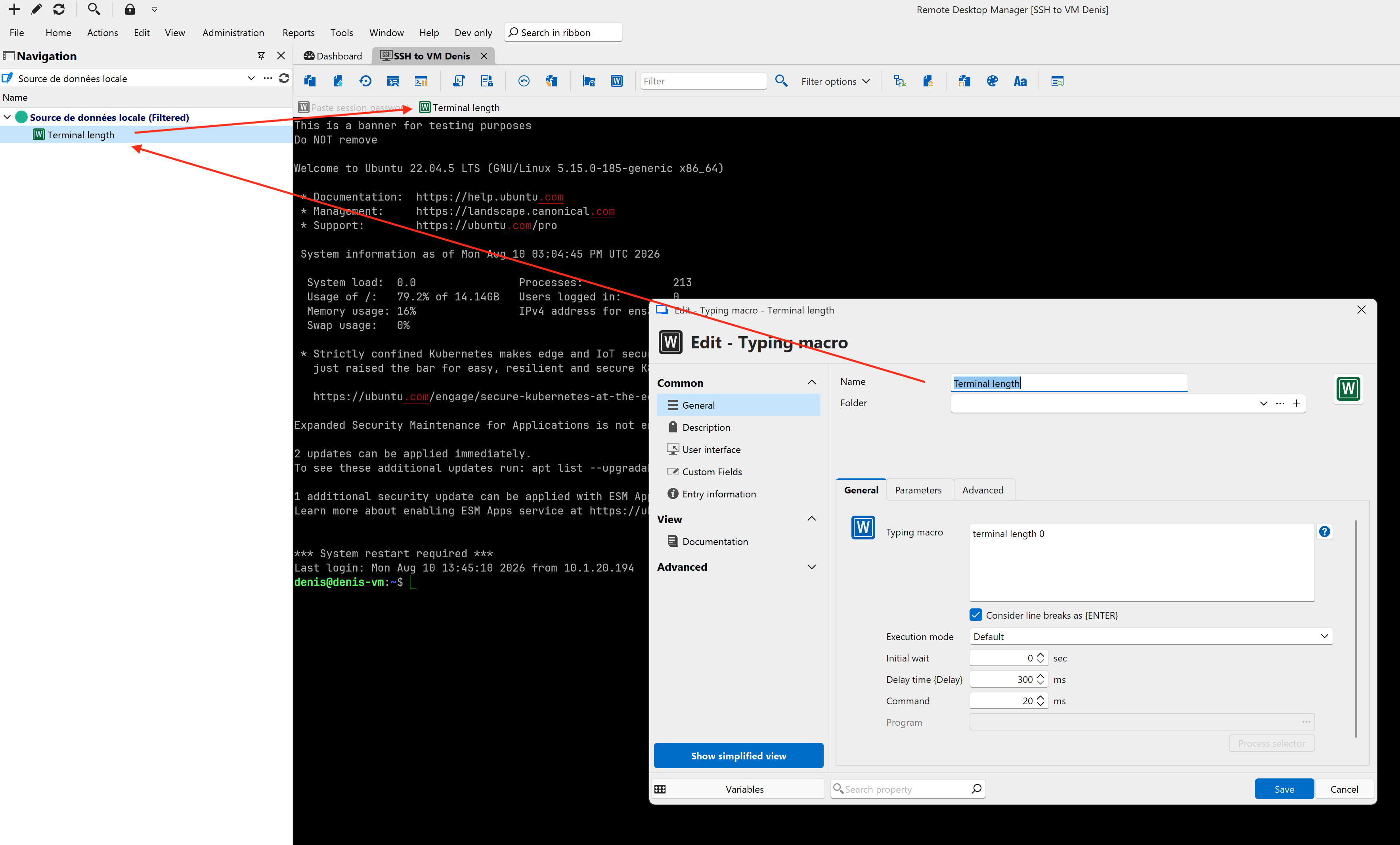
Denis Vincent
4cabd7cf-c1ac-4c20-a26b-2472012be678.png
That's a solution for sure! I will run with that option. Thank you!