How to get SFTP working with vCenter

Is there a way to configure Remote Desktop Manager to get SFTP working with vCenter without changing the shell in vCenter (see article Using WinSCP with the VMware vCenter Server Appliance - JohnBorhek.com)?
In WinSCP there is an advanced option SFTP server where you can fill in: shell /usr/libexec/sftp-server to get this working. I can't find this kind of setting in Remote Desktop Manager.
Because our vcenters are only accesible through Devolutions Gateway we need to get this working within Remote Desktop Manager and can't use an external tool like WinSCP.
Recommended Answer
Here you go: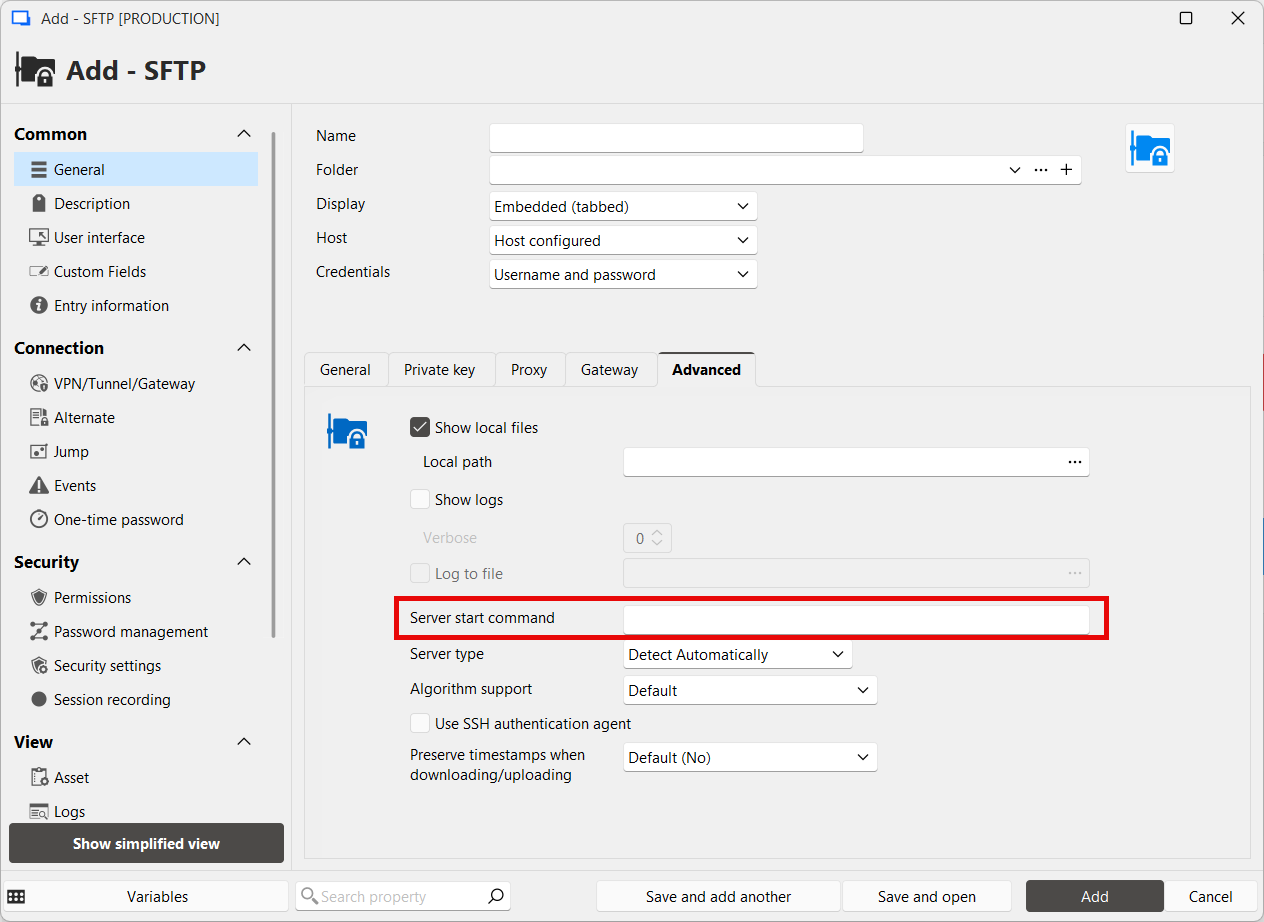
Denis Vincent
image.png
All Comments (4)
Hi @hjbos
In the "Advanced" tab, you can set "Server start command" with: shell /usr/libexec/sftp-server (or just: /usr/libexec/sftp-server if the previous does not work)
I would recommend you also set "Server type" to "Unix".
Let us know if it works or not.
Regards
Denis Vincent
Hi Denis,
Can you share a screenshot of this settings? I don't see this setting on our side.
Here you go:
Denis Vincent
image.png
Hi Denis,
This is working, thanks!