20263.12.0 64-bit Unexpected echo and input during Telnet connection
20263.12.0 64-bit Unexpected echo and input during Telnet connection

I encountered the following issues while establishing a Telnet connection:
1. Typing a single character results in two characters being displayed.
2. The echo does not show up in accordance with the device's output.
3. The right-click on the mouse activates the copy content input function. How should I solve this problem?
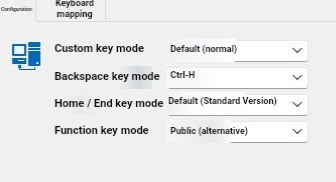
Here is the screenshot of my settings. I hope it will be helpful.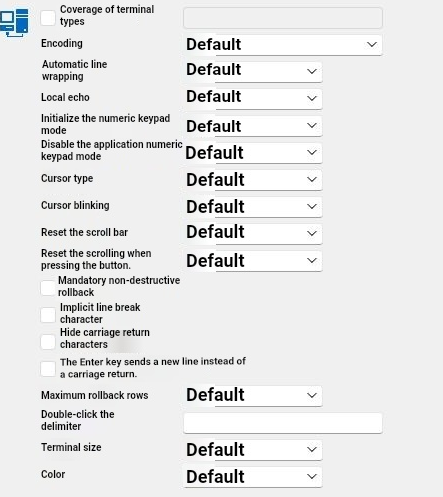
2026-10-06_094842.png
2026-10-06_094821.png
All Comments (11)
Hello,
Did all of this work for you in a previous version? If so do you remember which one?
For the echo/ double character displayed, could you configure the logs in your entry properties at verbose level 2 and give us the output as it could help us see what's going on?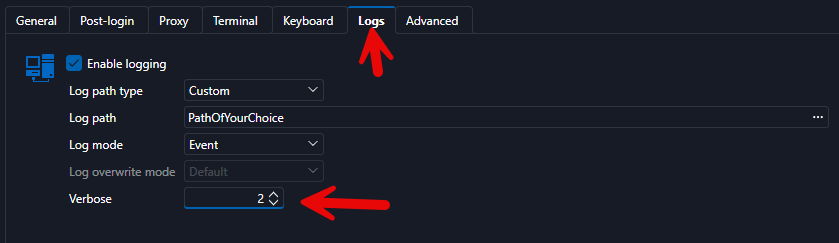
Best Regards,
Michaël Beaudin
ebae2d98-d648-4bdf-9f5a-72a6ae52e5a7.png
Hello,
Did all of this work for you in a previous version? If so do you remember which one?
For the echo/ double character displayed, could you configure the logs in your entry properties at verbose level 2 and give us the output as it could help us see what's going on?
Best Regards,
@Michael Beaudin
Thank you for your reply. The attachment is the log file I set up according to your requirements. I hope it will be useful to you. Thank you.
2026108.log
Thanks for that. I have created a ticket and attached the logs to it and we will see if it can help our dev. We'll get back to you if we need more information or if we have a fix.
Best Regards,
Michaël Beaudin
Thanks for that. I have created a ticket and attached the logs to it and we will see if it can help our dev. We'll get back to you if we need more information or if we have a fix.
Best Regards,
@Michael Beaudin
Thank you very much. Thank you for your hard work. Looking forward to your good news.
Hi @Confused Hao
What type of server are you connecting to? Based on the logs you sent, the server is not responding to telnet option negotiation, and seems to have echo on by default which is unusual for telnet.
You could try setting the "Local echo" setting to "Off"
You could try the "Raw terminal" instead and see if it works better, You would have to set "Local echo" to "Off" as well.
Regards
Denis Vincent
I made some investigation, and I believe you will need to use the telnet terminal, and set the "Local echo" setting to "Off", but it does not work at the moment. I made a fix that will be available, probably in the next version.
Denis Vincent
Hi @Confused Hao
What type of server are you connecting to? Based on the logs you sent, the server is not responding to telnet option negotiation, and seems to have echo on by default which is unusual for telnet.
You could try setting the "Local echo" setting to "Off"
You could try the "Raw terminal" instead and see if it works better, You would have to set "Local echo" to "Off" as well.
Regards
@Denis Vincent
Thank you for your reply. Sorry, I didn't understand what "original end point" refers to. The same situation occurs when local echo is turned off. This is quite strange, but in fact, sometimes the device doesn't receive two identical character inputs. It only shows two characters when inputting one character in the RDM program. And I also found that pressing the Enter key would display twice, but the device only received one input.
Sorry, I am unable to upload GIF images or videos. I will present it through pictures, hoping to clarify the issue.
Regards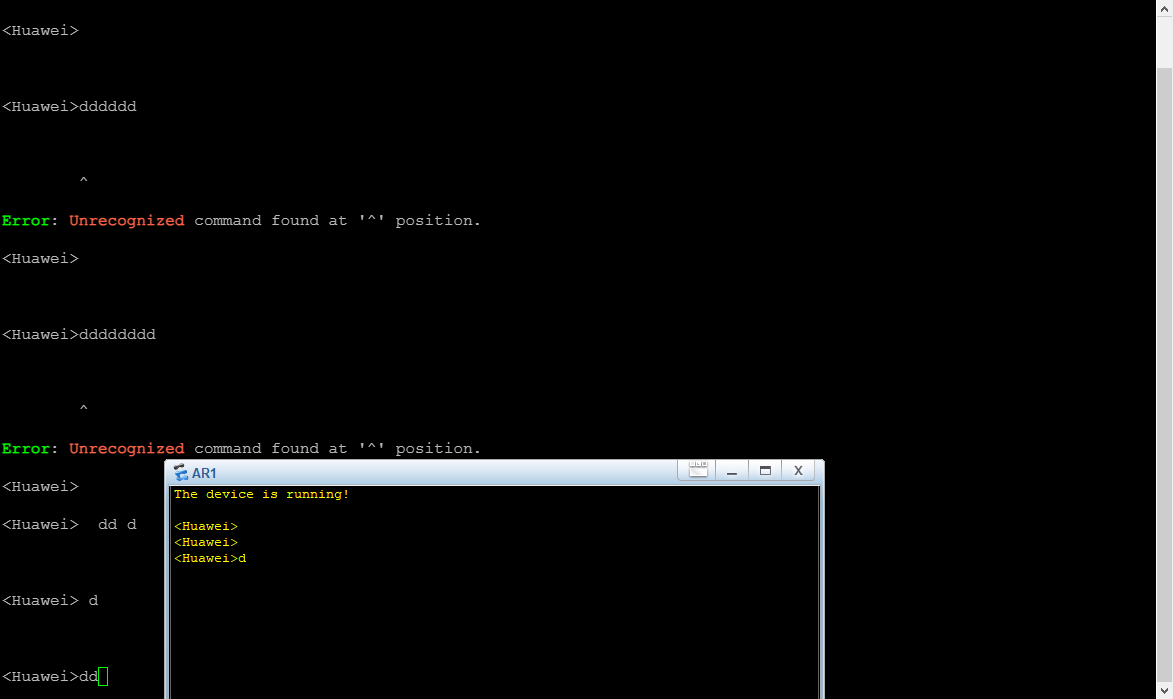
9b808d9f-8a8d-4e45-b198-04e49e4d1f09.png
I made some investigation, and I believe you will need to use the telnet terminal, and set the "Local echo" setting to "Off", but it does not work at the moment. I made a fix that will be available, probably in the next version.
@Denis Vincent
This will be a very delightful piece of news and I'm really looking forward to it.
Regards
Hi @Confused Hao
What type of server are you connecting to? Based on the logs you sent, the server is not responding to telnet option negotiation, and seems to have echo on by default which is unusual for telnet.
You could try setting the "Local echo" setting to "Off"
You could try the "Raw terminal" instead and see if it works better, You would have to set "Local echo" to "Off" as well.
Regards
@Denis Vincent
It is a network device and belongs to the router and switch products of Huawei Company.
Regards
Hello,
Thank you for being so patient!
I'm pleased to inform you that a new version of RDM (2026.3.15.0) has been released, featuring the fix for your issue.
Latest Version: Download RDM
Please let us know if this works or if you encounter any issues.
Best regards,
Maxim Robert
Hello,
Thank you for being so patient!
I'm pleased to inform you that a new version of RDM (2026.3.15.0) has been released, featuring the fix for your issue.
Latest Version: Download RDM
Please let us know if this works or if you encounter any issues.
Best regards,
@Maxim Robert
Thank you very much. After testing, it is now working properly. Thank you all for your efforts.
Best regards