
Nicolas Dufour
SSH Connection stuck when switching Apps longer than 5sec
Hi,
Thank you for reporting this issue. We will investigate.
Best Regards,
Google Account Age Access Denied
Hi,
A new release with a fix is currently rolling out. It should be available to all users within the next few days.
Best regards,
Google Account Age Access Denied
Hi,
We investigated and confirmed this is a bug in our latest Android release, not related to your age. Google Play may show an age-range sharing prompt depending on the laws of your region or state, and declining it wrongly blocks the app. A fix will be released shortly.
Best Regards,
Google Account Age Access Denied
Hi,
No, RDM does not think you are too young. Google Play reported that your account’s age has not been verified yet, and in your region Google requires that before apps can run. Open the Play Store app, go to Settings, then Family, then age verification, and complete the verification. If the account is supervised with Family Link, the parent must share the age range in the Family Link app instead. Then reopen RDM.
Best Regards,
IPad OS Crash
Hi,
Thanks for letting us know. We’ll investigate why the app crashes even with 2FA disabled.
Best Regards,
IPad OS Crash
Hi,
To help us determine whether the crash is related specifically to 2FA, could you please try connecting to Devolutions Cloud without using a 2FA code, if possible, and let us know whether the app still crashes?
Best Regards,
Two feature requests for Touch Mode
Hi,
Thank you for your feedback. We will investigate and keep you updated.
Best regards,
Using TAB on Visual studio 2022 remotely using Android version of RDM
Hi,
Version 2026.3.0.21 was rolled out gradually and was therefore not available to all users immediately.
The rollout is now complete, and the latest version is available to 100% of users. You should now be able to see and update to version 2026.3.0.21.
Best Regards,
SOTI MDM Managed App Config
Hi,
Managed application configuration files support dynamic placeholders and variables that automatically populate runtime values, such as device hostnames or user attributes.
However, storing or pushing cleartext passwords through App Config is strongly discouraged. Most Mobile Device Management (MDM) platforms intentionally omit secure macros for cleartext user passwords to prevent credential exposure.
In RDM, MDM cannot be used to add or configure individual entries. To make entries available to users, they should instead be created and managed within a shared Workspace.
Administrators can use MDM to preconfigure up to 10 Workspaces, such as DVLS and Hub, allowing users to connect to the required Workspaces on first launch. Administrators can also configure general application settings, including language, theme, startup section, background lock timer, screen capture protection, and telemetry.
General session defaults for RDP, VNC, and terminal sessions can also be configured through MDM. These settings are general defaults that apply across sessions and do not include entry-specific values such as hostnames, usernames, or passwords.
Best Regards,
Reconnect RDP session after WIFI interruption
Thank you for providing this information.
We will create a ticket to investigate the issue further and will keep you informed of any updates.
Best Regards,
Reconnect RDP session after WIFI interruption
Hi,
This option already exists. If you go to the application settings, then to the Sessions section under the More header, you should see the option "Automatically reconnect sessions."
Please verify that this option is enabled. If it is enabled but does not appear to be working, it would be helpful to identify a specific pattern or scenario that allows us to reproduce the issue.
This will greatly help us determine why the feature is not working as expected and whether there is an underlying problem.
Best Regards,
Key remapping in iOS App
Hi,
Thank you for the suggestion. We’ll add key remapping for the iOS app to our feature list for consideration.
At the moment, we’re focused on more pressing issues, so we’re unable to provide a timeframe for when this might be implemented.
Best regards,
Copy not working in SSH terminal sessions (iPad app) — Paste still works
Hi,
as you mentioned, the copy and paste functionality is quite basic. We will investigate.
Best Regards,
Two feature requests for Touch Mode
Hi,
Thank you for your feedback. Tickets have been created for both issues.
Please note that we cannot provide a timeline for their implementation.
Best Regards,
Cannot import data source since last update
Hi,
glad to hear it worked. Have a great weekend!
Best Regards,
Cannot import data source since last update
Hi,
Thank you for attaching both files.
I tried importing your file, and everything worked successfully.
First make sure you have the latest version of the application, which is 2026.1.2.9.
From the video, we can see that you exported your data as an .rdm file and are trying to link that file as the XML data source file.
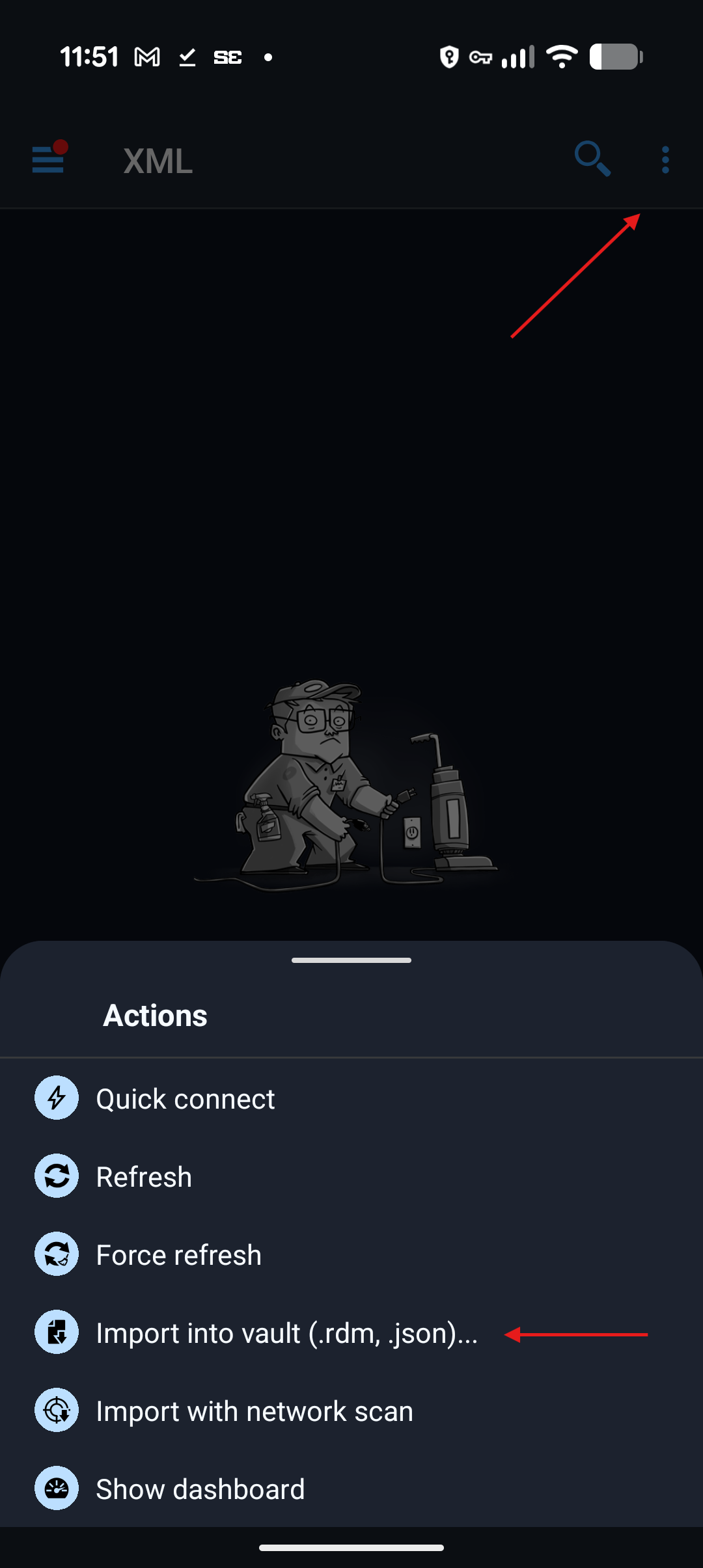
You need to import it as an .rdm file by choosing the following option: Importar en bóveda (.rdm, .json).
Then, select your .rdm file. I have attached a video that shows the steps to follow.
Best Regards,
Cannot import data source since last update
Hi Roberto,
We would now need a video of the file import process on Android.
Also, could you try to reproduce the issue using fake data? Please use data that does not correspond to real machines, real usernames, or real passwords.
If you can reproduce the issue with fake data, you could export it from RDM Windows and send us the file so we can test it on our side.
If we can reproduce the issue, we should be able to fix it.
Best Regards,
Cannot import data source since last update
Hi,
Thank you for the video. We would also like to see a video from the file import on Android.
Also, what is your version number of RDM Windows?
Best Regards,
Cannot import data source since last update
Hi,
Could you please send us a screenshot of your update history, as outlined in one of my previous posts?
Also, could you provide a video showing the process when you attempt to import the .rdm file?
Best regards,
Cannot import data source since last update
Hi,
A better approach would be to use a shared data source such as Devolutions Hub Business Free. This way, you will be able to share your data across multiple devices and platforms.
If you still prefer to use a local file on your different devices, we suggest the following:
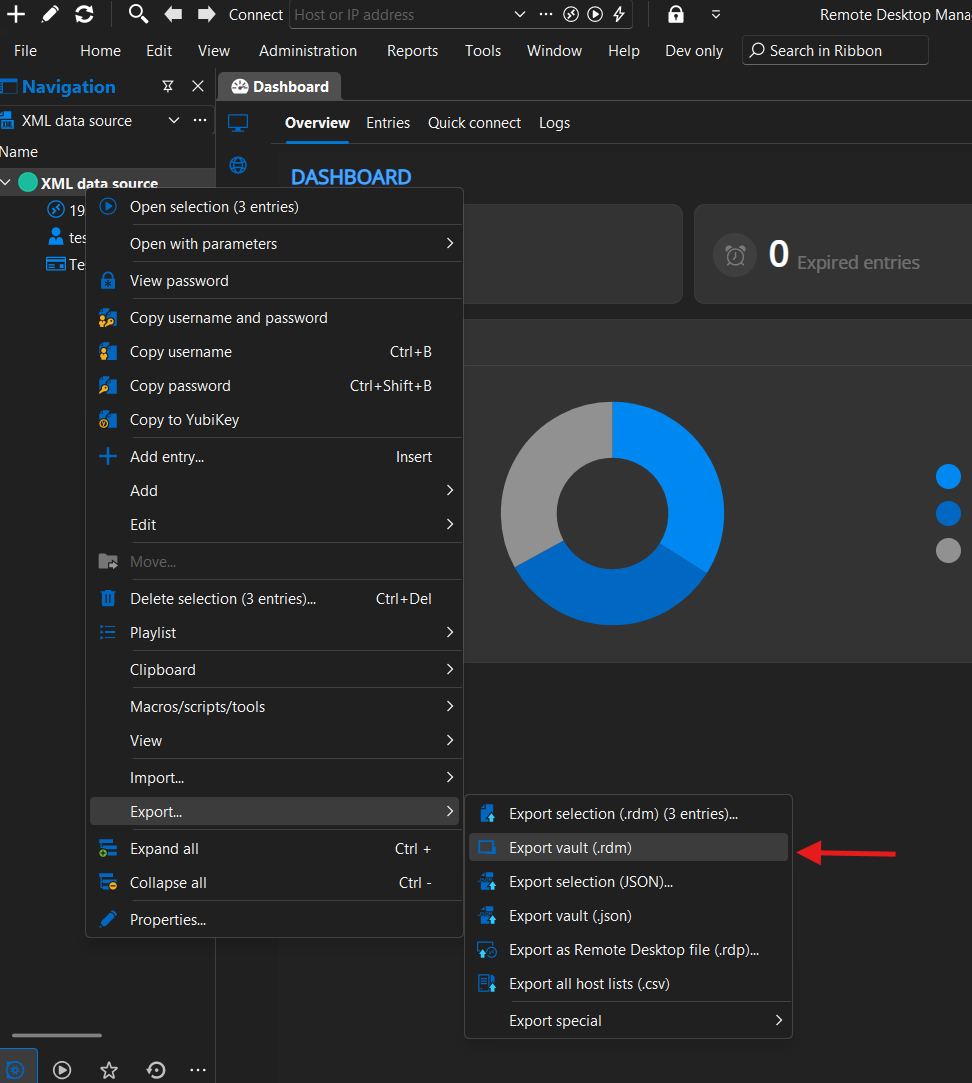
1- From your RDM Windows application, export your data to an .rdm file.
2- Send the file to your mobile device via email or another method.
3- Save the file on your mobile device.
4- In RDM Android, create a new XML data source.
5- Import the entries from your file into the data source.
Best Regards,
[iOS] sFTP Broken in 2026.1.1.1
Hi,
Thank you for your feedback. We will create a ticket regarding the alphabetical sorting.
However, please note that we are unable to provide an estimated timeline for its implementation.
Best Regards,
Cannot import data source since last update
Hi, we have several questions:
1. Did you lose your existing data source after updating the application? If so, what data source type or types were you using?
2. What data source type or types are you exporting your data from in RDM Windows and trying to import into RDM Android?
Also, could you open the main application navigation screen by tapping the hamburger icon at the top left of the main window, then tap About, then Update History, and send us a screenshot of the update history?
If you are unable to take a screenshot, it may be due to a security setting in the application. To enable screenshots, tap the hamburger icon, go to Settings, then Security and Privacy, and uncheck “Protect data from screen capture.” You should then be able to take screenshots within the application.
Best Regards,
Wrong Input when click f1-f12 button (ssh)
Hi,
A keyboard setting must be configured to ensure that the function keys work properly when using Byobu. Currently, the mobile version does not support configuring keyboard options within the SSH Terminal entry. However, it will recognize and use the setting if it has already been configured.
To resolve this issue, set the Function Keys Mode to VT100+ in the keyboard options of the SSH Terminal entry. This setting cannot be configured on mobile platforms at this time. If you are using a non local data source such as Hub or Devolutions Server, you can configure it using one of our desktop versions, such as RDM Windows. Once configured, RDM Android will apply the setting, since non local data sources can be shared across multiple devices and platforms.
At this time, it is not possible to modify keyboard configuration options directly on RDM Android. A ticket has been created to add this capability in a future release, and we are aiming to include it in our June release.
Best regards,
Log in to Continue - but can't click anything
Hi,
The Hub Business team has released a new update that should resolve the issue.
Could you please test it and let us know if you are still experiencing the problem?
Best regards,
Log in to Continue - but can't click anything
Hi,
Could you please let me know which data source type you are using and what your application version is?
The application version can be found in the main menu under the About section.
Best regards,