Two feature requests for Touch Mode
1 vote

I have two feature requests when using touch mode on Android. I'm attaching videos of both items.
1) When zoomed in on the screen, double tapping and dragging a file (or any object) doesn't scroll the screen as the object is moved around near the edges. This means it's impossible to drag to an area that is off the screen. When using mouse mode, the screen automatically moves as I'm dragging the file around, but in touch mode it doesn't.
2) When using two fingers to scroll up and down, the screen scrolls whatever had focus last. For example, if I'm in Outlook and click on the body of a message and then try to scroll with my fingers over the the email list, the message body scrolls instead. I have to click into the email list in order for the email list to scroll. It would be much nicer if whatever was below my fingers scrolled instead. This is how other remote desktop applications work along with Microsoft Windows itself.
Thanks,
Rich
Two finger scrolling.mp4
Drag not moving window view.mp4
All Comments (11)
Hi,
Thank you for your feedback. Tickets have been created for both issues.
Please note that we cannot provide a timeline for their implementation.
Best Regards,
Nicolas Dufour
Hello,
Thank you for being so patient!
I'm pleased to inform you that a new version of RDM Android (2026.3.0.21) has been released, featuring the fix for your issue.
Note that the version might not appear in the store directly. If it doesn't, it will be available in the next few days.
Please let us know if this works or if you encounter any issues.
Best regards,
Maxim Robert
I just tested the latest version (2026.3.0.21) and neither of these two items have been implemented.
Rich
Hello,
For scrolling, you can enable the new touch mode by tapping the three vertical dots on the toolbar, then going to Session Settings > Interactive Method and disabling Legacy Touch Mode. Once you've done this, reconnect to your remote session. Please note that this feature is currently experimental.
Here's a quick guide explaining how the new touch mode works compared to the legacy touch mode:
- When you pinch with your fingers to zoom in or out, the zoom is no longer performed on the client side. Instead, the gesture is sent to the remote session, similar to using a Windows laptop with a touchscreen.
- If you want to zoom locally instead, look at the bottom-right corner of the screen. You'll see a button with an arrow pointing to the left. Tapping it will open a small "map" of the remote session. To zoom locally, place one finger on the map and another finger anywhere else on the screen, then perform a pinch gesture.
- You can navigate around the zoomed-in view by dragging your finger across the map. In the top-left corner of the map, you'll find a small handle that you can use to move the map anywhere on the screen so that it doesn't obstruct your content.
- You can also drag the map toward any edge of the screen to collapse it back into an arrow button and position it wherever you prefer.
As for your first point (When zoomed in on the screen, double-tapping and dragging a file (or any object) doesn't scroll the screen as the object is moved near the edges.), this functionality should be available in our upcoming release. It will work in both touch modes (legacy and non-legacy).
Best Regards,
Frederick Simard
Thanks, but I don't see an option to disable Legacy touch mode . I only see a Legacy keyboard mode.
Rich
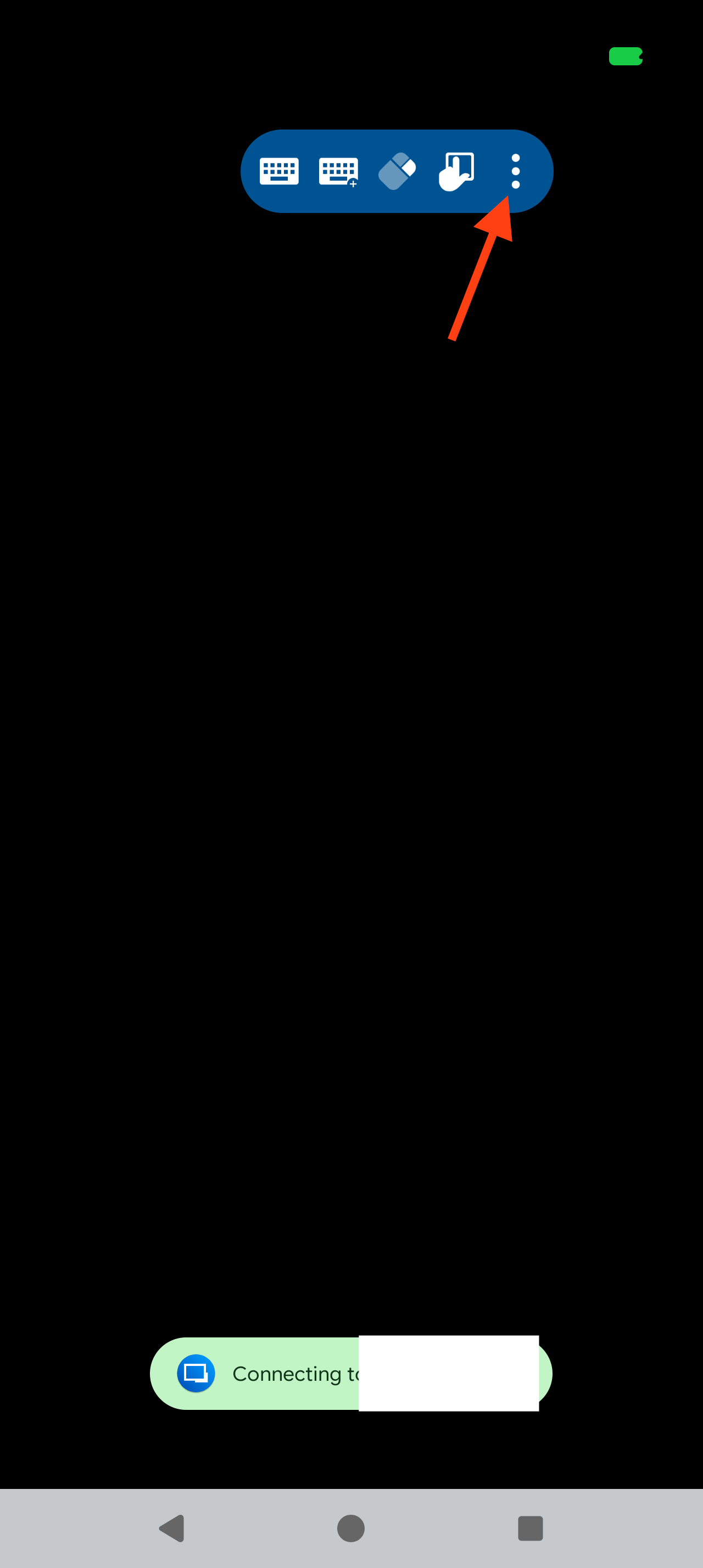
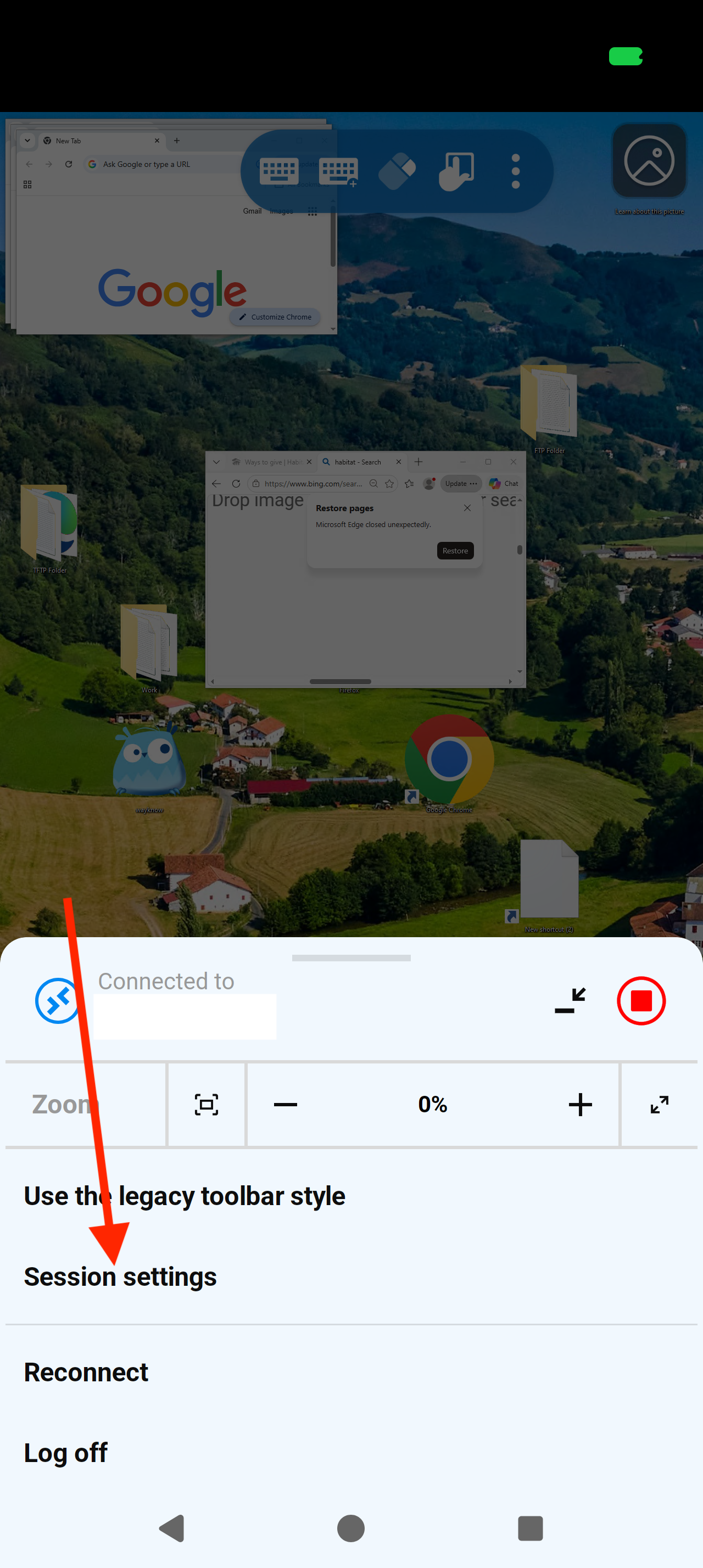
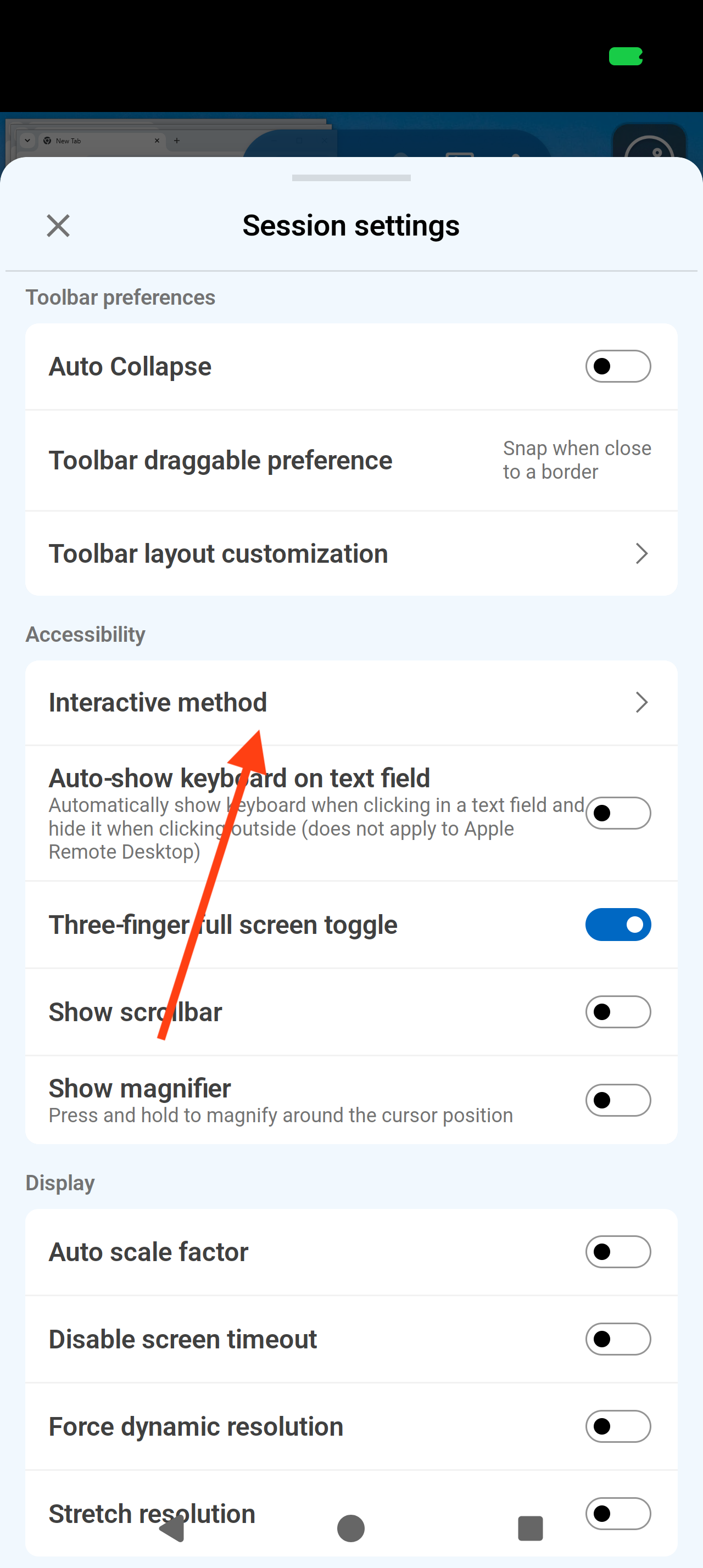
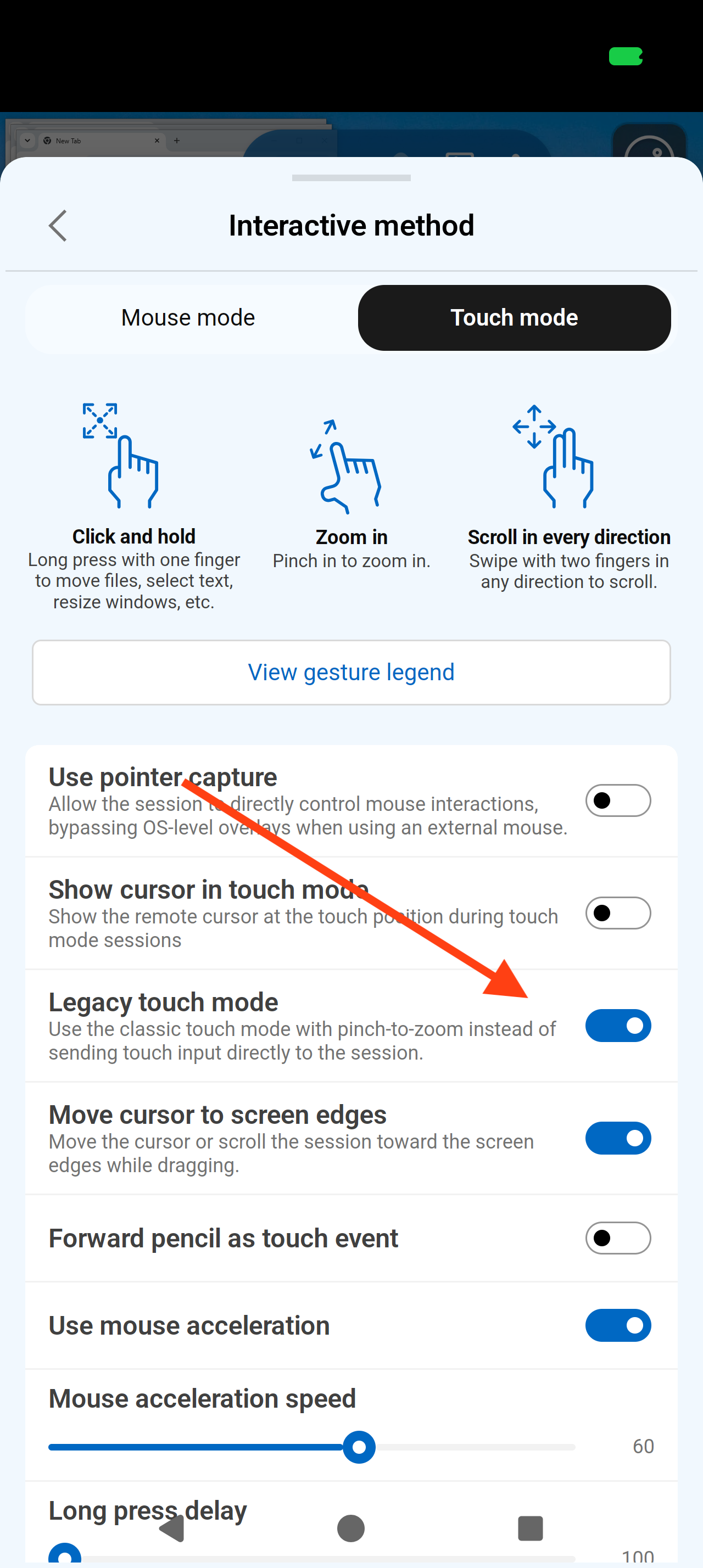
I've attached screenshots to show you where to disable it.
Best Regards,
Frederick Simard
Screenshot_20260922-120653.png
Screenshot_20260922-120649.png
Screenshot_20260922-120644.png
Screenshot_20260922-120636.png
This doesn't really solve my second issue. With legacy mode off, a single finger now scrolls the screen in touchpad mode and to pan around when zoomed in I need to use the new map feature. This is a pain and not very user friendly. I wanted to keep everything the way it was (legacy zoom), but have the two finger scroll work on the area my fingers are located. Is there not a way to do this?
Rich
Hi,
Thank you for your feedback. We will investigate and keep you updated.
Best regards,
Nicolas Dufour
Hello,
We previously had another user requesting similar behavior that would allow them to easily scroll between two separate application windows, so we initially grouped your request with theirs.
However, after re-reading your request, I realized that your use case is different: you are referring to scrolling different areas within the same application window in the RDP session.
In that scenario, this should be feasible. Since the application window already has focus, we should be able to send the new cursor position before sending the scroll input. This would allow the scroll to be directed to the specific area of the application that the cursor is positioned over.
The limitation applies when trying to scroll a different application window that does not currently have focus. In that case, we would first need to give that window focus before sending the scroll input. With the way input is handled over RDP, this would require us to send a click to that window first.
Automatically sending a click before scrolling could cause unwanted interactions. For example, the click could activate a button, link, or other control underneath the cursor when the intention was only to scroll. It could also interfere with normal scrolling behavior in the currently focused window.
There is one downside to sending the cursor position as part of the scrolling behavior. Currently, you can initiate the scroll gesture from anywhere on the Android screen, even outside the remote application window. With this change, the scroll gesture would need to start within the remote application window so that we can determine the correct cursor position and send the scroll input to the appropriate area. In other words, initiating a scroll from outside the window would no longer work as it does today.
Since your use case involves scrolling different areas within the same application window, we don't have the focus issue described above, so the behavior you requested should be possible with this tradeoff.
Best Regards,
Frederick Simard
Hello,
We previously had another user requesting similar behavior that would allow them to easily scroll between two separate application windows, so we initially grouped your request with theirs.
However, after re-reading your request, I realized that your use case is different: you are referring to scrolling different areas within the same application window in the RDP session.
In that scenario, this should be feasible. Since the application window already has focus, we should be able to send the new cursor position before sending the scroll input. This would allow the scroll to be directed to the specific area of the application that the cursor is positioned over.
The limitation applies when trying to scroll a different application window that does not currently have focus. In that case, we would first need to give that window focus before sending the scroll input. With the way input is handled over RDP, this would require us to send a click to that window first.
Automatically sending a click before scrolling could cause unwanted interactions. For example, the click could activate a button, link, or other control underneath the cursor when the intention was only to scroll. It could also interfere with normal scrolling behavior in the currently focused window.
There is one downside to sending the cursor position as part of the scrolling behavior. Currently, you can initiate the scroll gesture from anywhere on the Android screen, even outside the remote application window. With this change, the scroll gesture would need to start within the remote application window so that we can determine the correct cursor position and send the scroll input to the appropriate area. In other words, initiating a scroll from outside the window would no longer work as it does today.
Since your use case involves scrolling different areas within the same application window, we don't have the focus issue described above, so the behavior you requested should be possible with this tradeoff.
Best Regards,
Frederick Simard
@Frederick Simard
I don't think that's a good trade-off. As you mentioned, sending a mouse click to the other window can have strange effects. There's got to be a way to do the scrolling without sending the mouse click because many other RDP apps do it. You can see for yourself by using aRDP free. The mouse cursor on the phone moves, but it must not be sending a mouse click because you can scroll windows in the background without bringing them into focus.
Rich
Hello,
We have implemented the fix and are currently in the testing phase.
You are correct, the behavior you mentioned should work with the fix, with no additional work required.
My apologies for the confusion in my earlier post. We aim to release the fix within the next two weeks.
Best Regards,
Frederick Simard