
pplevesque
Limited PAM Administrator
Hello @Luc Fauvel
Do you have any update on this feature? It prevents our power users from managing the PAM feature for our customers. If I give them the PAM Administration privilege, they are able to checkin internal privilege credentials (a vault that they should not have access).
Thanks
Limited PAM Administrator
Hello Maurice,
I'm adding my voice to this thread. I would like to delegate PAM Administrators roles to allow the them to create PAM Providers for customers without allowing them to create new PAM Vaults and prevent them to see our internal PAM Vault.
Actually, PAM Administrators are able to navigate inside any PAM Vault even if they don't have Read access to it.
Add Configurations options in ADMX/GPO files
Hello,
We're using some GPO configurations to make sure all our staff have the same baseline for usage.
I would like to add a request for those settings to be able to configure by GPO :
User interface - Ribbon - Ribbon style Simplified & Always show ribbon
Clipboard 60 sec expiration
Define Interface Language to English
Website session with SSH Link
Hi Hubert,
Thank you very much for your quick answer. I'll manage to use it embedded.
Have a great one,
Website session with SSH Link
Hi,
We started using website session with ssh link enabled as VPN/Tunnel/Gateway and just found there's a different behavior in VPN/Tunnel/Gateway and Settings (SSH Link) pane when the session Display is defined as external or embed.
If the session is selected to use External Display, the Use over secure gateway setting isn't shown/available.
If the session is selected to use Embed Display, the Use over secure gateway setting is available and shown.
Is it a bug or a limit of the system?
Thanks
Copy Username and Password + OTP
Hi,
I would like to suggest to add OTP copy while using the Copy Username and Password.
If there's an OTP in the entry, it would be nice to use the button Copy Username and Password (+OTP) to paste it and then only trigger ctrl+v to paste the OTP without having to use the Copy OTP button. I've seen this feature in Bitwarden.
Thanks
Update ADMX
Hi,
We try to deploy unified settings of UI for Remote Desktop Manager for all our users.
We miss those two settings, I'm wondering if you could add them to the existing ADMX in a future release?
Disable Auto focus tab on item select
Disable Auto select item on tab focus
Thanks
Azure authentication loop problem
Hi Érica,
I've tried the Type of user interaction login option to Select account in the Microsoft Authentication settings in DVLS at first and it works for now. It makes sense because our daily tasks are two login under diffrent identity.
I'll wait for few days before closing it.
Thank you very much for your quick and effective support.
Azure authentication loop problem
Hi Érica,
I don't have any error in DVLS Logs. Under RDM, it shows one error about remote name could not be resolved but it was when my computer returns from sleep. It doesn't repeat afterward while my authentication loop.
Ping online method is None and my full username (Azure AD login) is setup in datasource.
Azure authentication loop problem
Hi,
We use Devolutions Server 3.12 and Remote Desktop Manager 2022.3.35.
Since 2 to 3 weeks, we have some users entering in authentication loop after network topology change and I can't figure where's the problem. When the problem occurs, we delete the Devolutions folder under AppData on the concerning computer and the login process start to work correctly again.
We can reach the devolutions server url without problem, the login process opens the web authentication page correctly and it shows success on authentication but it looks like the token doesn't get it's way back to Remote Desktop Manager and the client restart to ask for authentication (looping).
Azure AD and DVLS shows success authentication in logs while the problem occurs.
Could you help us fix that strange problem?
Thanks
Credential entry username trailing space
Hi,
We had login issue with one user and just discovered that a credential entry username can contain a trailing space.
It's not common since we use the App for many years but I suppose that a credential entry username should not contain a trailing space (after ou before username).
Have a great one
Debug info:
RDM Version 2022.3.32
Devolution Server in the backend
ADMX Auto focus dashboard
Hi,
I searched for "auto focus dashboard" turn off by GPO but couldn't find it.
Is it possible to add it or have the correct settings to push by GPO?
Thanks
Open with parent credential keyboard shortcut
Hi,
We're planning to start using Parent Credential to manage privileges sessions and looking for a keyboard shortcut.
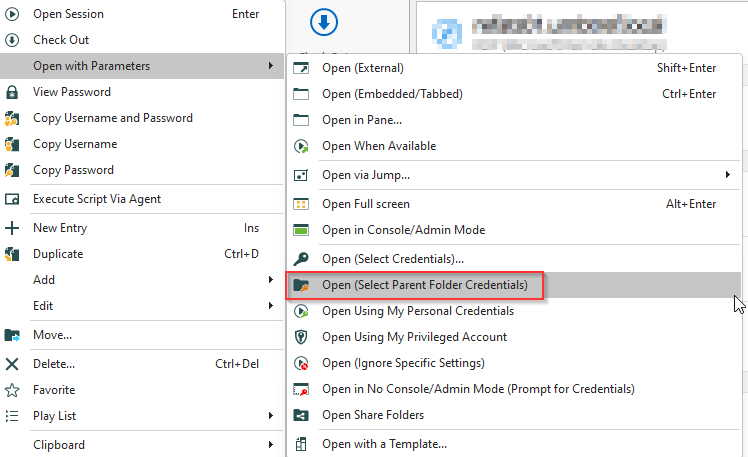
I'm asking if it could be fast implementation to add Keyboard shortcut to Open with Parameters / Open (Select Parent Folder Credentials
Thanks
Unable to logon with Edge plugin
Hi,
I've upgraded Devolutions Server to version 2022.2.5.0 yesterday and since then, some of my users are unable to login within the Edge add-in with Microsoft 365 Azure login. The login process initiated by the add-in goes well to Azure AD but then came-back with and error "Could not login to Devolutions Server. Please contact your administration".
The login process works correctly with Administrator rights
Azure AD Logins for this user are successfully allowed for the same entry.
They are able to login successfully with web interface and use the vault.
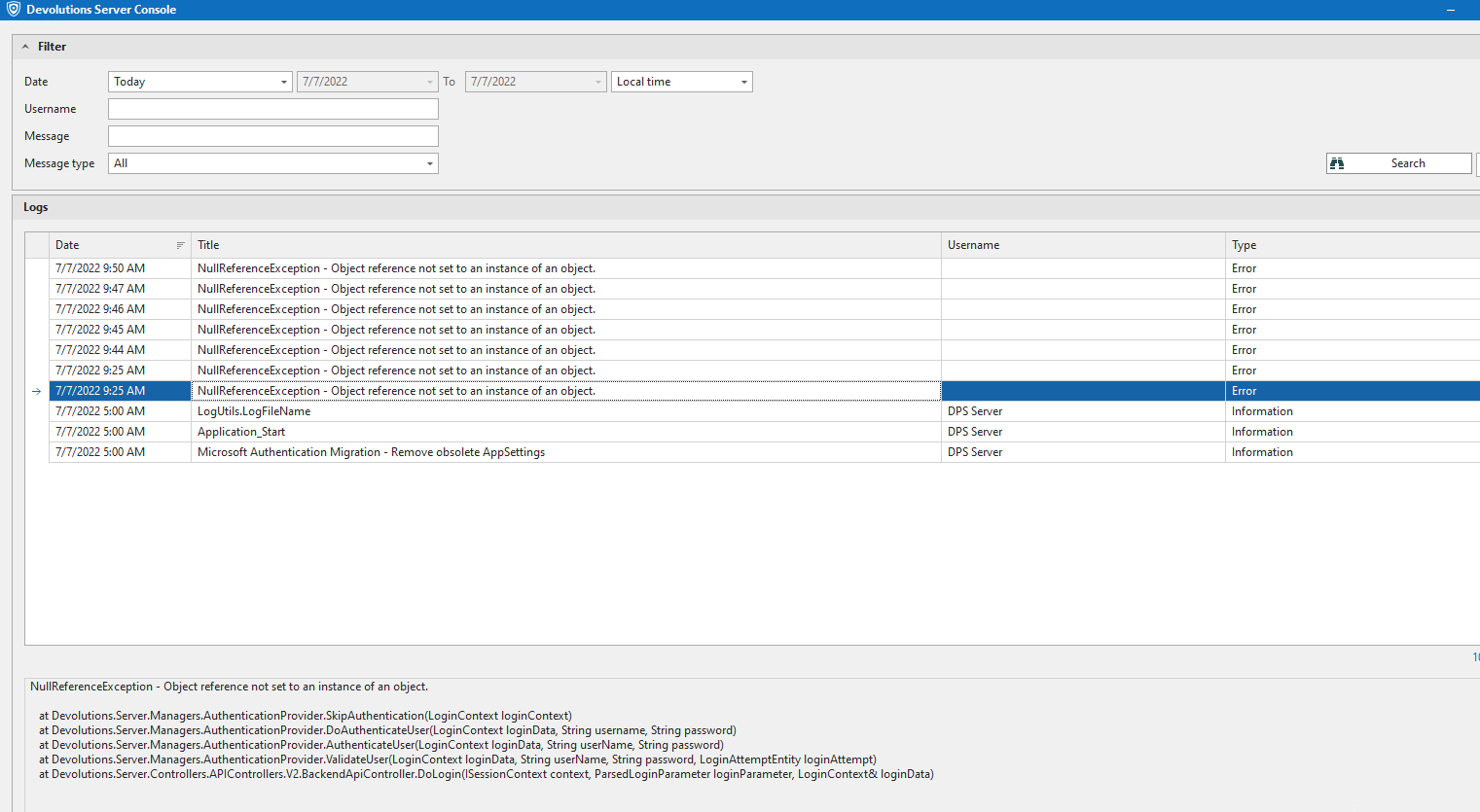
In the Devolutions Server logs, there's an error saying "NullReferenceException" everytime the Edge login is tried for this user (see attached screenshot)
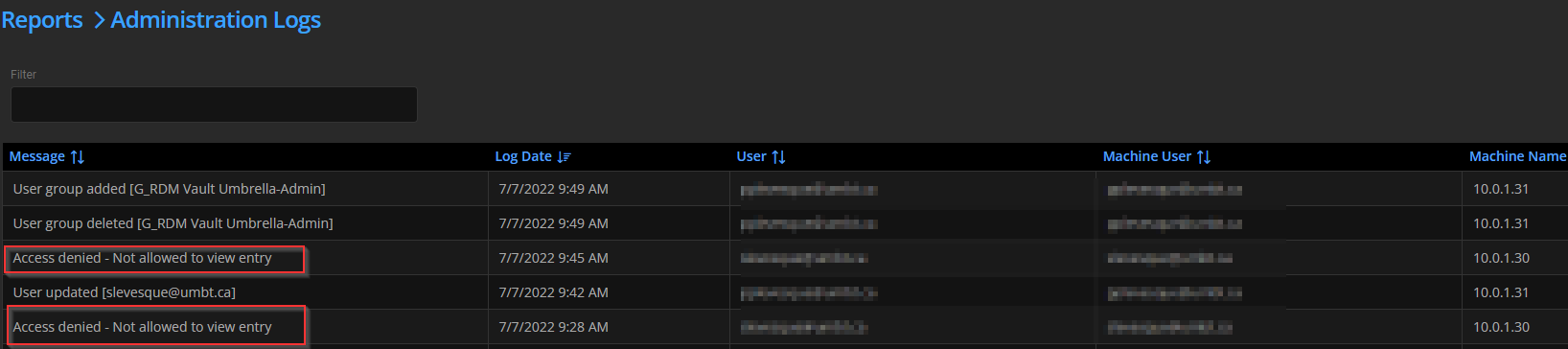
In Administration Logs, it says "Access denied - Not allowed to view entry" but the same user was working correctly before the upgrade.
.
OTP Copy contextual link
Hi Samuel,
We use Website entry and add a One Time Password inside it. Do you have the same behavior with this kind of entry on your side?
Thanks
OTP Copy contextual link
Hi,
Since the last update to 2022.1.25, the contextual menu to directly copy OTP code is removed. It was heavily used in our team instead of View One-Time Password.
Is it a parameter to update on our Data Source or a user interface preference?
Thanks
Log SSH session
Hi,
Do you know if there's a feature to allow SSH Terminal Output logs into the database instead of local computer?
Thanks
Okta MFA
Hi,
We see many MFA provider supported but Okta Verify isn't listed.
I vote for a Feature to support Okta MFA:
https://help.okta.com/en/prod/Content/Topics/Security/mfa/about-mfa.htm
AutoFill Passwords in iOS 12
Hi,
With the recent changes with Lastpass, I would love to drop their apps and use my Private Vault under RDM for IOS for Autofill.
Please let us know if it's still under consideration of development. My only alternative is to look at Bitwarden and I would prefer to keep only one password solution and all my password under RDM
Auto-fill logins on iOS | Bitwarden Help & Support
Thanks
Folder from template not naming correctly
We have the same issue.
Thanks
Powershell Characters escape
Thanks Erica for your help.
It works with the variable in quotation marks!
I'll create a shared template to always have it under new sessions.
Thank your very much
Powershell Characters escape
I'm trying to configure a session of type Powershell (local) and it was successful for one connection. I tried to setup a second one with different credentials and I'm getting an error indicating that the character & is not authorized.
This character is in my credential's password string which is linked by the credential repository.
I'm using the password with $USERNAME$ and $PASSWORD$ variable
How can I use the password which include a & in the embedded script of the Powershell session?
Thanks
Enter key in treeview
Hi,
I figured out that it was a Keyboard shortcut entered by default on my RDM version 12.0.8
I disabled it and it's now working like a charm.
User interface/Keyboard/Actions/Open URL was set to "Enter". I changed it to None.
Thanks!
Enter key in treeview
You are right with the behavior:
I'm in a RDP session, with a "Login Account" entry type selected (in blue) in the treeview since I just used "Copy Username and Password" then press Enter in a running RDP session and this triggers the "Open" of the Login Account entry instead doing an Enter in the remote RDP session.
Here is the print screen of my RDP Session configuration (2017-01-11 11_33_25)
Enter key in treeview
Hi Mark,
I tried this but I cannot use Remote Desktop with those options enabled. They are both disabled on our setup because we have too much Credentials entries and the navigation bar and tree view keep moving at every clic on tab / tree if I use those options.
When they are uncheked, It keeps opening entries that are selected in the treeview when we're connected to an RDP session and press Enter.