
Marc-Antoine Dubois
2026.3.1 - 2026.2.4 - Web apps won't start with Run As Account - Run As Account Attempting Interactive
Hi Taylor,
Thank you for the detailed report. We reproduced the issue on PowerShell Universal 2026.3.3 and reviewed it with our development team.
What’s happening
When an app runs with Run As credentials, PSU first starts the app’s process with an interactive logon for the Run As account. Your policy denies interactive logon to that account, so the attempt is refused; that’s the logon type 2 failure you see in the Security log.
PSU then falls back to a non-interactive method. That method needs the PSU service account to hold the Replace a process level token right, which local Administrators don’t have by default. Even when that right is granted, the app still fails to start because of a bug in how the app host locates a working folder: it looks in the service account’s profile instead of the Run As account’s.
Next steps on our side
The documentation will be corrected. It currently suggests that an administrator service account needs no additional rights.
An issue has been opened for the startup bug.
The team will investigate starting Run As processes with fewer privileges.
Workarounds
Either of these resolves the issue (both tested):
Allow the Run As account to log on locally on the PSU server, by removing it from Deny log on locally. No additional rights are needed on the service account.
Run the PowerShell Universal service as LocalSystem.
We’ll update this thread as the fixes are released.
Best regards,
DVLS 2026.2.16.0 | Reauthenticate frequently
Hi,
Thanks for the extra test. I've sent you a private message listing the logs that would help us see what triggers the re-authentication. We'll update this thread with the relevant findings so others running into the same behavior can benefit.
Best regards,
[any version] Adding administrator is to your identity disables all other roles
@Christian Robert
It's my error. I accidentally moved the thread to the feature requests of the Devolutions PowerShell module instead of PSU feature requests. I moved the thread to the correct forum section.
Thank you.
Best regards,
[any version] Adding administrator is to your identity disables all other roles
Hi Matthew,
Thank you for reaching out!
I moved this thread to the feature requests.
We'll keep you posted with our thoughts regarding this.
Best regards,
DVLS 2026.2.16.0 | Reauthenticate frequently
Hi,
Sounds good.
10-15 seconds is on the higher-end, I'd say. It mainly depends on the quantity of entries, if you have 500 entries, I'd say it's unexpected, but if you have above 7000, I'd be less surprised.
The only way to know for sure is with the DPS_Main logs, you can enable them by following these steps: https://docs.devolutions.net/server/knowledge-base/how-to-articles/enable-the-devolutions-server-log-files
Feel free to send them to me in a DM and I'll have a look.
Best regards,
[2026.3.1.0] Cannot create apps / scripts
@realslacker @Thomas Hofkens @gennadyshykhovtsov 2026.3.2 is released, once you update, could you share your experience with us?
Thank you!
Best regards,
Dashboard - invoke-psuscript error
@michaelhanson1458 PowerShell Universal version 2026.3.2 is now released. Once you update, could you share with me if this is now solved?
Best regards,
Get-PSUJobPipelineOutput returns no data for completed jobs (2026.3.x regression)
@pos-basic-infrastructure @realslacker 2026.3.2 is released, once you update, could you share your experience with us?
Thank you!
Best regards,
sign out on nested IIS goes to 404
Hi Matthew, I sent you a DM, you can upload the file there.
DVLS 2026.2.16.0 | Reauthenticate frequently
Hi,
Your use case is fine.
Your settings rule out the usual causes of timed sign-ins. The token lifetime is at its default, nothing is set to disconnect the workspace, and you use local accounts. What stands out is that the workspace is already offline when the message appears, since you have to go online again before the sign-in starts. I suspect it's going offline in the background, and the sign-in follows from that.
With Ping online method on Web request, RDM checks the server before treating the workspace as online. If that check fails, for example while the VPN is down or still connecting, or after the machine wakes from sleep, the workspace can drop offline.
To test this, could you set Ping online method to None on one client (workspace properties > Advanced) and tell us whether the prompts stop there?
Best regards,
Dashboard - invoke-psuscript error
Hi Michael,
This is a known issue in 2026.3.0, it should be fixed in 2026.3.1.
However, due to another issue in 2026.3.1 impacting the creation of scripts, I'd recommend you wait for us to release 2026.3.2, which is planned to release today.
I'll keep you posted, and I wish you a good day!
Best regards,
[2026.3.1.0] Cannot create apps / scripts
Hi,
We can reproduce this issue internally.
We will inform you once a fix is made.
Thank you for informing us!
Best regards,
Fallback License
Hi,
I took the liberty of opening a case with the sales team to see if there's something they can do for you. They'll reach out through email.
You'll be able to provide them sensitive information if they need it.
I also sent you a PM on the forum.
Have a good day!
Best regards,
Kerberos failure via Devolutions Gateway (KDC proxy) caused by duplicate UPN across forests
Hi,
I wanted to post this on the forum in case someone runs into this in the future.
Without revealing them, thank you to the customer who found this.
The issue we had was related to Kerberos not working when using Devolutions Gateway as a KDC proxy in an environment where the client sits in Domain A but is trying to reach into Domain B. The Gateway is in Domain B.
Despite the configuration on the AD side being properly configured, we only got generic NTLM downgrades from the Remote Desktop Manager client and a generic "Account restriction" message.
Here’s what they figured out:
The issue was caused by having two users with the same "User logon name". Even though the users were in different domains (and forests), the duplicate UPN caused ambiguity during cross-forest Kerberos principal resolution. This interfered with Kerberos realm discovery, leading to Kerberos failing silently and falling back to NTLM, which ultimately resulted in the misleading:
“A user account restriction (for example, a time-of-day restriction) is preventing you from logging on.”
Once the duplicate user logon name was made unique across the environment, Kerberos authentication started working as expected through the Gateway.
Before figuring this out, the workaround was to use FreeRDP with the SSPI module in portable version. This seemed to bypass the fallback lookup of the Kerberos realm that Microsoft RDP performs by default. Like so:
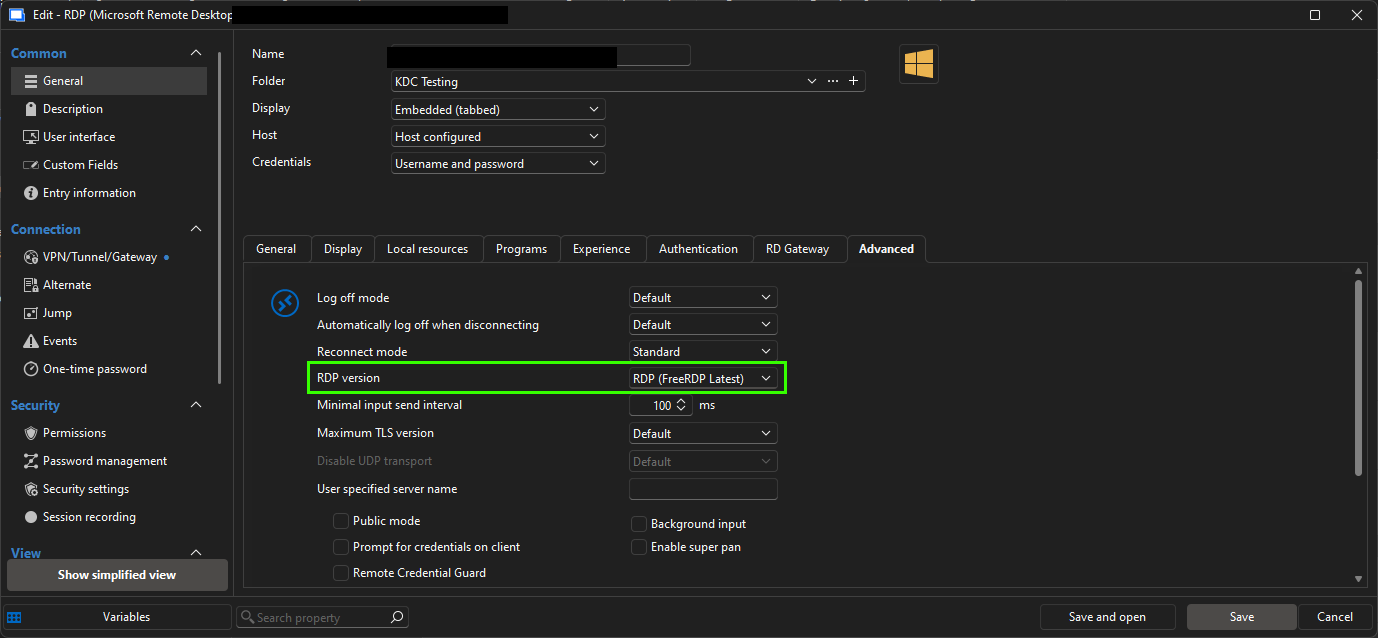
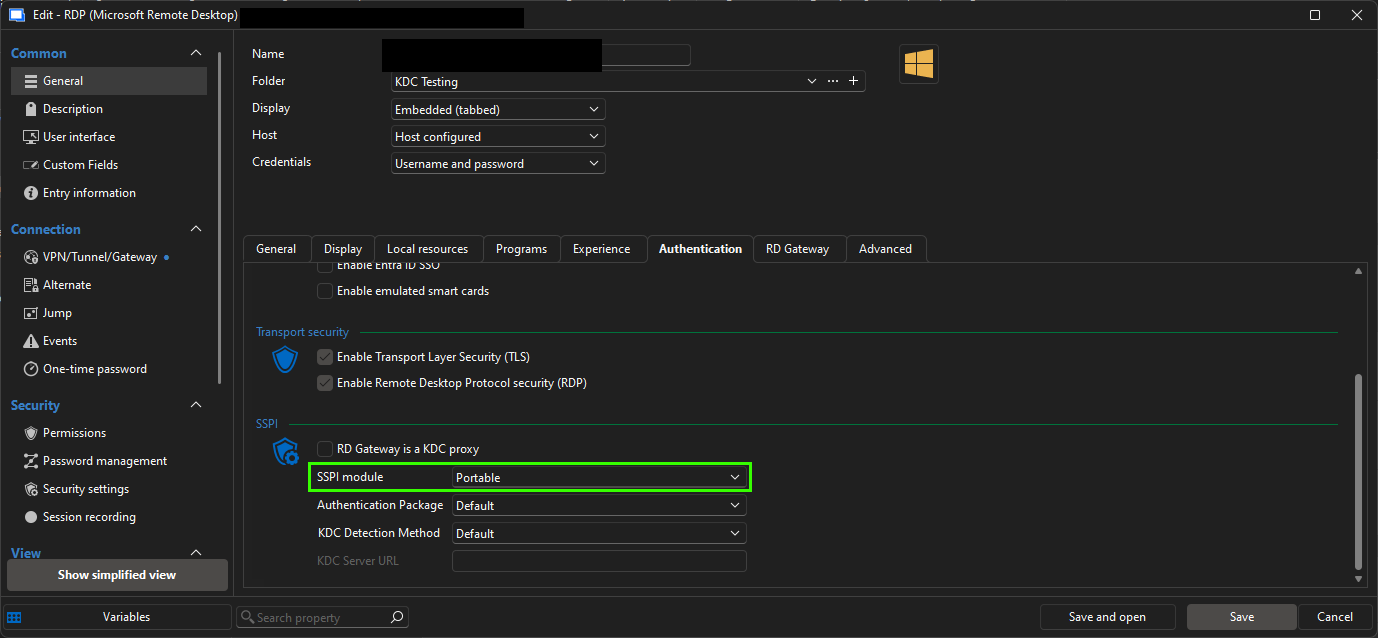
Hopefully this saves someone a few hours of troubleshooting.
Best regards,
No connection from RDM to DVLS (including a solution)?
Hi Alex,
Good catch. I'll verify internally.
For now, as you suggested, it seems like we need to update the documentation.
Best regards,
SAML 2.0, or OpenID Authentication
Hi,
I wanted to chime in and say that the following post also requests the same features: https://forum.devolutions.net/topics/50807/duo-sso-integration
GMSA Authentication issues on DVLS SQL server after migration to Windows Server 2025
Bonjour René,
Super, bon travail!
I marked your post as the recommended answer and tagged the thread as resolved.
Have a great weekend!
Best regards,
Asset Management - Searching for the best way
Hi,
I wanted to give you an update regarding this.
I talked with the developers, and while it could be done, they would prefer not to modify the default filtering and objective of the "AD Sync" entry. This is especially for compatibility reasons.
However, a solution would be to reuse parts of the logic from the AD sync and create a new entry type. For now, the feedback is noted, and they'll wait to see more interest from the community.
As for what we can do right now, we've discussed solving it with PowerShell. For now, I haven't worked on this, and I'll do so at my leisure.
Just to brain-dump a few thoughts we can bounce back on:
What if we create the script outside of RDM and use the Devolutions PowerShell module + ActiveDirectory module?
The logic could be:
Prompt the user for a specific OU or set it inside a variable. This is the OU we want to import objects from.
Obtain the object type that will determine which template is used.
Loop through the OU, store objects in an array (or CSV?)
Connect to the RDM datasource.
Add a switch, if object = user, create an entry in folder x (var) of vault y (var) and respect template type. Leverage https://docs.devolutions.net/powershell/powershell-commands/new-rdmentry/
Doc for the Devolutions PowerShell module: https://docs.devolutions.net/powershell/overview/what-is-powershell/
Microsoft AD module: https://learn.microsoft.com/en-us/powershell/module/activedirectory/?view=windowsserver2025-ps
Sample PowerShell scripts made by the support team: https://github.com/Devolutions/DevoSamples-ps
I look forward to seeing your thoughts on the matter.
Best regards,
Applications Maximized But Not Full Screen After Reconnect
Hi,
That's good news!
As you wrote to me in PM, we'll consider this resolved. I've marked your latest message as the answer in case someone else stumbles on this thread. I also tagged the thread as "Resolved."
Of course, feel free to further interact if needed.
Have a great day!
Best regards,
Asset Management - Searching for the best way
Hi Footless,
Good catch. I get the same.
I had a look at the XML format of the entry, thinking we could remove this hardcoded "ObjectClass=Computer".
However, I found out it's assumed in the code that the lookup will be for computer objects. See the "Sync" section.
My XML for reference:
<?xml version="1.0" encoding="utf-8"?>
<ArrayOfConnection>
  <Connection>
    <AppVersion>2025.3</AppVersion>
    <ConnectionType>Sync</ConnectionType>
    <CreatedBy>DOMAIN\REDACTED</CreatedBy>
    <CreationDateTime>2026-01-27T14:54:40</CreationDateTime>
    <ID>5c6ecde1-59fd-439a-800d-4e49cb534052</ID>
    <Name>Sync</Name>
    <UpdateDateTime>2026-01-27T14:55:36</UpdateDateTime>
    <Sync>
      <ActiveDirectoryFilter>objectclass=user</ActiveDirectoryFilter>
      <Domain>REDACTED</Domain>
      <Host>REDACTED</Host>
      <OrganizationalUnit>CN=Users,DC=RED,DC=ACTED</OrganizationalUnit>
      <Parameter1Label>Parameter #1</Parameter1Label>
      <Parameter2Label>Parameter #2</Parameter2Label>
      <Parameter3Label>Parameter #3</Parameter3Label>
      <Parameter4Label>Parameter #4</Parameter4Label>
      <Parameter5Label>Parameter #5</Parameter5Label>
      <SafePassword>REDACTED</SafePassword>
      <SyncType>ActiveDirectory</SyncType>
      <UserName>MyUser</UserName>
    </Sync>
  </Connection>
</ArrayOfConnection>
I will ask the devs their thoughts to see if allowing a more global filter is doable and desirable.
We will keep you posted.
Best regards,
Applications Maximized But Not Full Screen After Reconnect
Okay, here's an update:
I copied your XML. I highly doubt it's a setting issue in RDM. I tried the mouse jiggler, custom display, and everything that stood out; nothing changes the behaviour.
I found this when trying another server:
The issue occurs on one of my test domain controllers that's on Windows Server 2025 24H2 26100.4349, but not on my Windows Server 2025 24H2 26100.7462 (Screenshots)
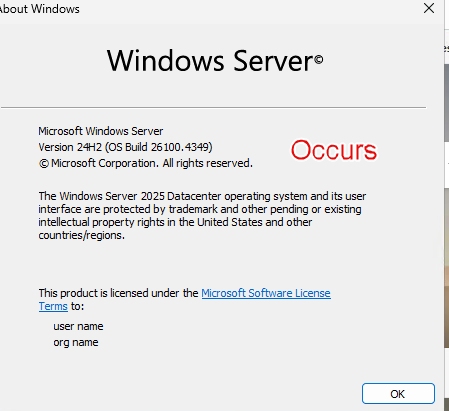
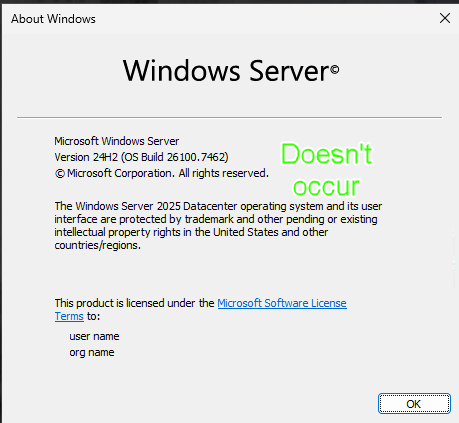
To further prove it's not a configuration/setting issue on the entry, I simply changed the hostname on the entry to a 2025 server using version 7642, and no issue.
What's your Windows 11 version?
Best regards,
Applications Maximized But Not Full Screen After Reconnect
Hi,
I wanted to let you know I've received the XML.
I read and understood what you meant regarding the GPO/Hardening and logon/lockscreen image. However, my knowledge on this subject (How it ties inside of RDM) is limited, so I sent a poke to my colleagues, hoping someone has pointers.
In the meantime, I'll do some tests with the XML.
Thanks!
Best regards,
Applications Maximized But Not Full Screen After Reconnect
Hi,
Thank you for the clear explanation.
I tried on both Windows Server 2025 and Windows 11. I do not get this behaviour. I tested with different screen sizes and Remote Desktop Size combinations with no difference.
Can you send me the XML values of your RDP entry? I wonder if I'll get better results by copying your entry structure. Read: https://docs.devolutions.net/powershell/rdm-powershell/powershell-scripting/tips-tricks/#reverse-engineering-an-entrys-structure
Please make sure there's no sensitive information before posting it. Feel free to send me a PM if you prefer.
Best regards,
Asset Management - Searching for the best way
Hi,
Thank you for reaching out!
I think the "Active Directory Synchronizer" could achieve what you're looking for. Read: https://docs.devolutions.net/rdm/kb/knowledge-base/entry-settings/configure-active-directory-synchronizer/
The goal of the entry is primarily to synchronize computer objects; however, you can input custom filters in the "Filter" tab.
I haven't tried it before, and I invite other users to post their configuration if they use it in this manner.
I assume it would be possible to change the filter to filter for users as well by using "objectClass=user". I would then use a "Template" for this synchronizer and create "Contact" or "Username/Password" entries.
Let me know if this helps!
Best regards,
Scan doesn't return any users
Hi Stephen,
Thank you for reaching out!
To troubleshoot this, I'll need the logs, which contain sensitive information.
I sent you a private message with the steps on how to send them to us.
We can post the solution here afterwards.
Best regards,