Asset Management - Searching for the best way

I am currently looking for an asset management system. I have seen that this function can also be implemented in RDM.
I'm just unsure whether it can be implemented well with it.
I am trying to find a solution that automates a lot of things for me.
My idea was:
- An automatic import/sync with Active Directory, which synchronizes all users of an OU for me.
- Here I can then create an asset for each user (computer, smartphone, monitor, etc.).
Would that be a good solution?
I'm open to further suggestions :) Thank you!
All Comments (4)
Hi,
Thank you for reaching out!
I think the "Active Directory Synchronizer" could achieve what you're looking for. Read: https://docs.devolutions.net/rdm/kb/knowledge-base/entry-settings/configure-active-directory-synchronizer/
The goal of the entry is primarily to synchronize computer objects; however, you can input custom filters in the "Filter" tab.
I haven't tried it before, and I invite other users to post their configuration if they use it in this manner.
I assume it would be possible to change the filter to filter for users as well by using "objectClass=user". I would then use a "Template" for this synchronizer and create "Contact" or "Username/Password" entries.
Let me know if this helps!
Best regards,
Marc-Antoine Dubois
I tried it, but the filter shows directly: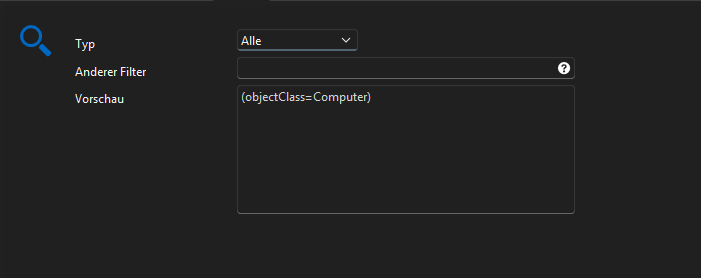
If I add objectClass=user to "Other Filter" it looks like this: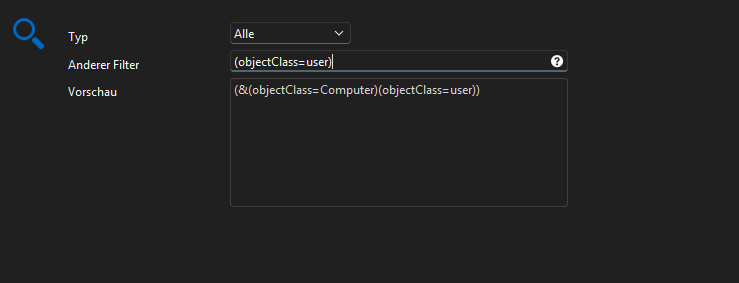
Import message: "No new computers found"
The OU / Container DN shows the path to a user OU
510a7130-ce92-40f5-a181-edb92ec406d2.png
9c50d5e3-b21e-4c01-b4f8-e30d753b5df2.png
Hi Footless,
Good catch. I get the same.
I had a look at the XML format of the entry, thinking we could remove this hardcoded "ObjectClass=Computer".
However, I found out it's assumed in the code that the lookup will be for computer objects. See the "Sync" section.
My XML for reference:
<?xml version="1.0" encoding="utf-8"?>
<ArrayOfConnection>
  <Connection>
    <AppVersion>2025.3</AppVersion>
    <ConnectionType>Sync</ConnectionType>
    <CreatedBy>DOMAIN\REDACTED</CreatedBy>
    <CreationDateTime>2026-01-27T14:54:40</CreationDateTime>
    <ID>5c6ecde1-59fd-439a-800d-4e49cb534052</ID>
    <Name>Sync</Name>
    <UpdateDateTime>2026-01-27T14:55:36</UpdateDateTime>
    <Sync>
      <ActiveDirectoryFilter>objectclass=user</ActiveDirectoryFilter>
      <Domain>REDACTED</Domain>
      <Host>REDACTED</Host>
      <OrganizationalUnit>CN=Users,DC=RED,DC=ACTED</OrganizationalUnit>
      <Parameter1Label>Parameter #1</Parameter1Label>
      <Parameter2Label>Parameter #2</Parameter2Label>
      <Parameter3Label>Parameter #3</Parameter3Label>
      <Parameter4Label>Parameter #4</Parameter4Label>
      <Parameter5Label>Parameter #5</Parameter5Label>
      <SafePassword>REDACTED</SafePassword>
      <SyncType>ActiveDirectory</SyncType>
      <UserName>MyUser</UserName>
    </Sync>
  </Connection>
</ArrayOfConnection>
I will ask the devs their thoughts to see if allowing a more global filter is doable and desirable.
We will keep you posted.
Best regards,
Marc-Antoine Dubois
Hi,
I wanted to give you an update regarding this.
I talked with the developers, and while it could be done, they would prefer not to modify the default filtering and objective of the "AD Sync" entry. This is especially for compatibility reasons.
However, a solution would be to reuse parts of the logic from the AD sync and create a new entry type. For now, the feedback is noted, and they'll wait to see more interest from the community.
As for what we can do right now, we've discussed solving it with PowerShell. For now, I haven't worked on this, and I'll do so at my leisure.
Just to brain-dump a few thoughts we can bounce back on:
What if we create the script outside of RDM and use the Devolutions PowerShell module + ActiveDirectory module?
The logic could be:
- Prompt the user for a specific OU or set it inside a variable. This is the OU we want to import objects from.
- Obtain the object type that will determine which template is used.
- Loop through the OU, store objects in an array (or CSV?)
- Connect to the RDM datasource.
- Add a switch, if object = user, create an entry in folder x (var) of vault y (var) and respect template type. Leverage https://docs.devolutions.net/powershell/powershell-commands/new-rdmentry/
- Doc for the Devolutions PowerShell module: https://docs.devolutions.net/powershell/overview/what-is-powershell/
- Microsoft AD module: https://learn.microsoft.com/en-us/powershell/module/activedirectory/?view=windowsserver2025-ps
- Sample PowerShell scripts made by the support team: https://github.com/Devolutions/DevoSamples-ps
I look forward to seeing your thoughts on the matter.
Best regards,
Marc-Antoine Dubois