2026.3.1 - 2026.2.4 - Web apps won't start with Run As Account - Run As Account Attempting Interactive
2026.3.1 - 2026.2.4 - Web apps won't start with Run As Account - Run As Account Attempting Interactive

[Reposting with fully sanitized screenshot because there's apparently no way to modify a screenshot or edit a post after making it]
Hi there,
New PSU user here. I am working through configuring our server, running PSU as a service on Windows Server, no IIS.
While running the PSU service as local system, I created a web app and configured Run-As credentials to use a domain account and had no issue.
When I moved converted PSU service to run as a service account, as it's documented that this is best practice, my web apps will no longer start. I already tried re-creating the run as account credential secrets while running PSU service as the service account; this is not the issue. The credentials validate successfully. The PSU Service account is a local admin on the server.
When I look in event viewer, I see that the Run As account is attempting to log into the server interactively (logon type 2), which is something we explicitly block for service account in our environment. Can someone explain to me if this is a bug or by design for some reason?
I don't understand why the Run As account is attempting to log in interactively. See attached screenshot for details.
I had this issue in 2026.2.4 and attempted an upgrade to 2026.3.1 but that did not fix the issue.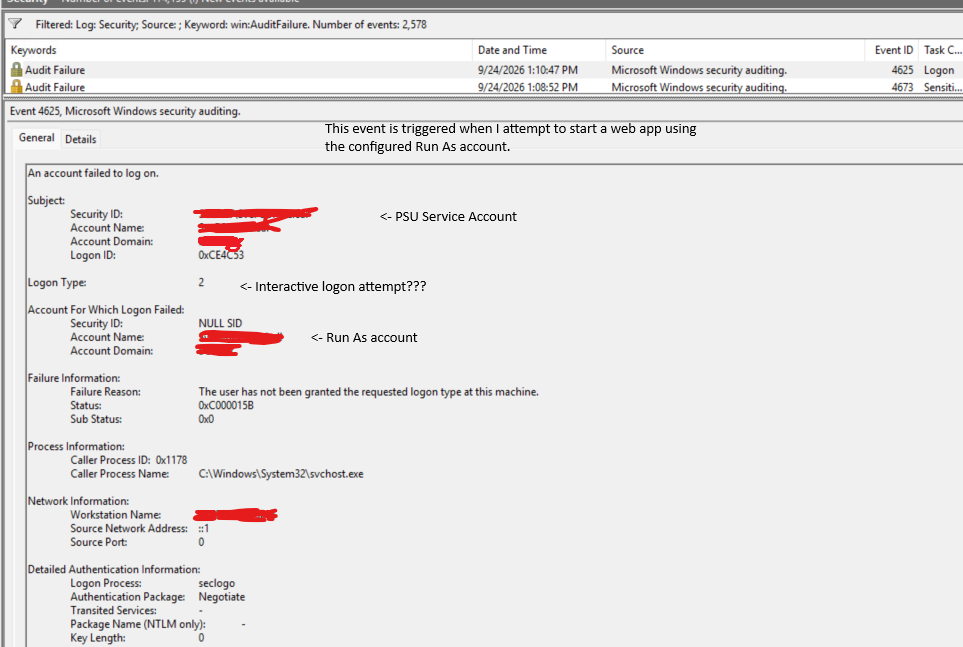
Screenshot 2026-09-25 155515.png
All Comments (2)
Hi Taylor,
Thank you for the detailed report. We reproduced the issue on PowerShell Universal 2026.3.3 and reviewed it with our development team.
What’s happening
When an app runs with Run As credentials, PSU first starts the app’s process with an interactive logon for the Run As account. Your policy denies interactive logon to that account, so the attempt is refused; that’s the logon type 2 failure you see in the Security log.
PSU then falls back to a non-interactive method. That method needs the PSU service account to hold the Replace a process level token right, which local Administrators don’t have by default. Even when that right is granted, the app still fails to start because of a bug in how the app host locates a working folder: it looks in the service account’s profile instead of the Run As account’s.
Next steps on our side
- The documentation will be corrected. It currently suggests that an administrator service account needs no additional rights.
- An issue has been opened for the startup bug.
- The team will investigate starting Run As processes with fewer privileges.
Workarounds
Either of these resolves the issue (both tested):
- Allow the Run As account to log on locally on the PSU server, by removing it from Deny log on locally. No additional rights are needed on the service account.
- Run the PowerShell Universal service as LocalSystem.
We’ll update this thread as the fixes are released.
Best regards,
Marc-Antoine Dubois
Thank you, I appreciate the attention to this issue! Option 1 is not possible in our environment (Infosec policies), but we are using option 2 as a workaround for now. I look forward to seeing the results of the bug fix!