[2026.3.1.0] Cannot create apps / scripts

I just installed 3.1.0 on my own laptop to test something out but I wasn't able to create apps or scripts. I signed in with a developer account. I also tried in a docker container with a trial key but same thing there. Just click the button for 'Create App' or 'Create Script' and it just freezes the whole page except for the navigation menu.
All Comments (8)
Experiencing the same with published folders
I installed the Module 'PowerShellUniversal.ActiveDirectory.Scripts' and those scripts are showing up just fine. The PowershellUniversal.App.ActiveDirectory App works, too
Hello @Thomas Hofkens
Thank you for reporting this and for confirming that you can reproduce the same behavior in both your local installation and a Docker container.
I reviewed the recent PowerShell Universal 2026.3.0 and 2026.3.1 reports in the forum. There are several issues currently being investigated around the latest releases, but I have not found an exact duplicate matching this specific behavior so far.
The additional detail about existing Apps and Scripts from the PowerShellUniversal modules loading correctly is useful. It appears the issue may be more specifically related to the creation actions in the Admin Console rather than loading existing resources.
Could you please provide the following?
1. Browser and browser version where this occurs.
2. Whether the same behavior occurs in a private or incognito window, or another browser.
3. The first relevant error shown in the browser Developer Tools Console immediately after clicking Create App or Create Script.
4. Any corresponding PSU System Log errors from the same timestamp.
5. For Published Folders, please confirm which action triggers the same behavior: opening the page, creating a folder, editing one, or saving it.
Because this is a public forum, please sanitize all evidence before posting. Remove credentials, tokens, license keys, cookies, private keys, full connection strings, email addresses, usernames, customer data, tenant or account identifiers, internal domains, hostnames, IP addresses, and private URLs. Please do not upload unredacted HAR files, memory dumps, database backups, or complete configuration files to this public thread.
Best regards,
Ruben Tapia
I'm seeing this on 2026.3.1 on Microsoft Edge v153.0.4234.48
Using New-PSUScript via the API still works.
Same happens for me as well on: Scripts,Apps,Published Folders
PSU: 2026.3.1
Google Chrome, Version 153.0.8010.53 (Official Build) (64-bit)
This is what i see from developer tools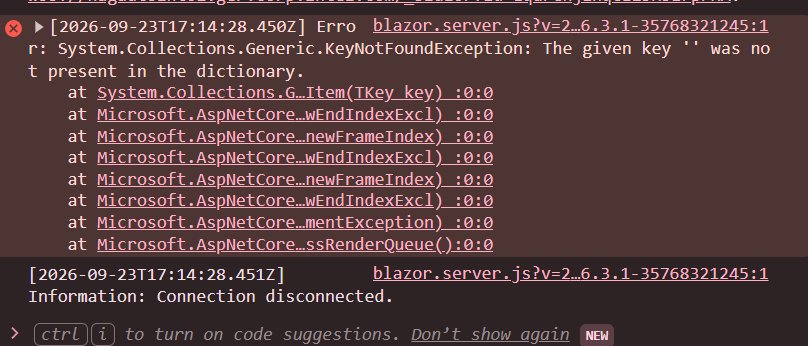 And after some clicks: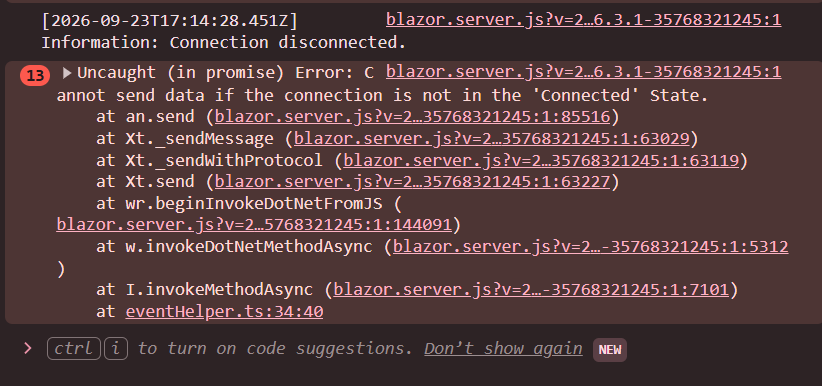
53ab188f-299e-456f-8afc-1aaea9b46dbd.png
61a9b37a-e570-4537-8c2b-fe2d5bc2ba21.png
Hi,
We can reproduce this issue internally.
We will inform you once a fix is made.
Thank you for informing us!
Best regards,
Marc-Antoine Dubois
@realslacker @Thomas Hofkens @gennadyshykhovtsov 2026.3.2 is released, once you update, could you share your experience with us?
Thank you!
Best regards,
Marc-Antoine Dubois
Thanks, I'm going offline for 10 days but I'll try to remember to send feedback